Key takeaways
- Best speakers and soundbars for gaming: 7 options from desk speakers to a 5.1 system, compared by ports, bass, room size and a speaker placement guide.
The best speakers and soundbars for gaming depend on where you sit: a pair of desk speakers for a PC at arm’s length, a soundbar for a console on a TV, and a full surround system only if you have the room. This guide compares seven listings from compact bars to a 5.1 home theater, using titles and published specifications only. All claims are the seller’s, and nobody on our editorial team has heard them. The placement guide below does more for sound than any model on the list.
Seven audio options in one view
Our top picks
 Assistrust Sound Bar for Smart TV
- 【𝐈𝐦𝐩𝐚𝐜𝐭𝐟𝐮𝐥 𝐕𝐨𝐥𝐮𝐦𝐞 𝐁𝐨𝐨𝐬𝐭】: Elevate faint sounds to vibrant…
- 【𝐄𝐩𝐢𝐜 𝐂𝐢𝐧𝐞𝐦𝐚 𝐀𝐮𝐝𝐢𝐨】: Powered by 4 high-performance drivers,…
- 【𝐓𝐚𝐢𝐥𝐨𝐫𝐞𝐝 𝐒𝐨𝐮𝐧𝐝】: Fine-tune your listening experience with 3…
 Bose TV Speaker
- Designed with simplicity in mind, the Bose TV…
- WIDE, NATURAL SOUND: 2 angled full-range drivers deliver…
- This sound bar for smart tv is designed…
 Klipsch ProMedia 2.1 THX Certified Computer Speaker
- The Klipsch ProMedia 2.1 THX Certified Speaker System…
- KLIPSCH MICROTRACTRIX HORN TECHNOLOGY makes a major contribution…
- The two-way satellites’ 3” midrange drivers blend perfectly…
| Product | Key specs | |
|---|---|---|
| Assistrust Sound Bar for Smart TV | 【𝐈𝐦𝐩𝐚𝐜𝐭𝐟𝐮𝐥 𝐕𝐨𝐥𝐮𝐦𝐞 𝐁𝐨𝐨𝐬𝐭】: Elevate faint sounds to vibrant… 【𝐄𝐩𝐢𝐜 𝐂𝐢𝐧𝐞𝐦𝐚 𝐀𝐮𝐝𝐢𝐨】: Powered by 4 high-performance drivers,… 【𝐓𝐚𝐢𝐥𝐨𝐫𝐞𝐝 𝐒𝐨𝐮𝐧𝐝】: Fine-tune your listening experience with 3… | Check price |
| Bose TV Speaker | Designed with simplicity in mind, the Bose TV… WIDE, NATURAL SOUND: 2 angled full-range drivers deliver… This sound bar for smart tv is designed… | Check price |
| Klipsch ProMedia 2.1 THX Certified Computer Speaker | The Klipsch ProMedia 2.1 THX Certified Speaker System… KLIPSCH MICROTRACTRIX HORN TECHNOLOGY makes a major contribution… The two-way satellites’ 3” midrange drivers blend perfectly… | Check price |
 Audioengine A2 HD Audioengine A2 HD | DESIGNED FOR DESKTOPS, GAMING & HOME OFFICES BLUETOOTH aptX HD & USB DAC Easily switch between room-filling speaker playback and private… | Check price |
 Audioengine S8 Powered Subwoofer Audioengine S8 Powered Subwoofer | 250 Watts Power: Our S8 subwoofer is a… Big bass in a mini subwoofer allows for… Sleep Mode Functionality: Featuring a convenient sleep mode,… | Check price |
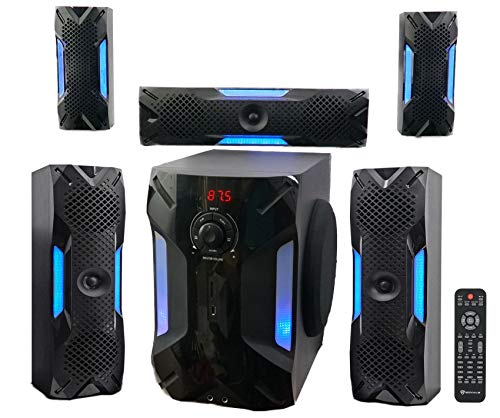 Rockville HTS56 5.1-Channel Bluetooth Home Theater System Rockville HTS56 5.1-Channel Bluetooth Home Theater System | POWERFUL 5.1 SURROUND SOUND: Delivers 1000W peak power… Connect via Bluetooth, USB, SD, RCA, or optical… Includes 2 mic inputs with echo control, a… | Check price |
 Bose Surround Sound System for Home Theater Bose Surround Sound System for Home Theater | The smallest speakers designed by Bose so the… Designed to bring music movies and TV to… Simply plug the adapters into a power source… | Check price |
As an Amazon Associate we earn from qualifying purchases at no extra cost to you.
| Model | Key point from title | Price tier | Best for |
|---|---|---|---|
| Assistrust Sound Bar | Bluetooth, ARC, optical and AUX, 3 EQ modes, detachable 2-in-1 bar | Budget | Small TV or monitor setups |
| Bose TV Speaker | Compact all-in-one bar, Bluetooth, HDMI-ARC, remote | Mid-range | Console on a TV with a simple setup |
| Klipsch ProMedia 2.1 THX | 2.1 computer speaker system with a subwoofer, THX certified per the title | Mid-range | PC gamers wanting desk bass |
| Audioengine A2 HD (HD3) | Wireless desktop speakers with DAC, headphone amp and USB audio | Premium | Small desks and music plus gaming |
| Audioengine S8 Subwoofer | 250W, 8-inch powered sub, wireless-ready | Mid-range | Adding bass to existing speakers |
| Rockville HTS56 | 5.1 channel Bluetooth system, 8-inch sub, 250W RMS claim | Budget | Big-room surround on a budget |
| Bose Surround Sound System | Two wireless receivers, AC2 adapters, home theater | Premium | Owners adding surround to a compatible Bose set |
Price tiers are relative within this set and estimated from the product type and brand. No current prices were supplied, so check each listing.
Placement guide: set up the triangle first
For desk speakers, place the two speakers and your head at the corners of an equilateral triangle. If you sit 70 cm (about 28 inches) from the screen, put the speakers about 70 cm apart, angled in toward you, with the tweeters at ear height. This is a common rule of thumb, not a measurement of any listed model. If the speakers are too far apart, voices in a stereo mix can seem to leave the middle.
| Setup | Where to put it | Common mistake |
|---|---|---|
| Desk speakers | Equal distance each side of the monitor, at ear height | Pushing them against the wall behind the desk |
| Soundbar on a TV | Centred just below the screen | Blocking the bar with a TV stand lip |
| Subwoofer | Floor, near a wall or corner for more bass | Placing it in the same corner as the couch |
| Rear surrounds | At or above ear level, slightly behind the seat | Placing them on the floor |
The seven, in detail
Assistrust Sound Bar for TV, PC and Gaming
The title lists Bluetooth, ARC, optical and AUX connections, auto volume boost, three equalizer modes and a detachable 2-in-1 design for TV, PC, gaming and projectors. That range of ports makes it flexible for a spare room or monitor. The brand is unfamiliar, so rely on buyer reviews for build and sound quality. Three equalizer modes are a quick way to lift dialogue or bass, but they are presets rather than true tuning. If you plan to use it with a monitor on a desk, check the bar’s size against your desk depth.
Pros
- Four connection types in the title
- Detachable 2-in-1 design
Cons
- Little detail on power or drivers
- Auto volume boost can compress dynamics
Who it’s for: Budget shoppers who want a bar for a TV, PC or projector.
Bose TV Speaker
A compact all-in-one soundbar with Bluetooth, HDMI-ARC, a remote and a black finish. The title does not mention a subwoofer, so bass comes from the bar itself. It is built for a TV, so it suits a console connected to a screen. It does not list gaming features, and the title gives no power figure. Its small size makes it easy to place under a TV, though a compact bar cannot move as much air as a separate sub, so treat the bass claim with care.
Pros
- HDMI-ARC and Bluetooth
- Compact and simple
Cons
- No separate subwoofer in the title
- Not designed specifically for gaming
Who it’s for: Console players who want an easy, tidy TV upgrade.
Klipsch ProMedia 2.1 THX Certified
A 2.1 computer speaker system: two satellites and a subwoofer, with THX certification named in the title. It is a long-standing format for PC gamers who want proper bass on a desk. The title does not list connections, so check for the input you need before buying. Subwoofers need floor space, and a sub under a desk can rattle the floor or nearby objects at higher volumes. Because it is a wired desk system, plan cable routes behind the desk.
Pros
- 2.1 layout with a subwoofer
- THX certification named in the title
Cons
- Connections not listed in the title
- Needs room for the sub and cables
Who it’s for: PC gamers who want desk speakers with real bass.
Audioengine A2 HD (HD3) Wireless
Compact desktop speakers with Bluetooth, a built-in DAC, a headphone amp and USB audio. The DAC and USB input make them a clean PC connection, and Bluetooth helps for phones, and the headphone amp lets you plug in headphones without a separate box. They are small, so expect less bass than a 2.1 system unless you add a sub. The S8 below is one possible add-on, but check input compatibility on both listings.
Pros
- DAC and headphone amp
- USB audio and Bluetooth
Cons
- Small speakers with limited bass
- Premium tier in this set
Who it’s for: Gamers with a small desk who also listen to music.
Audioengine S8 Powered Subwoofer
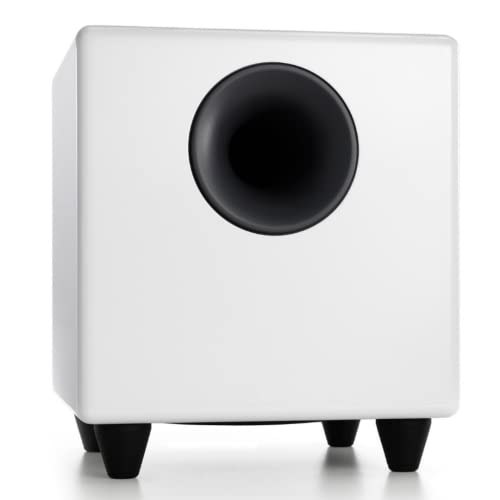
A powered 8-inch sub with a 250W rating and wireless-ready wording, described for home theater, music and gaming. It is a sub only, not a speaker system, so it does nothing alone. It makes sense as an add-on to existing speakers, but check input compatibility and whether the wireless feature needs a separate adapter. A sub this size needs floor space and a power outlet, and it may be too strong for a small or shared room.
Pros
- Large 8-inch driver
- 250W rating per the title
Cons
- Not a complete system
- Wireless needs extra hardware to check
Who it’s for: Owners of speakers who want more bass.
Rockville HTS56 5.1 Home Theater
A 5.1-channel Bluetooth system with an 8-inch sub, a 1000W peak and 250W RMS claim, USB and SD inputs, an optical TV input, karaoke mic inputs, LED effects and a five-band EQ. Peak power is a headline, RMS the more honest figure. Five speakers need wiring and space, and the karaoke and LED features add little for gaming. The USB and SD inputs are handy for music but not for game audio. A listing like this is about volume and scale, so treat the clarity as something to judge in the return window.
Pros
- Six-piece 5.1 layout
- Optical input and Bluetooth
Cons
- Peak figure is only a headline
- Needs room and cable runs
Who it’s for: Large-room gamers who want surround on a budget.
Bose Surround Sound System for Home Theater
The title lists two wireless receivers and AC2 adapters, with movies, sports and TV shows as use cases. It does not mention gaming. It is unclear from the title whether this is a complete system or an add-on for a compatible Bose set, so check the listing and your model before buying. The title mentions AC2 adapters, so check the listing for what they are and what the receivers pair with.
Pros
- Wireless receivers named
- Home theater focus
Cons
- Unclear whether standalone
- No gaming mention in the title
Who it’s for: Owners of a compatible Bose set who want surround.
How we picked these
We are an editorial team using published specifications, manufacturer documentation and buyer reviews. Nobody on the team used or measured these units. We chose listings that are clearly audio gear a gamer might buy, from bars to desk speakers to subs, and flagged ones that are add-ons or unclear. Titles that give very little detail are called out rather than filled in from memory.
What to look for
Setup type: soundbar, 2.1 or home theater
A soundbar is the simplest TV upgrade, a 2.1 desk system gives a stereo image for a PC, and a 5.1 system gives rear speakers at the cost of wiring. If you are also upgrading a screen, our list of 4K gaming monitors for PS5 and PC may help.
Connectivity
HDMI ARC sends TV audio to a bar over one cable, optical is a common alternative, and AUX or USB suit desks. Bluetooth is convenient but can lag behind the picture. Count the ports on your TV or PC before you buy.
Bass and subwoofer output
A sub adds low-end weight, but watts do not guarantee good bass. Compare RMS figures, not peak, and keep volume reasonable for neighbours and your hearing. Position matters as much as size. A sub near a wall or corner gets louder bass but can sound boomy, while a sub away from walls is tighter but quieter, so try two spots before settling.
Room size and power
A small desk needs small speakers, while a large living room can use a sub and surrounds. Over-powering a small room gives boomy sound. As a rough planning idea, treat a bedroom or desk as a small space where compact speakers are enough, and a living room of more than about 20 square metres as the case for a sub and surrounds. This is an estimate, not a rule.
Clarity for dialogue and positional audio
Footsteps and voices matter more in many games than deep bass. Look for clear mids and accurate stereo, and test dialogue clarity in the return window. Some bars have a dialogue or voice mode, and a dedicated EQ preset can help, but too much boost can make voices harsh.
Mistakes buyers make
- Buying on watts: peak figures are large but say little about clarity, so compare the RMS number when a listing gives one.
- Ignoring ports: a bar without the right input may not connect, and HDMI ARC needs to be switched on in your TV settings.
- Skipping placement: speakers pushed against a wall sound muddy, and a soundbar hidden in a TV cabinet loses clarity.
- Adding a sub with no speakers: the S8 does nothing alone.
- Playing too loud: long sessions at high volume can harm hearing.
Verdict
For a PC desk, the Klipsch 2.1 system is the bass-forward choice and the Audioengine A2 HD is the compact premium pick. For a console on a TV, the Bose TV Speaker is the simple choice and the Assistrust is the budget bar. The Rockville suits big rooms, and the Bose surround set and the S8 are add-ons. Check each listing before buying, and keep the return window in mind so you can try the sound in your own room.
Audio setup questions
Are speakers or a soundbar better for gaming?
Desk speakers are usually better for a PC at arm’s length, because you sit between them and hear a clear left and right image. A soundbar suits a console on a TV, where one box under the screen is simpler. Home theater systems add rear speakers for movies but need space and wiring, so pick the layout that matches your room.
What connection should I look for: HDMI ARC, optical or Bluetooth?
HDMI ARC and optical are the usual choices for a TV, since they carry audio from the screen to the bar with little fuss. Bluetooth is convenient for phones but can add delay in games. USB or a 3.5mm input suit PC speakers. Check that the model you choose has the port your TV or PC really offers.
Do I need a subwoofer for gaming?
Not always. A subwoofer adds low bass for explosions and engine rumble, and it matters most in a larger room. In a small room or at night, a big sub can disturb neighbours. Some listings here include a sub, one is a sub only, and compact speakers rely on their own drivers.
What does peak power mean on a home theater listing?
Peak power is a short burst figure and is usually much larger than the continuous rating. The Rockville listing names both a 1000W peak and a 250W RMS number, and RMS is the more useful figure for comparing systems. Neither tells you how clear or loud it will sound in your room, so treat them as rough guides.
Can I use a TV soundbar with a PC?
Often yes, if the bar has an input your PC can use, such as optical, AUX or Bluetooth, or HDMI ARC through a monitor or TV. A soundbar sits low, so check that the height suits your seating position. If you sit close, a pair of desk speakers will typically give a more accurate stereo image.
Related guides
- Helping Hands Soldering Station With Magnifier
- Bench Power Supply For Electronics Hobbyists
- Does The Motherboard Affect Gaming Performance