
Key takeaways
- Bluetooth Low Energy: pairs directly with the computer, tablet or phone. No dongle, no port used, and one keyboard can usually switch between up to three paired devices.
- Logi Bolt receiver: a secure USB-A receiver built on Bluetooth LE technology. It is more stable in crowded offices and works before the operating system loads (useful for BIOS menus). Bolt is not cross-compatible with the older Unifying receivers.
- Standard 2.4 GHz USB receiver: used by budget sets such as the MK270, MK295 and MK330. Plug-and-play on any PC, but it occupies a USB-A port and cannot pair with an iPad or a phone.
If you want a true Logitech Bluetooth keyboard and mouse combo, the Pebble 2 Combo is the affordable choice and the MX Keys S Combo is the premium one, while the popular MK270 and MK330 sets are not Bluetooth at all; they rely on a small USB receiver. That distinction trips up a lot of buyers, especially those shopping for a tablet, a Mac with only USB-C ports, or a laptop where every port is already taken.
Our top picks

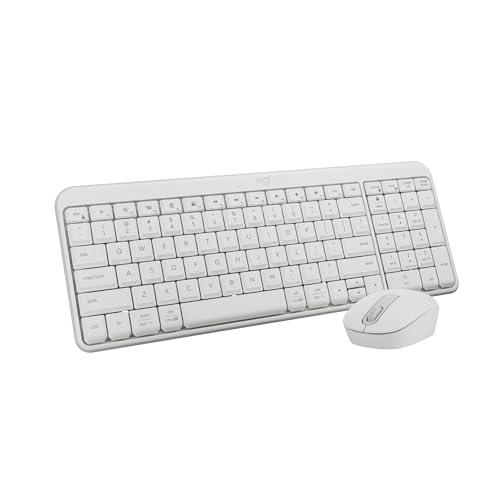
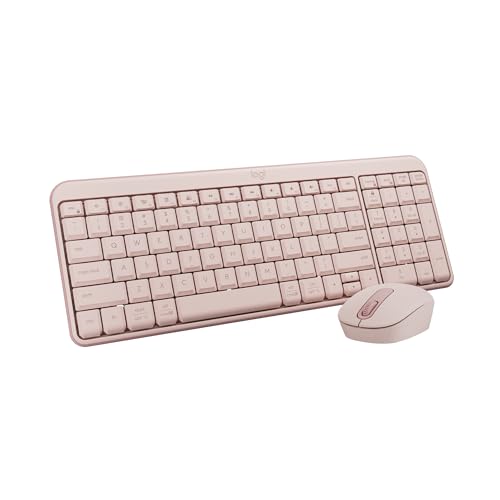
As an Amazon Associate we earn from qualifying purchases at no extra cost to you. Ratings are shown as listed on Amazon.
Bluetooth, Logi Bolt or Receiver: Know What You Are Buying
Logitech sells three connection types, sometimes in the same product family:
- Bluetooth Low Energy: pairs directly with the computer, tablet or phone. No dongle, no port used, and one keyboard can usually switch between up to three paired devices.
- Logi Bolt receiver: a secure USB-A receiver built on Bluetooth LE technology. It is more stable in crowded offices and works before the operating system loads (useful for BIOS menus). Bolt is not cross-compatible with the older Unifying receivers.
- Standard 2.4 GHz USB receiver: used by budget sets such as the MK270, MK295 and MK330. Plug-and-play on any PC, but it occupies a USB-A port and cannot pair with an iPad or a phone.
Many current mid-range and premium combos support both Bluetooth and a Bolt receiver, giving you the choice.
Logitech Combos Compared
| Combo | Connection | Keyboard layout | Power (rated life) | Multi-device | Typical price range |
|---|---|---|---|---|---|
| MK270 | 2.4 GHz USB receiver | Full size | AA/AAA; keyboard up to about 36 months, mouse up to about 12 months | No | $25–$35 |
| MK330 | 2.4 GHz USB receiver | Full size, media keys | AA/AAA; keyboard up to about 24 months, mouse up to about 12 months | No | $30–$45 |
| MK295 Silent | 2.4 GHz USB receiver | Full size, quiet keys | AA/AAA; long multi-year rating | No | $30–$45 |
| Pebble 2 Combo | Bluetooth or Logi Bolt | Compact, no number pad | AAA/AA; keyboard up to about 36 months, mouse up to about 24 months | Yes, 3 devices | $45–$70 |
| Signature MK650 for Business | Bluetooth or Logi Bolt | Full size with number pad | AA/AAA; multi-year rating | No (single host) | $50–$80 |
| MX Keys S Combo | Bluetooth or Logi Bolt | Full size, backlit | Rechargeable USB-C; keyboard up to 10 days with backlight or about 5 months without, mouse up to about 70 days | Yes, 3 devices | $180–$230 |
| MK120 (wired) | USB cable | Full size | No batteries | No | $15–$25 |
Battery ratings are maker estimates based on typical office use; heavy typing, backlighting and gaming-style mouse use shorten them.
Which Combo Fits Your Setup
| If you… | Choose | Why |
|---|---|---|
| Need the cheapest reliable desktop set | MK270 or MK120 | Receiver or cable needs no pairing; works on any Windows PC |
| Use an iPad, Android tablet or Chromebook | Pebble 2 Combo | Native Bluetooth, small footprint, switches to your phone with one key |
| Work on a Mac with USB-C only | Pebble 2 Combo or MX Keys S Combo (or the Mac editions of MX) | Bluetooth avoids a USB-A adapter; Mac editions print Command and Option keys |
| Type all day and want backlit keys | MX Keys S Combo | Spherical-dish keys, smart backlight, rechargeable |
| Want a full number pad on a budget with Bluetooth | Signature MK650 | Full layout at a mid-range price |
| Share a desk or open office | MK295 Silent | Quieter keys and clicks |
| Want a mini layout | Pebble 2 Combo or MX Keys Mini with a separate mouse | Drops the number pad to bring the mouse closer to your body |
The MK330 in Context
The MK330 is a frequent search because it sits in the middle of the receiver-based range: full layout, dedicated media keys and a slightly more contoured mouse than the MK270. It remains a sound office or family-PC choice. Just treat it as a USB-receiver product. If you plan to pair it with a tablet or a TV, it will not work, and if your laptop only has USB-C, you will need a small USB-C to USB-A adapter that stays plugged in.
Pairing a Logitech Bluetooth Keyboard and Mouse
- Windows 11: Settings, Bluetooth & devices, Add device, Bluetooth. Long-press the Easy-Switch key on the keyboard (about 3 seconds) until its light blinks quickly, then select it from the list and type the code shown.
- macOS: System Settings, Bluetooth. Put the keyboard and mouse in pairing mode and click Connect. macOS may prompt to identify the keyboard layout on first use.
- iPad and Android: open Bluetooth settings and pair each device separately. Keyboard shortcuts vary by platform; the Pebble keyboard adapts its layout automatically for many of them.
- Logi Options+: optional software for customizing buttons, enabling Flow (moving the cursor between two computers) and checking battery levels. Not required for basic use.
Ownership Realities
Batteries and charging
Replaceable-battery combos are cheaper to run than many people expect: a pair of AAA cells every couple of years in the keyboard and an AA cell once or twice a year in the mouse. Rechargeable MX models avoid waste but need a top-up roughly every week or two if the backlight stays on.
Lag and interference
Bluetooth adds a few milliseconds of latency compared with a receiver. That is invisible in office work but noticeable to competitive gamers, who are better off with a dedicated wired or 2.4 GHz gaming mouse. If Bluetooth drops in a busy office or near a USB 3.0 hub, switching to the Bolt receiver usually fixes it.
What wears first
On low-cost sets, the most common failures are a mouse scroll wheel that starts skipping and keyboard legend wear on frequently used keys after a few years. Premium MX models use more durable key caps and an electromagnetic scroll wheel that has fewer mechanical parts to wear.
Mixing and matching
You do not have to buy a matched set. Pairing a K380-style compact Bluetooth keyboard with an M-series Bluetooth mouse often costs about the same as a combo and lets you pick a mouse size that fits your hand.
Quick Answers
Can one Bolt receiver connect both keyboard and mouse?
Yes, a single Logi Bolt receiver supports up to six Bolt devices.
Do Logitech Bluetooth combos work with a wired fallback?
Not as a data connection. On rechargeable MX models, the USB-C cable is for charging, and the keyboard keeps working wirelessly while it charges.
