Our Top Picks
The best bench power supply for electronics hobbyists is an adjustable 0-30V DC unit with a 10A ceiling, a clear display, a coarse/fine adjustment knob, an output on/off switch and current limiting, and the 30V 10A Jesverty, WANPTEK and NANKADF listings below all fit that description. If you want a different trade-off, the FNIRSI DPS-150 is a compact, programmable option with a stated low ripple figure, while the two NICE-POWER units are the lower-priced entries, with a catch about total power that we explain below.
The Editorial team compiled this comparison from published specifications, manufacturer documentation and buyer reviews. Nobody on the team has handled these supplies, and we only repeat what each listing title says. Most bench supplies run from mains power, so a short safety section follows the product notes. Read it before you plug anything in.
What 30V and 10A really give you

Jesverty DC Power Supply Variable, 0-30V 0-10A Adjustable Switching DC Regulated Bench Power Supply with High Precision 4-Digit LED Display, 5V/2A USB Port, Coarse and Fine Adjustment SPS-3010


As an Amazon Associate we earn from qualifying purchases. Product prices and availability are accurate as of the date/time indicated.

DC Power Supply Variable, Bench Power Supply with Encoder Adjustment Knob, Output Enable/Disable Button, Adjustable Power Supplies with USB Quick-Charge, Short Circuit Alam (30V 10A Black)


As an Amazon Associate we earn from qualifying purchases. Product prices and availability are accurate as of the date/time indicated.

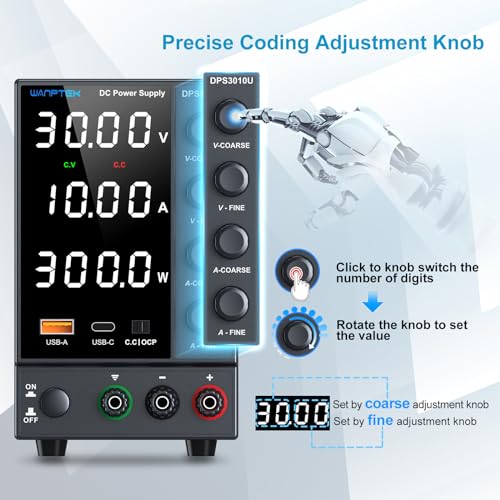
DC Power Supply Variable 0-30V 0-10A, Adjustable Switching Regulated Bench Power Supply with Encoder Coarse & Fine Knob, 3.6A USB & Type-C Quick-Charge, OCP Overcurrent Protection


As an Amazon Associate we earn from qualifying purchases. Product prices and availability are accurate as of the date/time indicated.

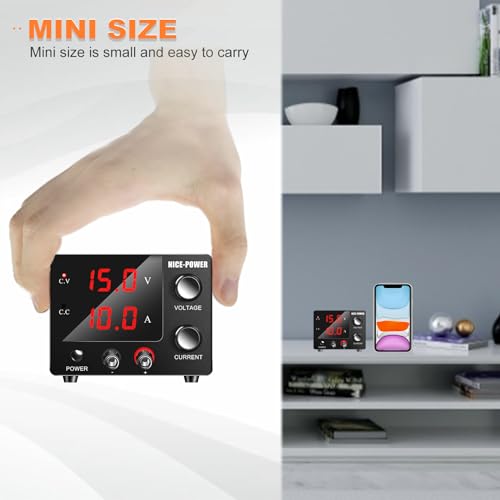
NICE-POWER DC Power Supply Variable 0~30V 0~10A, 3-Digits LED Display Current and Voltage Adjustable 150W Fixed with Encoder DC Bench Power Supply 15V 10A/30V 5A,Electroplating DIY etc PSU




As an Amazon Associate we earn from qualifying purchases. Product prices and availability are accurate as of the date/time indicated.

DC Power Supply Variable, 30V 10A Adjustable Switching Regulated DC Bench Power Supply with Intelligent Charging Mode, 18W USB Interface, Precision Encoder Knob (Black)


As an Amazon Associate we earn from qualifying purchases. Product prices and availability are accurate as of the date/time indicated.

Jesverty DC Power Supply Variable, 0-32V 0-10A Switching Bench Power Supply with 20W USB & Type-C Quick-Charge, Encoder Corase & Fine Adjustment Knob, Output Switch, 4-Digit LED Display - SPS-3010V


As an Amazon Associate we earn from qualifying purchases. Product prices and availability are accurate as of the date/time indicated.

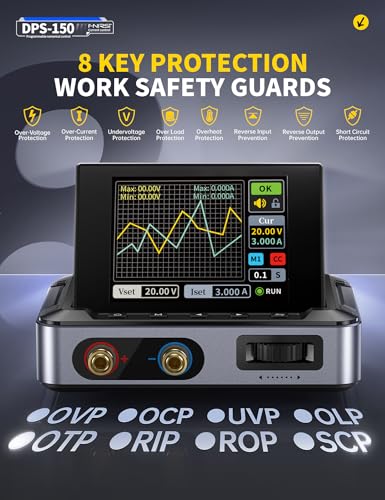
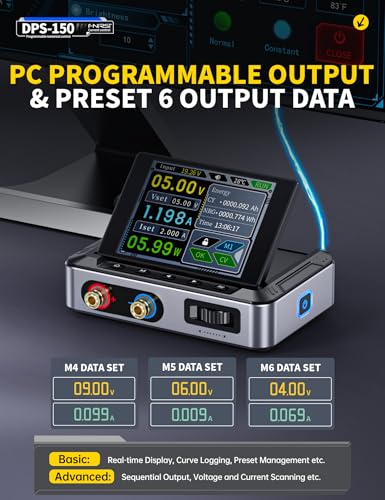
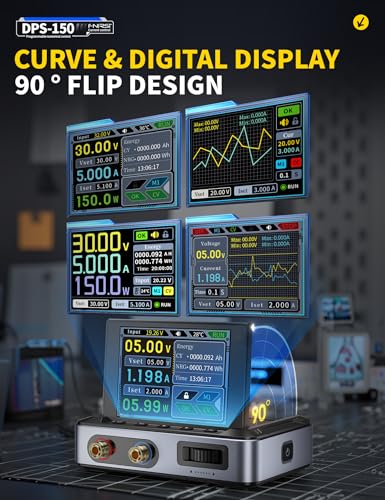
FNIRSI DPS-150 DC Power Supply Variable 30V 5A, 4-Digit IPS Flip Display | <20mV Power Ripple, PD/QC/DC Input, PC Programmable Adjustable Power Supply for Electronics, Battery Charging, Automotive Use



As an Amazon Associate we earn from qualifying purchases. Product prices and availability are accurate as of the date/time indicated.

NICE-POWER DC Power Supply Variable, 30V 5A Adjustable Switching Regulated Power Supply with Encoder, Upgraded 3-Digits LED Display, Electroplating DIY LED Test Mini Regulated DC Bench Power Supply


As an Amazon Associate we earn from qualifying purchases. Product prices and availability are accurate as of the date/time indicated.
Before comparing models, it helps to translate the ratings into projects. The table below uses typical loads as planning examples. These are estimates for illustration, not product measurements.
| Project | Typical setting | Planning current | Does it fit? |
|---|---|---|---|
| Arduino or ESP32 board on the bench | 5V | 0.1 to 0.5A | Any unit here |
| Short 12V LED strip | 12V | 1 to 3A | Any unit here |
| Small DC motor or fan test | 6 to 12V | 1 to 4A | Any unit here |
| Audio amplifier module prototype | 12 to 24V | 2 to 5A at peaks | 5A units are tight |
| Car-style 12V accessory | 12 to 14V | 5 to 10A | 10A units, if full current is available at 12-14V |
The point is that the first three rows cover most hobby work, and the last two are where the 10A rating and total power limit begin to matter. A 30V, 10A rating would imply up to 300W at the top end, but not every listing guarantees full current at full voltage. When the title includes a watt figure, use it to check your own project.
The eight supplies, one at a time
Jesverty SPS-3010: 0-30V, 0-10A with 4-digit display and 5V/2A USB
The title for this model gives the most beginner-friendly feature list among the 10A units: a 0-30V, 0-10A adjustable switching regulated output, a high-precision 4-digit LED display, a 5V/2A USB port and coarse and fine adjustment. The model number in the title is SPS-3010. A four-digit display is helpful because it lets you read voltage to a tenth or hundredth of a volt, depending on the layout, which matters when you want to bring a project up to exactly 3.3V or 5V.
Coarse and fine adjustment is the feature that makes a bench supply comfortable to use. Instead of one knob that jumps in big steps, you have two controls, so you can set an approximate voltage and then trim it. The USB port is a convenience for charging a phone or running a USB gadget while you work, but it is not the main output, and its 2A rating is stated only in the title.
Because the unit is described as switching, a hobbyist working on very sensitive analog or radio circuits should check the listing for noise figures. For general use, such as microcontroller boards, LED experiments and motor tests, a switching design is common and practical.
As an estimate for planning, a 10A, 30V ceiling covers typical hobby loads easily. What the title does not say is whether you can draw full current at full voltage, the exact protections, or the fan noise, so confirm on the listing before you buy.
Pros
- 0-30V and 0-10A range stated in the title
- 4-digit display for finer readout
- Coarse and fine adjustment
- USB port included for incidental charging
Cons
- Switching design may add noise for sensitive analog work
- Protections and fan behavior are not detailed in the title
- USB port is a side feature, not a substitute for a proper charger
Who it’s for: first-time buyers who want a straightforward 30V 10A unit with a clear readout.
NANKADF 30V 10A: encoder knob, output enable button and short circuit alarm
The NANKADF title highlights an encoder adjustment knob, an output enable/disable button, USB quick-charge and a short circuit alarm, with a rating of 30V and 10A in black. The output enable button is the feature to focus on. It lets you set the voltage and current limit with the output off, then connect your circuit and switch on, which is a safer habit than adjusting while the leads are live.
A short circuit alarm indicates that the unit signals when a short condition is detected. The title does not say how the alarm works, whether it cuts the output, or whether it beeps. Those details matter if you plan to use this unit to troubleshoot boards where shorts are likely, so it is worth reading the listing for the protection behavior. Do not treat an alarm as a replacement for good bench practice, like setting the current limit before connecting.
The encoder knob style is a rotary control that clicks through steps. Many users find it pleasant for fine adjustments, but the title does not say how coarse and fine modes work here, so check the pictures and the manual.
It is priced in the middle of the group, close to the Jesverty and WANPTEK units. Choosing between them comes down to the interface you prefer and what the listings clarify about protections.
A practical way to use the enable button: leave it off while you swap probes, clip on a new board and change the voltage setting, then press it only when the wiring is checked. A quick estimate shows why this matters. A 12V rail with a shorted board and a 10A ceiling could push up to 120W into the fault if no limit is set, which is enough to scorch a trace. The button and the limit setting together keep that scenario off the table.
Pros
- Output enable/disable button for safer connection
- Short circuit alarm named in the title
- 30V and 10A rating
- USB quick-charge port included
Cons
- Title does not give a display type or resolution
- Alarm behavior is not described
- Model details are thinner than some competitors
Who it’s for: beginners who want an output switch and a built-in warning for shorts.
WANPTEK 0-30V 0-10A: encoder coarse and fine knob, 3.6A USB and Type-C, OCP
This listing names a 0-30V, 0-10A adjustable switching regulated supply with an encoder coarse and fine knob, a 3.6A USB and Type-C quick-charge output, and OCP overcurrent protection. Of the group, it is the one that talks most clearly about the charging ports, with both USB and Type-C mentioned. If you work on phones, power banks or modern USB-C gadgets, that may be useful, though you should check the listing for which fast-charge protocols are supported.
OCP stands for overcurrent protection, which is the feature that responds when the load tries to draw more than the supply is meant to give. The title does not say what the trip threshold is or whether it latches, so that is another check for the product page. Overcurrent protection is not the same thing as an adjustable current limit, which is what you set to protect a test circuit. Make sure the unit has both.
Using a planning example: if you are running a 12V LED strip that draws about 3A, you have a comfortable margin at 10A. If you are experimenting with a 12V pump that draws 6A at startup, the margin is smaller but still workable. Those numbers are illustrative, not measured.
The model sits in the same price band as the Jesverty SPS-3010 and the NANKADF. Pick between them on the control layout and which protections the listing documents most clearly.
The Type-C port is the unusual selling point here. If you build or repair gadgets that charge over USB-C, a bench source that can power them without hunting for an adapter is handy. The 3.6A figure for the USB side is also stated in the title, but do not assume that this is simultaneous with the main output at full load. The listing and manual should tell you whether the combined draw is limited.
Pros
- 30V and 10A range
- USB and Type-C quick-charge outputs stated
- Overcurrent protection named
- Coarse and fine encoder knob
Cons
- Display type is not in the title
- Supported fast-charge protocols are not detailed
- OCP behavior is not described
Who it’s for: hobbyists who also charge USB-C devices and want a stated overcurrent feature.
NICE-POWER 0-30V 0-10A, 150W fixed: 3-digit display and encoder
Read this title carefully. It lists 0~30V, 0~10A, a 3-digit LED display, 150W fixed, an encoder, and the pair 15V 10A and 30V 5A, along with electroplating DIY as a use. The 150W fixed figure and the 15V 10A and 30V 5A pair tell you the real limit: 15 x 10 is 150W and 30 x 5 is also 150W. So you cannot draw 10A at 30V. The 10A is available at lower voltage, up to about 15V, and the current falls as voltage rises. That is an estimate from the title numbers, and the listing should confirm it.
For projects that run at 5V, 9V or 12V, the unit is fine, since 12V at 10A is 120W, under the cap. For a 24V amplifier or a 30V experiment that needs more than 5A, it will not suit you. This is the sort of detail that makes a 0-30V 0-10A label misleading when you glance at it.
A 3-digit display shows fewer digits than the 4-digit models, which limits how finely you can read the voltage, so you may see 5.0 where a 4-digit unit would show 5.01. For logic work that is rarely a problem. The electroplating mention suggests an intended market of DIY plating and general bench use. For electronics, it is a fair low-cost option as long as you respect the power limit.
One way to use this unit sensibly is to think in watts. At 5V you could draw 10A for 50W; at 12V, 10A for 120W; at 15V, 10A for the full 150W. Above 15V, the current available shrinks in proportion, so at 24V the ceiling would be about 6.25A and at 30V about 5A. These are estimates from the title’s own numbers. If a project needs more than that, the unit will either limit itself or shut down, and the listing should say which.
Pros
- One of the lowest-priced units in the set
- 150W cap is stated, so the real limits can be worked out
- Encoder control
Cons
- Cannot supply 10A at 30V, per the 150W cap
- 3-digit display limits resolution
- Title mentions electroplating, which is not the same as electronics use
Who it’s for: low-voltage hobby work up to roughly 15V where budget matters most.
Kungber 30V 10A: intelligent charging mode, 18W USB and precision encoder
The Kungber title describes a 30V, 10A adjustable switching regulated DC bench supply with an intelligent charging mode, an 18W USB interface and a precision encoder knob, in black. The distinguishing feature is the charging mode. The title does not say what chemistries or voltages it supports, how it detects them, or what protections it uses, so this is a reason to read the listing and manual carefully before connecting any battery.
Battery charging with a bench supply is an area that needs caution. Lithium cells need correct voltage limits and cutoff, and an adjustable supply without the right profile can overcharge them. Treat the charging mode as a convenience for lead-acid or similar uses only if the manual says so, and follow the battery maker’s guidance. Never leave charging unattended, and use a non-flammable surface.
The 18W USB interface is a modest amount of power for charging small devices. It is not the main output, and 18W is a figure taken from the title, not an independent figure.
Among the group, this is priced at the higher end, comparable to the next step up from the mid-range models. If you have no need for the charging mode, the Jesverty or WANPTEK units give similar headline ratings for slightly less according to the price tier. If you do want a unit that advertises a charging function, ask the seller what it does before you rely on it.
If you do plan to charge batteries, a worked caution helps. A typical single lithium-ion cell has a maximum charge voltage around 4.2V, and setting a supply a few tenths of a volt too high can overcharge it. A charger built for the chemistry handles this for you. A general-purpose bench supply puts that responsibility on you, so ask whether the charging mode is built for your battery type, and when in doubt use the battery maker’s charger instead.
Pros
- 30V and 10A range
- Charging mode advertised in the title
- 18W USB output
Cons
- Charging mode details are missing from the title
- Higher price tier than similar 10A units
- Display type is not stated
Who it’s for: users who specifically want a charging-oriented feature and will verify its behavior first.
Jesverty SPS-3010V: 0-32V, 0-10A with 20W USB and Type-C quick-charge
The SPS-3010V is the second Jesverty listing in this group and, from the title, a slightly different model: it extends the range to 0-32V, adds a 20W USB and Type-C quick-charge output, an output switch, an encoder coarse and fine knob and a 4-digit LED display. That makes it close to the SPS-3010 above, but with a higher voltage ceiling and the Type-C port.
The extra 2V is a small difference, but it can help if you need a few volts above 30V, for example when a 28V accessory needs headroom. The output switch is the same feature that makes NANKADF attractive: set up first, then enable the output. If you are choosing between the two Jesverty units, the key difference in the titles is the Type-C port and the slightly wider range, and you will want to confirm both on the listing.
Because the two Jesverty models are near-duplicates in function, treat them as a family. If you do not need Type-C or the extra 2V, the SPS-3010 may be enough. If you do use USB-C devices at your bench, the SPS-3010V might be more convenient. The title does not provide fast-charge protocol support, so verify it if you plan to rely on the port.
A simple way to decide: list the highest voltage and the highest current your next three projects need. If none goes above 30V and none needs a USB-C port at the bench, the cheaper SPS-3010 tier may serve you equally well. If one of them is a 28 to 32V accessory, the extra range is the reason to choose this model. Neither title gives fan noise or ripple data, so those remain open questions.
Pros
- 0-32V and 0-10A range stated
- Output switch and 4-digit display
- Type-C quick-charge output mentioned
Cons
- Close to the SPS-3010, so the extra value is modest
- Protocol support not detailed
- Switching noise caveat applies
Who it’s for: hobbyists who want the SPS-3010 layout plus a Type-C port and a little more voltage.
FNIRSI DPS-150: 30V 5A, IPS flip display, low ripple, PC programmable
This is the outlier. The title describes a variable DC supply with a 30V, 5A rating, a 4-digit IPS flip display, a ripple figure of less than 20mV, PD/QC/DC input, PC programmability and uses that include battery charging and automotive work. It is the only title that gives a ripple value. A ripple figure under 20mV suggests a cleaner output than many switching bench supplies, which is useful for sensitive circuits, though the test conditions behind the figure are not in the title.
The input detail is worth reading twice. The title says PD, QC and DC input, which indicates that the unit is powered from a USB-C PD or QC source or a DC source rather than directly from a wall socket in the way the 10A bench boxes are. That changes the practical limits: your maximum output power is likely tied to the capability of the adapter you feed it. The title does not say the maximum power, so check the listing for what output you can get from each input type.
Being programmable from a PC is helpful for logging and for repeating tests, and the flip display is described in the title as an IPS panel. It is also compact, which makes it nice for a small desk. At 5A maximum, it is not a replacement for a 10A unit for heavy loads, but for microcontrollers, sensors, small motors and LED rigs, it covers most needs.
A planning example for the input question: if you feed the unit from a 65W USB-C PD adapter, the output cannot exceed what the adapter can deliver after conversion losses. At a 20V PD profile, a 65W adapter supplies about 3.25A at most, and the supply’s own conversion losses reduce what reaches the output. That is an estimate with assumptions stated, but it shows why a 5A rating may not be available from every source. Match your adapter to your projects.
Pros
- Stated ripple figure under 20mV
- IPS flip display and PC programming
- Compact, with PD/QC/DC input
Cons
- 5A ceiling, lower than the 10A units
- Output power depends on the input source
- Highest price tier in the set
Who it’s for: hobbyists who care about cleaner output and programmability and who are fine with 5A.
NICE-POWER 30V 5A: encoder, 3-digit display, mini regulated supply
The second NICE-POWER entry is the lowest-priced option here. The title lists 30V and 5A, an encoder, an upgraded 3-digit LED display, and uses such as electroplating, DIY and LED test work, in a mini regulated switching format. The maximum power works out to 150W at full rating (30 x 5), consistent with the 150W cap on its larger sibling, so this one does reach its full voltage and current rating together.
That is a useful point. For a beginner on a budget, a unit that can give 5A at 30V is more honest than a 10A claim that only applies at half the voltage. For typical beginner projects such as Arduino boards, LED strips and small motors, 5A is plenty. For power-hungry builds, it is the first one to run out of headroom.
The 3-digit display limits resolution, and the title does not detail the protections, ripple or fan noise. The mini format helps on a crowded desk. As with the other NICE-POWER, the mention of electroplating suggests a mixed audience, so make sure the listing details cover the protections you want for electronics work.
If your budget is tight and your projects stay below about 100W, this is a practical way to start. If you think you will graduate to larger loads in a year, the 10A units give you more growth room.
For a sense of scale, 5A at 12V is 60W, enough for a long LED strip or a couple of small pumps, and 5A at 5V is 25W, which is more than enough for several microcontroller boards at once. These are illustrative estimates. If you outgrow the unit, it still works as a secondary supply for a second rail, which is often handy when you build circuits that need both 5V and 12V at the same time.
Pros
- Lowest-priced unit in the set
- 30V and 5A listed together, so the full rating is plain
- Compact format
Cons
- 5A ceiling
- 3-digit display limits resolution
- Limited protection detail in the title
Who it’s for: beginners on a tight budget who will stay under about 100W.
How we picked these
Nobody on the team used or measured these units. The Editorial team read each listing title and cross-checked it against published specifications, manufacturer documentation and buyer reviews, and we kept every claim in the product notes to what the title says. Anything else, including ripple on units that do not state it, protection thresholds, fan noise and the real behavior of USB charging ports, is marked as something to check on the listing.
The picks are grouped on four questions. Does the rating deliver the current you need at the voltage you need? Does the interface let you set voltage and current limit safely, with an output switch? Are protections named? And does the title reveal details like ripple or power caps, or hide them? We also treated listings that share a family, such as the two Jesverty models and the two NICE-POWER models, as related choices instead of unrelated products. The Price tier column compares listing prices within this group only.
Comparison at a glance
| Model | Key spec (from the title) | Price tier | Best for |
|---|---|---|---|
| Jesverty SPS-3010 | 0-30V, 0-10A, 4-digit LED, 5V/2A USB | Mid-range | Straightforward all-rounder |
| NANKADF | 30V 10A, encoder, output enable, short circuit alarm | Mid-range | Safe connect-then-enable habit |
| WANPTEK | 0-30V, 0-10A, USB and Type-C, OCP | Mid-range | USB-C charging on the bench |
| NICE-POWER 150W | 0~30V, 0~10A, 150W fixed, 3-digit LED | Budget | Low-voltage work up to about 15V |
| Kungber | 30V 10A, charging mode, 18W USB | Premium | Users who want a charging mode |
| Jesverty SPS-3010V | 0-32V, 0-10A, 20W USB and Type-C, output switch | Mid-range | Wider range plus Type-C |
| FNIRSI DPS-150 | 30V 5A, IPS display, under 20mV ripple, PC programmable | Premium | Low noise, programmable use |
| NICE-POWER 30V 5A | 30V 5A, encoder, 3-digit LED | Budget | Entry-level desk supply |
Safety before your first power-up
Most bench supplies plug into a mains outlet (the FNIRSI listing names PD, QC and DC input instead). Inside the case of a mains unit the mains side carries dangerous voltage, and capacitors can hold a charge even when unplugged. Follow these rules:
- Do not open the case, and do not modify mains-side wiring. Use only a qualified technician or the manufacturer for repair.
- Use a grounded outlet and an undamaged power cord. If the plug or cable is damaged, stop using the unit.
- Keep liquids away, especially if you work with electroplating or wet soldering sponges.
- Keep the vents clear. Switching supplies often have a fan, and blocked vents can overheat the unit.
- Do not touch exposed leads while the output is on, and do not work on live mains circuits with a low-voltage bench supply. Mains work needs an isolated setup and professional training.
- Follow the manufacturer’s manual for current limit, output switch use and storage.
Where you plug in matters too. A workshop outlet loaded with other tools can trip, so see our guide to heavy-duty power strips for workshops for ideas on a robust setup, and never daisy-chain strips.
A first-session routine with current limit
This is a general routine; follow your unit’s manual for exact button sequences.
- With the output off, set the voltage to the level your circuit needs.
- Set the current limit low. For an unknown board, 100mA is a common cautious start; for a known 12V strip, set it a little above the expected current.
- Connect the load with the output off, red lead to positive and black to negative.
- Switch the output on and watch the display. If the supply enters constant-current mode right away, stop and find the fault.
- Raise the current limit gradually only if the circuit needs it.
Worked example: you have a new 5V sensor board of unknown condition. Set 5.0V and a 0.2A limit. If the board draws 40mA, the display shows about 0.04A, and nothing is wrong. If the display jumps to 0.20A and the voltage collapses, the supply is in current limit, which means the board is drawing too much. That is a signal to check for a solder bridge or reversed part, not to raise the limit.
Another estimate: if you power a 5V device from a 12V rail with a simple linear regulator at 1A, the regulator dissipates (12 – 5) x 1 = 7W as heat. That is a good reason to use a heat sink or a different approach, and it shows why seeing current on the display is valuable.
Mistakes new buyers make
- Trusting headline ratings. A 0-30V, 0-10A label does not mean 10A at 30V. Look for a watt cap in the title.
- Skipping the current limit. Overcurrent protection is not a replacement for setting your own limit.
- Using a switching supply for sensitive analog work without checking noise. Look for a ripple figure.
- Charging lithium batteries on a bench supply. Use a proper charger, and follow the battery maker’s guidance.
- Ignoring the input type. A unit with PD/QC/DC input needs a suitable source.
- Buying more than you need. If your projects stay under 5A, a 5A unit is a reasonable choice.
Verdict
For most hobbyists, a 30V 10A unit from the Jesverty, WANPTEK or NANKADF listings is the most flexible starting point, with Jesverty SPS-3010 offering the clearest feature list. If budget is tight and your projects stay under about 100W, the NICE-POWER 30V 5A is the plain, low-cost option, while the 150W NICE-POWER 10A is best for low-voltage work. If you want cleaner output and PC control, the FNIRSI DPS-150 is the specialist choice, with the 5A and input-source caveats. Whichever you choose, set the current limit first, keep the case closed, and follow the manual.
Related guides
Frequently asked questions
What voltage and current range does a hobbyist bench power supply need?
For most microcontroller, LED, sensor and small motor projects, an adjustable 0-30V supply with a 5A to 10A ceiling covers nearly everything. Logic boards usually run at 3.3V or 5V, while many hobby projects use 9V, 12V or 24V rails. Check that the unit can reach the voltage you need at the current you need, since some listings show a total power limit rather than full current at full voltage.
What does the current limit do, and why set it first?
The current limit caps how much current the supply will deliver. If a board has a short, the supply drops into constant-current mode instead of pushing as much as it can, which reduces damage and smoke. Set the limit low before you connect an unfamiliar circuit, then raise it only as far as the circuit legitimately needs. Follow the instruction manual for the exact steps on your model.
Is a switching bench supply good enough, or do I need a linear one?
For general hobby work, such as powering microcontrollers, LEDs, motors and charging experiments, a switching supply is usually adequate and is lighter and cheaper. Sensitive analog, audio or radio work can be affected by switching noise, and a linear supply may be quieter. If noise matters to you, look for a stated ripple figure and check the listing, since most titles do not give one.
Is it safe to charge batteries with a bench power supply?
It can be risky. Lithium cells in particular need a charger designed for their chemistry, with correct cutoff voltage and temperature protection, and they can catch fire if overcharged. A supply that lists a charging mode does not replace manufacturer guidance for the specific battery. Never leave batteries charging unattended, charge on a non-flammable surface, and follow the battery maker’s instructions.
Can I open the case to repair or modify a bench supply?
Not unless you are qualified. The input side of a mains-powered supply can hold dangerous voltage even after unplugging, because capacitors may stay charged. Do not open the case, and keep liquids and metal objects away from vents. For any repair or mains wiring, use the manufacturer’s service route or a qualified technician, and never bypass fuses or protections.