Our Top Picks
 EIZO ColorEdge CG2700S-BK 27" Class WQHD LCD Monitor15.4" x 25.1" x 3.4"3.4 x 25.1 x 15.4 inches14.11 PoundsCheck on Amazon
 EIZO FlexScan EV2410R-BK 24" Class WUXGA LED Monitor13.6" x 20.9" x 2.2"2.2 x 20.9 x 13.6 Inches8.6 poundsCheck on Amazon
 EIZO ColorEdge CG2700X 27" Class 4K UHD LCD15.4" x 25.1" x 3.4"3.4 x 25.1 x 15.4 inches14.99 PoundsCheck on Amazon
The best Eizo monitor depends on whether color accuracy or office comfort comes first: the ColorEdge CG2700S suits color-critical work at QHD, the CG2700X adds 4K, and the FlexScan EV2495 or EV2795 cover everyday office desks. This shortlist covers seven Eizo listings, from compact 24-inch FlexScan models to a 31.5-inch 4K FlexScan and two 27-inch ColorEdge screens. Everything below comes from listing titles, published specifications and buyer reviews. Two titles deserve a warning before checkout: one states that its warranty is valid only in Japan, and another is a truncated German-language entry. Eizo screens cost more than mainstream brands, so the sections after the table explain what that premium may or may not buy you.
All seven Eizo listings side by side
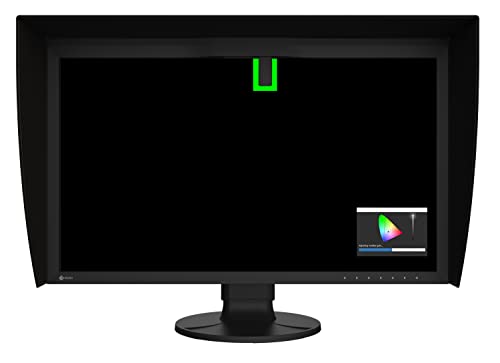
EIZO ColorEdge CG2700S-BK 27" Class WQHD LCD Monitor - 16:9 - Black


As an Amazon Associate we earn from qualifying purchases. Product prices and availability are accurate as of the date/time indicated.
EIZO FlexScan EV2410R-BK 24" Class WUXGA LED Monitor - 16:10 - Black


As an Amazon Associate we earn from qualifying purchases. Product prices and availability are accurate as of the date/time indicated.
EIZO ColorEdge CG2700X 27" Class 4K UHD LCD Monitor - 16:9 - Black


As an Amazon Associate we earn from qualifying purchases. Product prices and availability are accurate as of the date/time indicated.

EIZO FlexScan EV2490-BK (23.8-inch monitor, 1920 x 1080, USB Type-C compatible, Daisy Chain Function, Anti-Glare IPS, Eye Reduction, Black/The warranty is valid only in Japan)

As an Amazon Associate we earn from qualifying purchases. Product prices and availability are accurate as of the date/time indicated.
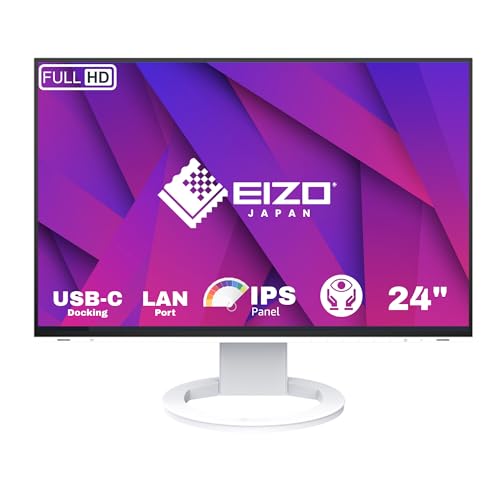
Eizo FlexScan EV2495 24.1" 16:10 WUXGA USB Docking IPS LED Monitor, Bl


As an Amazon Associate we earn from qualifying purchases. Product prices and availability are accurate as of the date/time indicated.

Eizo FlexScan EV2795-BK LED Display 68.6 cm (27") 2560 x 1440 pixels Quad HD Black

As an Amazon Associate we earn from qualifying purchases. Product prices and availability are accurate as of the date/time indicated.
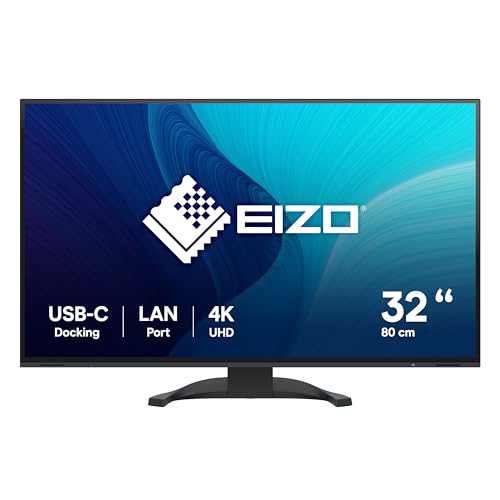
Eizo Flexscan Ev3240x. Bildschirmdiagonal: 80 cm (31.5"), Display-Aufl?sung: 3840 x 2160 pixel, HD-type: 4k Ultra HD, Bildschirmtechnology: Lcd, Rea

As an Amazon Associate we earn from qualifying purchases. Product prices and availability are accurate as of the date/time indicated.
| Model | Key point from title | Price tier | Best for |
|---|---|---|---|
| ColorEdge CG2700S-BK | 27-inch WQHD, 16:9, ColorEdge line | Premium | Color-critical work at 1440p |
| ColorEdge CG2700X | 27-inch 4K UHD, 16:9, ColorEdge line | Premium | Color work that needs 4K detail |
| FlexScan EV3240X | 31.5-inch, 3840 x 2160, German-language title | Mid-range | One large 4K office canvas |
| FlexScan EV2795-BK | 27-inch, 2560 x 1440, Quad HD | Mid-range | Sharp everyday 27-inch office use |
| FlexScan EV2495 | 24.1-inch, 16:10 WUXGA, USB docking, IPS | Budget | Laptop users who want one-cable desks |
| FlexScan EV2410R-BK | 24-inch, WUXGA, 16:10, LED | Budget | Compact desks, plain office tasks |
| FlexScan EV2490-BK | 23.8-inch 1080p, USB-C, daisy chain, Japan-only warranty | Budget | Buyers comfortable with import risk |
Price tiers are relative inside this set only; every Eizo here sits above typical mainstream monitors.
The seven picks in detail
Eizo ColorEdge CG2700S-BK (27-inch WQHD)
The title names a 27-inch WQHD LCD in 16:9 and the ColorEdge badge, which is the real reason to shortlist it. ColorEdge is generally positioned as the color-managed range for photographers, video editors and print proofing, while FlexScan targets offices; confirm that on the manufacturer page. The title says nothing about ports, panel type, hood or calibration hardware, so check the listing. At 2560 x 1440 on 27 inches the density is about 109 pixels per inch by our arithmetic. If print matching matters, budget separately for a hood and a calibration routine.
Pros
- Color-managed line aimed at accuracy-sensitive work
- QHD on 27 inches keeps text readable at 100% scaling
Cons
- Title omits ports and calibration details
- Among the two most expensive listings in the set
Who it’s for: Photographers and designers who want accuracy at 1440p and do not need 4K.
Eizo ColorEdge CG2700X (27-inch 4K UHD)
Same family and same 27-inch size, but the title promises 4K UHD instead of WQHD. That lifts density to roughly 163 pixels per inch, so detail is finer while menus shrink; expect to run scaling near 150% on most systems. A 4K signal also leans on cable and graphics-output versions, because older HDMI or DisplayPort revisions may cap the refresh rate. It is the priciest listing here. Because 4K UHD is also a common delivery size for video, a 1:1 preview of finished frames is a practical draw.
Pros
- Finest pixel density in the set
- Full 3840 x 2160 frames can be viewed at 1:1
Cons
- Highest price tier of all seven
- Needs scaling and a capable cable for comfortable use
Who it’s for: Video editors and retouchers who want UHD frames shown pixel for pixel.
Eizo FlexScan EV3240X (31.5-inch 4K)
The listing text is in German and cut off mid-word, yet it still gives 31.5 inches (80 cm) and 3840 x 2160, described as 4K Ultra HD LCD. A German-language entry hints at a European listing, so verify the plug type, power adapter and warranty region. At about 140 pixels per inch it lands between the 24-inch and 27-inch 4K models for sharpness. Ports are unknown because the title stops early. The larger panel also wants more desk depth than a 24-inch screen, so check your sitting distance first.
Pros
- Large canvas for two windows side by side
- Mid-range tier for a 4K Eizo
Cons
- Truncated, non-English title; ports unconfirmed
- Possible regional variant; check warranty and plug
Who it’s for: Office users who want one big 4K surface and will verify the listing details first.
Eizo FlexScan EV2795-BK (27-inch QHD)
This entry reads like a data-sheet feed: LED display, 68.6 cm (27-inch), 2560 x 1440, Quad HD, black. No ports, no panel type, no extras. It shares the CG2700S resolution and size, so the price gap to that model is about color tooling and positioning rather than pixel count. Check the listing for USB-C, hub and DisplayPort details, since 27-inch buyers usually want a single cable to a laptop. For general office work the identical pixel grid costs well under half as much in this set.
Pros
- Same 1440p grid as the premium 27-inch ColorEdge
- Sensible mid-range cost for a 27-inch Eizo
Cons
- Sparse title; ports and panel details need checking
- Not marketed here as a color-critical screen
Who it’s for: Office and general users who want a roomy 27-inch screen without paying for color management.
Eizo FlexScan EV2495 (24.1-inch 16:10)
Here the title lists 24.1 inches, 16:10 WUXGA (1920 x 1200), USB docking and IPS, then cuts off at “Bl”. The 16:10 shape adds 120 rows over a 1080p screen, about 11% more vertical space for documents. USB docking should let a laptop connect through one cable, but the title gives no power-delivery wattage, so confirm charging support. Our monitor docking station guide explains what to match. With two document windows side by side, each gets about 960 pixels of width, roughly 10 inches at this density, which is wider than a letter-size page.
Pros
- Extra vertical room from 16:10
- Docking claim reduces desk cable clutter
Cons
- Title cut off; ports and wattage unstated
- Only about 94 pixels per inch, so text is clear but not fine
Who it’s for: Hybrid workers who dock a laptop and want a compact Eizo.
Eizo FlexScan EV2410R-BK (24-inch WUXGA)
A short title: 24-inch class, WUXGA, LED, 16:10, black. That gives 1920 x 1200 on a small footprint, but nothing about ports, USB hubs or stand movement. Compared with the EV2495 in this same set, it names fewer features while listing at a similar tier, which leaves it as the plain option rather than the feature-rich one. Titles this short leave details to the product page, so confirm anything beyond size and resolution there.
Pros
- 16:10 workspace in a small footprint
- Lowest-effort Eizo for basic desk work
Cons
- Title says nothing about connectivity or ergonomics
- Overlaps with the EV2495, which names more features
Who it’s for: Shoppers who want a simple 24-inch office Eizo and will check the spec sheet.
Eizo FlexScan EV2490-BK (23.8-inch 1080p)
Its title lists a 23.8-inch 1920 x 1080 anti-glare IPS panel with USB Type-C, daisy chain and an eye-reduction mode, then adds “the warranty is valid only in Japan.” Treat that line as the headline. Outside Japan, manufacturer support may be unavailable, and the unit could ship with a Japanese manual or region-specific accessories. Daisy chaining needs a compatible source and downstream monitor. The eye-reduction wording is a feature label rather than a health claim; comfort still depends on brightness, distance and regular breaks.
Pros
- USB-C input plus daisy chain in a budget Eizo
- Anti-glare IPS finish for bright rooms
Cons
- Warranty limited to Japan per the title
- 1080p at 23.8 inches is only about 93 pixels per inch
Who it’s for: Importers who accept warranty risk; most US buyers are safer with the EV2495.
How we picked these
The set comes from seven Eizo listings supplied for this page. We compared titles for panel size, resolution, aspect ratio, interface wording and warranty text, then cross-checked those against published specifications, manufacturer documentation and buyer reviews. Price tiers are relative inside the set. Statements in a title are seller claims until the data sheet confirms them, and where a title is silent we say “check the listing” instead of guessing. Nobody on the team used or measured these units. Two listings are weaker matches for most US shoppers: the Japan-only warranty unit and the truncated German-language entry.
What to look for in an Eizo monitor
ColorEdge or FlexScan: choose the job first
ColorEdge is the color-management line, and FlexScan is the office line. If your deliverables are printed photos, graded video or brand-critical design, a ColorEdge makes sense, and you should budget for a calibration routine. If you mostly handle email, spreadsheets and video calls, a FlexScan gives the same build philosophy for less.
Pixel density at each size
Density equals diagonal pixels divided by diagonal inches. These are our calculations from the resolutions in the titles, not manufacturer figures.
| Size and resolution | Pixels per inch | Typical scaling |
|---|---|---|
| 23.8-inch, 1920 x 1080 | about 93 | 100% |
| 24.1-inch, 1920 x 1200 | about 94 | 100% |
| 27-inch, 2560 x 1440 | about 109 | 100% |
| 31.5-inch, 3840 x 2160 | about 140 | 125% to 150% |
| 27-inch, 3840 x 2160 | about 163 | 150% to 175% |
At 150% scaling a 27-inch 4K panel behaves like a 2560 x 1440 workspace drawn with more detail. As a worked example, at 125% scaling the same 27-inch 4K panel gives a 3072 x 1728 workspace, about 44% more pixels than QHD, but body text then renders smaller on the glass. If you are weighing 5K as well, our 5K monitor comparison covers that density tier, and the 4K monitors for work page covers cheaper 4K options.
16:10 versus 16:9
Two listings use 16:10 (1920 x 1200). The extra 120 rows show roughly 11% more of a document or spreadsheet than 1080p at the same width. Video content still letterboxes slightly, which matters little for office use.
Ports, docking and bandwidth
USB-C can carry video and power, but only if the laptop port supports DisplayPort output and the monitor supports power delivery at a wattage your laptop needs. For 4K at 60 Hz you generally want HDMI 2.0 or DisplayPort 1.2 or newer; older HDMI 1.4 connections often limit 4K to 30 Hz. A truncated title cannot answer these questions.
Region and warranty
Two of the seven titles point to a non-US market. Confirm the seller, the warranty territory and the power plug before you pay. Ask the seller in writing whether the unit ships with a US-compatible power cable, and keep the order confirmation in case a return is needed.
Mistakes buyers make with Eizo
- Paying for ColorEdge when the work never leaves a browser or spreadsheet.
- Assuming 4K automatically means easier reading; without scaling, text on a 27-inch 4K panel is small.
- Ignoring warranty wording, especially the Japan-only line on the EV2490-BK.
- Trusting a truncated title for ports and USB-C power, then discovering the laptop will not charge.
- Buying a color-critical screen without any plan for calibration or a controlled room light.
- Forgetting desk depth: a 31.5-inch panel wants a longer sitting distance than a 24-inch screen, so measure the desk before ordering.
- Reusing an old HDMI cable and wondering why 4K refresh looks limited, or skipping a check of the laptop’s video-output support.
- Comparing an EV2410R and EV2495 on price alone and overlooking the docking claim.
Verdict
For color work, the CG2700S is the sensible QHD choice and the CG2700X the 4K upgrade, provided the listing confirms ports and calibration features. For offices, the EV2495 is the most useful all-rounder because it names docking and 16:10 together, while the EV2795 gives a larger 27-inch QHD surface. The EV3240X suits big-canvas 4K users after the listing checks out. Choose the EV2410R only if you want a plain 24-inch, and avoid the EV2490-BK unless the Japan-only warranty is acceptable.
Eizo monitor questions answered
Is an Eizo monitor worth the higher price?
It depends on the job. Eizo’s ColorEdge line is generally aimed at color-critical work, where consistent output matters more than price. For ordinary office tasks, a mainstream monitor can cover most needs, though FlexScan models trade extra cost for build and office-focused features. Compare the listing’s stated specifications and warranty terms against what you actually need before paying a premium.
What is the difference between ColorEdge and FlexScan?
ColorEdge is generally the color-management range for photo, video and print professionals, while FlexScan is the general office and business range. Both appear in this set. The titles do not spell out calibration hardware, so confirm features such as built-in sensors or included software on the manufacturer’s page before assuming they come with the unit.
Do I need 4K on a 27-inch Eizo?
Not necessarily. A 27-inch QHD screen is about 109 pixels per inch and works at 100% scaling. A 27-inch 4K screen is about 163 pixels per inch, giving finer detail but needing 150% scaling or more. Choose 4K when you must see full UHD frames pixel for pixel, or when you value sharper text.
Can these Eizo monitors charge a laptop over USB-C?
Only some titles mention USB-C or USB docking, and none state power-delivery wattage. A monitor can accept video over USB-C without charging the laptop, so check the listing for wattage and compare it with your laptop charger rating. If it is lower, plan to keep the original charger plugged in.
Is the EV2490-BK safe to buy outside Japan?
Its title states that the warranty is valid only in Japan. That means manufacturer repair or replacement outside Japan may be refused, and the unit might include a Japanese manual or region-specific accessories. Unless you accept that risk or the seller offers its own return and support terms, the EV2495 is a lower-risk alternative for US buyers.