
Key takeaways
- An OLED laptop panel lights each pixel on its own, which is why black looks truly black and colors jump off the screen compared with a typical LCD.
An OLED laptop panel lights each pixel on its own, which is why black looks truly black and colors jump off the screen compared with a typical LCD. The catch is that OLED is only one line on a spec sheet, and the processor, memory, refresh rate and resolution wrapped around it vary enormously. This guide compares seven OLED notebooks from the listings, from a 14-inch ultralight to a 15.3-inch gaming model, so you can decide whether you want the panel for movies, photo work, or all-day writing.
The decision is mostly about what you pair the display with. Creators will weigh color coverage and resolution, travelers will care about weight and platform, and gamers will look for a high refresh rate. By 2026 the field also splits across Intel, AMD and Snapdragon chips, which changes software compatibility and efficiency. Everything below is judged from the specifications in each listing, not from lab measurements.
Quick Picks
Our top picks





As an Amazon Associate we earn from qualifying purchases at no extra cost to you.
| Product | Best for | Key spec from the title |
|---|---|---|
| ASUS Zenbook 14 OLED | Travel and everyday use | Ryzen AI 9 465, 16GB RAM, 1TB SSD, 2K 500 nits HDR |
| ASUS Vivobook S16 (Ryzen AI 7) | Roomy multitasking | 16″ 16:10 WUXGA OLED, 32 GB RAM, 1TB SSD |
| HP OmniBook 3 14 OLED | Color-focused creators | WUXGA OLED, 100% DCI-P3, Snapdragon X, 16GB DDR5 |
| Acer Swift Go 16 | Smooth large-screen viewing | 3200×2000, 120Hz, Core Ultra 5 125H, 512GB SSD |
| Dell XPS 14 | Premium sharpness | 3.2K OLED, 48-120Hz, Core Ultra 7 255H, 32GB |
| ASUS Vivobook S16 (Snapdragon X2) | Efficient Copilot+ use | Snapdragon X2 Elite, 16 GB RAM, 1TB SSD |
| Lenovo Legion 5a | Gaming on OLED | RTX 5060, 2560×1600 165Hz OLED, 32GB DDR5 |
How to Choose
Check resolution and refresh rate together
An OLED panel at WUXGA (1920×1200) is already crisp on a 14 to 16-inch screen. Step up to 2K, 2560×1600 or 3200×2000 and text and photos get noticeably finer, but you also push the graphics hardware harder. Refresh rate is the other half: 60Hz is standard, 120Hz makes scrolling and cursor movement feel smoother, and gaming panels climb to 165Hz. Variable ranges such as 48-120Hz can save power when the screen is mostly still. Aspect ratio deserves a glance as well: 16:10 panels are taller than 16:9 ones, which means more visible lines of a document or spreadsheet without making the laptop any wider.
Look at color and brightness claims
For creative work, a stated gamut such as 100% DCI-P3 tells you the panel covers the wide color range used in film and many photo workflows. Brightness is quoted in nits; 500 nits with HDR support is a respectable figure for a laptop, while lower numbers can look dim in a bright room. Ignore marketing phrases that name no figure at all, since they cannot be compared.
Match the processor platform to your software
Intel Core Ultra and AMD Ryzen AI chips run standard Windows software without surprises. Snapdragon X-series laptops are built for efficiency and Copilot+ features, but some older or specialized programs may need emulation or may not run at all. Check the apps you rely on before choosing Snapdragon, especially for niche drivers, games or plug-ins.
Memory, storage and where budget OLEDs cut corners
Eight gigabytes of RAM is the practical minimum, but sixteen is a much better target for photo editing and many browser tabs. A 256 GB SSD fills quickly once creative files arrive, so 512 GB or 1 TB gives breathing room. Lower-priced OLED models often trim storage, RAM or brightness first, so read those lines before you fall for the panel alone.
The 7 Best Options
ASUS Zenbook 14 OLED
This ultralight 14-inch touchscreen pairs a Ryzen AI 9 465 processor with 16GB of RAM, a 1TB SSD and a 2K display rated at 500 nits with HDR. It is meant for people who carry their laptop everywhere and want a high-quality panel without heft, such as students, consultants or frequent flyers.
- Strength: 1TB of storage and 16GB of RAM suit a long-term daily driver.
- Strength: a touchscreen with a backlit keyboard and a stated long battery life.
- Trade-off: the 14-inch size gives less workspace than the 16-inch models.
Skip it if you need a dedicated graphics card for gaming or heavy rendering. The title does not list a discrete GPU, so treat it as a writing, browsing and media machine whose main luxury is the screen and the low weight rather than raw graphics power.
ASUS Vivobook S16 (Ryzen AI 7 445)
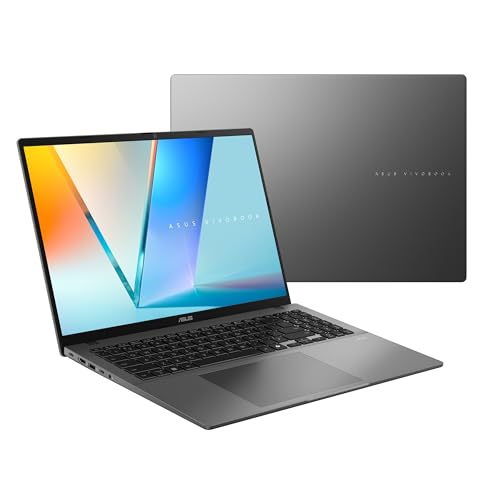
The first Vivobook S16 listing shows a 16-inch 16:10 WUXGA OLED, a Ryzen AI 7 445, Radeon graphics, 32 GB of RAM and a 1TB SSD. It is the memory-rich option for someone who keeps dozens of tabs, documents and calls running together.
- Strength: 32 GB of RAM leaves plenty of room for multitasking.
- Strength: a large 16:10 panel gives extra vertical space for documents.
- Trade-off: integrated Radeon graphics, so it is not a gaming machine.
Skip it if you want a compact laptop for tight airplane trays. A 16-inch body is a better fit for a desk or couch, and buyers who rarely open more than a few apps will not use all of that memory.
HP OmniBook 3 14 OLED
HP’s 14-inch OmniBook lists a WUXGA OLED with 100% DCI-P3, an 8-core Snapdragon X processor with up to 45 NPU TOPS, 16GB of DDR5 and a 256GB SSD. The listing targets creators and designers who care about color accuracy and AI features.
- Strength: the 100% DCI-P3 gamut stands out for color work.
- Strength: Wi-Fi 6E and 16GB of DDR5 memory.
- Trade-off: only 256GB of storage fills up quickly with creative files.
Skip it if your key programs are not built for Snapdragon-based Windows. Photographers who keep large libraries locally should also think twice, since a 256GB drive leaves little space once raw files and project folders start piling up.
Acer Swift Go 16 (SFG16-72-5844)
The Swift Go 16 lists a 16-inch OLED with 3200×2000 resolution and a 120Hz refresh rate, driven by an Intel Core Ultra 5 125H with 8GB of RAM and a 512GB SSD. It is Intel Evo certified, which points toward thin-and-light, responsive laptop use.
- Strength: a sharp 3200×2000 panel at 120Hz is smooth for reading and video.
- Strength: 512GB of storage and Intel Evo certification.
- Trade-off: 8GB of RAM is the lowest among the larger models here.
Skip it if you plan to run demanding multitasking workloads. The display is the star of this listing, so it makes the most sense for someone who streams, reads and edits lightly rather than someone who needs a deep memory pool for heavy projects.
Dell XPS 14 (DA14250)
The XPS 14 lists a 14.5-inch touch 3.2K OLED with a 48-120Hz range, an Intel Core Ultra 7 255H, Intel Arc graphics, 32GB of memory and a 1TB SSD. It is the premium-tier choice for buyers who want sharpness, power and storage together in a single machine.
- Strength: 3.2K resolution with adaptive 48-120Hz refresh.
- Strength: 32GB of memory and 1TB of storage as configured.
- Trade-off: it sits in the premium tier, so value-focused buyers may look elsewhere.
Skip it if you simply want an OLED screen without paying for top-end specs. Several other laptops in this list give you the same panel type at lower tiers, and the XPS only makes sense when you will genuinely use the memory and storage on offer.
ASUS Vivobook S16 (Snapdragon X2 Elite)
This Vivobook S16 swaps in a Snapdragon X2 Elite processor with Adreno graphics, 16 GB of RAM and a 1TB SSD behind the same 16-inch 16:10 WUXGA OLED. As a Copilot+ PC, it targets users who value on-device AI features and efficiency.
- Strength: Copilot+ PC credentials with a 1TB SSD.
- Strength: large 16:10 OLED display at WUXGA resolution.
- Trade-off: Snapdragon software compatibility needs checking for niche apps.
Skip it if you depend on legacy programs or specialized peripherals. Compared with its Ryzen sibling, this version gives up half the memory on paper, so buyers who run many apps at once may prefer the 32 GB configuration instead.
Lenovo Legion 5a Gaming Laptop
The Legion 5a is the outlier: a gaming laptop with a Ryzen 7 250, GeForce RTX 5060, a 15.3-inch WQXGA 2560×1600 OLED at 165Hz, 32GB of DDR5 RAM, a 1TB SSD, Wi-Fi 7 and RGB backlighting. It suits gamers who want OLED contrast and speed together.
- Strength: RTX 5060 graphics and a 165Hz OLED panel.
- Strength: 32GB of DDR5 and Wi-Fi 7 for demanding use.
- Trade-off: a gaming chassis with RGB styling is less discreet for the office.
Skip it if you need an ultralight travel laptop. Gaming hardware of this kind is normally heavier and louder under load than the thin models above, and it is a poor match for anyone who mainly types documents.
Which One Fits Your Situation
You travel constantly
The ASUS Zenbook 14 OLED is built around being ultra light with long battery life, while still giving you 16GB of RAM and 1TB of storage.
You edit photos or video
The Dell XPS 14 pairs a 3.2K panel with 32GB of memory and a 1TB SSD, a strong combination for creative workflows. The HP OmniBook 3 14 is a lighter-duty alternative with its 100% DCI-P3 claim.
You want a big screen for work
The ASUS Vivobook S16 with Ryzen AI 7 gives you a 16-inch 16:10 OLED and 32 GB of RAM for heavy multitasking.
You play games
The Lenovo Legion 5a is the only model with discrete RTX graphics and a 165Hz OLED display, so it fits gaming best. If you want something quieter and slimmer for casual games plus work, the Acer Swift Go 16 offers a 120Hz OLED panel, though it relies on Intel’s integrated hardware.
Common Mistakes
- Buying on the OLED label alone and ignoring RAM and storage that will limit you later.
- Assuming Snapdragon laptops run every Windows program without checking compatibility.
- Expecting integrated graphics to handle modern games at high settings.
- Overlooking refresh rate, which affects how smooth everyday scrolling feels.
- Ignoring brightness figures, which decide how usable the screen is near a window.
Related guides
- Helping Hands Soldering Station With Magnifier
- Bench Power Supply For Electronics Hobbyists
- Is 8000Hz Polling Rate Worth It For 144Hz Monitor
Frequently Asked Questions
Is an OLED laptop worth it?
If you watch video, edit images or simply value contrast, the panel is a visible upgrade. For spreadsheets and plain browsing, a good LCD can be enough.
What does 100% DCI-P3 mean?
It describes how much of the DCI-P3 color range the display can reproduce. A higher figure matters most for photo and video work.
How much RAM do I need on an OLED laptop?
Sixteen gigabytes is a good target for creative and multitasking use. Eight gigabytes works for lighter tasks, while 32 GB suits heavy workloads such as large photo libraries, many browser windows and editing software running together.
Do OLED screens suit gaming?
Yes, especially with a high refresh rate such as 165Hz, though you still need a capable graphics card, like the one in the Legion 5a, to use that smoothness.









