Key takeaways
- One laptop that has to handle payroll spreadsheets on Monday and family photos on Saturday faces a tougher brief than a pure work machine or a pure.
One laptop that has to handle payroll spreadsheets on Monday and family photos on Saturday faces a tougher brief than a pure work machine or a pure home machine. It needs a keyboard you can type on for hours, enough memory to keep a browser, email, and video calls running together, and a screen that still looks good for streaming at night. It also needs sensible security and management options, because work files and personal files sit on the same drive. The best choice balances those two lives rather than maximizing either one.
This guide is aimed at freelancers, small business owners, and employees who bring their own device and want a single machine for everything in 2026. Six laptops are compared, from a basic Lenovo and a touch-screen HP to two Dell touch-screen models with large memory and 1TB SSDs. The notes below explain which specs matter for a mixed workload, and the final sections match each model to a real situation so you can decide quickly.
Quick Picks
Our top picks
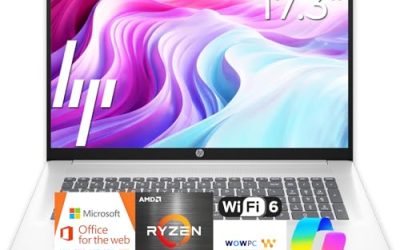
 HP 17 inch Business Laptop Computer •
- All In The Detail: The HP laptop has…
- Immersive Full HD Display: Experience high performance with…
- Windows 11 & Office 365 for Web: Preloaded…



As an Amazon Associate we earn from qualifying purchases at no extra cost to you.
| Product | Best for | Key spec taken from the product title |
|---|---|---|
| Lenovo Business 15.6-inch FHD | Light business use on a tight budget | 8GB DDR5, 128GB storage, USB-C, Wi-Fi 6 |
| HP 17-inch Business Student Laptop | Big-screen office work | AMD Ryzen 5 7430U, Copilot PC |
| Dell 16 Touchscreen Business Laptop | Heavy multitasking and storage | Core 7 150U, 32GB DDR5, 1TB SSD |
| Dell 15.6-inch Touchscreen Laptop | Performance-focused professionals | Core Ultra 7 255U, 16GB DDR5, 1TB SSD |
| HP 15.6-inch Touchscreen Laptop | Windows Pro and AMD performance | Ryzen 7 7730U, 16GB, 512GB SSD, Windows 11 Pro |
| HP 15.6-inch Laptop (N200) | Basic documents and browsing | 4-core N200, 4GB RAM, 128GB SSD, S Mode |
How to Choose
Choose memory for how many things you keep open
Business use often means a browser with many tabs, a spreadsheet, a messaging app, and a video call all at once. Eight gigabytes of RAM covers light use, 16GB is a comfortable target for most professionals, and 32GB suits heavy multitaskers or people who run large files. A 4GB laptop will slow down quickly with this mix. When the title does not list RAM, treat that as a flag to read the full description.
Windows edition and security features
Windows 11 Pro adds device management and encryption tools that matter if your employer or client requires them, while Windows 11 Home is fine for solo use. Watch out for S Mode, which limits installs to the Microsoft Store and can block business software. Look for features such as a fingerprint reader or a webcam shutter if you handle sensitive client data, and check the listing because these details are not always in the title.
Display, keyboard, and touch
For long workdays, a full-size backlit keyboard with a number pad speeds up data entry. A touch screen is convenient for note taking and signing documents, but it adds glare and weight. Screens labeled 16:10, as on the 16-inch Dell, give more vertical room for documents. Brightness near 300 nits is a good indoor level, and an IPS panel offers wider viewing angles for sharing a screen across a table.
Storage, ports, and where budget models cut corners
A 512GB SSD is a sensible baseline for a mixed work and home laptop, and 1TB is better if you store photos or large project files. USB-C is useful for docks and monitors, and Wi-Fi 6 helps on busy office networks. Budget models cut memory, storage, and display quality first, so be wary of 128GB drives for a machine that holds both work and personal data. Ignore bundled software lists unless you will use them. If you take calls all day, also consider the webcam and microphone descriptions, since a built-in camera that looks fine in a listing can still be grainy in a dim room, and a headset is a small upgrade that helps any model here.
The 6 Best Options
Lenovo Business 15.6-inch FHD Laptop
The Lenovo Business model lists an Intel processor, 8GB of DDR5 memory, and 128GB of storage with Office 365, Copilot AI, Wi-Fi 6, and USB-C. The anti-glare 15.6-inch FHD screen and long battery life claim make it a sensible entry for basic business tasks. It is a practical starter machine for someone who lives in documents and email.
- Strength: 8GB of DDR5 memory with Wi-Fi 6 and USB-C for modern connectivity.
- Strength: an anti-glare FHD display is easier on the eyes in bright offices.
- Trade-off: 128GB of storage is small for a combined work and personal laptop.
Skip it if you store photos or large files locally. It suits a budget-minded user who works mostly in the cloud. Keep the Office subscription terms in mind, since a bundled plan is time-limited, and plan to add an external drive or lean on online storage for personal photos and downloads.
HP 17-inch Business Student Laptop
This 17-inch HP pairs an AMD Ryzen 5 7430U processor with a Copilot PC label and a large display. It is targeted at business and student users who want a big workspace. The title is short on memory and storage details, so confirm those numbers in the listing.
- Strength: a Ryzen 5 processor handles everyday office tasks well.
- Strength: a 17-inch display provides a roomy workspace for spreadsheets.
- Trade-off: the title omits RAM and storage, so you must verify them elsewhere.
Skip it if you travel often, since a 17-inch body is heavy to carry. It is a fit for a home office desk. Because the headline specs are thin, treat it as a candidate to research further rather than a confirmed value pick, and compare it with the other Ryzen option below before deciding.
Dell 16 Touchscreen Business Laptop
The Dell 16 is the most generously equipped option, with a Core 7 150U processor, 32GB of DDR5 memory, and a 1TB SSD. Its 16:10 FHD+ IPS touch display rated at 300 nits adds extra vertical room, and the keyboard is full-size and backlit with a number pad. For someone running many applications, it is a standout.
- Strength: 32GB of DDR5 RAM and a 1TB SSD cover heavy multitasking.
- Strength: a 16:10 IPS display with 300 nits works well for documents.
- Trade-off: a premium configuration usually costs more than the basic models.
Skip it if your needs are light, since the extra memory will go unused. It is for professionals who want a machine that lasts. The generous memory and drive also make it easier to keep work projects and a personal media library on the same laptop without constant cleanup, which is the real test of a dual-purpose machine.
Dell 15.6-inch Touchscreen Business Laptop
This Dell uses an Intel 12-core Core Ultra 7 255U processor with speeds up to 5.2GHz, 16GB of DDR5 RAM, and a 1TB SSD. The 15.6-inch FHD touch screen and backlit keyboard make it a capable laptop for mixed work. It sits between the Lenovo and the larger Dell on memory.
- Strength: a Core Ultra 7 processor with 16GB of DDR5 RAM offers strong everyday performance.
- Strength: a 1TB SSD leaves plenty of room for work and personal files.
- Trade-off: a touch screen adds glare and weight compared to a non-touch display.
Skip it if you do not need touch, since you could put the budget toward a lighter laptop. It is a fit for professionals who want a faster processor. The 16GB of memory is enough for a typical office stack, though anyone who keeps huge spreadsheets or many browser profiles open may eventually wish for the 32GB of the larger Dell.
HP 15.6-inch Touchscreen Laptop
The HP touchscreen model lists a Ryzen 7 7730U, 16GB of RAM, a 512GB SSD, an FHD IPS display, and AMD Radeon graphics. It runs Windows 11 Pro, has Wi-Fi 6, a Copilot key, and a numeric keypad. It is the best fit in this group for users who need the Pro edition for work security policies.
- Strength: Windows 11 Pro and a Ryzen 7 processor suit business use.
- Strength: 16GB of RAM with a numeric keypad and IPS touch display.
- Trade-off: a 512GB SSD is smaller than the 1TB drives on the Dell models.
Skip it if you need lots of local storage. It is a sound pick for a hybrid worker who uses company tools. The numeric keypad and IPS display also make long evenings of personal budgeting or photo sorting more comfortable, and the Copilot key is a convenience rather than a reason to buy.
HP 15.6-inch Laptop (N200)
This HP lists a 4-core Intel N200 processor, 4GB of RAM, and a 128GB SSD with Windows 11 Home in S Mode. It is the most basic option and is aimed at light tasks such as email, documents, and web apps. S Mode limits installs to the Microsoft Store unless you switch out of it.
- Strength: a simple, portable 15.6-inch laptop for basic work.
- Strength: a long battery life claim for days away from a charger.
- Trade-off: 4GB of RAM and S Mode restrict business software and multitasking.
Skip it if you need specialized business software or many open windows. It suits occasional use. A shared family laptop for forms, banking, and homework is a better match than a primary work computer, and you can usually switch out of S Mode for free if you need a specific desktop application, though the small memory will still be the limit.
Which One Fits Your Situation
You run a small business and need to multitask
The Dell 16 Touchscreen with 32GB of RAM and a 1TB SSD handles invoices, video calls, and personal files without strain.
Your employer requires Windows Pro
The HP 15.6-inch Ryzen 7 touchscreen model is the clear fit, with Windows 11 Pro and 16GB of RAM.
You want a big screen at home
The HP 17-inch Ryzen 5 laptop gives a large workspace, though you should confirm its memory and storage first.
You need a basic starter laptop
The Lenovo Business 15.6-inch laptop covers email and documents with 8GB of DDR5 RAM, and it is a more flexible choice than the S Mode HP N200 model.
Common Mistakes
- Buying a 4GB laptop for a day filled with browser tabs and video calls.
- Overlooking S Mode and discovering later that business software will not install.
- Mixing work and personal files on a small 128GB drive and running out of space.
- Paying for a touch screen when you rarely use it, adding glare and weight.
- Assuming the headline processor speed applies to sustained work instead of short bursts.
Related guides
- Helping Hands Soldering Station With Magnifier
- Is 8000Hz Polling Rate Worth It For 144Hz Monitor
- Bench Power Supply For Electronics Hobbyists
Frequently Asked Questions
Should a business laptop have 16GB of RAM?
For most professionals, yes. 8GB handles light use, while 16GB gives room for many apps and tabs. Choose 32GB only for heavy workloads.
Is Windows 11 Pro necessary?
It is useful if your workplace requires device management, encryption, or domain join. For solo work, Windows 11 Home usually suffices.
Is a touch screen worth it?
It helps with note taking, signing documents, and presenting. If you mostly type, a non-touch display is lighter and reduces glare.
Can one laptop handle work and personal use safely?
Yes, provided you use separate user accounts, keep drive encryption on, and follow your employer’s policy. Having enough storage keeps both sets of files organized.