Key takeaways
- Antenna gain and count. High-gain external dipoles reshape the signal into a flatter “donut” — more horizontal reach, slightly less directly above and below. More antennas also means more MIMO streams, which stabilizes throughput at the edge of coverage.
- Front-end modules (FEMs). The amplifiers between the chipset and the antennas. Routers that advertise high-power FEMs hold signal quality a room or two further out.
- Band physics. A 2.4 GHz signal travels roughly twice as far through walls as 5 GHz, and 6 GHz (WiFi 6E/7) is the shortest-range of all. Most “whole home” coverage claims are quietly based on 2.4 GHz.
- The uplink problem. Your phone transmits at a fraction of the router’s power. In practice the connection dies when the router can’t hear the reply — not when the signal stops reaching the device.
What's inside
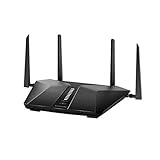
The best WiFi router for long range in 2026 is the ASUS RT-BE88U for most large homes, the TP-Link Archer AX73 for budgets under roughly $150, and — past about 3,500 square feet — a three-node mesh kit rather than a bigger single router. The picks below are ranked on antenna architecture, transmit/amplification hardware (front-end modules), and independently published signal measurements through walls, mapped to realistic square-foot coverage in a typical wood-frame house rather than the numbers on the box.
As an Amazon Associate we earn from qualifying purchases at no extra cost to you.


What actually limits WiFi range
Every consumer router sold in the US is capped at roughly the same effective radiated power by regulation, so a “long range” label can’t mean a legally stronger transmitter. Real differences come from four places:
- Antenna gain and count. High-gain external dipoles reshape the signal into a flatter “donut” — more horizontal reach, slightly less directly above and below. More antennas also means more MIMO streams, which stabilizes throughput at the edge of coverage.
- Front-end modules (FEMs). The amplifiers between the chipset and the antennas. Routers that advertise high-power FEMs hold signal quality a room or two further out.
- Band physics. A 2.4 GHz signal travels roughly twice as far through walls as 5 GHz, and 6 GHz (WiFi 6E/7) is the shortest-range of all. Most “whole home” coverage claims are quietly based on 2.4 GHz.
- The uplink problem. Your phone transmits at a fraction of the router’s power. In practice the connection dies when the router can’t hear the reply — not when the signal stops reaching the device.
Best long-range WiFi routers compared
| Router | Class | Bands | Antennas | Wired ports | Realistic coverage* | Price range |
|---|---|---|---|---|---|---|
| TP-Link Archer AX73 | AX5400 WiFi 6 | Dual | 6 external | 1×1G WAN, 4×1G LAN | ~2,500–3,000 sq ft | $90–130 |
| ASUS RT-BE88U | BE7200 WiFi 7 | Dual | 4 external + internal array | 1×10G SFP+, 1×10G, 4×2.5G, 4×1G | ~3,000–3,500 sq ft | $350–400 |
| ASUS ROG Rapture GT-BE98 | BE25000 WiFi 7 | Quad | 8 external | 2×10G, 4×2.5G | ~3,000–4,000 sq ft | $650–750 |
| TP-Link Deco XE75 (3-pack) | AXE5400 WiFi 6E mesh | Tri | Internal | 3×1G per node | Up to ~7,200 sq ft (claim) | $300–400 |
| Netgear Orbi 970 (3-pack) | BE27000 WiFi 7 mesh | Quad | Internal high-gain | 10G + 2.5G per unit | Up to ~10,000 sq ft (claim) | $1,500–2,300 |
*Single router, central placement, wood/drywall construction. Brick, plaster, and foil-backed insulation cut these figures substantially.
The picks, by situation
Best for most large homes: ASUS RT-BE88U
Eight streams across 2.4 and 5 GHz, strong FEMs, and adjustable external antennas keep roughly 200–400 Mbps alive at 60–80 feet through two or three drywall partitions in published lab measurements — comfortably covering a 3,000-square-foot two-story home from a central spot. The ten wired ports (including 10G SFP+ and 10G copper) mean you can later add a wired AiMesh satellite without buying a switch. Weaknesses: it’s physically huge, and being dual-band it skips the short-range 6 GHz spectrum.
Best budget long range: TP-Link Archer AX73
Six external antennas plus a dedicated high-power FEM make this the range-per-dollar leader under $150. It reliably pushes 5 GHz one room further than most routers at its price, which is what kills the classic “bedroom dead zone.” Limitations: gigabit ports only, and a modest 2×2 2.4 GHz radio.
Maximum single-box coverage: ASUS ROG Rapture GT-BE98
Eight antennas, quad-band WiFi 7 (2.4 + dual 5 + 6 GHz), and a 25 Gbps aggregate rating. The second 5 GHz radio can later serve as a dedicated wireless backhaul. Honest caveat: past roughly four interior walls it still loses to a $300 mesh kit — physics doesn’t care what you paid.
When a single router isn’t enough
If your home is over ~3,500 square feet, L-shaped, or built with brick/plaster, distributed nodes beat a louder router every time. The Deco XE75 three-pack (claimed ~7,200 sq ft) covers most situations for around $300–400; the Orbi 970 system (claimed ~10,000 sq ft, WiFi 7 backhaul) is the no-compromise option at a much higher price. Plan on roughly one node per 1,500–2,000 square feet or one per two walls.
Match the router to your house
| Your situation | Right choice | Why |
|---|---|---|
| Apartment or single floor under ~1,500 sq ft | Archer AX73 | Six antennas erase one-room-over dead spots without overspending |
| 2,500–3,500 sq ft two-story, wood-frame | RT-BE88U | 8-stream array + central placement covers both floors; ports for expansion |
| 3,000–4,000 sq ft, want WiFi 7 and 10G wiring | GT-BE98 | Biggest single-box footprint plus backhaul options |
| 4,000+ sq ft, L-shaped, brick, or plaster | Mesh (Deco XE75 / Orbi 970) | No single radio wins against masonry at that scale |
| Barn, garage, or outbuilding up to ~1 km away | Point-to-point bridge (see below) | Client uplinks die long before 1 km |
How far will it actually reach? A quick calculation
Signal loss per obstacle, approximated from published RF measurements:
| Obstacle | 2.4 GHz | 5 GHz | 6 GHz |
|---|---|---|---|
| Drywall / wood stud wall | ~3 dB | ~4–5 dB | ~7 dB |
| Brick wall | ~7 dB | ~10–12 dB | 15+ dB |
| Concrete floor | ~10–15 dB | ~15–20 dB | 20+ dB |
| Foil insulation / metal | 20+ dB | 30+ dB | Effectively blocked |
Worked example: a good router delivers about −52 dBm at 60 feet line-of-sight on 5 GHz. Through three drywall walls (−15 dB) you land at roughly −67 dBm — right at the threshold for stable 4K streaming and video calls. Swap one of those for a brick wall and you’re at −73 dBm, buffering territory; −75 dBm and below is where connections drop. Useful rules of thumb: halving the distance gains ~6 dB, so moving the router 15 feet closer to a dead zone is worth more than most hardware upgrades, and 2.4 GHz will still be faintly usable where 5 GHz has already failed.
Searching for a “long range WiFi router 1km”? Read this first
No consumer router delivers usable WiFi to phones and laptops at 1 km. Even outdoors with clear line of sight, free-space path loss at 5 GHz over 1 km runs about 94 dB — a router might hold a weak link for a few hundred meters, but the client’s far weaker transmitter kills the return path first, and foliage or a single wall collapses it to tens of meters.
For genuinely covering 1 km — say, house to barn — the right tool is a point-to-point wireless bridge, not a router. A pair of outdoor units like the Ubiquiti NanoStation loco5AC or TP-Link CPE710 (directional, PoE-powered, roughly $50–75 each) mounted with clear line of sight will carry a few hundred megabits across that distance reliably. Mount them above the roofline, run Ethernet back to your indoor router, and expect speeds far better than any “long range” router claim.
Ownership realities: placement, heat, and lifespan
- Placement beats hardware. Elevating the router to shelf height (~6 ft) and pulling it out from behind the TV or a metal cabinet can recover 5–10 dB — gain you legally can’t add with transmit power.
- Antenna orientation matters. Vertical antennas spread signal horizontally for single floors; tilting one or two to ~45° helps reach upstairs.
- Heat shortens life. High-power FEMs run warm. A router stuffed in a closed cabinet loses range and ages faster; expect 4–6 years of useful life before firmware support — the real end-of-life marker — dries up.
- Common mistakes: buying WiFi 7 for range (6 GHz reaches the least far), cranking transmit power while ignoring the uplink bottleneck, and buying a flagship router for a masonry home that needed mesh.
FAQ
Does WiFi 7 have better range than WiFi 6?
Not in raw distance — transmit power limits are identical. WiFi 7 holds usable speeds further out thanks to cleaner channels and MLO, but its headline 6 GHz band is the shortest-range radio on board.
Do more antennas mean more range?
Partially. Extra antennas add MIMO streams and gain, which stabilize connections near the edge — but they don’t add transmit power, so eight antennas won’t double your coverage.
Is 2.4 GHz still the longest-range band?
Yes. It’s slower but penetrates walls best; reserve it for smart home devices and far corners, and keep 5 GHz for bandwidth-heavy gear.