Our Top Picks
 MT-VIKI 15.6'' Rack KVM Console w/Monitor/Keyboard/Touchpad8 port KVM VGA+ 15.6'' LCDCheck on Amazon
The best monitor for a full-size server rack is a 1U KVM console, because the screen, keyboard and touchpad fold into one drawer and one console can reach several servers. The MT-VIKI 15.6-inch HDMI listing is the practical choice in this set, while small-rack and home-lab owners should look at the 7.84-inch and 6.91-inch DeskPi-style touchscreens. This guide sorts eight listings by rack units, depth and job, then works through a fit calculation with every assumption stated. Two of the eight are broadcast monitors, which we flag plainly below, and two more are near-duplicate mini-rack panels. The details come from listing titles, so confirm depth ranges, cable types and mounting parts on the product page before you buy.
Where each display fits

SEETEC P173-9HSD-RM 17.3" 400nit 7RU 3G SDI Broadcast Rack Mount Monitor | 4K HDMI AV YPbPr, Image Freeze, Focus Assist, Full HD 1920×1080 IPS Screen, for Director Studio Production


As an Amazon Associate we earn from qualifying purchases. Product prices and availability are accurate as of the date/time indicated.

7.84 Inch 2U Rack Mount Touchscreen Monitor,1280×400 IPS Secondary Display with Speaker, Compatible with DeskPi RackMate T0/T1/T2/T0 Plus/T1 Plus/TL1, Tecmojo 4U/6U/9U/12U 10inch Server Rack Cabinet


As an Amazon Associate we earn from qualifying purchases. Product prices and availability are accurate as of the date/time indicated.
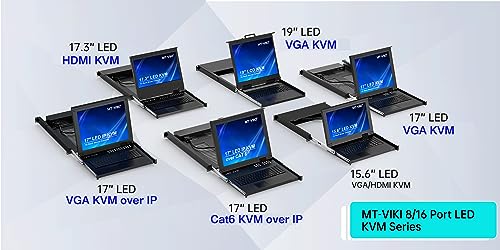
MT-VIKI 15.6'' Rack KVM Console w/Monitor/Keyboard/Touchpad,8 Port KVM VGA | 1080P@60Hz, Fits 18.9" to 31.5" Deep Racks (480-800mm), Included 8 Cables for Server Room, Data Center


As an Amazon Associate we earn from qualifying purchases. Product prices and availability are accurate as of the date/time indicated.
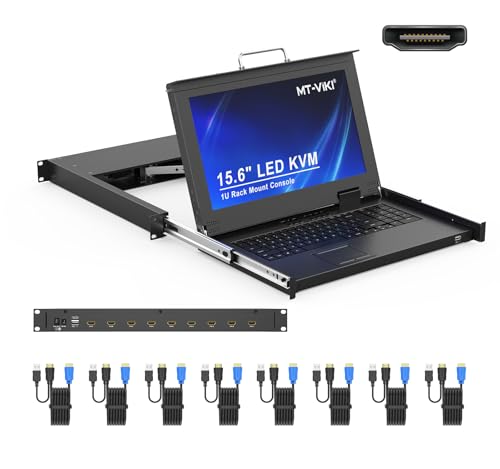
MT-VIKI Rack Mount KVM Console w/15.6" LCD Monitor, 8 Port HDMI KVM Switch, 1920x1080@60Hz 1U Integrated Monitor Keyboard, Fits 18.9" to 31.5" Deep Racks (480-800mm), Included 8 Cables


As an Amazon Associate we earn from qualifying purchases. Product prices and availability are accurate as of the date/time indicated.

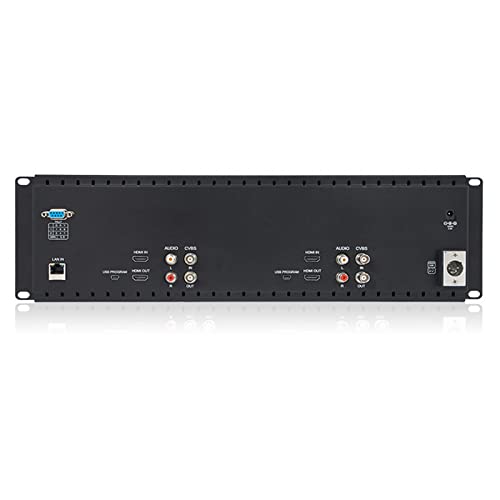
FEELWORLD D71 Plus -H Dual 7" 3RU IPS 1920x1200 Broadcast LCD Rack Mount Monitor with HDMI, AV Input and Output


As an Amazon Associate we earn from qualifying purchases. Product prices and availability are accurate as of the date/time indicated.
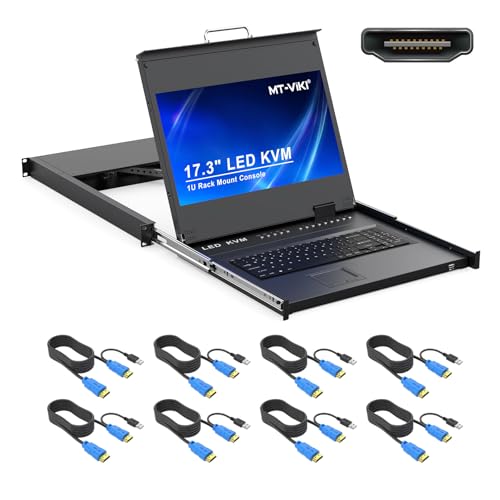
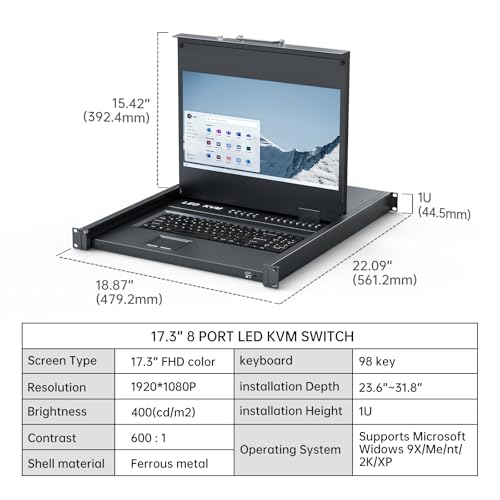
MT-VIKI® KVM Rack Mount HDMI with 17.3'' LCD Monitor, 1080P@60Hz Support OSD/Hotkey, Included 8 KVM Cables+Keyboard + Touchpad, Fit 1U 19'' Rack, Mount Depth 23.6-31.8"



As an Amazon Associate we earn from qualifying purchases. Product prices and availability are accurate as of the date/time indicated.
| Model | Key point from title | Price tier | Best for |
|---|---|---|---|
| MT-VIKI 15.6-inch VGA KVM console | 8-port VGA KVM, 1080P at 60Hz, 480 to 800 mm depth | Mid-range | Older VGA servers |
| MT-VIKI 15.6-inch HDMI KVM console | 8-port HDMI KVM, 1U, 8 cables included | Premium | Modern HDMI servers |
| MT-VIKI 17.3-inch HDMI KVM console | 17.3-inch LCD, OSD and hotkey, 1U, keyboard and touchpad | Premium | Larger screen in a 1U drawer |
| SEETEC P173-9HSD-RM | 17.3-inch 7RU 3G-SDI broadcast monitor, IPS, 400 nits | Mid-range | Video control rooms, not servers |
| FEELWORLD D71 Plus -H | Dual 7-inch 3RU broadcast LCD, 1920×1200, HDMI and AV | Mid-range | Dual-feed video monitoring |
| AISHICHEN 7.84-inch 2U | 1280×400 touch, speakers, DeskPi RackMate fit | Budget | Mini-rack status panel |
| ZHAOCAILIN 7.84-inch 2U | 1280×400 IPS touch, speaker, 10-inch racks | Budget | Mini-rack status panel |
| GeeekPi 6.91-inch 1U | 1424×280 touch, DeskPi RackMate fit | Budget | Slimmest mini-rack display |
The eight listings, by job
MT-VIKI 15.6-inch rack KVM console, 8-port HDMI
This is the sensible full-rack pick. The title lists a 15.6-inch 1920×1080 LCD at 60Hz, an integrated 1U monitor and keyboard, an 8-port HDMI KVM switch, eight included cables, and a fit for racks from 18.9 to 31.5 inches deep (480 to 800 mm). HDMI at 1080p60 needs only about 3 Gbit/s of video data (our estimate), so any HDMI link copes. One console can reach eight servers, which saves buying a screen for each. The price tier is high, so compare it against the VGA version if your servers are older. One practical benefit of a 1U drawer is that it slides shut when idle, which keeps the rack front tidy and protects the screen. The title does not say whether the hinge locks open, so check buyer comments on that before you rely on it for long sessions.
- Pros: keyboard, screen and switch in 1U; cables included
- Cons: premium price; HDMI-only servers required
Who it’s for: admins with HDMI-equipped servers in a full rack.
MT-VIKI 15.6-inch rack KVM console, 8-port VGA
The same rack-depth range (18.9 to 31.5 inches), but with 8-port VGA at 1080P and 60Hz, a monitor, keyboard and touchpad, and eight cables. VGA is analog, so image sharpness depends on cable quality and length, and many newer servers have dropped the VGA port. Older Dell, HP and Supermicro-class machines usually still have it. This is the lower-cost option in the KVM family, and the title does not mention OSD controls. Because the picture path is analog, check cable length early: a shorter lead often gives a cleaner image, so avoid coiling extra cable behind the drawer. Some servers also only output VGA at certain resolutions during boot, so expect to see lower-resolution text in BIOS screens.
- Pros: suits legacy servers; lower price than the HDMI sibling
- Cons: analog picture; fewer modern features in the title
Who it’s for: a rack of older servers that still have VGA.
MT-VIKI 17.3-inch KVM with HDMI
The title lists a 17.3-inch LCD at 1080P and 60Hz, OSD and hotkey support, eight KVM cables, keyboard and touchpad, a fit for a 1U 19-inch rack and a mount depth of 23.6 to 31.8 inches. The larger screen is easier to read at arm’s length, though 1080p stretched over 17.3 inches gives about 127 pixels per inch (our estimate). The depth range starts higher than the 15.6-inch models, so shallow racks may not take it. OSD and hotkey support are the features to value here: hotkeys let you jump between servers from the keyboard, and the on-screen display shows which port is active. Keyboard layout and touchpad feel are not described in the title, so buyer reviews are the place to check.
- Pros: larger screen; OSD and hotkey switching; cables included
- Cons: highest price; needs deeper racks
Who it’s for: admins who read dense logs and want the bigger panel.
SEETEC P173-9HSD-RM broadcast monitor
A 17.3-inch 1920×1080 IPS, 400 nits, 7RU rack monitor with 3G-SDI, HDMI and AV inputs, image freeze and focus assist. It is a production tool. At 7RU the faceplate takes about 12.25 inches of rack height (our calculation), which is a lot of space in a server rack, and the title shows no keyboard or server switching. Include it only if the rack holds video gear; for server administration, it is the weaker match in this set. Its image freeze and focus assist features are tools for camera operators, not for reading server logs. If you already own one for a studio rack, it can show a diagnostic feed from a camera, but it will not replace a console.
- Pros: bright IPS panel; SDI input for camera work
- Cons: 7RU is bulky; no KVM function in the title
Who it’s for: studio and control-room racks.
FEELWORLD D71 Plus -H dual 7-inch
Two 7-inch 1920×1200 IPS screens in a 3RU frame, with HDMI and AV input and output. That makes two feeds visible side by side in 5.25 inches of rack height (our calculation). Like the SEETEC, it is made for broadcast and AV work. A sysadmin could use it to watch two HDMI outputs, though there is no keyboard or switching, and the dual-7 layout leaves little room for text-heavy consoles. The 1920×1200 figure applies to the panels as listed, and the 16:10 shape is taller than typical video monitors, which helps with text. Still, two 7-inch windows mean each feed is small, so this fits status checks better than reading config files.
- Pros: two feeds in 3RU; HDMI in and out
- Cons: not a server console; small panels
Who it’s for: AV racks that monitor two sources.
AISHICHEN 7.84-inch 2U touchscreen
A 1280×400 touch display with built-in speakers for DeskPi RackMate T0, T1, T2 and 10-inch server racks. At 7.84 inches diagonal, the panel is about 7.5 by 2.3 inches (our estimate), so it fits a 2U faceplate in a 10-inch rack. This is a status display, not a KVM. Think of it for a Raspberry Pi dashboard, switch status or monitoring page, and check the listing for how it connects. The built-in speakers are a minor feature, useful for alert sounds rather than music. At 1280×400, a monitoring page designed for a normal screen may need a custom layout to look right, since the aspect ratio is about 3.2 to 1.
- Pros: low price; touch input; fits mini-racks
- Cons: very short panel; not for full-size racks
Who it’s for: home-lab owners with a DeskPi rack.
ZHAOCAILIN 7.84-inch 2U touchscreen
Another 7.84-inch, 1280×400 IPS touch display with a speaker, aimed at DeskPi RackMate models and Tecmojo 4U, 6U, 9U and 12U 10-inch cabinets. It is a near-duplicate of the AISHICHEN listing, and the title differences are the brand and the cabinet list. Compare current prices and returns policy rather than specs. Both work as secondary displays, not primary consoles. Look at what the seller includes in the box, such as brackets, screws and cables, because the titles do not list them. If you run a Tecmojo cabinet, the named sizes are the part to verify against your exact model before ordering.
- Pros: lowest price here; names several 10-inch cabinets
- Cons: near-duplicate; limited vertical space for text
Who it’s for: a budget mini-rack display.
GeeekPi 6.91-inch 1U touchscreen
The slimmest panel in the set: 1424×280 at 6.91 inches, 1U, for DeskPi RackMate and 10-inch racks. By our estimate it measures about 6.8 by 1.3 inches, which fits within 1U (1.75 inches). It shows a single line of status tiles or a clock-style dashboard well and little else. With 280 pixels of height, a browser page will feel cramped. The 1U height is the point: it leaves the other slots in a small cabinet free for a switch, a Pi cluster or a power strip. Think of it as a status strip showing a clock, temperature or link lights, not a window into a server.
- Pros: takes only 1U; touch support
- Cons: only 280 pixels tall; slightly higher cost than 7.84-inch siblings
Who it’s for: compact dashboards in a tiny rack.
How we picked these
We grouped the eight listings by what a rack owner is trying to do, then compared rack units, depth ranges and ports. The basis is published specifications, manufacturer documentation and buyer reviews. Nobody on the team used or measured these units. Claims in titles, such as compatibility and included cables, are seller statements, and we flag near-duplicate and off-purpose listings plainly. We did not rank by screen size, because a bigger panel is not better if it does not fit your rack depth or connect to your servers.
What matters when you shop for a rack display
Count rack units first
One unit is 1.75 inches tall, so 1U is 1.75, 2U is 3.5, 3RU is 5.25 and 7RU is 12.25 inches. A 10-inch mini rack uses the same unit height but a narrower frame, so a panel sold for one width does not automatically suit the other. Write down the free units in your rack before you shop, because a 7RU broadcast screen can take the space of several servers. For example, a 12U cabinet with a 7RU monitor has only 5U left for everything else, while a 1U KVM drawer leaves 11U. Rack-unit maths is the quickest way to tell whether a display is practical.
Depth: a worked example
Assume a rack with 28 inches of usable depth. Subtract about 3 inches for cable bend at the rear, leaving about 25 inches. The MT-VIKI 15.6-inch range of 18.9 to 31.5 inches fits, while the 17.3-inch range, starting at 23.6 inches, also fits but with little spare room. Measure from the front rail to the nearest rear obstruction, not to the cabinet wall. These numbers are an example with assumed values, not a measurement of your rack. Add the length of the console and any rails to the figure, since a drawer that slides forward still occupies space behind the rail.
Ports and switching
Match VGA or HDMI to your servers. An 8-port console only helps if you can connect the cables and keep them tidy. A 1080p60 signal needs about 3 Gbit/s, so no unusual cable is required, but long VGA runs can soften the picture. Hotkey switching saves time when you cycle through servers. USB keyboards and mice also need to be recognized by each server, so expect to check boot-time behavior on older machines. Power-cycle sequence matters little for video, but keep cabling labeled by port number.
Security and safety
A KVM console gives physical control of every connected server, so lock the rack or screen when you leave. Check the weight rating of your rails before you load a drawer, and keep power cables away from video leads. These are general guidelines; follow the maker’s instructions.
Mistakes buyers make
People often buy a display without checking depth, then find the drawer touches the rear door. Another is picking a broadcast monitor and expecting keyboard control. Mini-rack touchscreens get bought for 19-inch racks, where they do not fit without a kit. Buyers also forget that a KVM needs one cable set per server. Finally, many ignore port type and end up with a VGA console for HDMI-only machines. Measure the rack and list your servers before you order. Another slip is overlooking weight: a 1U drawer with a steel frame can be heavy, and cheap rails may sag. Last, buyers sometimes expect a mini-rack touchscreen to show a server’s console directly, when it is only a display that needs its own computer behind it.
Verdict
For a full-size rack, choose the MT-VIKI 15.6-inch HDMI console, or the VGA version for legacy gear, and the 17.3-inch if your rack is deep enough. For DeskPi and 10-inch racks, the AISHICHEN or ZHAOCAILIN 2U panels are budget status displays, and the GeeekPi suits 1U. If you are choosing racks first, read our guide to server rack enclosures for home labs. For a desk instead, see the best Lenovo monitor comparison. Avoid the broadcast units unless your rack holds video gear, and always measure depth first.
Frequently asked questions
What is the best monitor for a full-size 19-inch server rack?
For server administration, a 1U KVM console is the most practical choice because the screen, keyboard and touchpad fold into one drawer. The MT-VIKI 15.6-inch and 17.3-inch listings are the closest fits in this set. Check the stated depth range against your rack and the port type, VGA or HDMI, against your servers.
What does 1U mean for a rack monitor?
One rack unit is 1.75 inches (44.45 mm) of vertical space, and a standard rack is 19 inches wide. A 2U panel is 3.5 inches tall and a 3RU panel 5.25 inches. Counting units before you buy keeps you from losing slots you wanted for servers or switches.
Are broadcast rack monitors suitable for server rooms?
They can display a signal, but they are built for video production. The SEETEC and FEELWORLD listings add SDI or AV inputs and tools like focus assist, yet the titles show no keyboard or server switching. For managing machines, a KVM console is the better fit, so treat broadcast panels as a weaker match.
Can I use the 7.84-inch touchscreens with any rack?
No. The titles name DeskPi RackMate and 10-inch mini-rack cabinets. They are status displays, not full consoles, and they suit small home-lab racks. Do not assume they fit a 19-inch rack without a mounting kit, and check the listing for how they connect to your computer.
Does an 8-port KVM need special cables?
Usually yes. KVM consoles use one set of video and USB leads per server, and the MT-VIKI titles say eight cables are included. Count your servers, check VGA or HDMI per machine, and allow cable length for the rack depth so the leads do not tug on the ports.