Key takeaways
- Plug the extender into an outlet in the same room as the router and wait for the Power LED to go solid green.
- Press the WPS button on the extender — its WPS LED blinks.
- Within two minutes, press the WPS button on your router.
- When the Router Link LED lights, the 2.4 GHz band is linked and the extender broadcasts yourSSID_2GEXT.
- Repeat the button sequence to link the 5 GHz band (yourSSID_5GEXT).
- Unplug and move the extender roughly halfway toward the dead zone. Check the Router Link LED: green is good, amber is acceptable, red means it’s too far from the router to repeat anything useful.
What's inside
The Netgear AC750 WiFi range extender is worth buying in 2026 only for small coverage gaps and internet plans under roughly 150 Mbps — it pushes a usable signal through two to three drywall walls and delivers enough bandwidth for HD streaming and video calls, but its single-radio design halves whatever it receives and its lone 10/100 Ethernet port caps wired devices below 95 Mbps. If your plan is faster or your dead zone sits behind brick or concrete, skip to the AC1900 class or a budget mesh kit instead.
As an Amazon Associate we earn from qualifying purchases at no extra cost to you.


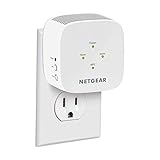

Which model the “AC750” label actually refers to
Netgear has sold several extenders in the AC750 class, but the one almost everyone means is the EX3700 — a wall-plug unit with two small external antennas, a WPS button, and one Fast Ethernet (10/100) port. It runs 802.11ac (WiFi 5) on two bands: up to 300 Mbps link rate on 2.4 GHz and up to 433 Mbps on 5 GHz. Those numbers are link rates, not throughput, and the difference matters a lot for an extender, as the throughput section below explains.
Setup: WPS button vs. browser-based
There are two ways to get the Netgear WiFi extender AC750 running. Both take under ten minutes; they differ in how much control you get.
WPS setup (fastest, least control)
- Plug the extender into an outlet in the same room as the router and wait for the Power LED to go solid green.
- Press the WPS button on the extender — its WPS LED blinks.
- Within two minutes, press the WPS button on your router.
- When the Router Link LED lights, the 2.4 GHz band is linked and the extender broadcasts yourSSID_2GEXT.
- Repeat the button sequence to link the 5 GHz band (yourSSID_5GEXT).
- Unplug and move the extender roughly halfway toward the dead zone. Check the Router Link LED: green is good, amber is acceptable, red means it’s too far from the router to repeat anything useful.
Browser setup via mywifiext.net
- Plug in the extender, then join the NETGEAR_EXT network from a laptop or phone.
- Open a browser and go to mywifiext.net (or 192.168.1.250).
- Create the extender’s admin login, then run the setup wizard: pick your 2.4 GHz and 5 GHz networks, enter their passwords, and optionally rename the extended SSIDs.
- Reconnect your devices to the new extended networks, then relocate the unit and check the LED as above.
Which method to use
Use the browser method if your router is an ISP gateway with WPS disabled, if WPS pairing times out (common on some cable-company routers), or if you want control afterward — the web interface is where you update firmware, set static channels, and enable FastLane mode. WPS is fine when it works, but it gives you no chance to rename networks or verify which band linked.
Real dual-band throughput, not box numbers
An extender is a single radio that must receive a packet and then re-transmit it on the same channel, so throughput through the extended network is roughly half of what the extender itself negotiates with the router — before walls, distance, and interference take their share. In typical home conditions, expect:
- 5 GHz extended band: about 60–120 Mbps real throughput in the same or adjacent room, tapering to 25–50 Mbps with a wall or two between client and extender.
- 2.4 GHz extended band: about 20–45 Mbps — slower but reaches farther.
- Wired via the Ethernet port: hard-capped near 94 Mbps because it’s 10/100, not gigabit.
FastLane mode is the one lever that changes this: it dedicates one band as the router-to-extender link and the other to clients, avoiding the same-channel re-transmission penalty. Use it when the router and extender have a clean 5 GHz path but clients are mostly 2.4 GHz, or vice versa. The practical takeaway: the AC750 comfortably feeds HD streaming (15–25 Mbps), video calls, and browsing on two or three devices. It is the wrong tool for several simultaneous 4K streams or a gigabit fiber plan.
How many walls does the signal realistically reach?
Coverage depends almost entirely on wall material, not square footage claims on the box. Assuming you place the extender where it still sees a strong router signal (the halfway point, LED green or amber), this is what it can push through:
| Obstruction between extender and dead zone | 2.4 GHz band | 5 GHz band |
|---|---|---|
| Drywall / plasterboard, wooden doors | 3–4 walls | 2–3 walls |
| Brick or cinderblock | 1–2 walls | ~1 wall, unreliable |
| Poured concrete, stone | ~1 wall | Usually blocked |
| Foil-backed insulation, mirrors, metal cabinets, refrigerator | Effectively blocked | Effectively blocked |
The most common setup error defeats all of this: placing the extender inside the dead zone. It can only rebroadcast what it hears, so it must sit where the router’s signal is still healthy — roughly halfway between router and dead zone, in the open rather than behind a TV or inside a cabinet.
AC750 vs. N300 vs. AC1900: the numbers side by side
The AC750 sits in the middle of Netgear’s aging-but-still-sold WiFi 5 extender lineup. The N300 (EX2700) is cheaper but single-band; the AC1900 units (EX6400, and the desktop Nighthawk EX7000) cost more and add gigabit Ethernet.
| Model | Class / bands | Max link rates | Ethernet | Form factor | Typical 2026 price |
|---|---|---|---|---|---|
| EX2700 (N300) | N300, 2.4 GHz only | 300 Mbps | 1× 10/100 | Wall plug, internal antennas | ~$20–30 |
| EX3700 (AC750) | AC750, dual band | 300 + 433 Mbps | 1× 10/100 | Wall plug, 2 external antennas | ~$25–40 |
| EX6120 (AC1200) | AC1200, dual band | 300 + 867 Mbps | 1× 10/100 | Wall plug | ~$35–55 |
| EX6400 (AC1900) | AC1900, dual band | 600 + 1300 Mbps | 1× Gigabit | Wall plug | ~$60–90 |
| EX7000 Nighthawk (AC1900) | AC1900, dual band | 600 + 1300 Mbps | 5× Gigabit | Desktop unit, 3 antennas | ~$80–110 |
Which one fits your situation
- Tightest budget, one weak room, plan under 50 Mbps: the Netgear N300 WiFi range extender (EX2700) is enough. Single-band 2.4 GHz is slow but adequate for a smart speaker, thermostat, and a browsing laptop.
- Typical apartment or small house, plan under ~150 Mbps, streaming plus phones: the AC750 is the value sweet spot — dual-band keeps video traffic off congested 2.4 GHz for only a small price step over N300.
- 4K streaming or four-plus devices on the extended network: step up to AC1200 (EX6120) for the faster 5 GHz link.
- Gigabit plan, or you need to wire a console or smart TV: a Netgear AC1900 WiFi range extender — the EX6400 for one wired device, the EX7000 if you want a five-port switch built in.
- Whole-home dead zones or a WiFi 6/7 router already installed: skip WiFi 5 extenders entirely; an entry-level WiFi 6 mesh kit will outperform any of these and adds seamless roaming.
Ownership realities
Nothing mechanical wears out on a wall-plug extender, but a few things catch owners off guard. There is no seamless roaming (no 802.11k/v/r), so phones tend to cling to a faint router signal instead of switching — giving the extended network its own SSID name makes manual switching predictable. The unit runs warm to the touch, which is normal. Firmware updates through mywifiext.net still arrive occasionally and are worth applying for security fixes. And while two extenders can technically be daisy-chained, each hop halves throughput again — a second separately placed unit or a mesh kit is the better fix.
FAQ
Will the AC750 work with a non-Netgear router? Yes. It follows the same Wi-Fi standards as any router; WPS or browser setup works with ISP gateways too, though browser setup is more reliable on rented equipment.
Can I plug a smart TV into its Ethernet port? Yes — it works as a wireless bridge for one wired device. Just remember the port is 10/100, so throughput tops out around 94 Mbps even on the 5 GHz link.
Is the AC750 still sensible in 2026? For a single dead room on a modest internet plan, yes — it’s cheap and dependable. For faster plans or whole-home coverage, budget Wi-Fi 6 mesh systems have become inexpensive enough that they’re the better long-term buy.