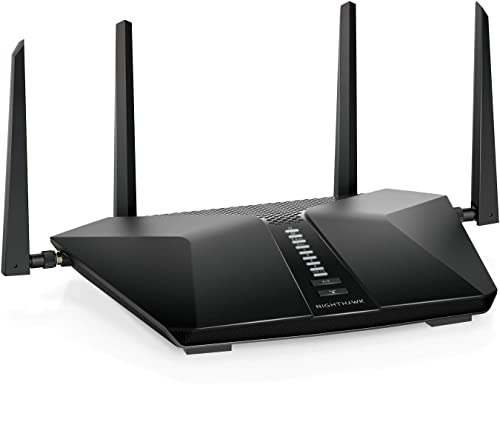
The Netgear Nighthawk AX5400 (sold mainly as the RAX50, and in a security-bundle version as the RAX54S) is a solid dual-band Wi-Fi 6 router for apartments and homes up to roughly 2,000 to 2,500 square feet on internet plans up to about 1 Gbps, but in 2026 it is an older Wi-Fi 6 design with gigabit-only ports, so it only makes sense at a clear discount. If you have multi-gig internet, a large home or many Wi-Fi 7 devices, a current Wi-Fi 7 router or mesh system is the better buy.
Netgear has sold more than one AX5400-class Nighthawk over the years, so check the model number on the box or the label under the router. The specs and advice below describe the common RAX50-style hardware.
Our top picks



As an Amazon Associate we earn from qualifying purchases at no extra cost to you.
Key specs
| Spec | Nighthawk AX5400 (RAX50 class) |
|---|---|
| Wi-Fi standard | Wi-Fi 6 (802.11ax), dual band |
| Max link rate | About 574 Mbps (2.4 GHz) + 4,804 Mbps (5 GHz) |
| Streams | 6 total: 2 on 2.4 GHz, 4 on 5 GHz |
| Channel width | Up to 160 MHz on 5 GHz |
| Processor | 1.5 GHz triple-core |
| Wired ports | 4 x gigabit LAN, 1 x gigabit WAN |
| USB | 1 x USB 3.0 |
| Security | WPA2, WPA3; Netgear Armor subscription offered (bundled trial or term on RAX54S) |
| Management | Nighthawk app and web interface |
What the AX5400 rating actually means
AX5400 is the sum of the two bands’ maximum link rates. No single device reaches 5,400 Mbps. A typical 2×2 Wi-Fi 6 laptop or phone connects at up to 2,402 Mbps on 5 GHz with a 160 MHz channel, or 1,201 Mbps at 80 MHz. Real-world throughput is usually 50 to 70 percent of the link rate at close range.
| Distance / obstacles | Typical link rate (2×2 Wi-Fi 6 client) | Realistic throughput |
|---|---|---|
| Same room, 10–15 ft | 1,200–2,400 Mbps | About 700–940 Mbps (capped by gigabit WAN on internet tests) |
| 1–2 walls, 25–35 ft | 600–1,200 Mbps | About 350–650 Mbps |
| Far end of home, 50+ ft, 3+ walls | 150–400 Mbps | About 80–250 Mbps |
These are typical ranges for this class of router; walls, floors and interference shift them. The gigabit WAN port is the hard ceiling: even if Wi-Fi could go faster, internet traffic tops out around 940 Mbps after overhead.
Strengths
- Four 5 GHz streams: More robust 5 GHz coverage than 2×2 AX3000 routers, especially with several devices active at once.
- 160 MHz support: Lets Wi-Fi 6 laptops and phones reach high speeds at close range.
- OFDMA and MU-MIMO: Handles 30 to 50 connected devices better than Wi-Fi 5 routers.
- Familiar setup: The Nighthawk app walks through setup in minutes, while the web interface still gives access to port forwarding, DHCP reservations and other advanced options.
- USB 3.0: Basic network storage and media sharing.
Weaknesses
- Gigabit ports only: No 2.5 GbE WAN or LAN. On multi-gig fiber or cable plans, the router becomes the bottleneck.
- No 6 GHz band: Lacks Wi-Fi 6E or Wi-Fi 7, so newer phones and laptops cannot use the cleaner 6 GHz spectrum.
- Subscription upsell: Some security and parental features sit behind Netgear Armor and Smart Parental Controls subscriptions after any included term ends.
- Dual band only: In crowded apartment buildings, all your 5 GHz devices share one band with neighbors’ networks.
- Coverage limit: A single unit struggles in homes over about 2,500 square feet or with several floors.
Nighthawk AX5400 vs alternatives in 2026
| Option | Bands | Fastest port | Best for | Typical price |
|---|---|---|---|---|
| Nighthawk AX5400 (RAX50 class) | 2.4 + 5 GHz | 1 Gbps | Plans up to 1 Gbps, homes up to ~2,500 sq ft | About $130–$220 |
| Typical AX3000 Wi-Fi 6 router | 2.4 + 5 GHz (2×2) | 1 Gbps | Apartments, plans under 500 Mbps | About $80–$150 |
| Wi-Fi 6E tri-band router | 2.4 + 5 + 6 GHz | Often 2.5 Gbps | Dense apartments, 6E devices | About $200–$400 |
| Wi-Fi 7 tri-band router (e.g. Nighthawk RS300) | 2.4 + 5 + 6 GHz | 2.5 Gbps or more | Gigabit-plus plans, new devices | About $230–$400 |
| Wi-Fi 7 mesh (2–3 units) | Tri or quad band | 2.5–10 Gbps | Large or multi-story homes | About $400–$1,500 |
Who should buy it
| Your situation | Recommendation |
|---|---|
| Internet plan up to 500 Mbps, apartment or small house | Good choice if discounted below newer AX3000 or entry Wi-Fi 7 routers |
| 1 Gbps plan, 1,500–2,500 sq ft single level | Works well; you will see most of the gigabit on wired and close Wi-Fi devices |
| 2 Gbps or faster plan | Skip; gigabit WAN wastes over half your plan |
| Recent phones and laptops with Wi-Fi 7 | Skip; a Wi-Fi 7 router unlocks 6 GHz and Multi-Link Operation |
| Large or multi-story home | Skip the single router; choose mesh, or pair it with a wired access point |
| Already own it and it works | Keep it while Netgear still issues firmware for your model |
Setup and tuning tips
- Update firmware immediately after setup through the app or web interface, and turn on automatic updates if offered.
- Place the router centrally and elevated, at least 3 to 5 ft off the floor, away from metal cabinets and aquariums.
- Keep Smart Connect on for simplicity; turn it off and use separate band names only if a smart home device refuses to join the 2.4 GHz band.
- Enable 160 MHz on 5 GHz if your devices support it and you are not in a crowded apartment building with heavy interference.
- Use WPA2/WPA3 mixed mode if older devices cannot connect under WPA3 only.
- Change the admin password and disable remote management unless you need it.
Ownership realities
Routers in this class run warm; give it a few inches of space on all sides. Fan-less designs rely on airflow through vents, so do not lay objects on top. Expect firmware support to be the deciding factor for how long it remains safe to use; check Netgear’s support page for your exact model number periodically. If Netgear stops issuing updates, move it to access point duty behind a supported router or replace it.
Verdict
The Nighthawk AX5400 remains a capable Wi-Fi 6 router for gigabit-or-slower internet in small to midsize homes, with stronger 5 GHz performance than basic AX3000 models. It is not the newest technology: Wi-Fi 7 routers such as Netgear’s RS series add 6 GHz, multi-gig ports and better future-proofing. Buy the AX5400 only at a meaningful discount and only if its gigabit ceiling matches your plan.
More from Amazon
Programs that pair well with the guide above. Offers and eligibility are set by Amazon and may change.
Free shipping on eligible items, Prime Video and more. Eligible new members can start with a free trial.
Start a Prime free trialAd-free music streaming. Eligible new subscribers can start with a free trial.
Try Music Unlimited freeA Prime membership for ages 18-24 with a trial period. Eligibility is set by Amazon.
See Prime for Young AdultsAudiobooks and podcasts to listen to on the go. Eligible new members can start with a free trial.
Try Audible freeAs an Amazon Associate we earn from qualifying purchases.