Key takeaways
- An in-depth look at the Starlink Dish V4 and Router Gen 3, covering setup, speeds, Wi-Fi coverage and real-world reliability for rural homes.
Rural homes beyond the reach of cable and fiber often live with slow connections, strict data caps, and video calls that freeze at the worst moment. The Starlink Dish V4 and Router Gen 3 kit aims to change that equation by pairing a flat-panel satellite dish with a modern tri-band Wi-Fi 6 router, all in one box that a homeowner can set up without a professional installer. This in-depth look walks through what the kit includes, how it behaves day to day, and where its smaller sibling, the Starlink Mini, fits in.
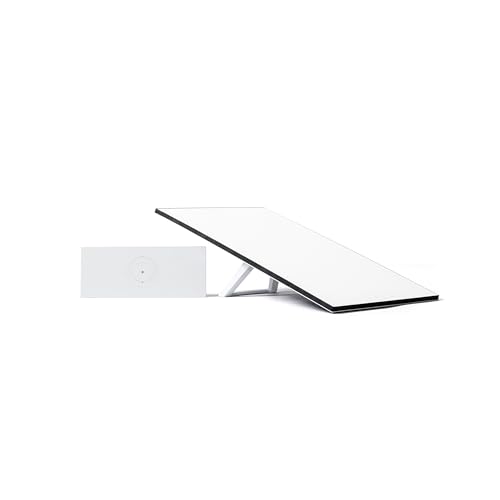

Satellite internet has a reputation for lag and flaky weather performance, and the low-Earth-orbit design behind this kit is meant to answer both complaints. Below you will find a buying guide for choosing between the two kits, a close look at each one, and practical guidance for the situations rural households actually face, from thick-walled farmhouses to cabins that run on limited power.
Quick Picks
As an Amazon Associate we earn from qualifying purchases
| Product | Best for | Key spec |
|---|---|---|
| Starlink Standard Kit V4 with Gen 3 Router | Rural homes needing whole-home Wi-Fi | Tri-band Wi-Fi 6, 220 Mbps download |
| Starlink Mini Kit | Travel, RVs, and portable use | Dual-band Wi-Fi 5, 100 Mbps download, 1100 g |
How to Choose
Dish Size and Placement
Dish size decides how much roof, wall, or yard space the install needs, and how easy the hardware is to move later. The full-size V4 dish is a wide flat panel that wants a broad, unobstructed view of the sky, so a roof mount or a tall pole in an open yard usually gives the steadiest link. Trees, chimneys, and neighboring buildings can block part of the sky and cause brief dropouts, so check the sky view with the companion app before drilling any holes. The Mini dish is far smaller and lighter, which makes it simple to prop on a table or a campsite clearing, though its compact antenna gathers a weaker signal than the full-size panel.
Router Coverage and Wired Ports
The router is the part of the kit your household touches every day, so its wireless coverage and wired ports deserve as much attention as the dish itself. The Gen 3 router in the Standard Kit is a tri-band Wi-Fi 6 unit with two Ethernet ports, which suits a house with wired gear such as a desktop computer, a game console, or a network storage box. Its listed coverage suits a modest home, but thick stone walls, metal roofing, and long hallways can shrink the usable area, and a mesh node may be needed for far bedrooms. The Mini kit builds its router into the dish, which leaves only one Ethernet port and a shorter wireless reach.
Power, Cables, and Mounting
Every satellite kit needs power at the dish and a cable run back to the router, so the layout of the home shapes the install more than any spec sheet does. The Standard Kit ships with a separate power supply, a long Starlink cable, and an AC cable, which gives flexibility about where the router lives indoors, though the cable run still needs a tidy path through a wall or window frame. The Mini runs on 12-volt DC power, which makes it a natural fit for vehicles, boats, and off-grid cabins with battery banks. The Standard Kit includes a kickstand for flat surfaces, while a permanent roof or pole mount is a separate purchase.
Portability and Service Plans
A kit that never moves and a kit that travels every weekend are different purchases, even when they share a brand name. The Standard Kit is built for a fixed address, with a large dish, a separate router, and a mains power supply that assume a house with reliable electricity. The Mini is built to move, with its router inside the dish, a backpack-friendly shape, and a DC input that pairs well with a vehicle or a portable power station. Service plans matter just as much as hardware, since residential plans and roaming plans carry different terms, and a plan tied to one address may not follow the dish to a campsite.
The 2 Best Options
Starlink Standard Kit V4 with Gen 3 Router
This is the kit the title names, and it is the right default for a rural home that wants a permanent satellite connection. The V4 dish pairs with the Gen 3 router to deliver tri-band Wi-Fi 6 throughout a house, with two Ethernet ports for wired gear and app-based control for aiming the dish and managing the network. The listed download rate of 220 Mbps handles 4K streaming, large downloads, and several people online at once, while the 20 Mbps upstream rate keeps video calls and cloud backups moving. Everything needed to get online arrives in the box, from the kickstand to the power supply.
Specs
- Brand: Starlink
- Model name: Standard Kit
- Model number: 02534001-AM
- Wireless: Tri-band Wi-Fi 6, 802.11ac, 802.11ax, 802.11n
- Data transfer rate: 220 Megabits Per Second
- Maximum upstream data transfer rate: 20 Megabits Per Second
- LAN port bandwidth: 1000 Mbps
- Number of Ethernet ports: 2
- Number of antennas: 3
- Security protocol: WPA2-Enterprise, WPA2-PSK
- Control method: App
- Special features: Internet Security, Remote Access, Weatherproof
- Included components: AC Power Cable (4.92 ft), Gen 3 Router, Kickstand, Power Supply (4.02 ft), Standard Kit, Starlink Cable (49.2 ft)
- Item weight: 15 Pounds
- UPC: 850049670180
Best for: Rural homes that want a permanent, whole-house satellite connection with wired ports for a desktop, console, or storage box.
Watch out for: The dish needs a wide, clear view of the sky, and heavy tree cover or a blocked horizon can cause brief dropouts.
ASIN: B0D5SGXQCD
Starlink Mini Kit
The Mini is a distinct sibling model, not a smaller bundle of the same kit, and it earns its place for anyone whose internet needs to travel. Its dish and router live in one compact unit that weighs about 1100 grams, with dual-band Wi-Fi 5, a single Ethernet port, and a 12-volt DC input that suits vehicles, boats, and cabins running on batteries. The listed download rate of 100 Mbps is lower than the full-size kit, yet it still covers streaming, browsing, and video calls for one or two people on the move. For an RV owner, it trades throughput for genuine portability.
Specs
- Brand: Starlink
- Model name: Starlink Mini Kit
- Model number: starlink Mini Kit
- Wireless: Dual-band, 802.11ac, Wi-Fi 5
- Data transfer rate: 100 Megabits Per Second
- Maximum upstream data transfer rate: 100 Megabits Per Second
- LAN port bandwidth: 1000 Mbps
- Number of Ethernet ports: 1
- Number of antennas: 1
- RAM memory installed: 512 MB
- Security protocol: WPA 2
- Control method: App
- Connectivity: Wi-Fi, Ethernet
- Voltage: 12 Volts (DC)
- Item weight: 1100 Grams
- Mfr part number: 2535012-501
- UPC: 850049670302
Best for: Travelers, RV owners, and off-grid users who need a compact, battery-friendly satellite kit that fits in a backpack.
Watch out for: The built-in router covers a smaller area than the separate Gen 3 router, and the lower throughput shows when several people stream at once.
ASIN: B0DH3PLZ6N
Which One Fits Your Situation
A Fixed Rural Home With Several People Online
Choose the Standard Kit V4 with the Gen 3 router. Its tri-band Wi-Fi 6 radio and two Ethernet ports handle a household where one person streams a film, another joins a video call, and a third plays an online game at the same time. Mount the dish where the sky view is widest, place the router near the center of the home, and add a mesh node only if far rooms still show a weak signal.
A Household That Works From Home All Day
Choose the Standard Kit V4 as well, and wire the work computer to one of its Ethernet ports. A wired link removes wireless interference from the video-call chain, while the 20 Mbps upstream rate keeps screen sharing and cloud uploads steady. Keep the dish clear of new growth each season, since a branch that creeps into the sky view can turn a stable link into an uneven one.
An RV, Boat, or Frequent Traveler
Choose the Mini Kit. Its single-box design, light weight, and 12-volt DC input fit life on the move, and setup at a new stop takes minutes rather than an afternoon of mounting and cabling. Check that the service plan allows roaming before the first trip, and pack the kickstand and power cable where they stay dry and easy to reach.
A Cabin or Off-Grid Setup on Limited Power
Choose the Mini Kit for its modest draw and DC input, which pair well with a battery bank or a small solar array. Place the dish where it catches open sky without a long cable run, and keep expectations realistic: one or two people can stream and browse comfortably, but a full household of heavy users will feel the lower throughput ceiling.
Common Mistakes
- Mounting the dish under trees or beside a tall chimney, then blaming the hardware for dropouts that a clear sky view would have avoided.
- Placing the Gen 3 router in a far corner or a basement, where walls and floors eat the signal before it reaches the bedrooms.
- Forgetting to count wired devices before buying, and discovering too late that the Mini has only one Ethernet port.
- Buying a fixed-address plan for a kit that will travel, then finding the service does not follow the dish to a campsite or a second property.
- Skipping the app-based sky check before drilling holes, which turns a simple install into a second trip up the ladder.
Frequently Asked Questions
Does the Dish V4 need a clear view of the sky?
Yes. The dish talks to satellites passing overhead, so trees, buildings, and steep hills in its field of view can interrupt the link. Use the companion app to scan the sky from the planned mounting spot before installing anything, and favor a roof, pole, or open yard over a sheltered wall bracket.
Can the Gen 3 router cover a large house on its own?
It covers a modest home well when placed near the center, but thick walls, metal roofing, and multiple floors can shrink its reach. If far rooms show a weak signal, add a mesh node or a wired access point rather than moving the router to a corner where it serves one room and starves the rest.
Is the Mini Kit a good fit as a household main connection?
It can serve a small household, especially a one- or two-person home with light streaming and browsing. Its lower throughput and single Ethernet port show their limits when several people stream, game, and back up files at once, so a busy family home is better served by the full-size Standard Kit.
What should I check before mounting the dish permanently?
Confirm the sky view with the app, measure the cable path from dish to router, and make sure a power outlet sits within reach of the power supply. Check the mount type for the surface involved, leave slack in the cable for wind movement, and plan a route that keeps the cable out of foot traffic and lawn equipment.
More from Amazon
Programs that pair well with the guide above. Offers and eligibility are set by Amazon and may change.
Free shipping on eligible items, Prime Video and more. Eligible new members can start with a free trial.
Start a Prime free trialAd-free music streaming. Eligible new subscribers can start with a free trial.
Try Music Unlimited freeA Prime membership for ages 18-24 with a trial period. Eligibility is set by Amazon.
See Prime for Young AdultsAudiobooks and podcasts to listen to on the go. Eligible new members can start with a free trial.
Try Audible freeAs an Amazon Associate we earn from qualifying purchases.