
Key takeaways
- "Best overall" is a tricky phrase for gaming mice, because the best mouse for a shooter player with a claw grip is rarely the best for someone who.
“Best overall” is a tricky phrase for gaming mice, because the best mouse for a shooter player with a claw grip is rarely the best for someone who spends evenings in strategy games or long spreadsheet sessions. The honest way to answer is to look for the model that handles the widest range of jobs without a glaring weakness: a sensor sized to your screen, a connection type that fits your desk, and a shape you can hold for hours. This list reads that balance from the spec lines in each title.
The lineup covers wired and wireless options, from a basic budget optical mouse to Razer’s ergonomic designs and Logitech’s LIGHTSPEED wireless model. It is aimed at PC players who want one dependable mouse for gaming and daily work, and who would rather compare buttons, DPI, and battery figures than chase marketing language. Where 2026 shoppers see the same Logitech model in three colors, those listings were merged into one entry so the comparison stays clean.
Quick Picks
Our top picks

 Logitech G305 LIGHTSPEED Wireless Gaming Mouse
- Ultra-fast LIGHTSPEED wireless technology in this wireless mouse…
- G305 wireless computer mouse boasts an incredible 250…
- The durable, compact design with built-in nano receiver…


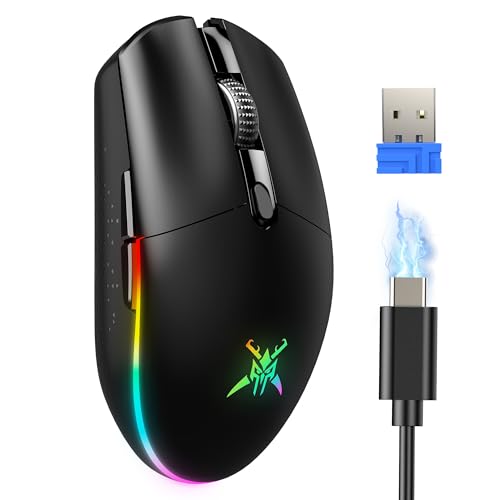


As an Amazon Associate we earn from qualifying purchases at no extra cost to you.
| Product | Best for | Key spec from the title |
|---|---|---|
| BENGOO Wired Gaming Mouse | Starter setups | Wired, RGB, DPI up to 3600, 6 programmable buttons |
| Logitech G305 LIGHTSPEED | All-round wireless play | Hero 12K sensor, 12,000 DPI, 250h battery life |
| Razer Basilisk V3 | Feature-heavy wired play | 26K DPI optical sensor, Chroma RGB, ergonomic |
| Razer DeathAdder Essential | Simple ergonomic wired | 6400 DPI optical sensor, 5 programmable buttons |
| TECKNET Dual-Mode | Wireless or wired flexibility | 8000 DPI, 100 hours battery, 2.4G plus USB-C |
| Aula SC620 | Tri-mode connectivity | 2.4GHz, USB-C, Bluetooth 5.3, 12000 DPI |
| Razer Basilisk V3 X HyperSpeed | Wireless ergonomic play | 18K optical sensor, Gen-2 mechanical switches |
| Redragon M810 PRO | Macro-heavy games | 10000 DPI, remappable keys, rapid-fire macros |
How to Choose
Sensor DPI and what you really need
The DPI numbers in titles run from 3600 up to 26K, and the gap looks bigger than it feels. Most players run between 400 and 1600 DPI in games, and a 1440p or 4K monitor benefits from the headroom only when you want fast cursor travel across a large desktop. A sensor rated near 6400 to 12,000 DPI is already more than enough for competitive play. Treat 18K and 26K as bragging rights unless you work across multiple big displays. What matters more is whether the mouse tracks smoothly at your chosen setting.
Wired, wireless, or tri-mode
Wired mice like the BENGOO, DeathAdder Essential, and Basilisk V3 skip batteries and charging entirely. Wireless models trade that for cable-free desks, with the G305 listing 250 hours of battery life and the TECKNET listing 100 hours. Tri-mode designs such as the Aula SC620 add Bluetooth 5.3 so you can pair with a laptop or tablet when you are away from a USB dongle. If you play competitively and travel little, wired or a good 2.4 GHz wireless link is plenty. Bluetooth is a convenience feature, not the mode you want for fast games.
Buttons, switches, and shape
Count the programmable buttons: five is the floor for a gaming mouse, six covers most shooters, and more suits MMO or strategy players who bind spells and macros to thumb keys. Mechanical switches, mentioned on the Razer Basilisk V3 X, are built for repeated clicking. Shape matters even more than specs. Ergonomic right-handed shells with rubber grips support a palm grip, while lighter, smaller bodies suit claw and fingertip grips. If you have large hands, lean toward the Razer ergonomic models; if you have small hands, the G305 is a safer fit.
Where budget mice cut corners
Cheaper wired mice often keep the sensor numbers high while trimming the build: thinner cable insulation, softer switches, and basic software. Wireless budget options may add input delay if the 2.4 GHz link is poorly implemented, and rapid-fire or macro keys can be a gimmick that adds weight. Look for named sensors, stated battery hours, and a brand with driver support. Ignore RGB claims; lighting has no effect on performance, and it can shave battery life on wireless models.
A practical way to apply all of this is to write down your grip and your desk before you shop. Measure your hand from the wrist crease to the tip of the middle finger: under about seven inches usually points to smaller or lighter shells, while eight inches and up leans toward the bigger ergonomic bodies. Then note how much desk space you have for swiping at low sensitivity. A player who uses a wide mouse pad and low DPI needs consistent tracking over long strokes, while someone with a compact pad cares more about weight and glide. With those two answers in hand, the eight listings sort themselves quickly into a short list of two or three.
Finally, think about how long you want the purchase to last. A budget mouse at the starter tier is fine for a first setup or a spare, a mid-range wireless model fits most players for years, and a premium sensor tier only matters if you already know your tracking needs outgrow the basics. Overall winners are rarely the ones with the most impressive numbers; they are the ones whose shape, connection, and battery habits match how you really play.
The 8 Best Options
BENGOO Wired Gaming Mouse
The BENGOO is the entry-level wired option, with RGB backlighting, an ergonomic shape, DPI adjustable in four steps up to 3600, and six programmable buttons. It suits someone building a first gaming setup or needing a backup mouse. The DPI ceiling is the lowest in the group, but it still covers typical 1080p play comfortably.
- Strength: six programmable buttons are generous for the budget tier.
- Strength: wired design means no charging and no pairing.
- Trade-off: 3600 DPI is modest next to every other mouse here.
Who should skip it: players on high-resolution multi-monitor desks and anyone who wants wireless freedom.
Logitech G305 LIGHTSPEED
The G305 is a wireless gaming mouse with the Hero 12K sensor, 12,000 DPI, six programmable buttons, and a stated 250 hours of battery life. The title calls it lightweight and mentions on-board memory. It is the most balanced choice here for players who want a clean desk and long stretches between battery swaps.
- Strength: 250-hour battery figure is the longest stated in the group.
- Strength: Hero 12K sensor and 12,000 DPI cover nearly every game genre.
- Trade-off: it has six buttons, so heavy MMO binding may feel tight.
Who should skip it: large-handed palm grippers who prefer a bulky ergonomic shell.
Razer Basilisk V3
This wired ergonomic mouse lists a 26K DPI optical sensor, Chroma RGB lighting, and a switch the title calls the fastest gaming mouse switch. It carries a long button list for macros and an ergonomic body meant for longer sessions. It targets players who want a feature-rich wired mouse that handles work and play.
- Strength: 26K sensor gives the most DPI headroom in the lineup.
- Strength: ergonomic shell with a high button count suits long sessions.
- Trade-off: wired only, so cable drag is part of the deal.
Who should skip it: anyone who wants a light, small mouse or a cable-free desk.
Razer DeathAdder Essential
The DeathAdder Essential keeps the classic ergonomic shape with a 6400 DPI optical sensor, five programmable buttons, and rubber side grips. It is the basic, reliable pick for buyers who want a respected shape without paying for extras.
- Strength: rubber side grips help control during quick movements.
- Strength: 6400 DPI is plenty for typical gaming.
- Trade-off: only five buttons limits macro-heavy genres.
Who should skip it: players who want wireless, many buttons, or tri-mode connectivity.
TECKNET Dual-Mode Wireless Gaming Mouse
The TECKNET works wirelessly over 2.4G or wired through USB-C, with 8000 DPI, six programmable buttons, RGB backlighting, and a 100-hour battery stated in the title. It is rechargeable, which suits the person who charges the mouse overnight and does not want to buy batteries.
- Strength: dual-mode lets you plug in when the battery runs low.
- Strength: rechargeable design avoids replacement cells.
- Trade-off: the battery figure is shorter than the Logitech listing.
Who should skip it: people who never want to think about charging.
Aula SC620
The Aula SC620 is a tri-mode wireless mouse using 2.4GHz, USB-C, or Bluetooth 5.3, with a 12000 DPI sensor, programmable macros, and a rapid-fire key. The connectivity range makes it the most flexible for someone who switches between a gaming PC and a laptop.
- Strength: three connection modes cover desktop, laptop, and tablet.
- Strength: 12000 DPI matches the Logitech headline number.
- Trade-off: rapid-fire keys add little for most players.
Who should skip it: players who want a well-known driver suite and long-term brand support.
Razer Basilisk V3 X HyperSpeed
This wireless Razer pairs Gen-2 mechanical switches with an 18K optical sensor and Chroma RGB. The title promises customizable buttons and the ergonomic Basilisk shape. It is the wireless route for fans of that design who want to drop the cable.
- Strength: an 18K sensor and mechanical switches are strong for wireless.
- Strength: it keeps the ergonomic shell of the wired Basilisk line.
- Trade-off: the visible title gives no battery hours.
Who should skip it: shoppers who want a stated battery figure up front.
Redragon M810 PRO
The Redragon M810 PRO is a wireless RGB mouse with 10000 DPI, remappable keys, rapid-fire macro keybinds, and an ergonomic grip. It is built for players who bind many actions, such as in MMOs or builders, and want cable-free play.
- Strength: remappable keys and macros suit complex games.
- Strength: 10000 DPI is more than enough for most screens.
- Trade-off: the title offers no battery number.
Who should skip it: minimalists who prefer a light, button-sparse mouse.
Which One Fits Your Situation
You want one wireless mouse for everything
Choose the Logitech G305 LIGHTSPEED. The long battery figure and the balanced sensor suit gaming, work, and travel.
You like big ergonomic mice and have large hands
The Razer Basilisk V3 gives you the shell, the DPI headroom, and the wired reliability that heavy sessions reward.
You switch between a PC and a laptop
The Aula SC620 with 2.4GHz, USB-C, and Bluetooth is the one that moves between devices without a dongle swap.
You are on a tight spending tier
The BENGOO or the DeathAdder Essential keeps costs low; the Razer is the better shape, and the BENGOO adds an extra button.
Common Mistakes
- Chasing the highest DPI instead of choosing a shape that fits the hand.
- Choosing Bluetooth mode for fast games where a 2.4 GHz link is better.
- Ignoring battery life or the charging method on wireless models.
- Buying more programmable buttons than the games in your library can use.
- Treating RGB lighting as a performance feature.
Related guides
- Helping Hands Soldering Station With Magnifier
- Bench Power Supply For Electronics Hobbyists
- Is 8000Hz Polling Rate Worth It For 144Hz Monitor
Frequently Asked Questions
What DPI should I look for?
Between 1600 and 12,000 DPI covers nearly all play. Most gamers set the mouse to a low DPI anyway, so a higher ceiling is optional.
Is wireless good enough for competitive games?
Modern 2.4 GHz wireless links like LIGHTSPEED are built for gaming, though listing details differ. Wired still removes any battery concern.
How many buttons do I need?
Five or six handle most genres. MMO and strategy players may want more thumb buttons or macro keys.
Why were some Logitech listings left out?
The G305 appeared in black, white, and lilac. They share the same specs, so one entry represents all three.


