Key takeaways
- Shopping for a new router in 2026 means choosing a generation, and the generation drives everything else.
Shopping for a new router in 2026 means choosing a generation, and the generation drives everything else. Wi-Fi 7 routers are now sold at mid-range prices, Wi-Fi 6E adds the uncrowded 6 GHz band, and plain Wi-Fi 6 or older AC models still fill the budget tier. The decision hinges on three things: the speed of your internet plan, the number of devices on the network, and how many square feet the signal must cover.
This guide is for households replacing an old router that drops video calls, or building a first network after a move. The nine routers below range from an entry AC1200 with Fast Ethernet ports to Wi-Fi 7 models with 2.5 gigabit connections, including one modem and router combination for cable customers. Each is described only by what its listing states: standard, ports, coverage, device count, and mesh support.
Quick Picks
Our top picks
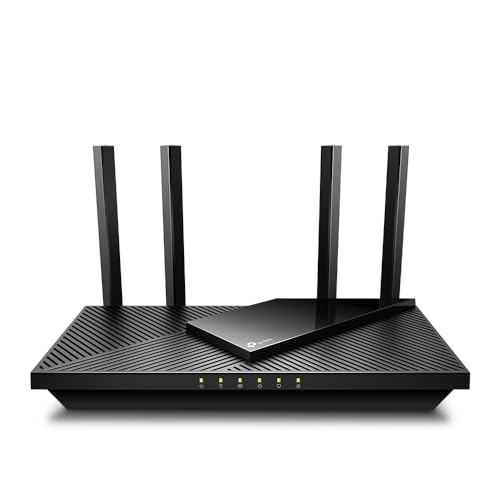 TP-Link AX1800 WiFi 6 Router
- Wi-Fi 6(802.11ax) technology achieves faster speeds, greater capacity…
- Enjoy smoother and more stable streaming, gaming, downloading…
- Wi-Fi 6 technology communicates more data to more…
 TP-Link BE6500 Dual-Band WiFi 7 Router
- 𝐅𝐮𝐭𝐮𝐫𝐞-𝐑𝐞𝐚𝐝𝐲 𝐖𝐢-𝐅𝐢 𝟕 - Designed with the latest…
- 𝟔-𝐒𝐭𝐫𝐞𝐚𝐦, 𝐃𝐮𝐚𝐥-𝐁𝐚𝐧𝐝 𝐖𝐢-𝐅𝐢 𝐰𝐢𝐭𝐡 𝟔.𝟓 𝐆𝐛𝐩𝐬 𝐓𝐨𝐭𝐚𝐥 𝐁𝐚𝐧𝐝𝐰𝐢𝐝𝐭𝐡…
- 𝐖𝐢𝐝𝐞 𝐂𝐨𝐯𝐞𝐫𝐚𝐠𝐞 𝐰𝐢𝐭𝐡 𝐒𝐭𝐫𝐨𝐧𝐠 𝐂𝐨𝐧𝐧𝐞𝐜𝐭𝐢𝐨𝐧 - Get up…
 TP-Link Dual-Band BE3600 Wi-Fi 7 Router
- 𝐅𝐮𝐭𝐮𝐫𝐞-𝐏𝐫𝐨𝐨𝐟 𝐘𝐨𝐮𝐫 𝐇𝐨𝐦𝐞 𝐖𝐢𝐭𝐡 𝐖𝐢-𝐅𝐢 𝟕: Powered by…
- 𝐁𝐄𝟑𝟔𝟎𝟎 𝐃𝐮𝐚𝐥-𝐁𝐚𝐧𝐝 𝐖𝐢-𝐅𝐢 𝟕 𝐑𝐨𝐮𝐭𝐞𝐫: Delivers up to…
- 𝐔𝐧𝐥𝐞𝐚𝐬𝐡 𝐌𝐮𝐥𝐭𝐢-𝐆𝐢𝐠 𝐒𝐩𝐞𝐞𝐝𝐬 𝐰𝐢𝐭𝐡 𝐃𝐮𝐚𝐥 𝟐.𝟓 𝐆𝐛𝐩𝐬 𝐏𝐨𝐫𝐭𝐬…
| Product | Key specs | |
|---|---|---|
| TP-Link AX1800 WiFi 6 Router | Wi-Fi 6(802.11ax) technology achieves faster speeds, greater capacity… Enjoy smoother and more stable streaming, gaming, downloading… Wi-Fi 6 technology communicates more data to more… | Check price |
| TP-Link BE6500 Dual-Band WiFi 7 Router | 𝐅𝐮𝐭𝐮𝐫𝐞-𝐑𝐞𝐚𝐝𝐲 𝐖𝐢-𝐅𝐢 𝟕 - Designed with the latest… 𝟔-𝐒𝐭𝐫𝐞𝐚𝐦, 𝐃𝐮𝐚𝐥-𝐁𝐚𝐧𝐝 𝐖𝐢-𝐅𝐢 𝐰𝐢𝐭𝐡 𝟔.𝟓 𝐆𝐛𝐩𝐬 𝐓𝐨𝐭𝐚𝐥 𝐁𝐚𝐧𝐝𝐰𝐢𝐝𝐭𝐡… 𝐖𝐢𝐝𝐞 𝐂𝐨𝐯𝐞𝐫𝐚𝐠𝐞 𝐰𝐢𝐭𝐡 𝐒𝐭𝐫𝐨𝐧𝐠 𝐂𝐨𝐧𝐧𝐞𝐜𝐭𝐢𝐨𝐧 - Get up… | Check price |
| TP-Link Dual-Band BE3600 Wi-Fi 7 Router | 𝐅𝐮𝐭𝐮𝐫𝐞-𝐏𝐫𝐨𝐨𝐟 𝐘𝐨𝐮𝐫 𝐇𝐨𝐦𝐞 𝐖𝐢𝐭𝐡 𝐖𝐢-𝐅𝐢 𝟕: Powered by… 𝐁𝐄𝟑𝟔𝟎𝟎 𝐃𝐮𝐚𝐥-𝐁𝐚𝐧𝐝 𝐖𝐢-𝐅𝐢 𝟕 𝐑𝐨𝐮𝐭𝐞𝐫: Delivers up to… 𝐔𝐧𝐥𝐞𝐚𝐬𝐡 𝐌𝐮𝐥𝐭𝐢-𝐆𝐢𝐠 𝐒𝐩𝐞𝐞𝐝𝐬 𝐰𝐢𝐭𝐡 𝐃𝐮𝐚𝐥 𝟐.𝟓 𝐆𝐛𝐩𝐬 𝐏𝐨𝐫𝐭𝐬… | Check price |
 NETGEAR Nighthawk WiFi 6 Router R6700AX | FAST, RELIABLE WIFI: Delivers fast, reliable WiFi across… Pairs with your existing modem or gateway via… Download the free Nighthawk app on iOS or… | Check price |
 TP-Link AXE5400 Tri-Band WiFi 6E Router | Tri-Band WiFi 6E Router - Up to 5400… WiFi 6E Unleashed Connect More Devices—True Tri-Band and OFDMA technology increase… | Check price |
 NETGEAR Nighthawk DOCSIS 3.0 Modem Router Combo | Check price | |
 TP-Link AC1200 WiFi Router Dual Band Wireless | Dual-band Wi-Fi with 5 GHz speeds up to… Covers up to 1,000 sq Supports IGMP Proxy/Snooping, Bridge and Tag VLAN to… | Check price |
 ASUS RT-AX1800S Dual Band WiFi 6 Extendable | Check price | |
 ARRIS Surfboard G34 DOCSIS 3.1 Cable Modem | Check price |
As an Amazon Associate we earn from qualifying purchases at no extra cost to you.
| Product | Best for | Key spec from the title |
|---|---|---|
| TP-Link Archer A54 | Tight budgets, light use | AC1200, 4 Fast Ethernet ports |
| TP-Link AC1900 | Older gear and moderate homes | AC1900, MU-MIMO, dual band |
| TP-Link Archer AX21 | Affordable Wi-Fi 6 upgrade | AX1800, gigabit, EasyMesh |
| ASUS RT-AX1800S | Built-in security and parental controls | Wi-Fi 6, AiMesh, built-in VPN |
| NETGEAR Nighthawk R6700AX | Mid-size homes | Up to 1,500 sq ft, 20 devices |
| TP-Link AXE5400 | Gamers and streamers wanting 6 GHz | Tri-band Wi-Fi 6E, 2.5Gbps WAN |
| TP-Link Archer BE230 | Multi-gig Wi-Fi 7 entry | BE3600, 2×2.5G ports, USB 3.0 |
| TP-Link BE400 | Large homes with many devices | BE6500, up to 2,400 sq ft, 90 devices |
| ARRIS Surfboard G34 | Cable customers replacing a rental modem | DOCSIS 3.1 modem, AX3000 Wi-Fi 6 |
How to Choose
Wi-Fi generation and what the number means
Labels like AX1800 or BE6500 add the theoretical speeds of all radios together, so no single device reaches that number. What counts is the standard: Wi-Fi 5 (AC), Wi-Fi 6 (AX), Wi-Fi 6E with a 6 GHz band, or Wi-Fi 7 (BE). Wi-Fi 6 is a sound baseline for most homes. Choose Wi-Fi 6E or 7 only if you own devices that support them, or plan to in the next few years.
Ports and your internet plan
Fast Ethernet ports, as on the Archer A54, top out at 100 Mbps and would throttle any modern plan. Gigabit ports match plans up to 1 Gbps. For faster plans or a NAS, look for 2.5 Gbps ports, which the BE230, BE400, and AXE5400 list. Check that the WAN port is not the bottleneck, and count LAN ports for wired gear.
Coverage and device counts
Listed coverage, such as 1,500 or 2,400 square feet, is an optimistic open-floor figure. Walls, floors, and appliances shrink it. Device counts like 20 or 90 describe how many clients the router claims to handle. For a large house, plan on mesh: EasyMesh, OneMesh, and AiMesh are brand-specific systems that let you add extenders from the same maker.
Security features and where budget models cut corners
Some listings include network security and parental controls without a subscription, such as the ASUS, while others advertise HomeShield or a VPN. Read what is free. Budget routers cut corners on CPU power, USB ports, firmware update frequency, and antenna count, which show up when many devices stream at once. Ignore bundled marketing awards in titles and focus on the specs.
Setup advice applies to every model. Put the router high and central, away from microwaves and thick masonry, and update the firmware on day one. Name the 2.4 GHz and 5 GHz networks distinctly if a smart plug refuses to join, then merge them again later. Entry tier routers handle small homes, mid-range tier routers add Wi-Fi 6 efficiency and more ports, and premium tier routers justify themselves only with multi-gig plans and many devices.
The 9 Best Options
TP-Link Archer A54 (AC1200)
The Archer A54 is the entry router: dual-band AC1200 with four Fast Ethernet ports, EasyMesh support, and a guest network. It is suitable for a small apartment with a modest internet plan and a few devices where the main goal is to retire a very old router.
- EasyMesh compatibility allows later expansion.
- Guest network support keeps visitors off your main devices.
- Trade-off: Fast Ethernet ports cap wired speeds at 100 Mbps.
It is a replacement-level pick, best for dorms, guest rooms, and secondary buildings. Skip it if your plan is faster than about 100 Mbps or you have many devices.
TP-Link AC1900 Smart WiFi Router
This dual-band AC1900 router lists MU-MIMO, which helps several devices share bandwidth more efficiently than older single-stream designs. It fits a household still using mostly Wi-Fi 5 devices that wants a step up in capacity without paying for newer standards.
- MU-MIMO supports multiple simultaneous clients.
- Dual-band design separates faster and longer-range traffic.
- Trade-off: it is an older Wi-Fi 5 design with no Wi-Fi 6 features.
It can make sense when an existing mesh or extender setup already depends on older gear. Skip it if your phones and laptops already support Wi-Fi 6 or newer.
TP-Link Archer AX21 (AX1800)
The AX21 offers Wi-Fi 6 at an accessible tier: dual band, gigabit ports, EasyMesh, and Alexa compatibility. It suits families with a mix of laptops, phones, and streaming boxes and a plan up to gigabit speeds.
- Wi-Fi 6 with gigabit ports covers common home setups.
- EasyMesh allows adding coverage later.
- Trade-off: no 2.5 Gbps ports or 6 GHz band.
For many homes it is the point where cost and capability line up without overbuying. Skip it if you plan a multi-gig internet plan.
ASUS RT-AX1800S
ASUS positions this Wi-Fi 6 router around subscription-free network security, parental control, and a built-in VPN, with AiMesh to extend coverage. It is a sensible option for parents who want filtering without a monthly bill.
- Subscription-free security and parental controls are listed.
- AiMesh compatibility allows mixing with other ASUS units.
- Trade-off: AX1800 is an entry-class speed tier.
Households that care about filtering more than raw speed tend to appreciate this balance. Skip it if you need multi-gig ports or the newest standard.
NETGEAR Nighthawk R6700AX
The R6700AX is a Wi-Fi 6 router listing coverage up to 1,500 square feet, 1.8 Gbps combined speed, support for 20 devices, and four gigabit ports. It is meant for a mid-size home where simple setup matters more than advanced tuning.
- Clear coverage and device-count figures help sizing.
- Four gigabit ports cover wired TVs and consoles.
- Trade-off: the 20-device figure is modest for a smart-home-heavy household.
The named Nighthawk line also appeals to buyers who prefer a familiar brand and a straightforward setup flow. Skip it if you own dozens of connected devices.
TP-Link AXE5400 Tri-Band Wi-Fi 6E
This tri-band Wi-Fi 6E router adds a 6 GHz band, 160 MHz channels, a 2.5 Gbps WAN port, and OneMesh support. The extra band gives compatible devices a cleaner lane, which helps gaming and 4K streaming in a busy building.
- 6 GHz band reduces interference for compatible devices.
- 2.5 Gbps WAN port supports faster plans.
- Trade-off: only 6E-capable devices can use the 6 GHz band.
Check your laptop and phone specs for 6 GHz support before you commit, because the benefit depends on them. Skip it if none of your devices support Wi-Fi 6E.
TP-Link Archer BE230 (BE3600)
The BE230 is a Wi-Fi 7 router with two 2.5G ports and three gigabit ports, USB 3.0, a 2.0 GHz quad-core processor, and four antennas. VPN and EasyMesh support round it out. It is a good entry to Wi-Fi 7 with a fast wired backbone.
- Two 2.5G ports plus USB 3.0 suit shared storage setups.
- Quad-core CPU helps with many simultaneous devices.
- Trade-off: BE3600 is the lower Wi-Fi 7 speed tier.
It is a forward-looking buy for people who expect to add Wi-Fi 7 phones and laptops soon. Skip it if your devices and plan are far below its capability.
TP-Link BE400 (BE6500)
The BE400 raises the Wi-Fi 7 tier to BE6500, with dual 2.5 Gbps ports, USB 3.0, a quad-core CPU, and HomeShield security. The listing claims coverage up to 2,400 square feet and support for 90 devices.
- Highest stated coverage and device count in this group.
- Dual 2.5 Gbps ports allow fast wired links.
- Trade-off: it sits in the premium tier, which is overkill for small homes.
The USB 3.0 port also lets you share a drive across the network, which suits home offices. Skip it if your home is small or your devices are older.
ARRIS Surfboard G34
The G34 combines a DOCSIS 3.1 cable modem with an AX3000 Wi-Fi 6 router, listing plans up to 1 Gbps, coverage up to 2,500 square feet, and four 1 GbE ports. It lets cable customers drop a rental gateway for one owned device.
- One box replaces both modem and router.
- Wi-Fi 6 with strong coverage figures.
- Trade-off: it is for cable internet only, and your provider must support it.
Confirm the model on your provider’s approved list first, since activation requirements vary. Skip it if you use fiber or want to upgrade your router separately.
Which One Fits Your Situation
You live in an apartment with a modest plan
The Archer AX21 is the sensible value choice, with the A54 as a minimal alternative for very light use. Place it near the middle of the unit and avoid the closet where the cable enters.
You have a large house and many smart devices
The BE400 has the largest stated coverage and device count, and EasyMesh-style options elsewhere in the TP-Link line help you grow. If stairs and thick walls are involved, budget for a second unit from the start.
You game or stream with compatible hardware
The AXE5400 offers a 6 GHz band and a 2.5 Gbps WAN port, which gives compatible devices cleaner airtime.
You rent a cable modem and want to stop
The ARRIS Surfboard G34 replaces the rental with one owned device, after you confirm your provider supports it.
Common Mistakes
- Pairing a fast internet plan with a router that has Fast Ethernet ports.
- Reading the combined speed label as the speed one device receives.
- Placing the router in a cabinet or corner instead of a central, open spot.
- Buying Wi-Fi 7 when none of your devices support it.
- Forgetting that mesh systems usually work best within one brand.
Related guides
- Helping Hands Soldering Station With Magnifier
- Bench Power Supply For Electronics Hobbyists
- Is 8000Hz Polling Rate Worth It For 144Hz Monitor
Frequently Asked Questions
Is Wi-Fi 7 worth it now?
If you have compatible devices and a fast plan, yes. Otherwise Wi-Fi 6 remains a strong, cost-effective choice, and you can upgrade later when more of your gear supports the newer standard.
Do I need a modem as well?
Most routers need a separate modem or fiber terminal. The ARRIS listing combines a cable modem with a router.
What does a 2.5 Gbps port do?
It allows wired connections faster than gigabit, useful for fast internet plans and network storage. You also need a 2.5G-capable device or adapter on the other end to see the benefit.
How do I choose between mesh and a single router?
One good router covers most apartments. Larger or multi-story homes benefit from adding mesh extenders.