Our Short List of 3

- Best for: Single-printer owners who dry and print from one spool
- Capacity: 1 spool, up to 210 mm diameter and 85 mm width
- Temperature range: 35 to 70 degrees Celsius
- Heating: 360-degree surround heating with built-in circulation fan
- Display: 4.6-inch touch screen with real-time humidity readout
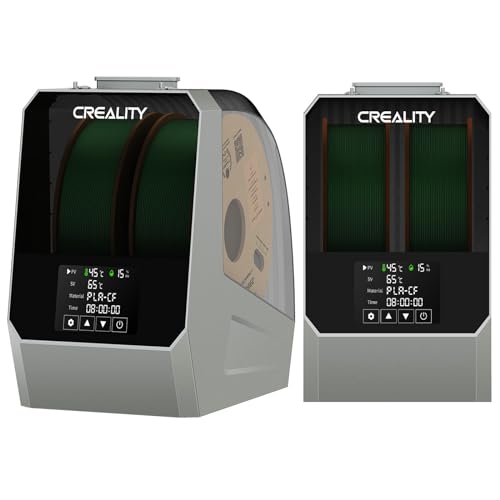
- Best for: Makers rotating two materials through the week
- Capacity: 2 spools
- Heating: Double PTC 360-degree hot-air heating
- Controls: LCD touch screen with one-key temperature settings per filament type
- Timer: 48 hours

- Best for: Dual-spool drying of PLA, PETG, TPU and ABS on a budget
- Capacity: 2 rolls under 70 mm wide, or 1 roll under 150 mm wide
- Temperature settings: 40, 45 and 50 degrees Celsius
- Timer: 6 to 12 hours
- Display: Real-time temperature and humidity inside the box
All 5 Picks at a Glance
| Product | Specs | Action |
|---|---|---|
| SUNLU FilaDryer S2 |
| Check price on Amazon |
| Creality Space Pi Plus |
| Check price on Amazon |
| Sovol SH01 |
| Check price on Amazon |
 SUNLU FilaDryer S4 |
| Check price on Amazon |
 Creality Space Pi X4 |
| Check price on Amazon |
Key takeaways
- Five filament dryers from SUNLU, Creality and Sovol compared on spool capacity, max temperature, timer range and feed ports for cleaner 3D prints.
Stringing, popping sounds at the nozzle and rough, weak layers usually trace back to one cause: filament that has absorbed moisture from the room air. A filament dryer fixes that by holding the spool in heated, circulating air before and during a print, and the real decision is matching the box to your materials and spool count. A PLA-only hobbyist needs far less heat than someone drying nylon or polycarbonate.
This guide serves five kinds of buyers: single-printer owners who want one spool ready at a time, makers who rotate two materials through the week, and multi-printer setups that need four spools drying at once. Every pick below is a heated dry box sold on Amazon, chosen from the brands’ own listings and spec sheets, with capacity, temperature range and timer compared side by side.
Quick Picks
As an Amazon Associate we earn from qualifying purchases
| Product | Best for | Key spec from title |
|---|---|---|
| SUNLU FilaDryer S2 | One spool dried and fed to a single printer | 70 degrees Celsius max temperature with circulation fan |
| Creality Space Pi Plus | Two spools with one-key material presets | Double PTC 360-degree hot-air heating |
| Sovol SH01 | Budget dual-spool drying with a live humidity readout | Real-time temperature and humidity display |
| SUNLU FilaDryer S4 | Four spools feeding several printers | 350W PTC heater with 3 circulation fans |
| Creality Space Pi X4 | Engineering filaments that need serious heat | Dual independent heating chambers, 85 degrees Celsius max |
How to Choose
Match the temperature range to your materials
Every filament has a drying temperature it responds to, and the box has to reach it. PLA and PETG dry at the gentle end of the scale, ABS and TPU sit in the middle, and nylon, polycarbonate and filled composites need the highest settings a desktop box can offer. A dryer that tops out at 50 degrees Celsius handles the common materials but leaves nylon under-dried, while a unit reaching 70 or 85 degrees Celsius covers the full shelf. Check the maximum temperature on the listing against the spool maker’s own drying guidance for the materials you actually print, not the ones you might print someday.
Count spools and measure yours before ordering
Capacity claims only help if your spools physically fit. Single-spool boxes usually accept a standard 1 kg spool up to about 210 mm across and 85 mm wide, which excludes some oversized and 2 kg spools. Dual-spool models split two ways: some take two narrow rolls side by side, others one very wide roll. Four-spool dryers suit multi-material units and small print farms. Measure your widest spool, including any cardboard or reusable spool adapters, and compare it with the internal dimensions on the product page. A spool that rubs the lid will not rotate freely on its rollers during a long drying cycle.
Decide whether you will print straight from the box
Most heated dryers double as feed boxes: the spool stays inside, and filament exits through a port or PTFE tube directly into the printer. That matters for hygroscopic materials like nylon and TPU, which can start reabsorbing moisture during a long print in a humid room. If you print those materials often, look for multiple exit holes positioned for your printer’s feed path and rollers that let the spool turn without drag. If you mainly dry PLA between prints and store spools in sealed bins afterward, a simple single-chamber box without feed ports does the same job for less money and shelf space.
Look at controls, timers and the humidity readout
Drying runs for hours, so controls decide how painless that is. One-key presets for common materials remove guesswork, a timer that matches your longest cycles avoids restarts, and a real-time humidity display tells you whether the spool is still giving up moisture or has levelled off. Timer ranges vary widely across this category, from 12 hours on simpler units to 99 hours on larger ones. A touch screen is easier to set with gloves off at the bench, while a rotary knob suits quick adjustments. Also check what happens when the cycle ends: some boxes drop into a low-power storage mode that keeps air dry until you print.
The 5 Best Options
SUNLU FilaDryer S2
- Best for: Single-printer owners who dry and print from one spool
- Capacity: 1 spool, up to 210 mm diameter and 85 mm width
- Temperature range: 35 to 70 degrees Celsius
- Heating: 360-degree surround heating with built-in circulation fan
- Display: 4.6-inch touch screen with real-time humidity readout
Single-printer owners who dry and print from one spool
Measure wide or 2 kg spools against the 85 mm width limit before ordering
The S2 is the default starting point for a one-printer desk. Its surround heating wraps the spool instead of warming only from below, the built-in fan keeps air moving, and the large touch screen shows temperature and humidity while the cycle runs. It feeds filament straight to the printer during long jobs, and its 70 degrees Celsius ceiling covers everything from PLA through nylon, which many single-spool rivals cannot match. If you own one machine and dry one spool at a time, this is the box that fits that routine without wasted capacity.
Creality Space Pi Plus
- Best for: Makers rotating two materials through the week
- Capacity: 2 spools
- Heating: Double PTC 360-degree hot-air heating
- Controls: LCD touch screen with one-key temperature settings per filament type
- Timer: 48 hours
Makers rotating two materials through the week
Check the seller name and return terms on the listing before ordering
The Space Pi Plus doubles capacity with two PTC heating elements that push hot air around both spools, and it leans on one-key settings so each material gets its listed temperature without manual programming. The LCD touch screen and 48-hour timer suit overnight drying before a weekend of printing, and the box feeds filament while it dries. It suits makers who keep a workhorse material loaded and rotate a second spool for the next job. Note that this listing is sold through a third-party storefront, so read the seller details as you would for any marketplace purchase.
Sovol SH01
- Best for: Dual-spool drying of PLA, PETG, TPU and ABS on a budget
- Capacity: 2 rolls under 70 mm wide, or 1 roll under 150 mm wide
- Temperature settings: 40, 45 and 50 degrees Celsius
- Timer: 6 to 12 hours
- Display: Real-time temperature and humidity inside the box
Dual-spool drying of PLA, PETG, TPU and ABS on a budget
The 50 degrees Celsius maximum is too low for nylon and polycarbonate drying profiles
The SH01 takes a simpler route: three fixed temperature settings, a knob-style routine, and a display that reports the temperature and humidity inside the box in real time. Its chamber swallows two standard rolls or a single wide one, the sealed lid lets it double as unpowered storage with desiccant bags inside, and the built-in fan evens out the heat. The trade-off is the 50 degrees Celsius ceiling, which covers PLA, PETG, TPU and ABS but stops short of what nylon and polycarbonate ask for. For common materials at a modest cost, that ceiling rarely matters in practice.
SUNLU FilaDryer S4
- Best for: Multi-printer benches and multi-material setups drying four spools at once
- Capacity: 4 spools of 1 kg each
- Heater: 350W PTC with 3 circulation fans
- Temperature range: 35 to 70 degrees Celsius
- Timer: 0 to 99 hours
Multi-printer benches and multi-material setups drying four spools at once
Measure your shelf first, since the 460 mm length is larger than most desktop gear
The S4 is built for benches where drying never really stops. Four 1 kg spools sit under a 350W PTC heater with three fans moving air across all of them, eight exit holes let several printers draw filament at once, and an automatic humidity mode restarts drying when moisture creeps back up, then settles into a power-saving storage state. The footprint is the honest cost: at 460 mm long it claims real shelf space. For a multi-material unit or two printers running daily, that space buys a rotation of ready filament instead of a queue of damp spools waiting their turn.
Creality Space Pi X4
- Best for: Engineering filaments and mixed-material drying at different temperatures
- Capacity: 4 spools across 2 independent heating chambers
- Maximum temperature: 85 degrees Celsius
- Special feature: Dual independent heating chambers with active dehumidification
- Filament types: PLA, PETG, ABS, TPU, PC, PA and PAHT in 1.75 mm and 2.85 mm
Engineering filaments and mixed-material drying at different temperatures
Confirm your bench can take a 5 kg unit that is meant to stay in one place
The X4 splits its four-spool capacity across two independent heating chambers, so a pair of spools can dry at one temperature while the other pair follows a different profile. Its 85 degrees Celsius maximum is the highest in this guide, which is what polycarbonate, PA and high-temperature composites call for, and active dehumidification keeps chamber air dry between cycles. At 5 kg it is a fixed piece of bench equipment rather than something you move around. Print farms and engineering-material users get the most from it; casual PLA printing does not need this much dryer.
Which One Fits Your Situation
You print PLA and PETG on one machine
Start with the SUNLU FilaDryer S2. One spool capacity matches a one-printer desk, the temperature range covers your materials with headroom to spare, and printing straight from the box keeps long PETG jobs dry end to end. The Sovol SH01 also works here if a second spool slot matters more than the higher temperature ceiling.
You swap between two materials all week
The Creality Space Pi Plus fits a two-material routine: dry the next spool while the current one prints, using the one-key presets to move between them quickly. If your pair is limited to PLA, PETG, TPU or ABS and you want the humidity readout and sealed storage, the Sovol SH01 covers the same habit for less.
You run several printers or a multi-material unit
Choose the SUNLU FilaDryer S4. Four spools drying together, eight exit holes and the automatic humidity mode keep a rotation of materials ready without daily reloading. Benches feeding an AMS-style system or two standalone printers benefit most, provided the shelf can spare the 460 mm footprint this capacity requires.
You dry nylon, polycarbonate or filled composites
Pick the Creality Space Pi X4. Its 85 degrees Celsius ceiling reaches the drying temperatures those materials specify, and the twin chambers let engineering spools run hot while gentler materials dry separately beside them. No other pick in this guide goes past 70 degrees Celsius, which leaves demanding filaments under-dried.
Common Mistakes
- Drying every material at the same temperature instead of matching the setting to the spool maker’s guidance for that filament
- Buying a single-spool box when you rotate two or more materials daily, which turns drying into a bottleneck before every print
- Ignoring spool width, then finding a wide or 2 kg spool will not fit or cannot rotate on the rollers
- Storing a damp spool in a sealed bin without drying it first, which locks the moisture in rather than removing it
- Leaving sealed dry boxes fully closed during a heated cycle when the maker instructs the vents or PTFE seals to be opened for moisture to escape
Frequently Asked Questions
How long does a spool take to dry?
It depends on the material and how much moisture it holds. Lightly damp PLA may need only a few hours, while saturated nylon can need an overnight run or longer. Use the preset or temperature your spool maker lists, watch the humidity readout fall and level off, and extend the timer rather than raising the heat beyond the recommended range.
Can I print while the filament is drying?
Yes, on models with exit ports or PTFE tube outlets, including every pick in this guide. The spool stays in the heated chamber and feeds the printer directly, which helps moisture-sensitive materials during long prints. Check that the port position lines up with your printer’s feed path so the filament runs without a sharp bend.
What temperature should I set for my filament?
Follow the drying guidance printed by the filament maker, since ranges differ by brand and blend. As a pattern, PLA sits at the low end, PETG, ABS and TPU in the middle, and nylon, polycarbonate and composites at the top. That is why maximum temperature matters: a box capped at 50 degrees Celsius cannot follow a profile that calls for more.
Does a filament dryer replace dry storage?
No. A dryer removes moisture that is already in the spool; it does not keep room air away from filament stored for months. Move dried spools into sealed bins or bags with desiccant, or leave them in a dryer that offers a storage mode. Combining both steps is what keeps prints consistent across a whole spool.
More from Amazon
Programs that pair well with the guide above. Offers and eligibility are set by Amazon and may change.
Free shipping on eligible items, Prime Video and more. Eligible new members can start with a free trial.
Start a Prime free trialAd-free music streaming. Eligible new subscribers can start with a free trial.
Try Music Unlimited freeA Prime membership for ages 18-24 with a trial period. Eligibility is set by Amazon.
See Prime for Young AdultsAudiobooks and podcasts to listen to on the go. Eligible new members can start with a free trial.
Try Audible freeAs an Amazon Associate we earn from qualifying purchases.