Our Short List of 3

- Best for: Buyers who want an established brand and M-DISC writing
- Model: GP65NB60
- Interface: USB 2.0
- DVD read and write speed: 8x
- CD read and write speed: 24x
- Best for: Sharing one drive between an older desktop and a USB-C laptop
- Model: A11
- Interface: USB 3.0 Type-A and Type-C
- Maximum DVD read speed: 8x
- Maximum CD read and write speed: 24x

- Best for: Offices and schools that need one drive to read almost any DVD format
- Model: DW316
- Interface: USB 2.0
- Drive type: DVD±RW Super Multi with dual-layer support
- DVD-RAM: supported
All 4 Picks at a Glance
| Product | Specs | Action |
|---|---|---|
| LG GP65NB60 |
| Check price on Amazon |
| Amicool External DVD Drive |
| Check price on Amazon |
| Dell DW316 |
| Check price on Amazon |
 Verbatim External Slimline CD/DVD Writer |
| Check price on Amazon |
Key takeaways
- Compare five external DVD drives by connector type, write formats, M-DISC support and bundled software, with picks for USB-C laptops, office and archiving.
Modern laptops ship without optical drives, so a shelf of DVD movies, photo discs burned a decade ago, or software that only exists on CD turns unreadable the day you upgrade. An external DVD drive fixes that with a single USB cable, yet the listings blur together: almost every model promises 8x DVD speeds and plug-and-play setup, while the real differences sit in the connector, the cables in the box, and which disc formats the drive can actually write.
This guide is for laptop owners rescuing a disc collection, office staff who still receive data on DVD, and anyone archiving files onto M-DISC media. Every pick was chosen from its Amazon listing details, covering interface, write formats, and bundled software, so you can match a drive to the discs on your shelf and the ports on your machine.
Quick Picks
As an Amazon Associate we earn from qualifying purchases
| Product | Best for | Key spec from title |
|---|---|---|
| ASUS ZenDrive U9M | Laptops with only USB-C ports | USB-C and USB-A cables included |
| LG GP65NB60 | A name-brand drive with M-DISC support | 8X DVD writer with M-DISC support |
| Amicool External DVD Drive | One drive shared between old and new PCs | USB 3.0 and Type-C dual interface |
| Dell DW316 | Offices standardising on one model | Low profile USB DVD Super Multi drive |
| Verbatim External Slimline CD/DVD Writer | Archiving with software in the box | M-DISC support with Nero software included |
How to Choose
Match the connector to your ports
Port layout decides whether a drive works the moment it arrives. Older slim drives ship with a single USB-A cable, which leaves USB-C-only laptops dependent on an adapter that may not pass enough power. Models that include both USB-A and USB-C cables, or a dual-headed connector, remove that gamble entirely. Check the listing photos for what is physically in the box, because several drives advertise Type-C support while only bundling a USB-A lead and expecting you to supply the adapter yourself.
Check write formats, not just read speeds
Every drive here reads DVD at 8x and CD at 24x, so headline speeds separate nothing. Format support is where models diverge. A drive that writes DVD+R and DVD-R but skips dual-layer media cannot burn a full 8.5 GB disc image, and only some listings include M-DISC writing for archival discs rated for long-term storage. DVD-RAM support is rarer still and absent from most budget listings. Read the format list on the product page and compare it against the blank media you already own before ordering.
Plan for bus power
Slim external drives draw all their power from the USB port, and a spinning disc plus a laser at full write speed pulls more current than a keyboard or mouse. Ports on unpowered hubs and some front-panel headers may not deliver enough, which shows up as a drive that disconnects mid-burn. Plug the drive directly into the laptop, or use a powered hub. A few listings note that Apple silicon Macs in particular should connect directly or through a powered hub to avoid power shortfalls.
Look at bundled software and system support
Neither Windows nor macOS ships with full disc-burning and DVD movie playback tools anymore, so the software in the box matters. Some drives bundle Windows burning suites such as CyberLink Power2Go or Nero, which do nothing for a Mac buyer. Playback on a Mac usually means installing a third-party player app regardless of brand. Confirm the listing names your operating system, and treat ChromeOS as unsupported unless the product page explicitly says otherwise, since most of these drives exclude it.
The 5 Best Options
ASUS ZenDrive U9M
The ZenDrive U9M suits anyone whose laptop dropped USB-A ports entirely. ASUS includes both a Type-C and a Type-A cable in the box, so the same drive moves between a new ultrabook and an older desktop without adapters. Its 13mm body and M-DISC writing cover the two jobs these drives are bought for: reading old discs on modern hardware and burning archival copies that outlast ordinary media. The bundled CyberLink and Nero utilities are Windows-focused, so Mac buyers should plan on their own playback app.
Specs
- Model: SDRW-08U9M-U
- Interface: USB 2.0 with Type-C and Type-A cables included
- DVD write speed: up to 8x
- CD write speed: up to 24x
- Disc support: CD, DVD±R/RW, dual-layer DVD and M-DISC DVD
- Body: 13mm ultra-slim, about 0.44 lb
- Compatibility: Windows and Mac OS X 10.6 and later
Best for: USB-C laptop owners who also need to burn archival discs
Watch out for: The interface is USB 2.0, so large file copies run slower than on USB 3.0 models
ASIN: B074SFZNG6
LG GP65NB60
- Best for: Buyers who want an established brand and M-DISC writing
- Model: GP65NB60
- Interface: USB 2.0
- DVD read and write speed: 8x
- CD read and write speed: 24x
Buyers who want an established brand and M-DISC writing
Only a USB-A cable is included, so check your ports before ordering
LG’s GP65NB60 is the straightforward name-brand option in this category. It is an ultra-slim tray-loading writer with M-DISC support, a USB 2.0 connection, and the standard 8x DVD and 24x CD speeds shared by nearly every portable drive. Buyers who distrust unbranded listings get a model number that has been sold for years with consistent specifications, which also makes finding replacement cables and support information easier. It sticks to a single USB-A cable, so USB-C-only laptops will need an adapter that the box does not provide.
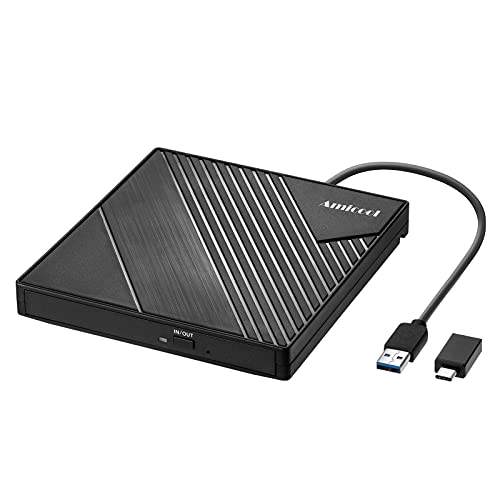
Amicool External DVD Drive
- Best for: Sharing one drive between an older desktop and a USB-C laptop
- Model: A11
- Interface: USB 3.0 Type-A and Type-C
- Maximum DVD read speed: 8x
- Maximum CD read and write speed: 24x
Sharing one drive between an older desktop and a USB-C laptop
Mac users should insert the disc before connecting, per the listing notes
The Amicool drive is built for households and small offices where one drive gets passed between machines. Its attached cable carries both USB 3.0 Type-A and Type-C connectors, and the USB 3.0 link gives file transfers more headroom than the USB 2.0 models here. The listing is explicit about its limits: it reads and writes CD and standard DVD formats, but Blu-ray discs and DVD-RAM are not supported, and it is made for computers rather than TVs, tablets, or game consoles. That honesty makes matching it to a disc collection simple.
Dell DW316
- Best for: Offices and schools that need one drive to read almost any DVD format
- Model: DW316
- Interface: USB 2.0
- Drive type: DVD±RW Super Multi with dual-layer support
- DVD-RAM: supported
Offices and schools that need one drive to read almost any DVD format
The design is functional rather than compact-first, so frequent travellers may prefer a slimmer model
The DW316 is Dell’s slim USB DVD writer, aimed at the office and education fleets Dell already supplies. It is a low-profile DVD Super Multi drive, which in Dell’s terminology means it handles DVD±R/RW, dual-layer media, and DVD-RAM, a format most slim writers skip. That breadth matters for IT staff pulling data off whatever discs arrive in the mail, including older RAM discs from legacy equipment. Power comes from the USB port and setup is plug and play on Windows, keeping deployment simple across a fleet of mixed laptops.
Verbatim External Slimline CD/DVD Writer
- Best for: Archiving photos and documents with burning software included
- Model: 98938
- Interface: USB 2.0 with USB-C adapter included
- DVD write speed: 8x
- CD write speed: 24x
Archiving photos and documents with burning software included
The bundled Nero software is Windows-only, so Mac buyers get the drive without the software benefit
Verbatim’s Slimline writer leans into archiving. It writes CD and DVD ±RW media, supports M-DISC blanks, and bundles Nero Burn and Archive software so Windows users can burn and catalogue discs without hunting for separate programs. A USB-C adapter is included alongside the USB 2.0 cable, covering newer laptops without a separate purchase. The two-year limited warranty is longer than the one-year cover typical in this category, which suits a drive bought to safeguard photo and document archives over several years of occasional use.
Which One Fits Your Situation
Your new laptop has only USB-C ports
Pick the ASUS ZenDrive U9M or the Verbatim Slimline. The ASUS includes a dedicated Type-C cable alongside the USB-A one, while the Verbatim adds a USB-C adapter to its USB 2.0 lead. Either connects without extra purchases, and both write M-DISC if the discs you are rescuing deserve archival copies rather than plain reads.
You are archiving family photos and documents
Choose a drive with M-DISC writing: the ASUS ZenDrive U9M, the LG GP65NB60, or the Verbatim Slimline. The Verbatim pairs that support with Nero archiving software and the longest warranty here, making it the natural fit when the drive exists mainly to create backups that sit in storage for years between uses.
You need one drive shared around an office
Take the Amicool for its dual USB 3.0 and Type-C connectors, which let it move between old desktops and new laptops without adapters. If your office still receives DVD-RAM or dual-layer media from legacy systems, the Dell DW316 is the safer shared drive because its Super Multi mechanism reads formats the Amicool excludes.
You just need to install or read the occasional disc
Any of the five will read a DVD at 8x and a CD at 24x, so decide by connector alone. The LG GP65NB60 covers USB-A machines with a long-established model, and the Amicool covers mixed desks. There is no performance gap to chase at this level, so buy the one that plugs straight into your computer.
Common Mistakes
- Assuming an external DVD drive also plays Blu-ray discs, when DVD-only models cannot read them at all
- Plugging the drive into an unpowered USB hub, then blaming the drive for discs that fail mid-burn
- Comparing headline transfer rates instead of checking which blank formats the drive can actually write
- Forgetting that modern operating systems no longer include DVD movie playback software by default
- Buying a USB-A-only drive for a USB-C-only laptop without confirming an adapter is in the box
Frequently Asked Questions
Can an external DVD drive play movies on a Mac?
Yes, the drive hardware works, but playback needs a player application. Apple’s own DVD Player is not supported on every current Mac setup, and several listings direct Mac users to a third-party player such as VLC. Insert the disc, connect the drive directly to a Mac port rather than a hub, and open the movie in the player app.
Do these drives work with Chromebooks?
Usually not. Most listings for external DVD drives, including the Amicool in this guide, state that ChromeOS is not supported, and Chromebooks lack the drivers and playback software these drives expect. Unless a product page names ChromeOS explicitly, assume a Chromebook cannot use the drive and look for a model that lists ChromeOS support in its specifications.
What is M-DISC, and do I need a drive that supports it?
M-DISC is a write-once disc format designed for long-term archival storage, using a rock-like recording layer instead of the organic dye in ordinary DVD blanks. You only need M-DISC writing if you are creating archives meant to last for decades, such as family photos or business records. Three drives in this guide, from ASUS, LG, and Verbatim, list M-DISC support.
Can I install an operating system from an external DVD drive?
In most cases, yes. Computers that can boot from USB devices generally recognise an external optical drive in the boot menu, so a Windows or Linux install disc works the same way it did from an internal drive. Check that your machine’s firmware allows USB booting, and connect the drive directly to the computer rather than through a hub during installation.
More from Amazon
Programs that pair well with the guide above. Offers and eligibility are set by Amazon and may change.
Free shipping on eligible items, Prime Video and more. Eligible new members can start with a free trial.
Start a Prime free trialAd-free music streaming. Eligible new subscribers can start with a free trial.
Try Music Unlimited freeA Prime membership for ages 18-24 with a trial period. Eligibility is set by Amazon.
See Prime for Young AdultsAudiobooks and podcasts to listen to on the go. Eligible new members can start with a free trial.
Try Audible freeAs an Amazon Associate we earn from qualifying purchases.