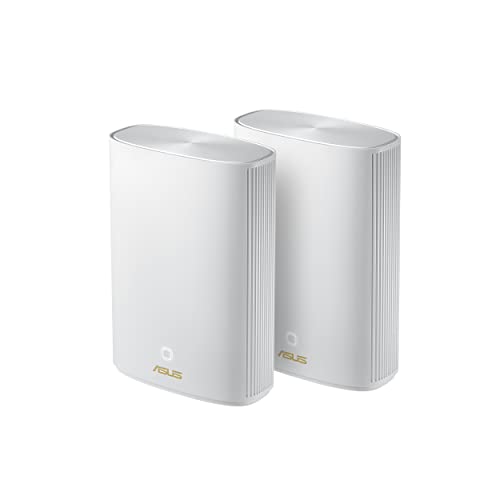
The ASUS ZenWiFi AX Hybrid XP4 is a sensible pick in 2026 only for one specific home: a place where Wi-Fi struggles to pass between rooms or floors, you cannot run Ethernet, and your internet plan sits at or below roughly 500 Mbps. Its trick is that each node can carry the backhaul link over your electrical wiring instead of the air, which can beat a wireless-only mesh through brick, concrete or stacked floors. For gigabit plans, Wi-Fi 6E/7 devices, or homes with flaky wiring, it is the wrong tool.
Our top picks


As an Amazon Associate we earn from qualifying purchases at no extra cost to you.
What the XP4 actually is
The XP4 is a dual-band Wi-Fi 6 mesh system sold as a single unit or a two-pack. Each node is a compact tower with a built-in HomePlug AV2 powerline adapter wired into its own power cord. When you plug two nodes into wall outlets on the same electrical system, they can talk to each other through the copper in your walls, use wireless backhaul, or use a plain Ethernet cable if you have one. ASUS calls this hybrid backhaul.
Because it runs the same firmware family as ASUS routers, it also supports AiMesh, so an XP4 node can be added to a compatible ASUS router you already own, and you get AiProtection Pro security filtering, parental controls, QoS and the ASUS Router app without a subscription.
Key specifications
| Item | ZenWiFi AX Hybrid XP4 |
|---|---|
| Wi-Fi standard | Wi-Fi 6 (802.11ax), dual-band |
| Wi-Fi class | AX1800: 574 Mbps (2.4 GHz) + 1201 Mbps (5 GHz) |
| Streams | 2×2 on each band |
| Powerline standard | HomePlug AV2 MIMO, up to 1800 Mbps PHY rate |
| Backhaul options | Powerline, wireless, Ethernet |
| Ethernet | Gigabit ports (WAN on the main node, LAN on each node) |
| Security | WPA3, AiProtection Pro |
| Typical price | Mid-range for a two-pack; frequently discounted as an older model |
The numbers that matter most are the powerline figure and the dual-band design. The 1800 Mbps powerline rate is a physical-layer number shared across the whole electrical network; it is not the speed a device will see. And because there is no dedicated third radio, wireless backhaul has to share the 5 GHz band with your phones and laptops, which is exactly why the powerline path exists.
Powerline backhaul: realistic speeds
HomePlug AV2 throughput depends heavily on wiring age, circuit distance and electrical noise. The table below gives realistic ranges for usable TCP throughput between two nodes, which is what caps the speed of devices connected to the far node.
| Wiring situation | Typical usable backhaul | What it means |
|---|---|---|
| Same circuit, newer wiring | 300 to 600 Mbps | Enough for most plans up to 500 Mbps |
| Different circuits, same panel | 150 to 350 Mbps | Fine for streaming and video calls |
| Different phase (split-phase US homes) or old wiring | 50 to 200 Mbps | Usable but not fast |
| Through surge protector or near noisy appliances | Often under 100 Mbps, or unstable | Move the node or the appliance |
| Separate panel, outbuilding or subpanel | Unpredictable, may fail | Plan for Ethernet or point-to-point wireless |
The practical takeaway: if your plan is 300 Mbps, the XP4 can plausibly deliver most of it at the second node. On a gigabit plan, the far node will almost never pass gigabit speeds over powerline, and only the main node will get close.
Where it beats a wireless-only mesh
- Concrete, brick or plaster-and-lath walls. Wireless backhaul between two dual-band nodes can drop sharply through dense materials; electrical wiring is indifferent to them.
- Multi-floor homes with no Ethernet. Running cable between floors is often the hardest install job. Powerline uses wiring that already climbs the building.
- Long, narrow layouts. Townhouses and ranch homes where the second node would be too far for a strong wireless link.
- Renters. No drilling, and the whole system leaves with you.
Where it falls short
- No 6 GHz, no Wi-Fi 7. Newer phones and laptops cannot use their fastest bands on this system.
- Dual-band only. If powerline fails and the system falls back to wireless backhaul, client speeds at the satellite take a real hit.
- Few ports. With one LAN port per node, a desk with a PC, console and NAS will need a small unmanaged switch.
- Power strip sensitivity. Each node must plug directly into a wall outlet; surge protectors and UPS units filter or block powerline signals.
- Firmware cadence. As an older model, it receives fewer feature updates than current ZenWiFi products, so security patches matter more than new features here.
Setup realities
- Plan outlets first. Pick wall outlets, not power strips, for both nodes. If an outlet is behind a desk where everything else is on a strip, plug the node into the wall and the strip into the node’s area separately.
- Start close, then move. Set up the main node at the modem, add the satellite in the same room through the app, then move it to its final location so it can pick the best backhaul.
- Check the backhaul type. The app and web interface show whether a node is using powerline, wireless or Ethernet. If it keeps choosing wireless, try a different outlet on another wall.
- Keep noise sources away. Phone chargers with cheap switching supplies, LED dimmers, treadmills and space heaters commonly degrade powerline links on the same circuit.
- Use Ethernet where you can. If even one run of cable is possible, wired backhaul beats both other options and frees the node to focus on clients.
XP4 versus the obvious alternatives
| Option | Backhaul | Best for | Main weakness |
|---|---|---|---|
| ASUS ZenWiFi AX Hybrid XP4 | Powerline, wireless, Ethernet | Hard walls, no cabling, plans under 500 Mbps | Powerline speed varies by wiring |
| Dual-band Wi-Fi 6 mesh (wireless only) | Shared 5 GHz | Open-plan homes, tight budgets | Satellite speed drops through dense walls |
| Tri-band Wi-Fi 6 or 6E mesh | Dedicated 5 GHz radio | Larger homes, faster plans | Still struggles through concrete |
| Wi-Fi 7 mesh with MLO | Multi-band wireless or 2.5G Ethernet | Gigabit-plus plans, new devices | Much higher cost |
| MoCA adapters plus any router or mesh | Coaxial cable | Homes with spare coax outlets | Needs coax in the right rooms |
MoCA deserves a mention because it solves the same problem more consistently: if your home has coax outlets, a pair of MoCA 2.5 adapters can carry near-gigabit backhaul, and you can pair it with a newer mesh system. Powerline is the answer when there is no coax and no Ethernet.
Who should buy it in 2026
| Your situation | Verdict |
|---|---|
| Plan up to 300 Mbps, thick walls, no cabling | Strong fit |
| Plan 300 to 500 Mbps, mostly streaming and work calls | Good fit if the wiring cooperates |
| Gigabit plan, want full speed in every room | Skip; look at wired or MoCA backhaul with a newer system |
| Already own a recent ASUS router | Consider a single XP4 node as an AiMesh satellite |
| Mostly Wi-Fi 6E or Wi-Fi 7 devices | Skip; you are paying for capabilities you cannot use |
Bottom line
The XP4 is not a speed machine. It is a problem solver for homes where wireless mesh keeps failing between rooms and cables are not an option. Bought at an older-model price and placed on direct wall outlets, it can deliver steady, moderately fast coverage that a wireless-only dual-band kit cannot. If your bottleneck is plan speed rather than walls, spend the money on a newer tri-band or Wi-Fi 7 system instead.
More from Amazon
Programs that pair well with the guide above. Offers and eligibility are set by Amazon and may change.
Free shipping on eligible items, Prime Video and more. Eligible new members can start with a free trial.
Start a Prime free trialAd-free music streaming. Eligible new subscribers can start with a free trial.
Try Music Unlimited freeA Prime membership for ages 18-24 with a trial period. Eligibility is set by Amazon.
See Prime for Young AdultsAudiobooks and podcasts to listen to on the go. Eligible new members can start with a free trial.
Try Audible freeAs an Amazon Associate we earn from qualifying purchases.