Our Top Picks
 TP-Link AXE5400 Tri-Band WiFi 6E RouterWiFi 6E, Tri-Band AXE540012.91 x 10.43 x 4.72 inches1.5 poundsCheck on Amazon

WiFi 6E adds a third wireless band at 6 GHz on top of the familiar 2.4 GHz and 5 GHz bands, and that extra spectrum is the main reason to upgrade. The 6 GHz band is reserved for WiFi 6E and newer devices, so it avoids the crowding that builds up on older bands in apartment buildings and dense neighborhoods. It also supports wide 160 MHz channels, which is how these routers move large files, game downloads, and high-bitrate streams with less waiting.
The catch is that 6 GHz signals fade faster through walls than 5 GHz signals, so a WiFi 6E router rewards good placement and works best when your fastest devices are in the same room or one room away. The five routers below cover the main buying paths: a value all-rounder, a control-heavy ASUS model, a gaming-focused TP-Link, a coverage-led NETGEAR, and a quad-band flagship for multi-gig internet plans.
As an Amazon Associate, we earn from qualifying purchases.
Quick Answer
For most homes, the TP-Link Archer AXE75 is the balanced pick: full tri-band WiFi 6E speed, wide channels, and mesh expansion without flagship pricing. Choose the ASUS RT-AXE7800 for deeper controls and security features, the Archer GXE75 for gaming tools, the NETGEAR RAXE300 for rated coverage, and the ROG GT-AXE16000 for multi-gig wired networks.
TP-Link Archer AXE75
The Archer AXE75 is the straightforward recommendation for a first WiFi 6E router. It is an AXE5400 tri-band model, and its radio layout is evenly split: the 6 GHz and 5 GHz bands carry the fast traffic while the 2.4 GHz band handles smart home gear and longer-range connections. Because the two fast bands are evenly matched, a household can put a gaming PC or VR headset on 6 GHz and still leave a full-speed 5 GHz band for everyone else.
TP-Link also includes the practical extras most buyers actually use. OneMesh support means the router can later pair with compatible TP-Link extenders under a single network name, VPN server and client support is built in, and WPA3 encryption is standard. One caution: hardware revisions of this model differ in their wired ports, with some units listing gigabit ports and newer listings showing a 2.5 Gbps WAN port, so confirm the port layout on the listing before ordering if multi-gig internet matters to you.
Specs
- WiFi class: AXE5400 tri-band WiFi 6E
- Rated speeds: up to 2402 Mbps on 6 GHz, 2402 Mbps on 5 GHz, 574 Mbps on 2.4 GHz
- Channels: up to 160 MHz wide on the 6 GHz band
- Memory: 512 MB RAM per the listing
- Mesh: OneMesh support
- Security: WPA3, VPN server and client (OpenVPN, PPTP, L2TP)
- Ethernet ports: confirm on the listing, revisions differ
ASUS RT-AXE7800

The RT-AXE7800 steps up to the AXE7800 class, which mainly means a much stronger 5 GHz radio alongside the 6 GHz band. That matters in mixed households where only a few devices support WiFi 6E: the laptops, consoles, and TVs still on 5 GHz get more capacity instead of sharing a narrower pipe. A 1.7 GHz quad-core processor keeps the router responsive when many devices are active at once.
ASUS leans into management and security. AiProtection Pro adds network security scanning, Safe Browsing filters risky sites, and the parental controls are more granular than most rivals. Instant Guard sets up a VPN tunnel back to your home network from the ASUS app, and AiMesh support lets the router join or lead an ASUS mesh system later. A single 2.5G WAN/LAN port covers multi-gig internet plans, and a USB 3.2 Gen 1 port can share storage or a printer across the network.
Specs
- WiFi class: AXE7800 tri-band WiFi 6E, up to 7800 Mbps combined
- Processor: 1.7 GHz quad-core CPU
- Wired: one 2.5G WAN/LAN port, gigabit LAN ports
- USB: one USB 3.2 Gen 1 port
- Mesh: AiMesh support
- Security: AiProtection Pro, Safe Browsing, Instant Guard VPN, parental controls
- Antennas: six external antennas
TP-Link Archer GXE75

The Archer GXE75 takes the same AXE5400 radio layout as the AXE75 and wraps it in gaming-focused hardware and software. The headline additions are a dedicated gaming port that prioritizes a wired console or PC, game acceleration tools, and a game panel that shows device status and traffic in one place. RGB lighting on the chassis will not change your ping, but the wired port layout is genuinely useful for a desk setup.
Wired connectivity is a step up from the value models: one 2.5G port plus four gigabit LAN ports means a PC, two consoles, and a streaming box can all plug in without a switch. A USB 3.0 port handles shared storage, EasyMesh support allows later expansion with compatible extenders, and HomeShield provides the security and parental control layer. If your household games on WiFi 6E laptops or a VR headset, the clean 6 GHz band plus the prioritization tools make this the gaming pick of the group.
Specs
- WiFi class: AXE5400 tri-band WiFi 6E, six streams
- Rated speeds: up to 2402 Mbps on 6 GHz, 2402 Mbps on 5 GHz, 574 Mbps on 2.4 GHz
- Wired: one 2.5G port and four 1G LAN ports
- USB: one USB 3.0 port
- Gaming: dedicated gaming port, game acceleration, game panel, RGB lighting
- Mesh and security: EasyMesh support, HomeShield
- Processor: quad-core CPU per the listing
NETGEAR Nighthawk RAXE300
The Nighthawk RAXE300 is the coverage-led option in this group. NETGEAR rates it for homes up to 2,500 square feet and up to 40 devices, with eight WiFi streams spread across the three bands. Like the ASUS above, it sits in the AXE7800 class, so the 5 GHz band is strong enough to carry most of a busy household while 6 GHz stays reserved for the newest phones, laptops, and headsets.
The wired side is well stocked for a single-router setup: one 2.5G port and four gigabit Ethernet ports cover a modem uplink plus several wired devices. A 1.7 GHz quad-core processor runs the show, and NETGEAR Armor adds a security layer on top of the standard firewall and WPA3 support. Note that this is a router only, so cable and DSL households still need a separate modem or a gateway in bridge mode.
Specs
- WiFi class: AXE7800 tri-band WiFi 6E, up to 7.8 Gbps combined
- Streams: eight WiFi streams
- Rated coverage: up to 2,500 sq. ft. and 40 devices per the listing
- Processor: 1.7 GHz quad-core CPU
- Wired: one 2.5G port and four 1G Ethernet ports
- Security: NETGEAR Armor, WPA3
- Requirements: separate modem or gateway required
ASUS ROG Rapture GT-AXE16000
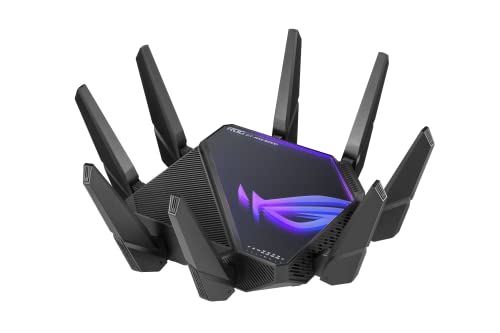
The GT-AXE16000 is the flagship option, built around a quad-band layout that splits traffic across two separate 5 GHz bands in addition to 6 GHz and 2.4 GHz. That second 5 GHz band is useful as dedicated backhaul in an AiMesh setup or as a private lane for gaming devices. Combined rated speeds reach 16,000 Mbps, and a 2.0 GHz quad-core 64-bit processor keeps up with heavy client counts.
The wired hardware is in a different league from the rest of this list: two dual-function 10G WAN/LAN ports, a separate 2.5G WAN port, and four gigabit LAN ports. That suits homes with multi-gig fiber, a fast NAS, or a wired workstation that can actually use 10G Ethernet. ROG software adds triple-level game acceleration and VPN Fusion, which lets different devices use different VPN tunnels at the same time, and AiProtection covers security. It is physically large with eight antennas, so plan shelf space for it.
Specs
- WiFi class: quad-band WiFi 6E, up to 16,000 Mbps combined
- Bands: 6 GHz, two 5 GHz bands, and 2.4 GHz
- Processor: 2.0 GHz quad-core 64-bit CPU
- Wired: two 10G WAN/LAN ports, one 2.5G WAN port, four 1G LAN ports
- Mesh: AiMesh support
- Gaming and VPN: triple-level game acceleration, VPN Fusion
- Security: AiProtection, Instant Guard
How to Choose a WiFi 6E Router
Start with your devices. The 6 GHz band only helps hardware that supports WiFi 6E or WiFi 7, so count your compatible phones, laptops, and headsets before paying for the fastest class. If most of your gear is still on WiFi 5 or WiFi 6, a model with a stronger 5 GHz radio, like the AXE7800 picks above, often serves you better today.
Next, match the router to your internet plan. Gigabit and slower plans are fine on any pick here, but multi-gig fiber needs a 2.5G or faster WAN port, and only some models offer one, so check the port list carefully. Home size matters too: larger or multi-story homes should look for mesh support such as OneMesh, EasyMesh, or AiMesh so coverage can grow later. Finally, decide how much management you want. App-only control is simpler, while ASUS and ROG models expose deeper settings for VPNs, traffic rules, and parental controls.
Who Should Skip WiFi 6E for Now
Skip the upgrade if none of your devices support the 6 GHz band, because they will never see the new spectrum and a good WiFi 6 router covers the older bands for less. Skip it if your home is large and spread out, since 6 GHz range is short and a mesh system built for coverage will serve you better than one powerful router. Also skip it if you are already planning a WiFi 7 purchase soon, because WiFi 7 routers include the 6 GHz band plus newer features, and buying twice in a short window wastes money.
FAQ
Do I need new devices to use the 6 GHz band?
Yes. Only devices with WiFi 6E or WiFi 7 radios can connect at 6 GHz. Everything else keeps working on the 2.4 GHz and 5 GHz bands, and a WiFi 6E router is fully backward compatible with older phones, laptops, and smart home gear.
Is WiFi 6E faster than WiFi 6 in the same room?
It can be, mainly because the 6 GHz band is far less crowded and supports wide 160 MHz channels with less interference. Real speeds still depend on your internet plan, the device, and distance, and the advantage shrinks as walls and floors get in the way.
Can one WiFi 6E router cover a large house?
A single router is usually enough for apartments and smaller homes. For large or multi-story houses, choose a model with mesh support so you can add nodes later, or place the router centrally and keep the most demanding 6 GHz devices in nearby rooms.
Does a WiFi 6E router replace my modem?
No. These are routers only, so cable, DSL, and fiber households still need the modem or optical terminal from their provider, or a gateway switched to bridge mode. The router connects to that box by Ethernet and handles your home network from there.
Final Verdict
Most buyers should start with the TP-Link Archer AXE75 for its even tri-band layout and mesh options, then step up based on need: the ASUS RT-AXE7800 for controls and security, the Archer GXE75 for gaming hardware, the NETGEAR RAXE300 for rated coverage and ports, and the ROG GT-AXE16000 when multi-gig wired networking is the priority. Whichever model you choose, place it centrally, keep 6 GHz devices nearby, and confirm the wired port layout on the listing before you order.
Product and ASIN Reference
| Product | ASIN |
|---|---|
| TP-Link Archer AXE75 AXE5400 Tri-Band WiFi 6E Router | B0B3SQK74L |
| ASUS RT-AXE7800 Tri-Band WiFi 6E Router | B0BLGGN4Z9 |
| TP-Link Archer GXE75 AXE5400 WiFi 6E Gaming Router | B0DM6M9RGD |
| NETGEAR Nighthawk RAXE300 AXE7800 WiFi 6E Router | B0B1LZMH78 |
| ASUS ROG Rapture GT-AXE16000 Quad-Band WiFi 6E Router | B09Z792WWF |
More from Amazon
Programs that pair well with the guide above. Offers and eligibility are set by Amazon and may change.
Free shipping on eligible items, Prime Video and more. Eligible new members can start with a free trial.
Start a Prime free trialAd-free music streaming. Eligible new subscribers can start with a free trial.
Try Music Unlimited freeA Prime membership for ages 18-24 with a trial period. Eligibility is set by Amazon.
See Prime for Young AdultsAudiobooks and podcasts to listen to on the go. Eligible new members can start with a free trial.
Try Audible freeAs an Amazon Associate we earn from qualifying purchases.