Key takeaways
- Compare the best hard gaming mouse pads for a fast, consistent glide, with surface materials, sizes, thickness and base grip to check before you buy.
Cloth is the default gaming surface, but it is not the only option. Hard gaming mouse pads use rigid plastic, polycarbonate or metal surfaces that keep friction low and consistent, wipe clean in seconds, and never fray at the edges. For players who flick fast and dislike the drag of fabric, a hard pad can feel like removing a speed limiter from the mouse.
The trade-offs are real, though. Hard pads are usually mouse-only sized rather than desk-wide, they can sound louder under the mouse, and a gritty surface can wear mouse feet faster than cloth does. This guide compares five hard gaming mouse pads by surface material, size, thickness and base design, so you can match one to your sensitivity, your desk space and your tolerance for upkeep.
As an Amazon Associate, we earn from qualifying purchases.
Our top picks
Quick Answer
Pick the Logitech G440 for a proven low-friction polymer surface, the Glorious Elements Air for an oversized hard pad that is barely there, the Razer Firefly V2 if you want a hard surface with lighting and a cable catch, the Corsair MM600 for two glide speeds on one aluminum plate, and the Razer Sphex V3 for the thinnest profile of all. Measure your mouse area first, because none of these is a full desk mat.
1. Logitech G440 Hard Gaming Mouse Pad

The G440 is the reference point for hard pads: a hard polymer surface on a rigid core, tuned by Logitech for low friction and consistent tracking with gaming sensors. Logitech pitches it at high-DPI players who make small, quick movements, and the moderate-friction wording in the listing is honest — this is fast, but it is not ice. The surface does not absorb sweat or humidity the way cloth does, so the glide stays the same in a warm room or a long session.
The standard size is 340 by 280 millimeters, which suits medium and high sensitivity players but will feel tight if you sweep a low-sensitivity mouse across the desk. The rubber base keeps the rigid plate planted, and the roughly 3 millimeter profile keeps your wrist close to desk height. There are no stitched edges to fray and nothing to wash; a wipe with a damp cloth restores the surface.
Specs
- Surface: hard polymer, low friction
- Size: 340 x 280 mm for the standard version; confirm the size option on the listing
- Thickness: about 3 mm
- Base: rubber, non-slip
- Extras: none; single surface, no lighting
2. Glorious Elements Air XL Hard Mouse Pad
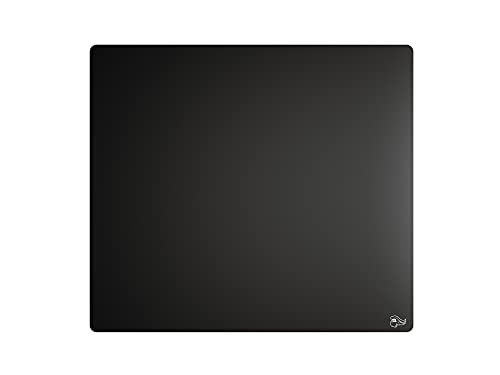
Most hard pads are small. The Elements Air is the exception: at roughly 17 by 15 inches it gives low-sensitivity players a genuinely wide hard surface, yet it is only about half a millimeter thick, so it sits almost flush with the desk. The polycarbonate surface is built for speed, with a near-zero-friction glide that suits fast flicks and wide arm movements.
That thinness cuts both ways. There is no cushioning at all, the flexible sheet can feel every crumb or speck of dust underneath the mouse, and the maker notes that hand oils can change the glide, so regular wiping is part of owning one. The base is adhesive-style rather than a heavy rubber slab, which keeps the pad planted but means you should place it carefully the first time. If you want a hard pad with real estate, this is the one shaped for you.
Specs
- Surface: hard polycarbonate, near-zero friction
- Size: about 17 x 15 inches (XL)
- Thickness: about 0.5 mm
- Base: adhesive-style, non-slip
- Weight: about 4.8 ounces, per the listing
3. Razer Firefly V2

The Firefly V2 is the hard pad for players who also want their setup to glow. Its micro-textured hard surface is calibrated for optical sensors, and Razer surrounds it with 19 Chroma RGB lighting zones that sync with other Chroma gear. A built-in cable catch at the top holds a wired mouse cable off the surface, which solves the cable-drag problem that hard pads otherwise make more noticeable.
At about 355 by 255 millimeters and 3 millimeters thick, it is a medium, mouse-only footprint. The lighting needs a USB connection, so it is a fixed desk piece rather than a travel pad, and the surface feel sits between speed and control rather than at the slick extreme. Choose it if the hard glide is only half the point and the other half is a battlestation that looks finished.
Specs
- Surface: micro-textured hard plastic
- Size: about 355 x 255 mm
- Thickness: about 3 mm (listing states 0.14 inches)
- Base: non-slip rubber
- Extras: Chroma RGB with 19 lighting zones, built-in cable catch, USB powered
4. Corsair MM600 Dual-Sided Aluminum Gaming Mouse Pad

The MM600 takes a different approach: a solid 3 millimeter aircraft-grade aluminum plate with a different polymer surface on each side. One side is smooth for high-speed glide; flip it over and the heavy-texture side gives you a control surface with more stopping power. It is effectively two hard pads in one footprint, which makes it the flexible choice for players who switch between fast shooters and slower, precision-led games.
The plate is rigid and cool to the touch, with rubber corner pieces that keep it from sliding or rocking. At about 352 by 272 millimeters it is a medium pad, and the metal build makes it heavier and less portable than the plastic options here. There are no edges to fray and both surfaces wipe clean. If you cannot decide between a speed pad and a control pad, this is the hedge.
Specs
- Surface: dual polymer surfaces, smooth speed side and heavy-texture control side
- Core: 3 mm aircraft-grade aluminum
- Size: about 352 x 272 mm
- Base: rubber corner feet, non-slip
- Model: CH-9000084-WW
5. Razer Sphex V3

The Sphex V3 is the minimalist option: a hard polycarbonate sheet just 0.4 millimeters thick that sticks to the desk and more or less disappears. Razer says this version is thinner and smoother than the V2, and the Large size stretches to 450 by 400 millimeters, which is desk-mat width from a pad that adds almost no height at the wrist. The adhesive base holds through hard swipes yet peels up without leaving residue, so you can reposition or remove it.
The compromises follow from the format. There is no padding, no lighting and no texture to slow the mouse down, so players who rely on surface friction for stopping will find it skatey. The Small size is compact at about 270 by 215 millimeters, so check which size a listing is selling before you order. For a clean desk that still plays fast, the Sphex V3 is hard to beat.
Specs
- Surface: hard polycarbonate, smooth
- Size: Large about 450 x 400 mm; Small about 270 x 215 mm
- Thickness: 0.4 mm
- Base: adhesive, removable without residue per the maker
- Extras: none; single surface, no lighting
How to Choose a Hard Gaming Mouse Pad
Start with size. Hard pads do not roll out across the whole desk like an XXL cloth mat, so measure the area your mouse actually travels. Low-sensitivity players need width above all and should look at the Elements Air or the Large Sphex V3; higher-sensitivity players can use any pad here.
Next, pick your friction. Smooth polycarbonate surfaces like the Sphex V3 and Elements Air are the fastest and the hardest to stop on. Textured surfaces like the G440 and the Firefly V2 add a little control, and the MM600 lets you flip between the two. Then check the base: adhesive bases sit flattest and stay put, rubber bases are easier to lift and move, and the MM600 relies on corner feet. Finally, budget for mouse feet. Hard surfaces, especially textured or dirty ones, wear PTFE feet faster than cloth, so keep a spare set that matches your mouse.
Who Should Skip a Hard Gaming Mouse Pad
Skip hard pads if you rest your wrist or forearm on the pad and want cushioning, because even the thickest option here is only about 3 millimeters of rigid material. Skip them if you play in a shared or quiet room late at night, since mouse feet click and scrape audibly on hard surfaces. Skip them if you need one surface under both keyboard and mouse, because these are mouse-area pads, not desk mats. And skip them if you rarely clean your desk: grit on a hard pad scratches the surface and your mouse feet, where cloth hides a multitude of sins.
FAQ
Do hard mouse pads wear out mouse feet faster?
They can. A hard surface, especially a textured one or one with dust and grit on it, abrades PTFE feet faster than cloth. Wiping the pad down regularly slows the wear, and most gaming mice accept replacement feet, so check that spares exist for your model before you commit.
Are hard gaming mouse pads good for low sensitivity play?
Only the larger ones. Low sensitivity means long swipes, and most hard pads are medium sized, so your mouse can run off the edge mid-flick. The Elements Air and the Large Sphex V3 are the picks here with enough width; the rest suit medium and high sensitivity better.
How do you clean a hard gaming mouse pad?
Wipe it with a soft cloth, lightly dampened with water, and dry it before playing. Avoid harsh solvents on coated or printed surfaces. Cleaning matters more than with cloth, because oils and dust change the glide and grit can scratch both the pad and your mouse feet.
Can you use a hard mouse pad with any sensor?
Modern optical sensors track well on the matte and micro-textured hard surfaces in this guide, and several of these pads are described by their makers as calibrated or optimized for optical sensors. Very glossy or transparent surfaces can trouble some sensors, so if your mouse is old, check its sensor notes against the listing before buying.
Final Verdict
For most players, the Logitech G440 is the sensible first hard pad: proven surface, standard size, nothing to configure. The Glorious Elements Air is the pick for low-sensitivity players who need width without thickness, and the Corsair MM600 is the smart buy if you want speed and control in a single plate. The Razer Firefly V2 adds lighting and cable management for a finished setup, while the Sphex V3 is the thinnest, cleanest way to make a desk play fast. Whichever you choose, measure your mouse area, keep the surface wiped, and keep spare mouse feet in a drawer.
Product and ASIN Reference
| Product | ASIN |
|---|---|
| Logitech G440 Hard Gaming Mouse Pad | B0BHMK6B2X |
| Glorious Elements Air XL Hard Mouse Pad | B08G676GN4 |
| Razer Firefly V2 | B07ZDWHL4M |
| Corsair MM600 Dual-Sided Aluminum Gaming Mouse Pad | B00N4OBA8K |
| Razer Sphex V3 | B098NRDCC9 |
More from Amazon
Programs that pair well with the guide above. Offers and eligibility are set by Amazon and may change.
Free shipping on eligible items, Prime Video and more. Eligible new members can start with a free trial.
Start a Prime free trialAd-free music streaming. Eligible new subscribers can start with a free trial.
Try Music Unlimited freeA Prime membership for ages 18-24 with a trial period. Eligibility is set by Amazon.
See Prime for Young AdultsAudiobooks and podcasts to listen to on the go. Eligible new members can start with a free trial.
Try Audible freeAs an Amazon Associate we earn from qualifying purchases.