Our Top Picks
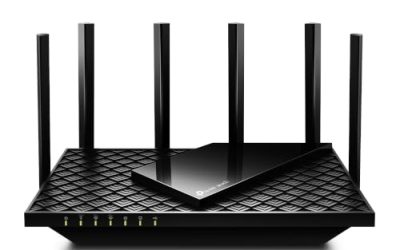
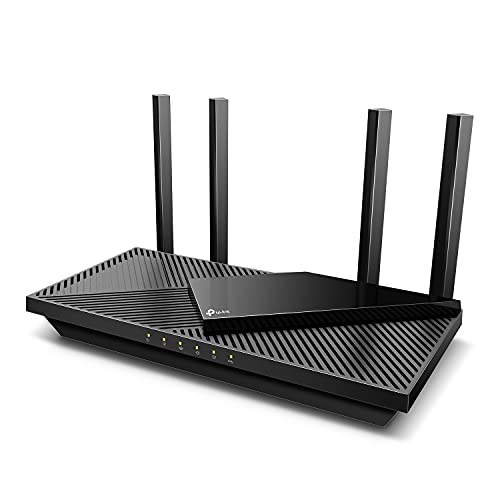 TP-Link Dual-Band AX3000 Wi-Fi 6 Wireless Gigabit InternetAX300012.99 x 9.45 x 2.87 inches1.66 poundsCheck on Amazon

A household router has to juggle far more than it did a few years ago. Game downloads run into hundreds of gigabytes, video calls compete with 4K streams, and a single home can easily have thirty or more connected devices once phones, laptops, consoles, TVs, and smart home gear are counted. WiFi 6, also written as 802.11ax, was designed for exactly that kind of congestion, and it remains the sweet spot for most buyers who want a fast, stable network without paying early-adopter prices for the newest standard.
This guide compares five standalone WiFi 6 routers across the main speed classes, from an affordable AX1800 model for smaller homes up to AX5700 hardware with multi-gig ports for demanding gaming setups. Each pick is a dual-band design sold as a single unit, and the sections below explain how speed ratings, port layouts, and software differ so you can match a router to your plan and your home.
As an Amazon Associate, we earn from qualifying purchases.
Quick answer
For most homes, the TP-Link Archer AX73 is the balanced pick, pairing AX5400 speeds and a USB 3.0 port with broad coverage. Gamers who want a 2.5 gigabit port should look at the ASUS RT-AX86U Pro, while the NETGEAR Nighthawk RAX50 suits larger spaces. The TP-Link Archer AX55 covers midrange needs, and the Archer AX21 is the entry point.
TP-Link Archer AX73 (AX5400)

The Archer AX73 sits at the top of TP-Link’s mainstream WiFi 6 line and is built around a 1.5 GHz tri-core processor that keeps the network responsive under load from many devices. Its AX5400 rating splits into up to 4804 Mbps on the 5 GHz band and 574 Mbps on the 2.4 GHz band, and support for 160 MHz channels on 5 GHz gives WiFi 6 laptops and phones room to reach their full link speeds. Six fixed antennas, beamforming, and a 4T4R radio layout spread a strong signal through larger single-floor homes and multi-room apartments.
On the software side, the AX73 includes TP-Link HomeShield for basic network security and parental controls, with advanced features behind an optional subscription tier. It also supports OneMesh, so a compatible TP-Link extender can later be added to form a roaming whole-home network without replacing the router. WPA3 encryption is supported alongside older WPA2 modes for legacy devices.
Specs:
– WiFi class: WiFi 6 (802.11ax), dual-band AX5400
– Rated speeds: up to 4804 Mbps (5 GHz), up to 574 Mbps (2.4 GHz)
– Processor: 1.5 GHz tri-core
– Antennas: 6 fixed external antennas
– Ports: 4 gigabit LAN, 1 gigabit WAN, 1 USB 3.0
– Features: OFDMA, MU-MIMO, beamforming, 160 MHz channels, WPA3, OneMesh, HomeShield
– Weight: about 1.5 lb
ASUS RT-AX86U Pro (AX5700)
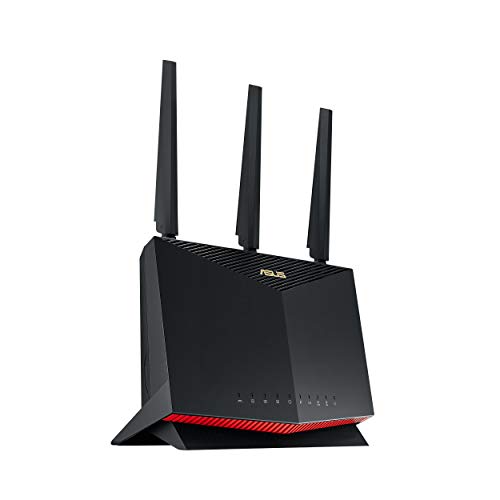
The RT-AX86U Pro is the gaming-leaning pick in this roundup, built on an AX5700 platform that combines up to 4804 Mbps on 5 GHz with up to 861 Mbps on 2.4 GHz. Its standout hardware feature is a 2.5 gigabit port that can serve as either the WAN or LAN connection, which suits households with internet plans faster than a gigabit or a wired gaming PC and network storage that can use the extra headroom. A dedicated gaming LAN port prioritizes traffic for one wired device, and the ASUS app includes a Mobile Game Mode intended to lower latency for phone gaming.
ASUS bundles AiProtection Pro network security powered by Trend Micro with no subscription fee, plus parental controls and VPN server and client support. The router is also AiMesh compatible, meaning it can pair with other ASUS AiMesh routers to build a mesh network later, or act as a node in an existing one. Its wireless class matches the AX73 closely, so the decision usually comes down to the multi-gig port and the ASUS software suite.
Specs:
– WiFi class: WiFi 6 (802.11ax), dual-band AX5700
– Rated speeds: up to 4804 Mbps (5 GHz), up to 861 Mbps (2.4 GHz)
– Ports: 2.5 gigabit WAN/LAN port, gigabit WAN, 4 gigabit LAN (confirm full port layout on the listing)
– Features: AiMesh compatible, AiProtection Pro, VPN server and client, Mobile Game Mode, port forwarding
– USB ports: confirm on the listing
– Model: RT-AX86U Pro
NETGEAR Nighthawk RAX50 (AX5400)

NETGEAR’s Nighthawk RAX50 is a 6-stream AX5400 router rated for coverage of up to 2,500 square feet, a sensible pick for larger homes where one router must reach distant rooms. Its combined dual-band throughput is rated at up to 5.4 Gbps, split between the 5 GHz and 2.4 GHz bands, and the 6-stream design gives it more simultaneous data paths than the 4-stream routers in this guide, which helps when several high-bandwidth devices are active in different rooms.
Setup and management run through the Nighthawk app, and the router supports NETGEAR Armor security as an optional subscription service. The RAX50 uses the model number RAX50-100NAS for the North American version. Buyers who prefer NETGEAR’s app ecosystem will find this the natural AX5400 option, while shoppers who need a USB port for shared storage should confirm the current listing details before ordering.
Specs:
– WiFi class: WiFi 6 (802.11ax), dual-band AX5400
– Rated speeds: up to 5.4 Gbps combined
– Streams: 6-stream design
– Rated coverage: up to 2,500 sq. ft. (per listing)
– Model number: RAX50-100NAS
– Management: Nighthawk app
– Ports and USB: confirm on the listing
TP-Link Archer AX55 (AX3000)
The Archer AX55 covers the middle of the market with an AX3000 rating: up to 2402 Mbps on 5 GHz and 574 Mbps on 2.4 GHz. That is roughly double the 5 GHz headroom of entry-level AX1800 models, which matters for households streaming 4K video to more than one screen or moving large game downloads over WiFi. Four high-gain external antennas and beamforming handle coverage, and a larger heatsink keeps the hardware cool under sustained load.
Like its bigger sibling, the AX55 includes HomeShield security tools, supports VPN server and client connections, and works with Alexa voice control. It is compatible with TP-Link OneMesh extenders and is also listed as EasyMesh compatible, giving two paths to expand coverage later. A USB 3.0 port allows basic shared storage or media serving on the local network. For a two or three bedroom home on a gigabit or slower plan, this class covers the realistic ceiling of what most client devices can use.
Specs:
– WiFi class: WiFi 6 (802.11ax), dual-band AX3000
– Rated speeds: up to 2402 Mbps (5 GHz), up to 574 Mbps (2.4 GHz)
– Antennas: 4 high-gain external antennas
– Ports: 4 gigabit LAN, 1 gigabit WAN, 1 USB 3.0
– Memory: 512 MB RAM (per listing)
– Features: OFDMA, MU-MIMO, beamforming, Target Wake Time, HomeShield, VPN server and client, OneMesh and EasyMesh compatible
TP-Link Archer AX21 (AX1800)
The Archer AX21 is the entry point into WiFi 6 and a sensible upgrade from an aging WiFi 5 router supplied by an internet provider. Its AX1800 rating delivers up to 1.8 Gbps of combined throughput, which comfortably covers internet plans in the few-hundred-megabit range and everyday mixes of streaming, browsing, video calls, and casual gaming. OFDMA support means it handles many low-bandwidth smart home devices more efficiently than older routers, even if its raw top speed is the lowest here.
The AX21 has four external antennas, gigabit Ethernet ports for wired devices, and works with Alexa. It supports TP-Link EasyMesh, so a compatible extender can be added later if a dead spot appears. TP-Link markets it under its Certified for Humans program, aimed at simpler setup for less technical buyers. Households with gigabit internet and several heavy users will outgrow it sooner than the faster models above, but for smaller homes and lighter plans it covers the essentials without paying for unused capacity.
Specs:
– WiFi class: WiFi 6 (802.11ax), dual-band AX1800
– Rated speeds: up to 1.8 Gbps combined
– Antennas: 4 external antennas
– Ports: gigabit WAN and LAN ports (confirm port count on the listing)
– Features: OFDMA, MU-MIMO, beamforming, EasyMesh support, Alexa compatible
– Setup: Certified for Humans device
How to choose
Start with your internet plan. A router cannot deliver more WAN throughput than your plan provides, so an AX1800 or AX3000 model is a rational match for plans up to a few hundred megabits, while gigabit plans justify the AX5400 class and faster. Only buyers with multi-gig internet or fast local transfers need a 2.5 gigabit port like the one on the RT-AX86U Pro.
Next, consider home size and layout. Any of these single routers can cover a typical apartment or small house; long floor plans, brick or concrete walls, and multi-story homes may need mesh expansion, so OneMesh, EasyMesh, or AiMesh compatibility is worth having as a future option. Then look at ports: count the devices you want wired, such as a desktop PC, console, or TV, and check whether you need USB for shared storage. Finally, weigh the software: security suites, parental controls, VPN support, and app quality differ between brands, and some advanced features sit behind subscriptions.
Who should skip
Skip WiFi 6 entirely if your home is already covered well by a WiFi 6E or WiFi 7 system, since side-grading adds little. Skip standalone routers like these if your home is large or has difficult construction and you already know a single unit leaves dead zones; a dedicated mesh kit is the better starting point. Gamers who play competitively on a desktop should also remember that a wired Ethernet connection still beats any wireless link for latency, so budget for a cable run before upgrading the router. Finally, if your internet plan is slow and your current router is stable, the real-world gain from new hardware may be modest.
FAQ
Is WiFi 6 worth it if my internet plan is slower than gigabit?
Yes, in many homes. WiFi 6 improvements such as OFDMA and better handling of many simultaneous devices improve local network responsiveness even when the internet connection itself is modest, and the benefit grows as you add phones, laptops, and smart home devices.
What does the AX number on a WiFi 6 router mean?
The AX number is the sum of the router’s maximum theoretical link rates across all bands, so AX5400 combines the 5 GHz and 2.4 GHz ratings. It is a speed class rather than a promise: real devices connect on one band at a time, and actual throughput is always lower than the headline figure.
Will a WiFi 6 router work with my older WiFi 5 devices?
Yes. WiFi 6 routers are backward compatible with WiFi 5 (802.11ac) and older standards, so existing phones, laptops, and smart home gear will connect normally. Those older devices simply will not gain the WiFi 6 specific efficiency features.
Should I buy a standalone router or a mesh system?
A standalone router is the simpler and usually cheaper choice for apartments and small to medium homes, especially if it supports a mesh expansion standard for later. Mesh kits make more sense for large, multi-story, or awkwardly shaped homes where one radio cannot reach every room.
Final verdict
For a single-router upgrade, the TP-Link Archer AX73 offers the strongest all-round balance of speed class, ports, and coverage features. The ASUS RT-AX86U Pro is the pick for gamers and anyone with a faster-than-gigabit internet plan thanks to its 2.5 gigabit port, while the NETGEAR RAX50 gives larger homes a 6-stream alternative in the same class. The Archer AX55 and Archer AX21 round out the list for midrange and entry-level budgets, and both leave the door open to mesh expansion later.
Product and ASIN Reference
| Product | ASIN |
|---|---|
| TP-Link Archer AX73 (AX5400) | B08TH4D3QV |
| ASUS RT-AX86U Pro (AX5700) | B0BQ417K47 |
| NETGEAR Nighthawk RAX50 (AX5400) | B082X17B8P |
| TP-Link Archer AX55 (AX3000) | B09G5W9R6R |
| TP-Link Archer AX21 (AX1800) | B08H8ZLKKK |
More from Amazon
Programs that pair well with the guide above. Offers and eligibility are set by Amazon and may change.
Free shipping on eligible items, Prime Video and more. Eligible new members can start with a free trial.
Start a Prime free trialAd-free music streaming. Eligible new subscribers can start with a free trial.
Try Music Unlimited freeA Prime membership for ages 18-24 with a trial period. Eligibility is set by Amazon.
See Prime for Young AdultsAudiobooks and podcasts to listen to on the go. Eligible new members can start with a free trial.
Try Audible freeAs an Amazon Associate we earn from qualifying purchases.