Key takeaways
- Compare the best DOCSIS 3.1 cable modems for Xfinity, Spectrum and Cox, with 2.5 Gbps ports, channel bonding and rental-fee savings explained.
A gaming router can only work with the connection it is fed, and on cable internet that connection starts at the modem. If you are still renting a gateway from your provider, you are paying a monthly fee for a box that combines modem and router duties and often does neither especially well. A standalone DOCSIS 3.1 cable modem hands the internet feed to the router you actually chose, which is the setup most gaming households end up preferring.
This guide covers five modem-only devices, none of which includes Wi-Fi. Each pairs with any separate router or mesh system and is approved for the major US cable providers. The picks split into two camps: multi-gig models with a 2.5 Gbps Ethernet port for plans above gigabit speed, and gigabit-class models with a single 1 Gbps port.
As an Amazon Associate, we earn from qualifying purchases.
Our top picks
Quick Answer
For cable plans above 1 Gbps, pick a DOCSIS 3.1 modem with a 2.5 Gbps Ethernet port: the ARRIS SURFboard S33, Motorola MB8611 and NETGEAR Nighthawk CM2000 all qualify, and the S33 adds a second 1 Gbps port. The ARRIS SURFboard SB8200 suits gigabit plans where a provider supports its dual-port layout, while the NETGEAR CM1000 is the straightforward gigabit pick. All five are modem-only, so budget for a separate router.
1. ARRIS SURFboard S33

The S33 is the most flexible modem in this roundup because of its port layout. Alongside the 2.5 Gbps Ethernet port that carries multi-gig plans to a capable router, it includes a second 1 Gbps port. On providers that support a second IP address, that extra port can feed a separate network, such as a work setup kept apart from the gaming LAN. For everyone else, the 2.5 Gbps port is the one that matters, removing the bottleneck that holds older modems back on faster tiers.
Under the housing it runs DOCSIS 3.1 with two OFDM downstream channels and two OFDMA upstream channels, backed by 32 downstream and 8 upstream DOCSIS 3.0 channels for compatibility with slower plans. ARRIS rates it for cable plans up to 2.5 Gbps, and it is approved for Comcast Xfinity, Cox and Spectrum. The compact white housing is smaller than most rivals, and setup runs through the SURFboard Central app.
Specs
- DOCSIS version: 3.1, backward compatible with DOCSIS 3.0
- Channels: 32 downstream x 8 upstream, plus 2 x 2 OFDM/OFDMA
- Ethernet ports: 1 x 2.5 Gbps, 1 x 1 Gbps
- Maximum plan speed: up to 2.5 Gbps
- Provider approval: Xfinity, Cox, Spectrum and other major cable providers
- Wi-Fi: none, modem only, separate router required
- Warranty: 2 years
2. Motorola MB8611
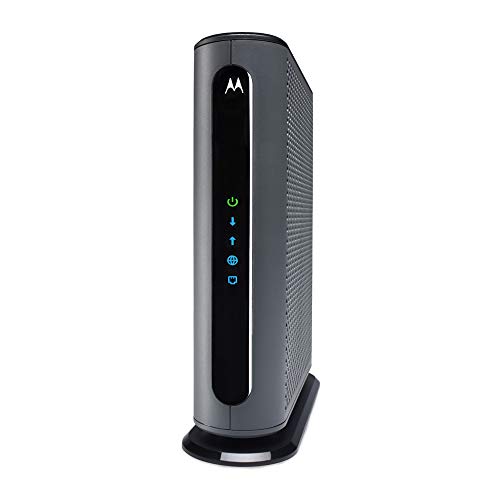
The MB8611 takes a simpler approach: one 2.5 Gbps Ethernet port, a tall tower housing, and a couple of practical extras. The most useful is the built-in lightning and surge protection, which guards the coax connection against power events that can damage networking gear. It also supports Active Queue Management, a DOCSIS 3.1 feature that helps the modem handle bufferbloat, the latency spikes that appear when uploads or cloud backups saturate the connection mid-match.
Motorola approves the MB8611 for Comcast Xfinity, Cox Gigablast and Charter Spectrum, for plans up to 2.5 Gbps. Channel bonding matches the other multi-gig picks at 32 downstream by 8 upstream DOCSIS 3.0 channels alongside DOCSIS 3.1 OFDM. Five status lights on the front panel make it easy to check connection state at a glance, and Motorola backs it with a 2-year warranty and US-based support.
Specs
- DOCSIS version: 3.1, backward compatible with DOCSIS 3.0
- Channels: 32 downstream x 8 upstream, plus DOCSIS 3.1 OFDM
- Ethernet ports: 1 x 2.5 Gbps
- Maximum plan speed: up to 2.5 Gbps
- Provider approval: Xfinity, Cox, Spectrum
- Extra features: built-in surge protection, Active Queue Management
- Wi-Fi: none, modem only, separate router required
- Warranty: 2 years
3. NETGEAR Nighthawk CM2000

The CM2000 is NETGEAR’s multi-gig entry, built around the same formula as the other 2.5 Gbps picks: DOCSIS 3.1, 32 by 8 channel bonding with 2 x 2 OFDM and OFDMA, and a single 2.5 Gbps Ethernet port feeding your router. NETGEAR rates it for cable plans up to 2.5 Gbps and lists compatibility with all major cable providers, including Xfinity, Spectrum and Cox.
The CM2000 suits households already invested in NETGEAR’s Nighthawk line, since it is designed to sit in front of a Nighthawk router or mesh system, though it works with any brand of router. One point to verify before ordering is the warranty term, which is not stated consistently across listings, so confirm it on the listing page.
Specs
- DOCSIS version: 3.1, backward compatible with DOCSIS 3.0
- Channels: 32 downstream x 8 upstream, plus OFDM(A) 2 x 2
- Ethernet ports: 1 x 2.5 Gbps
- Maximum plan speed: up to 2.5 Gbps
- Provider approval: Xfinity, Spectrum, Cox and other major cable providers
- Wi-Fi: none, modem only, separate router required
- Warranty: confirm on the listing
4. ARRIS SURFboard SB8200
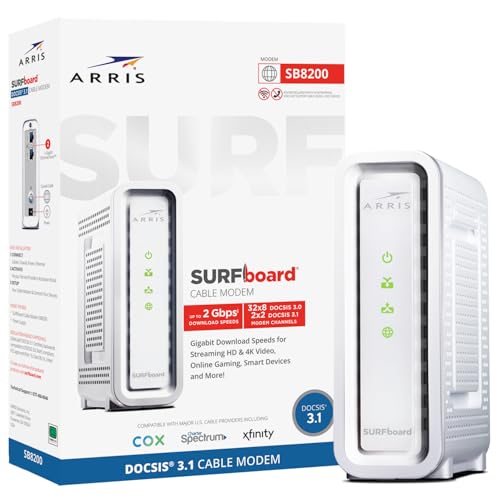
The SB8200 has been a default recommendation for gigabit cable plans for years, and its current listing still makes a case for it. Instead of a 2.5 Gbps port, it carries two 1 Gbps Ethernet ports. ARRIS rates the current version for plans up to 2 Gbps, and on providers that support port aggregation or a second IP, the twin ports can be put to work; on a single gigabit connection, you simply use one port.
The underlying platform is DOCSIS 3.1 with 32 downstream and 8 upstream DOCSIS 3.0 channels, approved for Xfinity, Cox and Charter Spectrum. For a household on a gigabit or slower plan with no move toward multi-gig service ahead, the SB8200 covers the requirement without paying for port speed that would sit unused. ARRIS includes a 2-year warranty, matching the S33.
Specs
- DOCSIS version: 3.1, backward compatible with DOCSIS 3.0
- Channels: 32 downstream x 8 upstream, plus DOCSIS 3.1 OFDM
- Ethernet ports: 2 x 1 Gbps
- Maximum plan speed: up to 2 Gbps per the current listing
- Provider approval: Xfinity, Cox, Spectrum
- Wi-Fi: none, modem only, separate router required
- Warranty: 2 years
5. NETGEAR CM1000

The CM1000 is the gigabit-class option for buyers whose plan tops out at 1 Gbps and who want a certified, no-frills modem. It was the first CableLabs-certified DOCSIS 3.1 modem, and it still covers the gigabit tier properly: 32 by 8 channel bonding, 2 x 2 OFDM, and a single Gigabit Ethernet port. That port is also the ceiling: a 1 Gbps port cannot pass more than gigabit throughput, so this is not a modem for multi-gig tiers.
NETGEAR certifies the CM1000 with Xfinity, Spectrum and Cox for plans up to 1 Gbps, and self-activation is supported for Xfinity customers, which can save a call during setup. The trade-offs against the faster picks are the port speed and a shorter 1-year warranty. For a gigabit plan paired with a good gaming router, it remains a sensible way to stop paying a gateway rental fee.
Specs
- DOCSIS version: 3.1, backward compatible with DOCSIS 3.0
- Channels: 32 downstream x 8 upstream, plus OFDM(A) 2 x 2
- Ethernet ports: 1 x 1 Gbps
- Maximum plan speed: up to 1 Gbps
- Provider approval: Xfinity, Spectrum, Cox
- Wi-Fi: none, modem only, separate router required
- Warranty: 1 year
How to Choose
Start with your plan speed, because it decides the port you need. A modem with only a 1 Gbps Ethernet port cannot deliver more than gigabit throughput to your router, no matter what the DOCSIS rating says. If your plan is faster than 1 Gbps, or you expect to upgrade soon, limit your shortlist to the 2.5 Gbps models: the S33, MB8611 and CM2000. If your plan is gigabit or slower, the SB8200 and CM1000 are enough.
Next, confirm approval with your provider for your exact tier. All five modems here are approved by Xfinity, Spectrum and Cox in general terms, but providers publish approved-device lists per speed tier, and some newer upload tiers require specific models. A two-minute check of your provider’s list before ordering prevents the most common cable modem mistake.
Finally, remember what a modem does not do. None of these devices creates a Wi-Fi network, assigns addresses to your devices, or offers parental controls or quality-of-service settings. Those jobs belong to the router behind the modem, which is why this purchase pairs naturally with a gaming router or mesh system you choose separately.
Who Should Skip
Skip this entire category if you are on fiber, DSL, satellite or fixed wireless service, since a DOCSIS modem only works on cable networks. Skip it if you rely on your provider’s bundled voice service, because none of these modems has a phone port. Skip it if you actually want an all-in-one box; a modem-router combo or gateway is the right product type instead.
Also skip the multi-gig models if your plan is well under a gigabit and your provider’s roadmap gives you no reason to upgrade; the gigabit-class picks do the same job for that use. And skip buying altogether if your provider supplies a modem at no charge and you are happy with it, as Spectrum customers in many areas already get one included.
FAQ
Will one of these modems replace my rented gateway completely?
Only the modem half of it. A rented gateway combines a modem and a router, so replacing it with a modem-only device means you also need a separate router or mesh system for Wi-Fi and device management. Once both are in place, you can return the gateway and remove the rental fee from your bill.
Does a faster modem reduce gaming lag?
A modem does not control most in-game latency, but upgrading from an old DOCSIS 3.0 unit to DOCSIS 3.1 can help under load, and features such as Active Queue Management on the MB8611 are designed to limit bufferbloat when the connection is busy. Your router’s quality-of-service settings and a wired connection still matter more.
How do I activate a new cable modem?
Connect the coax cable, power and an Ethernet cable to your router or a computer, then follow your provider’s activation page or app, which usually asks for the modem’s MAC address from the label. The S33 uses the SURFboard Central app, and Xfinity supports web self-activation for models such as the CM1000.
Can I use two routers with the S33’s second port?
Only if your provider supports a second IP address on your account, which is typically a business-class feature. On a standard residential plan, use the 2.5 Gbps port for your router and leave the second port unused.
Final Verdict
For most gaming households on cable, the ARRIS SURFboard S33 is the easiest modem to recommend: its 2.5 Gbps port covers multi-gig plans, the second port adds flexibility, and the 2-year warranty matches the best here. The Motorola MB8611 runs it close, trading the extra port for surge protection and Active Queue Management. NETGEAR fans on multi-gig plans get the same core speeds from the CM2000. On gigabit plans, the SB8200 and CM1000 cover the tier for less, with the SB8200 offering the longer warranty. Whichever you choose, pair it with a capable router, because the modem’s job is simply to feed it well.
Product and ASIN Reference
| Product | ASIN |
|---|---|
| ARRIS SURFboard S33 DOCSIS 3.1 Cable Modem | B08FMSC5WZ |
| Motorola MB8611 DOCSIS 3.1 Cable Modem | B08DDFKXKC |
| NETGEAR Nighthawk CM2000 Cable Modem | B08GWNZ9VF |
| ARRIS SURFboard SB8200 DOCSIS 3.1 Cable Modem | B07DY16W2Z |
| NETGEAR CM1000 DOCSIS 3.1 Cable Modem | B01I5TJGSE |
More from Amazon
Programs that pair well with the guide above. Offers and eligibility are set by Amazon and may change.
Free shipping on eligible items, Prime Video and more. Eligible new members can start with a free trial.
Start a Prime free trialAd-free music streaming. Eligible new subscribers can start with a free trial.
Try Music Unlimited freeA Prime membership for ages 18-24 with a trial period. Eligibility is set by Amazon.
See Prime for Young AdultsAudiobooks and podcasts to listen to on the go. Eligible new members can start with a free trial.
Try Audible freeAs an Amazon Associate we earn from qualifying purchases.