Our Top Picks
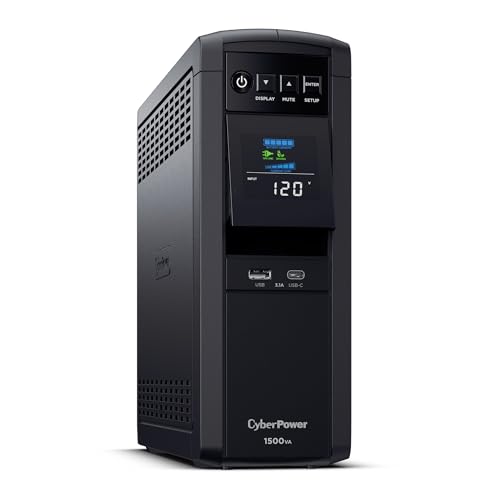 CyberPower CP1500PFCLCD PFC Sinewave UPS Battery Backup and1500VA14 x 3.9 x 11 inches24.9 poundsCheck on Amazon
Three hundred dollars is the first budget in this series where the question stops being “which strip?” and starts being “what system?” The strip itself has not changed much since the $200 guide: the same Tripp Lite still leads. What $300 changes is everything around it — the strip plus a real UPS, the first honest shot at whole-home protection, and real answers to the tower and long-cord questions.
Here is the honest framing up front: $300 buys a strip, not protection. A surge protector does not fix bad wiring, does not stop brownouts, and does not save anything from a direct lightning strike. It absorbs everyday spikes — and spent well, $300 buys a layered setup: a strong strip at the desk, a UPS behind the PC, and a plan for the whole house.
As an Amazon Associate, we earn from qualifying purchases.
Prices are November 2026 reads from Amazon US, manufacturer stores, and authorized retailers. Prices move — check the current price on Amazon before buying.
Our top picks
Best for: A gaming PC, a monitor, and a console — maximum protection per dollar
Check price on AmazonBest for: The biggest joule number and a USB-C port for the least money — buy it from Best Buy on sale
Check price on AmazonBest for: A workstation with audio gear, where the metal housing, filtering, and 10-foot cord matter more than outlet count
Check price on Amazon
Best for: An RTX 5060-class build with a monitor and a router — where the goal is a clean shutdown
Check price on Amazon
Best for: A laptop-first desk where fast USB-C charging is the priority
Check price on AmazonQuick Picks
| Pick | Why it wins | Price |
|---|---|---|
| Tripp Lite TLP128TTUSBB | Best overall: 4,320J, 12 outlets, fail-safe | $41–$77 |
| Rocketfish RF-HTS2223 | Most joules: 4,680J, 12 outlets, USB-C 20W | $54.99 ($44.99 Black Friday deal read) |
| Tripp Lite Isobar IBAR6ULTRAUSBB | Premium: metal housing, 3,840J, 10 ft cord | $149.99 |
| CyberPower CP1500PFCLCD | The $300 answer: 1,000W UPS; pair totals $280.94 | $239.95 |
| Anker Prime Charging Station (8-in-1, 240W) | Best 140W charging: 140W per USB-C port | $99.99–$129.99 |
How to Choose
Joules are the budget that matters most: how much surge energy a strip can absorb before its protection wears out. Below 1,000 joules is a power strip with aspirations; a PC desk wants 3,000 and up. The TLP128TTUSBB’s 4,320 joules has led this series for three guides running — and this guide brings the first challenger to beat it: the Rocketfish RF-HTS2223 reads 4,680 joules on Best Buy’s own listing. The caveat is the brand: Rocketfish is Best Buy’s house brand, with a thinner track record than Tripp Lite’s or APC’s.
Count the USB watts, not the USB ports. “Four USB ports” on a 2.4-amp shared budget is about 5 watts per port in use — a trickle, not a charger. Only 45W-plus USB-C PD charges a laptop; only 140W charges a 16-inch MacBook Pro at full speed.
Size a UPS in watts, not VA. A “1500VA” UPS is really 900 to 1,000 usable watts. Add up what goes on the battery outlets, keep it under 80% of the watt rating, and remember a UPS is a bridge to a clean shutdown, not a generator. An RTX 5060 build draws about 290W while gaming, per a 2026 UPS sizing calculator.
The $300 pair math. At $200, the better UPS pair — the CP1000PFCLCD at $179.99 plus the cheapest honest strip, the Anker 2100J at $24 — cost $203.99 and missed by $3.99. At $300, the bigger UPS fits: the CP1500PFCLCD at $239.95 plus the TLP128TTUSBB at $40.99 is $280.94, fitting by $19.06, with the 1,000-watt ceiling finally covering a real gaming PC with headroom.
Whole-home, honestly. A Type 2 whole-home device mounts at your main panel and guards the whole house. The Eaton CHSPT2ULTRA device reads $195.22 at Home Depot (October 14, 2026 read), and professional installation runs $260–$470 — a typical $455–$665 installed, which does not fit $300. The cheapest honest path is the smaller Eaton CHSPT2SURGE at $77.50 plus labor at the low end of the $140–$300 range: $217.50 in the best case, $377.50 at the high end. So whole-home can fit, but only if labor lands low and your panel has a spare breaker slot. Get a quote first. Do not DIY: it is live panel work, and NEC 230.67 has required a Type 1 or Type 2 SPD on new and replacement service equipment since 2020. A whole-home device complements strips at the desk; it does not replace them.
1. Tripp Lite TLP128TTUSBB — Best Overall
The pick that has led this series for three guides running. Twelve outlets, 4,320 joules, two USB-A ports, an 8-foot cord, RJ11 and coax protection, fail-safe shutoff, $150,000 insurance. At $40.99 it costs less than a video game; at $77.49 it still undercuts the Isobar below while giving you more joules, more outlets, and data-line protection.
Specs: 12 outlets; 4,320 joules; 2x USB-A sharing 2.1A; 8 ft cord; RJ11 + coax protection; fail-safe cut; 330V L-G; $150,000 insurance; lifetime warranty.
Pros: The highest joule rating of any name-brand strip with USB under $100; the only pick here with phone and cable line protection; fail-safe cutoff.
Cons: USB-A only, and the two ports share just 2.1 amps — about 5W per port when both are in use, so these are phone trickle-chargers, not laptop chargers; the $77.49 top of its range is nearly double the $40.99 low.
Best for: A gaming PC, a monitor, and a console — maximum protection per dollar.
2. Rocketfish RF-HTS2223 — Most Joules, With USB-C
The new challenger — the first strip here to beat the Tripp Lite’s joule number. Best Buy’s listing reads 4,680 joules across 12 outlets, with one USB-C port at 20W and one USB-A port at 12W — 32 watts total, enough to fast-charge a phone, though not a laptop — plus coax and modem jacks for the lines into the house. The price reads $54.99, with a $44.99 Black Friday deal read: on sale, the cheapest honest 4,000-plus-joule strip with USB-C here.
Specs: 12 outlets; 4,680 joules; 1x USB-C PD 20W + 1x USB-A 12W; coax/modem jacks; Best Buy house brand; $54.99 ($44.99 Black Friday deal read).
Pros: The highest joule rating here — 360 joules above the Tripp Lite; the only pick under $60 with a real USB-C PD port; 12 outlets.
Cons: Rocketfish is Best Buy’s house brand, with a thinner track record than Tripp Lite’s or APC’s; 20W USB-C charges a phone, not a laptop; no fail-safe cutoff is advertised — check the protection LED, because this strip may keep passing power after its protection wears out.
Best for: The biggest joule number and a USB-C port for the least money — buy it from Best Buy on sale.
3. Tripp Lite Isobar IBAR6ULTRAUSBB — Premium Pick
The strip for a workstation desk. A metal housing that will not melt or crack under a heavy surge, 3,840 joules, six outlets with isolated filter banks, 80 dB of EMI/RFI filtering, and a 10-foot cord with a right-angle plug — the longest cord with USB in this guide. The catalog reads $149.99, though other retailers read $135.37 to $209.15, and one reseller lists it as “not for sale in the USA until further notice” — confirm stock before you count on it.
Specs: 6 outlets; 3,840 joules; 2x USB-A sharing 3.1A; 10 ft cord, right-angle plug; metal housing; 80 dB filtering; isolated filter banks; $50,000 insurance; lifetime warranty.
Pros: Metal housing and isolated filter banks are genuinely premium; 10-foot cord reaches the far wall outlet without an extension.
Cons: Six outlets for $149.99 is the worst outlets-per-dollar here; USB-A only, shared 3.1A; availability is murky; no data-line protection, unlike the top pick.
Best for: A workstation with audio gear, where the metal housing, filtering, and 10-foot cord matter more than outlet count.
4. CyberPower CP1500PFCLCD — The $300 Answer (UPS)
The pick that makes $300 different from $250. The CP1500PFCLCD is a 1500VA/1,000W line-interactive UPS with pure sine wave output across 12 outlets, with a color LCD that reads your live load. At $239.95, the math is the whole story: plus the top pick at $40.99, it is $280.94, fitting by $19.06 — the first pair here that protects a real gaming PC, not just a router and a monitor.
An RTX 5060 build draws about 290W while gaming. Add a 40W monitor and a 15W router and you are near 345W — well under the 800W cap the 80% rule sets. CyberPower quotes 10 minutes of runtime at half load and 2.5 minutes at full load: time to save and shut down, not to keep playing. The CP1000PFCLCD at $179.99 was the right UPS at $250; the extra $60 here buys 400 more watts of ceiling. The limit, stated plainly: a flagship build pulling 650W-plus still wants a bigger unit.
Specs: 1500VA / 1,000W; pure sine wave; line-interactive with AVR; 12 outlets (6 battery + 6 surge-only); LCD load display; USB-A + USB-C ports; 10 min half load, 2.5 min full load; 3-year warranty.
Pros: 1,000W of pure sine wave is the widest headroom in CyberPower’s consumer line; the strip-plus-UPS pair finally fits under $300 at $280.94; the LCD shows your actual load.
Cons: $239.95 is most of the budget — the pair only works because the top pick is cheap; 24.9 lbs, so it lives on the floor, not the desk; plan on a replacement battery in three to five years.
Best for: An RTX 5060-class build with a monitor and a router — where the goal is a clean shutdown.
5. Anker Prime Charging Station (8-in-1, 240W) — Best 140W Charging
The 140W answer has not changed since $200. No strip here gives you USB-C 140W and real surge protection in one box. The Anker Prime Charging Station gives you the 140W: 240W total across two AC outlets, four USB-C ports, and two USB-A ports, with up to 140W from any single USB-C port. For surge protection it gives you 300 joules — a rounding error next to the top pick’s 4,320, and Anker says so on its own page.
So the honest buy is still the pair: the station at $99.99–$129.99 plus the TLP128TTUSBB at $40.99 is $140.98–$170.98 — comfortably under $300. Put the station on the desk for charging and the strip behind it for protection. The sibling trap: the Anker Prime 140W Power Strip has the same 140W headline and no surge protection at all.
Specs: 240W total; 2 AC + 4x USB-C + 2x USB-A; up to 140W per USB-C port; 300 joules; ActiveShield 3.0; Wi-Fi app control; model A91B2.
Pros: The only pick here that charges a laptop at full speed — 140W per port; the station-plus-strip pair costs $140.98–$170.98, leaving most of the $300 budget untouched.
Cons: 300 joules is not surge protection for a PC; only two AC outlets, so it cannot replace a strip; the $129.99 list price is $30 above the $99.99 deal read, so timing matters.
Best for: A laptop-first desk where fast USB-C charging is the priority.
What to Avoid
The Anker Prime 140W Power Strip. It has the 140W headline and no surge protection — a power strip with a fast charger inside, not a surge protector.
The Belkin BSV804 trap. Some roundups still list the Belkin BSV804 as a 4,000-joule strip with USB-C. Belkin’s own spec sheet says 900 joules and two USB-A ports sharing 2.4A. The 4,000-joule figure belongs to a different Belkin strip.
No-name tower strips with big numbers. The tower form factor is dominated by no-name brands promising 2,000-plus joules and eight USB ports. The only name-brand tower with USB we verified is the Tripp Lite TLP66USB at 1,200 joules — and Tripp Lite is honest about that number being small. A no-name strip’s $100,000 warranty is only as good as its claim process.
Daisy-chaining and plugging a strip into a UPS. One strip per wall outlet. Plugging a surge protector into a UPS — or a strip into a strip — can defeat clamping and void warranties. Keep the strip and the UPS on separate wall outlets, each doing its own job.
FAQ
What is the best strip-plus-UPS pair under $300?
The CP1500PFCLCD at $239.95 plus the TLP128TTUSBB at $40.99 — $280.94 total, fitting by $19.06. The 1,000W pure sine wave UPS covers a mid-range gaming PC (about 290W gaming for an RTX 5060 build), a monitor, and a router. At $200 the better pair missed by $3.99; at $300 it fits with money left over.
Does any whole-home surge protector fit $300 installed?
Not as a guarantee. The CHSPT2ULTRA reads $195.22 and installation runs $260–$470 — typically $455–$665 installed, which does not fit. The cheapest honest path is the smaller CHSPT2SURGE at $77.50 plus low-end labor: $217.50 in the best case, $377.50 at the high end. So it can fit, but only if labor lands low, your panel has a spare breaker slot, and no permit or extra work appears.
Does any strip give USB-C 140W and real surge protection in one box under $300?
No. The Anker Prime Charging Station gives 140W per USB-C port but only 300 joules of surge protection. The honest answer is still the pair — station plus TLP128TTUSBB for $140.98–$170.98. One box charges, the other protects.
Does a name-brand tower surge protector with USB exist?
Yes — the Tripp Lite TLP66USB, a five-outlet tower with three USB-A ports sharing 3.1A, reading $47.83–$76.35 (Newegg: $54.99). The catch is its 1,200 joules, the weakest protection here. A tower buys you a small footprint and reachable outlets, not protection.
Is 10 feet still the longest cord with USB?
Yes. The Isobar IBAR6ULTRAUSBB and the Tripp Lite TLP610U30CLAMPB (10 ft, 2x USB-C 30W, 900J, $113.24–$137.99) both top out at 10 feet. Twelve-foot strips exist, but neither has USB.
Verdict
Buy the TLP128TTUSBB first — at $40.99, still the best protection per dollar in this series. Then spend the rest of the $300 on the thing that actually changes the setup: the CyberPower CP1500PFCLCD at $239.95. Together they are $280.94 — the first pair in this series that protects a real gaming PC, with a 1,000-watt ceiling and ten minutes of half-load runtime.
Laptop-first desk? Swap the UPS for the Anker Prime Charging Station: $140.98–$170.98 for 140W charging plus real protection. For the panel, get a quote for the CHSPT2SURGE first — whole-home can fit at the low end of labor, but typically does not. Remember: $300 buys a strip, not protection. It does not fix bad wiring, it does not stop brownouts, and it will not save anything from a direct lightning strike. What it buys is a layered setup — and a strip you replace every three to five years, because protection wears out whether or not you notice.
Suggested Internal Links
- Best Surge Protector With USB Under $250 — the $250 guide.
- Best Surge Protector With USB Under $200 — the $200 guide.
- Best UPS for a Gaming PC Under $300 — the UPS guide behind the pair math.
More from Amazon
Programs that pair well with the guide above. Offers and eligibility are set by Amazon and may change.
Free shipping on eligible items, Prime Video and more. Eligible new members can start with a free trial.
Start a Prime free trialAd-free music streaming. Eligible new subscribers can start with a free trial.
Try Music Unlimited freeA Prime membership for ages 18-24 with a trial period. Eligibility is set by Amazon.
See Prime for Young AdultsAudiobooks and podcasts to listen to on the go. Eligible new members can start with a free trial.
Try Audible freeAs an Amazon Associate we earn from qualifying purchases.