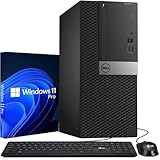
The best Intel Core desktop computers in 2026 are built on the Core Ultra 200S desktop family: the Dell Tower with a Core Ultra 7 265 for everyday work, the Dell Tower Plus for creative users who want a graphics card, and the HP OMEN 35L Intel version for gaming. For a laptop-class all-in-one, the HP OmniStudio X uses Core Ultra mobile chips. Older Core i5 and i7 towers such as the Lenovo ThinkCentre neo 50t Gen 5 remain fine for office work at lower prices.
Our top picks



As an Amazon Associate we earn from qualifying purchases at no extra cost to you.
Quick Comparison of Intel Core Desktops
| Pick | Intel chip | Graphics | Memory / storage | Best for | Price range |
|---|---|---|---|---|---|
| Dell Tower (ECT1250) | Core Ultra 5 225 or Ultra 7 265 | Intel integrated | 16-32GB DDR5-5600, 1TB SSD | Home and office | Mid |
| Dell Tower Plus (EBT2250) | Core Ultra 7 265 or 265K | Intel or GeForce RTX 5050 to 5060 Ti | 16-32GB DDR5, 1TB SSD | Creative work, light gaming | Upper mid |
| HP OMEN 35L (Intel) | Core Ultra 7 or Core i7-14700F | GeForce RTX 5070 | 32GB, 1TB SSD | Gaming | Premium |
| HP OmniStudio X 31.5 | Core Ultra 5 226V or Ultra 7 256V | Intel Arc integrated | 16GB LPDDR5X, 512GB-2TB | Big-screen all-in-one | Premium |
| Lenovo ThinkCentre neo 50t Gen 5 | Up to 14th Gen Core i7 | Optional Intel Arc A310 | Up to 64GB DDR5 | Business and school | Mid |
Best Overall: Dell Tower (ECT1250)
The Core Ultra 7 265 has 20 cores (8 performance, 12 efficient) with a turbo of about 5.3GHz, per retailer spec listings, and the system supports 64GB across two DIMM slots. Ports include HDMI 2.1, DisplayPort 1.4, Ethernet, Wi-Fi and Bluetooth 5.4. There is room for a 3.5-inch drive and full-height PCIe cards.
Trade-off: a 180W supply means no serious graphics card.
Best for Creators: Dell Tower Plus (EBT2250)
Dell offers Core Ultra 7 265 and 265K versions, up to 32GB DDR5, two M.2 slots and optional RTX 5050, 5060 or 5060 Ti graphics. A Micro Center version with an RTX 5060 Ti 8GB, 32GB DDR5 and Wi-Fi 7 sells in the mid-range gaming bracket. It is versatile for Premiere, DaVinci Resolve or Blender.
Trade-off: check configuration carefully, since the same name covers many builds.
Best for Gaming: HP OMEN 35L Intel
HP lists Intel versions with a Core Ultra 7 and RTX 5070, and a Core i7-14700F model with an RTX 5070 12GB, both with 32GB RAM and a 1TB SSD. The tool-less case design and good airflow are strengths. The 14700F is last-generation but still strong in games.
Trade-off: the Core Ultra 200S chips drop hyperthreading, and many gamers prefer AMD X3D chips for pure frame rates.
Best All-in-One: HP OmniStudio X 31.5
This 31.5-inch 4K IPS all-in-one runs Core Ultra 5 226V or Ultra 7 256V processors with Intel Arc graphics, 16GB LPDDR5X and Wi-Fi 7. It offers HDMI in and out, so a laptop can share the screen. The Core Ultra 200V series is built for efficiency and has a neural processing unit for AI features.
Trade-off: no memory upgrades and modest gaming ability.
Best Value Office: Lenovo ThinkCentre neo 50t Gen 5
Lenovo lists up to a 14th Gen Core i7 with up to 64GB of DDR5 and optional Arc A310 graphics. Because many third-party resellers sell it with Core i5-12400 to i7-13700 chips, always verify the CPU in the title.
Trade-off: some listings use older-generation chips.
Which Intel Chip Do You Need?
| Chip | Cores (P+E) | Use case |
|---|---|---|
| Core Ultra 5 225 | 10 (6 + 4) | Office, browsing, streaming |
| Core Ultra 7 265 | 20 (8 + 12) | Multitasking, light creative |
| Core Ultra 7 265K | 20 (8 + 12), unlocked | Creative work, gaming with a GPU |
| Core i7-14700F | 20 (8 + 12), no integrated graphics | Gaming with a discrete GPU |
| Core Ultra 7 256V (mobile) | 8 | Efficient all-in-ones |
Core counts come from Intel’s product listings. Note that “F” chips lack integrated graphics, so they require a graphics card.
How to Choose an Intel Desktop
Core Ultra or older Core i
Core Ultra 200S chips run cooler and use less power than 13th and 14th Gen at the same speed. For a new purchase, they have a longer platform life. Older Core i5-12400 and i7-13700 machines are worth considering only at clearly lower prices.
Integrated or dedicated graphics
If you only work in Office and browsers, Intel graphics suffice. For games, video editing or 3D, choose RTX 5060 or higher.
Cooling and power
K-series chips draw more power under load. Make sure the tower has a 500W or larger power supply if you add a graphics card.
Platform features
Check Wi-Fi 6E or 7, 2.5GbE Ethernet, USB-C ports and two M.2 slots for storage growth.
Worked Example: Choosing Between Two Towers
Take a photographer who edits 45-megapixel RAW files and plays games on weekends. A Core Ultra 7 265 with 32GB of RAM and a 1TB SSD edits comfortably, but the integrated graphics would limit game frame rates. Adding an RTX 5060 Ti through the Dell Tower Plus puts the machine in 1080p and entry 1440p territory for games, and speeds GPU-accelerated editing features. If the same photographer only edits and never games, the cheaper Dell Tower with 32GB covers the job and spends the saved money on a color-accurate monitor, which affects results more than a faster CPU. Total spend priorities in that case: monitor first, RAM second, CPU third, GPU last.
Ownership Realities
Intel microcode and BIOS updates have fixed stability and security issues over recent generations, so enable automatic BIOS updates through the maker’s utility. Make sure fans are clean, check the thermal paste on older systems, and keep Windows updated for hybrid core scheduling. If a system runs hot in a small cabinet, add ventilation rather than raising fan speed.
When buying, read the full model number, not just the marketing name. The same Dell or HP product line often spans several processor generations, memory types and power supplies, and a listing that omits the CPU model may be an older build. Compare the manufacturer’s spec sheet against the seller’s listing, and confirm the warranty length. For a multi-year purchase, a 3-year parts-and-labor plan is usually better value than a one-year plan, because most desktop failures that do occur appear after the first year. Keep the original recovery media or the system’s cloud recovery option handy, and make a Windows recovery drive on a spare USB stick the day you set the machine up. If you plan to add a graphics card later, measure the case: the Dell Tower is a compact chassis designed around low-profile cards, while the Tower Plus accepts full-height boards.
Frequently Asked Questions
What is the difference between Core Ultra and Core i7?
Core Ultra is Intel’s newer naming for chips from 2024 onward, with updated architecture, better efficiency and an NPU on mobile parts. Core i7 usually refers to the 14th generation and older.
Is a Core Ultra 5 enough for a desktop?
Yes, for office, streaming and school. Choose Ultra 7 for heavy multitasking or creative work.
Should I get an F-series Intel chip?
Only if the system has a graphics card. F-series chips have no integrated graphics.
Is Intel or AMD better for gaming?
AMD’s X3D chips lead many gaming comparisons, but Intel chips with a strong GPU still play modern games very well.
Do I need Windows 11 Pro?
Only for business features such as domain join and BitLocker management. Home is fine for most households.
More from Amazon
Programs that pair well with the guide above. Offers and eligibility are set by Amazon and may change.
Free shipping on eligible items, Prime Video and more. Eligible new members can start with a free trial.
Start a Prime free trialAd-free music streaming. Eligible new subscribers can start with a free trial.
Try Music Unlimited freeA Prime membership for ages 18-24 with a trial period. Eligibility is set by Amazon.
See Prime for Young AdultsAudiobooks and podcasts to listen to on the go. Eligible new members can start with a free trial.
Try Audible freeAs an Amazon Associate we earn from qualifying purchases.