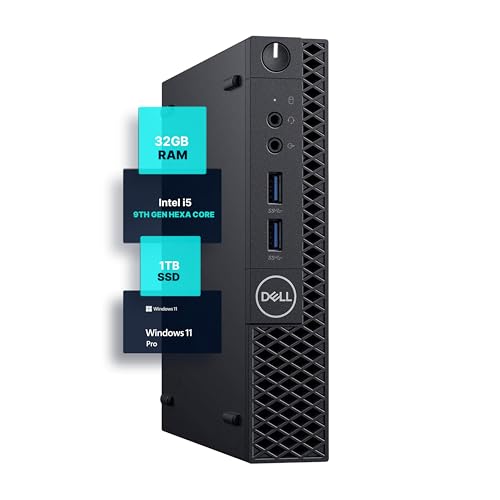
The best 1TB SSD desktop computers in 2026 are the Dell Tower for general use, the Dell Tower Plus when you want a second M.2 slot and optional graphics, and the Minisforum UM890 Pro or Beelink SER9 when space is tight. A 1TB NVMe SSD is the sweet spot for most buyers: roomy enough for Windows, apps, a photo library and several games, and fast enough that boot and load times stop being a complaint. This guide compares real models and explains what to check besides the headline capacity.
Our top picks



As an Amazon Associate we earn from qualifying purchases at no extra cost to you.
Quick Comparison of 1TB SSD Desktops
| Pick | Type | Storage setup | Extra drive options | Price range |
|---|---|---|---|---|
| Dell Tower (ECT1250) | Mini tower | 1TB M.2 PCIe NVMe | 1 M.2 slot, one 3.5 in bay | Mid |
| Dell Tower Plus (EBT2250) | Mid tower | 1TB NVMe | 2 M.2 slots, two 3.5 in bays | Mid to upper mid |
| Minisforum UM890 Pro | Mini PC | Configurable up to 1TB or more | Two PCIe 4.0 SSD bays | Mid |
| Beelink SER9 | Mini PC | 1TB PCIe 4.0 on the SER9 MAX | Expandable per Beelink, verify per SKU | Mid |
| Apple Mac mini (M4) | Mini PC | Choose 1TB at order | External Thunderbolt only | Upper mid |
| HP OMEN 35L | Gaming tower | 1TB SSD standard on many configs | Extra M.2 and bays | Premium |
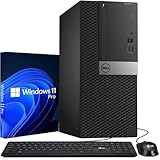
Best Overall: Dell Tower (ECT1250)
Retailer listings and Dell’s spec sheet show configurations with a 1TB M.2 PCIe NVMe SSD, 16GB or 32GB of DDR5-5600 and a Core Ultra 5 or 7 processor. It keeps a spare 3.5-inch bay, so you can add a cheap hard drive for backups. Dimensions are 12.76 by 6.06 by 11.53 inches.
Trade-off: only one M.2 slot, and integrated graphics.
Best for Expansion: Dell Tower Plus (EBT2250)
Dell lists two M.2 SSD slots, two 3.5-inch bays, three PCIe slots and two DIMM slots up to 64GB. Graphics options range from Intel integrated to GeForce RTX 5050, 5060 or 5060 Ti depending on configuration. With two M.2 slots you can keep a 1TB system drive and add a second 2TB game drive later without removing anything.
Trade-off: larger case, and the graphics card options push the cost up.
Best Mini PC with Dual SSD Bays: Minisforum UM890 Pro
Minisforum’s UM890 Pro uses a Ryzen 9 8945HS, two DDR5 SODIMM slots and two PCIe 4.0 SSD bays, with an OCuLink port for an external graphics dock. That means a 1TB drive today and a second drive later in a box that sits beside a monitor.
Trade-off: check the exact SKU, since some are sold barebone without RAM or storage.
Best Value Mini PC: Beelink SER9
The SER9 MAX is listed with a Ryzen 7 H 255, 64GB of LPDDR5X and a 1TB PCIe 4.0 SSD; other SER9 and SER9 Pro versions use up to a Ryzen AI 9 HX 370 with up to 32GB. Specs differ by variant, so read the listing carefully. The memory is soldered, so the storage is the part you can expand.
Trade-off: soldered RAM and variant confusion.
Best for Mac Users: Mac mini
You can order the Mac mini with 256GB, 512GB, 1TB or 2TB of internal storage. Apple’s internal SSD cannot be upgraded later, but Thunderbolt 4 ports at 40 Gb/s let an external NVMe enclosure work nearly like internal storage.
Trade-off: Apple charges a premium for the 1TB tier, so compare it to an external SSD route.
Best for Gaming: HP OMEN 35L
The OMEN 35L is sold in many configurations; reviewed 2026 units paired a Ryzen 7 9800X3D with an RTX 5070 Ti, 32GB of DDR5 and a 1TB SSD, while other regions list Ryzen 7 7800X3D or 8700F with an RTX 5070 12GB. A 1TB drive fits a handful of modern AAA games, so plan on adding a second drive.
Trade-off: premium price and big case.
What to Check Beyond “1TB SSD”
Interface: NVMe PCIe 4.0 versus 3.0 versus SATA
| Interface | Typical sequential read | Good for |
|---|---|---|
| SATA SSD | About 550 MB/s | Budget, older PCs |
| NVMe PCIe 3.0 x4 | Up to about 3,500 MB/s | Everyday use |
| NVMe PCIe 4.0 x4 | Up to about 7,000 MB/s | Gaming and content creation |
| NVMe PCIe 5.0 x4 | 10,000+ MB/s | Niche; needs good cooling |
These are interface ceilings; actual drive speeds depend on the model. For everyday work you will not feel a difference between PCIe 3.0 and 4.0.
DRAM cache and endurance
Prebuilt desktops do not always name the SSD brand. If it matters, check the manufacturer page for drive type, and favor a QLC drive only when the machine is mostly for office use.
How much space you really use
Windows 11 and common apps take 100-200GB. A large AAA game can take 100-150GB. A 1TB drive realistically leaves 700-800GB of usable room, enough for two or three big games plus files.
Worked Example: Where 1TB Goes
Marked capacity is decimal, so a “1TB” drive shows about 931GB in Windows. Subtract roughly 150GB for Windows 11, updates and core apps, and you have about 780GB. Now add a typical use case: 250GB of photos and documents, 60GB of creative apps, and three games at 100GB each. That totals 610GB, leaving about 170GB, or 18% of the drive, as free space. That is right on the edge of the 15-20% free space that keeps an SSD fast. The practical lesson: a 1TB drive is ideal for general use, but a gamer with five large titles should choose a model with a second M.2 slot such as the Dell Tower Plus or Minisforum UM890 Pro.
| User | Estimated need | Recommended setup |
|---|---|---|
| Office and browsing | 300-400 GB | 1TB single drive is generous |
| Family photos and school work | 500-700 GB | 1TB plus cloud backup |
| Casual gamer, 3 games | 600-800 GB | 1TB, plan a second drive |
| Video editor | 1-4 TB | 1TB system + external or second internal |
Ownership Realities
SSDs rarely die suddenly, but they slow as they fill past 85-90%. Leave free space, keep a backup on an external drive or cloud service, and avoid defragmenting an SSD. Installing a second drive is usually a ten-minute job: remove the heatsink cover, seat the M.2 stick at an angle, press it flat and fasten the single screw. Then open Disk Management in Windows, initialize the new disk and format it. Clone your old drive first if you are replacing instead of adding, and keep the original until you have confirmed the new one boots. Also note that some prebuilt desktops use a proprietary-length M.2 2230 drive in the main slot, which limits upgrade choices, so check the slot length in the manual before buying a replacement. If you want the option of a second drive, check for a free M.2 slot before buying; many mini PCs have only one.
Frequently Asked Questions
Is a 1TB SSD enough for a desktop?
For most people, yes. Gamers and video editors may want 2TB or a second drive.
Is NVMe worth it over SATA?
Yes. NVMe SSDs are common in new desktops and cost roughly the same as SATA, with much higher peak speeds.
Can I add a second SSD later?
Often yes on towers with a spare M.2 slot or 2.5/3.5-inch bay. Many small PCs and all-in-ones have a single slot.
Should I get 1TB internal or a smaller drive plus external storage?
If you travel with a laptop-like workflow, external storage works. For a fixed desk, 1TB internal is simpler and faster.
Do SSDs need cooling?
PCIe 4.0 drives benefit from a heatsink, which most desktops include or support.
More from Amazon
Programs that pair well with the guide above. Offers and eligibility are set by Amazon and may change.
Free shipping on eligible items, Prime Video and more. Eligible new members can start with a free trial.
Start a Prime free trialAd-free music streaming. Eligible new subscribers can start with a free trial.
Try Music Unlimited freeA Prime membership for ages 18-24 with a trial period. Eligibility is set by Amazon.
See Prime for Young AdultsAudiobooks and podcasts to listen to on the go. Eligible new members can start with a free trial.
Try Audible freeAs an Amazon Associate we earn from qualifying purchases.