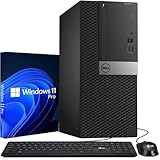
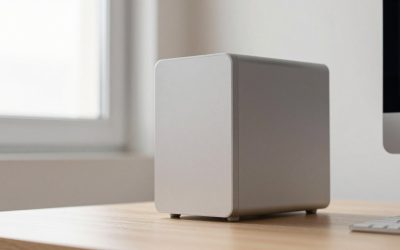
The best desktop computer with a monitor for most people in 2026 is an all-in-one such as the 24-inch iMac or the Lenovo IdeaCentre AIO 27, because the screen, speakers, webcam and PC arrive in one box with a single power cable. If you want to upgrade parts later, a tower such as the Dell Tower paired with a separate 24-27 inch monitor is the better long-term buy. This guide sorts the options by how you will use them, with real specs from the makers.
Our top picks
 Sceptre New 22-Inch Gaming Monitor
- 【INTEGRATED SPEAKERS】Whether you're at work or in the…
- 【EASY ON THE EYES】 Protect your eyes and…
- 【WIDEN YOUR PERSPECTIVE】Our sleek minimal bezel design ensures…
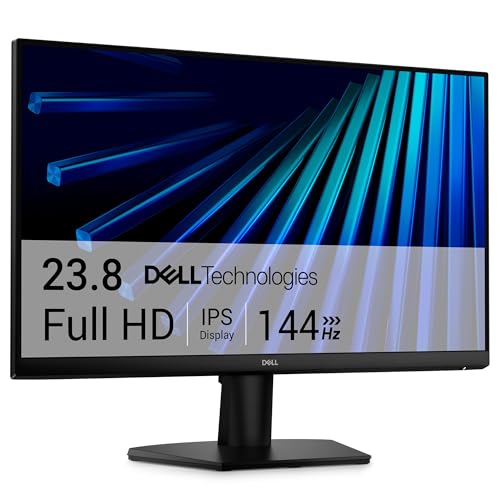 Dell 24 Monitor
- Clear visuals
- Eye comfort: TÜV Rheinland 3‑star* certification reduces harmful…
- Wide viewing angle: Get consistent views across a…
 Samsung 27" Essential S3
- An immersive viewing experience with a curved monitor…
- Stay in the action when playing games, watching…
- Gain the edge with optimizable game settings
| Product | Key specs | |
|---|---|---|
| Sceptre New 22-Inch Gaming Monitor | 【INTEGRATED SPEAKERS】Whether you're at work or in the… 【EASY ON THE EYES】 Protect your eyes and… 【WIDEN YOUR PERSPECTIVE】Our sleek minimal bezel design ensures… | Check price |
| Dell 24 Monitor | Clear visuals Eye comfort: TÜV Rheinland 3‑star* certification reduces harmful… Wide viewing angle: Get consistent views across a… | Check price |
| Samsung 27" Essential S3 | An immersive viewing experience with a curved monitor… Stay in the action when playing games, watching… Gain the edge with optimizable game settings | Check price |
| Dell 27 Monitor | Clear visuals Eye comfort: TÜV Rheinland 3‑star* certification reduces harmful… Wide viewing angle: Get consistent views across a… | Check price |
As an Amazon Associate we earn from qualifying purchases at no extra cost to you.
Quick Comparison: Desktop and Monitor Setups
| Pick | Type | Display | Best for | Price range |
|---|---|---|---|---|
| Apple iMac 24-inch | All-in-one | 23.5 in, 4480×2520 (4.5K), 500 nits | Creative work, family desk | Premium |
| HP OmniStudio X 31.5 | All-in-one | 31.5 in 4K IPS, 550 nits | Big-screen Windows setup | Upper mid to premium |
| Lenovo IdeaCentre AIO 27 (AMD) | All-in-one | 27 in class, Full HD touch options | Value Windows desktop | Budget to mid |
| Dell Tower + separate monitor | Tower + screen | Your choice, 24-27 in | Upgradeable home or office PC | Mid |
| Mac mini + monitor | Mini PC + screen | Your choice, up to three displays | Small desk, quiet operation | Mid |
Best Overall: Apple iMac 24-inch
The iMac packs a 23.5-inch 4.5K Retina panel (4480×2520, about 218 pixels per inch, 500 nits) with an M-series chip, 16GB of unified memory as the starting point, a 1080p camera and Thunderbolt 4 ports on the higher configurations, per Apple’s tech specs. Apple has refreshed the chip generation over time, so check which chip the current model uses before ordering. It suits writing, photo editing, video calls and general home use.
Main trade-off: memory and storage are fixed at purchase, so buy the configuration you need for the next five years.
Best Large Screen: HP OmniStudio X 31.5
HP’s OmniStudio X uses a 31.5-inch 4K UHD IPS panel rated at 550 nits with HDR 600 and about 95% DCI-P3 coverage, according to HP. Configurations include Intel Core Ultra processors, 16GB or more of memory and up to 2TB of storage, plus HDMI in and out so it can double as a display for a laptop. It fills a desk, so measure first: a 31.5-inch panel is roughly 28 inches wide.
Main trade-off: integrated graphics make it a work and media machine, not a gaming rig.
Best Value All-in-One: Lenovo IdeaCentre AIO 27 (AMD)
Lenovo sells 27-inch IdeaCentre all-in-ones with Ryzen processors across several generations. The Gen 10 listing spans Ryzen 5 and 7 200 Series and Ryzen AI 300 Series chips, while Gen 9 units use parts up to the Ryzen 7 7735HS. For browsing, spreadsheets, video calls and streaming, a Ryzen 5 with 16GB of RAM and a 512GB SSD is a comfortable floor.
Main trade-off: configurations vary widely; avoid any version with only 8GB of RAM.
Best Upgradeable: Dell Tower with a Separate Monitor
The Dell Tower (ECT1250) uses Intel Core Ultra 5 or 7 processors, DDR5-5600 memory with two DIMM slots (64GB maximum), an M.2 SSD slot, a 3.5-inch drive bay and full-height PCIe slots, per Dell’s spec sheet. It is 12.76 inches tall, 6.06 inches wide and 11.53 inches deep. Pair it with a 27-inch 1440p IPS monitor and you can replace either part separately in future.
Main trade-off: the 180W power supply and integrated graphics limit gaming; look at the Dell Tower Plus line if you want a graphics card option.
Best for Small Desks: Mac mini with Your Own Monitor
The Mac mini is about 5 by 5 inches. The M4 generation offers three Thunderbolt 4 ports on the back and supports up to three displays (two at 6K, one at 4K), per Apple. It stays near silent in office use. Pair it with a monitor that has USB-C or HDMI input; a 27-inch 4K screen is a good match.
Main trade-off: you must buy a monitor, keyboard and mouse separately.
How to Choose a Desktop and Monitor Combo
Screen size and resolution
At a desk depth of 24-30 inches, a 24-inch 1080p screen is the minimum; 27 inches at 1440p or 4K gives sharper text. Sit about an arm’s length (25-30 inches) away.
Memory and storage
Target 16GB of RAM and a 512GB SSD at minimum. Office users with many browser tabs benefit from 32GB.
All-in-one or separate parts
| Situation | Choose |
|---|---|
| Tidy desk, one cable, family use | All-in-one |
| You may upgrade RAM, storage or the screen | Tower + monitor |
| Very limited space | Mini PC + monitor |
| Photo or video editing | iMac or tower with a color-accurate monitor |
Ports and webcam
Look for at least four USB ports, one USB-C and an HDMI or DisplayPort output. All-in-ones usually include a 1080p webcam; separate monitors often do not.
Worked Example: Will It Fit Your Desk?
Take a standard 48-inch by 24-inch desk. A 27-inch all-in-one is roughly 24 inches wide and about 17 inches tall on its stand, leaving 24 inches of width for a keyboard, mouse pad and notebook. A 31.5-inch model is closer to 28 inches wide, so on a 48-inch desk you keep only about 20 inches beside it. A tower adds a box of about 6 by 12 by 12 inches that must sit on the desk, a shelf or the floor, and needs 3-4 inches of clearance behind for airflow and cables.
| Setup | Approx. footprint | Cables to manage | Replaceable parts |
|---|---|---|---|
| 24-27 in all-in-one | 21-24 in wide, 7-9 in deep | 1 (power) | Little or none |
| Tower + 27 in monitor | 24 in + 6 in wide | 3-4 | RAM, SSD, monitor, often GPU |
| Mac mini + 27 in monitor | 24 in + 5 in wide | 2-3 | Monitor only |
Ownership Realities
What wears first on a desktop is rarely the processor. Hard drives and fans fail before CPUs do, and cheap monitor stands wobble after a few years of height adjustments. On an all-in-one, a dead screen or power board usually means a service visit for the whole machine, while on a tower you swap one component. Plan for a five-year life: choose 16GB of RAM or more, a 512GB SSD you can grow, and a monitor with a height-adjustable stand or VESA 100×100 mounting holes so you can move it to an arm later. Keep the original packaging if you may move, since all-in-ones are awkward to ship without it.
Power use is also modest: a typical office tower idles at 15-30 watts, a Mac mini at under 10 watts, and a large all-in-one at 30-60 watts with the screen on. Running any of them 8 hours a day costs only a few dollars a month, so power should not decide the purchase.
Frequently Asked Questions
Does a desktop computer come with a monitor?
Only all-in-one models include a screen. Towers and mini PCs are sold without one, though some retailers bundle a monitor, keyboard and mouse.
What size monitor is best for a desktop?
For general use, 24 to 27 inches. Choose 27 inches at 1440p or higher if you work with spreadsheets or edit photos.
Is an all-in-one better than a tower and monitor?
An all-in-one is neater and simpler. A tower is easier to repair and upgrade, and you can keep the monitor when the PC ages.
Can I use a TV as a desktop monitor?
Yes, via HDMI, but a 4K TV at desk distance can look soft for small text unless it supports full 4:4:4 chroma.
How much RAM do I need?
16GB is the practical floor in 2026. Pick 32GB for heavy multitasking or creative work.
More from Amazon
Programs that pair well with the guide above. Offers and eligibility are set by Amazon and may change.
Free shipping on eligible items, Prime Video and more. Eligible new members can start with a free trial.
Start a Prime free trialAd-free music streaming. Eligible new subscribers can start with a free trial.
Try Music Unlimited freeA Prime membership for ages 18-24 with a trial period. Eligibility is set by Amazon.
See Prime for Young AdultsAudiobooks and podcasts to listen to on the go. Eligible new members can start with a free trial.
Try Audible freeAs an Amazon Associate we earn from qualifying purchases.