The best home office desktop computers in 2026 are quiet, power-sipping machines that handle video calls and many browser tabs: the Mac mini or 24-inch iMac for Apple users, and the Lenovo ThinkCentre Tiny M70q Gen 5, GEEKOM A5 or Dell Tower for Windows. For a home office, noise, desk footprint and webcam quality matter more than raw benchmark speed. Aim for 16GB of RAM, a 512GB SSD and a current processor, and you will not need to upgrade for years.
Our top picks
 Qehi All-in-One Desktop Computer 24" AIO Core
- 24‑Inch FHD Frameless Anti‑Glare Tiltable Display for Daily…
- 16GB RAM + 256GB SSD for Smooth Daily…
- Sleek Compact Integrated Build for Tidy Desk Layout…
 Dell Optiplex 3050 SFF Desktop Computer PC
- This Certified Refurbished product is tested and certified…
- Dell Optiplex 3050 SFF Desktop computer PC, Intel…
- Includes: USB Keyboard & Mouse, USB WiFi adapter,…
| Product | Key specs | |
|---|---|---|
| Qehi All-in-One Desktop Computer 24" AIO Core | 24‑Inch FHD Frameless Anti‑Glare Tiltable Display for Daily… 16GB RAM + 256GB SSD for Smooth Daily… Sleek Compact Integrated Build for Tidy Desk Layout… | Check price |
 HP 21.5" FHD All-in-One Desktop Computer | Check price | |
| Dell Optiplex 3050 SFF Desktop Computer PC | This Certified Refurbished product is tested and certified… Dell Optiplex 3050 SFF Desktop computer PC, Intel… Includes: USB Keyboard & Mouse, USB WiFi adapter,… | Check price |
 Lenovo IdeaCentre All-in-One Desktop Computer | Lenovo V100 all-in-one desktop with Intel N100 processor,… 23.8-inch Full HD IPS anti-glare display delivers sharp… 8GB DDR5 memory supports smoother multitasking for office… | Check price |
As an Amazon Associate we earn from qualifying purchases at no extra cost to you.
Quick Comparison of Home Office Desktops
| Pick | Form factor | Chip | Noise profile | Best for | Price range |
|---|---|---|---|---|---|
| Apple Mac mini | 5 x 5 in mini PC | Apple M4 | Near silent | Mac users, multi-monitor desks | Mid |
| Apple iMac 24-inch | All-in-one | Apple M-series | Near silent | Clean desk, built-in camera and speakers | Premium |
| Lenovo ThinkCentre Tiny M70q Gen 5 | Tiny desktop | Intel Core | Quiet | Windows, VESA mount | Mid |
| GEEKOM A5 | Mini PC | Ryzen 7 7730U | Quiet | Value, four-display support | Budget to mid |
| Dell Tower (ECT1250) | Mini tower | Core Ultra 5 or 7 | Quiet at idle | Upgradeable office PC | Mid |
| Lenovo IdeaCentre AIO 27 | All-in-one | Ryzen 5 or 7 | Quiet | Family and office desk | Budget to mid |
Best for Mac Users: Mac mini
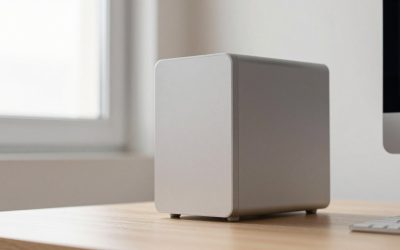
At about 5 by 5 inches, the Mac mini tucks beside a monitor or under a monitor arm. The M4 version supports up to three displays through its Thunderbolt 4 ports and HDMI, per Apple, which suits a work setup with a main screen and two side monitors. Reviewers describe it as whisper quiet under sustained load.
Trade-off: no built-in screen or webcam, and memory is fixed at purchase.
Best All-in-One: Apple iMac 24-inch
With a 23.5-inch 4.5K display, six speakers and a 1080p camera, the iMac gives video calls better audio and picture than most monitor-plus-webcam combos. It needs just one power cable, which helps in a small room.
Trade-off: little upgradeability, and Apple’s generation may have changed, so check the chip.
Best Windows Mini PC: Lenovo ThinkCentre Tiny M70q Gen 5
Reviewers name the Tiny line a leading quiet, space-efficient office PC. It mounts behind a monitor using a VESA bracket, uses little power, and offers business features such as TPM and serviceable parts.
Trade-off: not meant for gaming or heavy GPU work.
Best Value: GEEKOM A5
The A5 is built around a Ryzen 7 7730U (8 cores, 16 threads) and is reported to drive four 4K displays. Expandable RAM and storage are a bonus compared with soldered rivals. It is a strong choice for those who remote in to a corporate desktop.
Trade-off: third-party brand with a smaller service network.
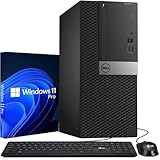
Best Upgradeable Tower: Dell Tower (ECT1250)
Core Ultra 5 225 and Ultra 7 265 configurations with 16GB or 32GB of DDR5, a 1TB SSD, two DIMM slots, one 3.5-inch bay and full-height PCIe slots give you room to grow. Dell lists a 180W power supply, and the case is about 12.8 inches tall, so it fits in a desk cubby.
Trade-off: integrated graphics only.
Best Budget All-in-One: Lenovo IdeaCentre AIO 27
The AMD IdeaCentre AIO lineup uses Ryzen 5 or 7 chips with a 27-inch display, camera and speakers in one unit. Pick a version with 16GB of RAM and a 512GB SSD.
Trade-off: screen brightness and speakers are basic compared with Apple’s.
What Matters in a Home Office
Noise
Mini PCs and Apple Silicon machines run near silent at office loads. Tower fans typically spin up only during heavy tasks. If you record audio or take many calls, pick a quiet design.
Desk space
| Desk width | Best fit | Why |
|---|---|---|
| Under 40 in | Mini PC + 24 in monitor | Tiny footprint, mount behind screen |
| 40-55 in | All-in-one or mini PC + 27 in monitor | Balanced desk |
| 55 in or wider | Tower + dual monitors | Room for peripherals |
Video call quality
A 1080p webcam is the 2026 baseline. All-in-ones usually include one; for mini PCs, add a separate camera and a headset.
Ports
Choose a machine with at least one USB-C or Thunderbolt port so a single-cable dock can drive a monitor and charge a laptop.
Worked Example: A Work-From-Home Desk
A remote worker sits eight hours a day with two apps on screen at once, a video call open and fifteen browser tabs. That load uses about 8-12GB of RAM, so 16GB covers it with room to spare. With a 27-inch 1440p monitor on an arm and a mini PC mounted behind it, the entire footprint on a 48-inch desk is the keyboard, mouse and a notebook. The same worker with a tower would devote 6 inches of desk width and a floor spot to the case, and see a few dollars a year more in electricity. For a simple office routine, the small machine wins on tidiness; the tower wins if the worker wants to add a graphics card or a second drive for local files.
A practical checklist before buying: measure desk depth (at least 24 inches for a 27-inch monitor), count the ports needed (monitor, dock, headset, webcam), and confirm that the computer supports the number of displays you plan to use.
Ownership Realities
Home office machines run long hours, so plan for dust and heat management. Place mini PCs where airflow is not blocked; blow out dust from tower vents twice a year. Use a surge protector or battery backup, back up to cloud storage, and enable disk encryption (BitLocker or FileVault) if you handle client data. Keep automatic updates on, and schedule them outside working hours.
Ergonomics deserve a line too. Set the top edge of the monitor at or slightly below eye level, about an arm’s length away, and tilt it back a few degrees. A 27-inch screen on a monitor arm is easier to position than a built-in all-in-one stand, though most all-in-ones offer only tilt adjustment, so check for VESA mounting if height adjustment matters to you. Pair the desktop with a decent keyboard and mouse; the bundled ones are rarely the best part of the package. Finally, think about internet: wired Ethernet is more stable for video calls than Wi-Fi, so choose a machine with a gigabit port or add a USB-C adapter. Most picks here include Ethernet, except the thinnest all-in-ones, which may rely on Wi-Fi 6 or 7.
Frequently Asked Questions
What is the best desktop for working from home?
For most people, a quiet mini PC or all-in-one with 16GB of RAM and a 512GB SSD. The Mac mini and iMac lead for Apple users.
Mini PC or all-in-one for a home office?
All-in-ones include a camera and speakers, which helps with calls. Mini PCs let you choose a larger or better monitor and are easier to replace.
How much RAM do I need for working from home?
16GB handles office apps, video calls and many tabs. Choose 32GB if you run design software or virtual machines.
Is a desktop better than a laptop for home office use?
For a fixed desk, a desktop gives more performance per dollar, better ergonomics with a full-size monitor and easier repairs.
Can I use my work laptop with a desktop monitor instead?
Yes, with a USB-C dock. A separate desktop is only needed for a personal setup or heavier tasks.
More from Amazon
Programs that pair well with the guide above. Offers and eligibility are set by Amazon and may change.
Free shipping on eligible items, Prime Video and more. Eligible new members can start with a free trial.
Start a Prime free trialAd-free music streaming. Eligible new subscribers can start with a free trial.
Try Music Unlimited freeA Prime membership for ages 18-24 with a trial period. Eligibility is set by Amazon.
See Prime for Young AdultsAudiobooks and podcasts to listen to on the go. Eligible new members can start with a free trial.
Try Audible freeAs an Amazon Associate we earn from qualifying purchases.