The best business desktop computers in 2026 come from the three vendors that sell directly to companies: Dell (Dell Pro Tower and Dell Tower), HP (Pro Tower 290 G9) and Lenovo (ThinkCentre neo 50t Gen 5 and ThinkCentre Tiny M70q Gen 5). For a small office, pick a tower with 16GB of RAM, a 512GB or 1TB SSD, Windows 11 Pro and a three-year warranty. The differences between brands are mostly in security features, serviceability and support, not raw speed.
Our top picks



As an Amazon Associate we earn from qualifying purchases at no extra cost to you.
Quick Comparison of Business Desktops
| Pick | Form factor | CPU options | Memory | Best for | Price range |
|---|---|---|---|---|---|
| Dell Pro Tower | Tower | Core Ultra 5 235, Core i5-14500 vPro configs | 16GB-32GB DDR5 | Managed office fleets | Mid |
| Dell Tower (ECT1250) | Mini tower | Core Ultra 5 225, Ultra 7 265 | 16-32GB DDR5-5600 | General office, value | Mid |
| HP Pro Tower 290 G9 | Tower | 12th/13th Gen Core i3 to i5 | 8-16GB | Small teams on a budget | Budget |
| Lenovo ThinkCentre neo 50t Gen 5 | Tower | Up to 14th Gen Core i7 | Up to 64GB DDR5 | Expandable office PC | Mid |
| Lenovo ThinkCentre Tiny M70q Gen 5 | Tiny desktop | Intel Core non-K, vPro on some | Up to 64GB | Space-saving, quiet desks | Mid |
| Apple Mac mini | Mini PC | Apple M4 | 16-32GB unified | Mac-based offices and creative teams | Mid |
Best Overall: Dell Pro Tower and Dell Tower
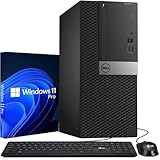
Dell is the only one of the three giants with Intel Core Ultra business towers widely listed. The Dell Pro Tower is offered in Core Ultra 5 235 and Core i5-14500 vPro configurations with 16GB or 32GB of DDR5 and 512GB to 1TB SSDs. The consumer-oriented Dell Tower (ECT1250) adds Core Ultra 5 225 or Ultra 7 265 variants, 180W power, Windows 11, Wi-Fi, HDMI 2.1 and DisplayPort 1.4 in a 12.76-inch tall case.
Trade-off: the low-power supply caps graphics upgrades.
Best Budget: HP Pro Tower 290 G9
HP’s 290 G9 offers TPM 2.0, a padlock loop, an 80 Plus Gold power supply and a case of just under 12 inches, weighing about 10.5 pounds. Variants span 12th and 13th Gen Intel processors and support two 4K monitors. It is aging, but workloads like email, CRM and spreadsheets do not demand new silicon.
Trade-off: older platform, so check the CPU generation and RAM type.
Best Expandable: Lenovo ThinkCentre neo 50t Gen 5
Lenovo lists up to a 14th Gen Intel Core i7, up to 64GB DDR5 and optional Intel Arc A310 graphics. Third-party listings show many custom setups with three-monitor outputs (DisplayPort, HDMI, VGA), Wi-Fi and RJ-45. It is simple to open and service.
Trade-off: reseller configurations vary, so confirm the model year.
Best Space Saver: Lenovo ThinkCentre Tiny M70q Gen 5
Business reviewers repeatedly name the Tiny line for quiet operation and its ability to mount behind a monitor with a VESA bracket. It handles Office, video meetings and web apps.
Trade-off: no room for full-size graphics cards.
Best for Mac Offices: Mac mini
The M4 Mac mini starts at 16GB and runs near silent. Three Thunderbolt 4 ports and HDMI drive up to three displays. Apple Business Manager and MDM tools make fleet management possible.
Trade-off: no memory upgrades and a need to purchase display peripherals.
Business Features That Matter
| Feature | What it does | Where to find it |
|---|---|---|
| TPM 2.0 | Hardware key storage for BitLocker and Windows 11 | All Windows picks above |
| Intel vPro | Remote management and out-of-band repair | Dell Pro Tower i5-14500 vPro, some Dell Tower configs |
| Windows 11 Pro | Domain join, BitLocker, Remote Desktop host | Choose Pro, not Home |
| Padlock loop / case lock | Physical anti-theft | HP Pro Tower |
| On-site warranty | Technician visits next business day | Dell ProSupport, HP Care Pack, Lenovo Premier |
How to Choose a Business Desktop
Size the team’s workload
Accounting, CRM and browser tabs: Core i5 or Core Ultra 5, 16GB, 512GB SSD. Design or analytics: Core i7 or Ultra 7, 32GB, 1TB SSD. Add a discrete GPU only for CAD or video work.
Choose a form factor
Towers are cheaper to repair and expand. Tiny PCs cut desk clutter. All-in-ones suit reception desks.
Plan the warranty
Three years of on-site support costs far less than a day of lost work per employee, so include it in your math.
Check the OS license
Use Windows 11 Pro. Reseller towers sometimes ship with Home, which cannot join a domain.
Worked Example: Five-Seat Office
Suppose five accountants use Excel, a browser, and a cloud accounting tool. A Core i5-class tower with 16GB and a 512GB SSD handles this. The hidden costs sit elsewhere: five monitors, five UPS units, and a backup plan. A 1-year warranty versus a 3-year warranty typically adds a modest amount per seat, but a single failed motherboard after month 14 can cost a full workday of that employee’s output. Standardize on one model so a spare unit can replace any failed machine in minutes, and image it with the same software load.
Replacement cycles matter too. Windows 11 has been the supported OS since 2021, and business PCs are commonly rotated every four to five years. Choosing a current-generation platform now, such as Core Ultra, extends the usable window versus buying 12th Gen hardware at a discount.
Ownership Realities
What wears first on a business desktop is usually the hard drive in older models, the fan, and the power supply. Choosing an SSD-only configuration removes the first failure point. Keep BIOS and firmware updated, enable BitLocker, and back up to a second location. Dust management matters in workshops and shops; towers with filters last longer.
Think about deployment, too. If you are setting up more than a handful of machines, use Windows Autopilot or a saved disk image so each PC is configured the same way in minutes, and label each unit with an asset tag. Document the BIOS password, and store BitLocker recovery keys in your directory service, not on the PC. Power protection is cheap insurance: a small battery backup (UPS) rated for the tower plus monitor protects open files during brownouts. Finally, consider noise and heat in small offices. Compact towers like the Dell Tower run quietly at idle, and tiny PCs add almost no noise, while workstation-class towers with graphics cards can be audible in a quiet room. Choose the lowest-power machine that does the job, since it is usually the quietest and the cheapest to run.
Frequently Asked Questions
What is the best business desktop brand?
Dell, HP and Lenovo are all strong. Dell is balanced, HP is security-focused, and Lenovo has good serviceability and tiny form factors.
How much RAM does a business desktop need?
16GB is the sensible minimum in 2026. Choose 32GB for analytics, design, or running local virtual machines.
Is a mini PC good for business?
Yes for most office tasks. They save space and power, but offer limited expansion.
Do I need Windows 11 Pro?
Yes, if you need domain join, BitLocker management or Remote Desktop hosting.
How long does a business desktop last?
Most last four to six years in office use. Replace the PC when the CPU generation falls out of the vendor’s driver and security update window, or when the machine can no longer run the applications your team depends on. SSD-only builds with a clean case tend to reach the upper end of that range.
Is refurbished business hardware safe to buy?
Often, from reputable sellers with warranty. Check CPU generation and Windows 11 compatibility first.
More from Amazon
Programs that pair well with the guide above. Offers and eligibility are set by Amazon and may change.
Free shipping on eligible items, Prime Video and more. Eligible new members can start with a free trial.
Start a Prime free trialAd-free music streaming. Eligible new subscribers can start with a free trial.
Try Music Unlimited freeA Prime membership for ages 18-24 with a trial period. Eligibility is set by Amazon.
See Prime for Young AdultsAudiobooks and podcasts to listen to on the go. Eligible new members can start with a free trial.
Try Audible freeAs an Amazon Associate we earn from qualifying purchases.