
Key takeaways
- Buying a new inkjet printer in 2026 is less about print quality, which has plateaued, and more about the economics around the machine.
Buying a new inkjet printer in 2026 is less about print quality, which has plateaued, and more about the economics around the machine. Does it use a subscription ink plan, how many pages can its paper tray hold, can it scan a stack of pages through a feeder, and will it still make sense once the starter ink runs out? Those questions separate a printer you forget about from one you resent every time a cartridge warning appears.
This guide is for households, students, and home offices that want a new wireless inkjet and need to choose between a basic all-in-one for occasional pages and a faster office-class unit with an automatic document feeder. All nine models below come from HP, Epson, and Brother, and the comparison below leans on what each title states: functions, duplex, feeder, speed, and subscription terms.
Quick Picks
Our top picks

 HP OfficeJet Pro 8125 Wireless All-in-One Color
- The OfficeJet Pro 8125 is perfect for home…
- Subscribe to the Instant Ink delivery service to…
- Fast color printing, scan, copy, auto 2-sided printing,…
 HP DeskJet 2923 Color Inkjet Printer
- Perfect for basic printing needs
- Color print, copy, scan, and a 60-sheet input…
- Print web pages and emails with precision—no wasted…

 HP DeskJet 2955 Color Inkjet Printer
- Print everyday color documents like to-do lists, letters,…
- Color print, copy, scan, and a 60-sheet input…
- Print web pages and emails with precision—no wasted…


As an Amazon Associate we earn from qualifying purchases at no extra cost to you.
| Product | Best for | Key spec from the title |
|---|---|---|
| HP DeskJet 2923 | Occasional home printing | Wireless all-in-one, print/scan/copy |
| HP DeskJet 2955 | Basic households and students | Wireless all-in-one, mobile printing |
| HP Envy 6155 | Everyday home use with duplex | Duplex printing, 3-month Instant Ink trial |
| HP Envy Photo 7975 | Photo-leaning families | Color photo printer, scan, copy |
| HP OfficeJet Pro 8125 | Home office documents | ADF, duplex printing |
| HP OfficeJet Pro 8135 | Home office with fax | ADF, fax, duplex |
| HP OfficeJet Pro 9135 | Small office workloads | Fax, ADF, duplex print and scan |
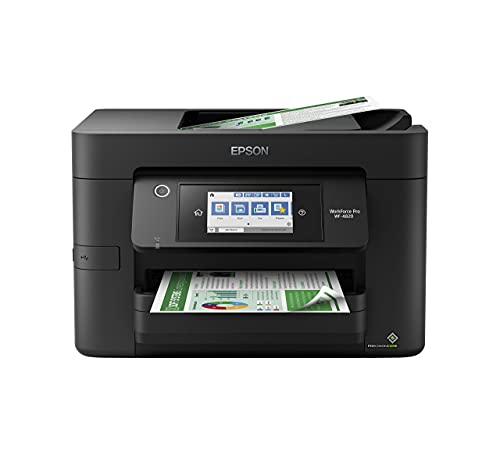
| Epson WorkForce Pro WF-4820 | Busy offices needing capacity | 25 ppm, 35-sheet ADF, 250-sheet tray |
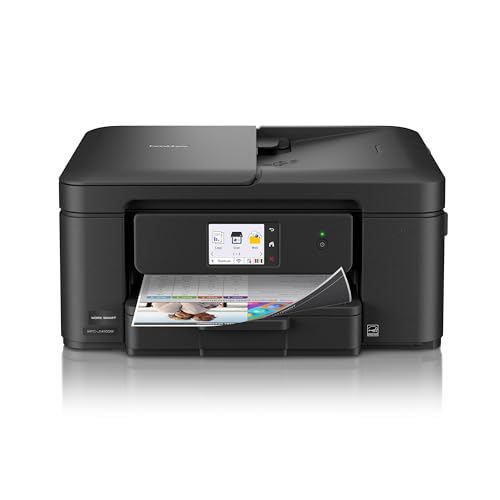
| Brother Work Smart 1410 | Easy navigation with a screen | 2.7-inch touchscreen, auto duplex |
How to Choose
Decide whether you need an automatic document feeder
An ADF lets you scan or copy multi-page documents without lifting the lid for each sheet. If you handle taxes, school forms, or contracts, look for it in the title. The OfficeJet Pro models and the Epson list one, with the Epson naming a 35-sheet capacity. Basic DeskJet models do not list a feeder, so plan to scan page by page.
Duplex and speed
Automatic two-sided printing halves paper use for long documents and is listed on most models here. Speed is stated only on the Epson at up to 25 pages per minute. For a home that prints a few pages a week, speed is irrelevant. For an office printing reports daily, it is the first spec worth reading. Ignore peak-speed claims for photos, which run far slower than text.
Ink plans and cartridge cost
Several HP listings mention a 3-month Instant Ink trial, and the Brother lists a Refresh subscription trial. These plans ship ink based on pages printed, which can lower the cost per page for steady users but leave you tied to the service. Before buying, ask whether you are comfortable with a subscription or prefer standard cartridges and a refillable approach. Budget models cut corners on starter ink volume and paper tray size.
Connectivity and tray capacity
All nine are wireless. Check for dual-band Wi-Fi if your network is crowded, and for a paper tray that fits your habits: the Epson lists a 250-sheet tray, which means fewer refills than a compact home model. Mobile printing support, mentioned on the DeskJet and Envy listings, matters if phones and tablets are your main devices.
Placement and upkeep deserve a mention too. Inkjets dislike long idle periods because ink can dry in the printheads, so a printer that sits unused for weeks needs an occasional test page. Put the printer near your router or confirm it can join a mesh network, and leave room around it for the paper tray and the feeder. Entry tier models suit light use, mid-range tier models add duplex and mobile features, and premium tier office units focus on speed, capacity, and fax.
The 9 Best Options
HP DeskJet 2923
The DeskJet 2923 is the plain entry point: a wireless color inkjet all-in-one that prints, scans, and copies with mobile compatibility. It is aimed at a student dorm or a household that prints a handful of pages a month and wants the lowest commitment.
- Print, scan, and copy in a small wireless package.
- Mobile printing is listed for phones and tablets.
- Trade-off: the title lists no automatic feeder or duplex, so multi-page jobs are manual.
Think of it as a tool for light, predictable use, where the low commitment is the whole appeal. Skip it if you handle documents in bulk or want two-sided printing.
HP DeskJet 2955
The 2955 sits in the same class as the 2923, with the same wireless all-in-one pitch and mobile compatibility. It suits a shared family computer where the printer is used for recipes, school worksheets, and the occasional form.
- Wireless all-in-one with easy-home-printing positioning.
- Color documents and mobile printing are named.
- Trade-off: it is a basic model, and running costs depend heavily on ink choices.
If you already own a DeskJet, this one adds little beyond a refresh, so it matters most to first-time buyers. Skip it if you plan to print daily or need a sheet feeder.
HP Envy 6155
Envy 6155 steps up with duplex printing and a 3-month Instant Ink trial, aimed at home use. It suits a household that prints regularly and wants two-sided output without buying an office-class machine.
- Duplex printing saves paper on longer documents.
- The ink trial lets you test a subscription before committing.
- Trade-off: no feeder is listed, so scanning stacks is slow.
It also fits students who print essays and want a comfortable middle step before office-class hardware. Skip it if you scan multi-page paperwork often.
HP Envy Photo 7975
The Envy Photo 7975 is marketed as a color photo printer with scan and copy, mobile printing, and an Instant Ink trial. It fits families who print school photos, crafts, and invitations alongside regular documents.
- Photo-oriented positioning with print, scan, and copy.
- Easy setup and mobile printing are named.
- Trade-off: the title says nothing about a feeder or speed for document-heavy work.
Photo output is where this line spends its effort, so use photo paper for the best results. Skip it if documents, not photos, are your main output.
HP OfficeJet Pro 8125
The OfficeJet Pro 8125 adds an automatic document feeder and duplex printing to a wireless color all-in-one aimed at home offices. A remote worker who regularly scans contracts and invoices benefits from the ADF immediately.
- ADF plus duplex printing for document work.
- Instant Ink trial included.
- Trade-off: it is larger than the DeskJet line, so desk space matters.
For anyone whose desk doubles as a scanning station, that feeder alone justifies stepping above the household models. Skip it if you only print a few pages a month.
HP OfficeJet Pro 8135
The 8135 builds on the same idea and adds fax to the feature list, plus an ADF and duplex. It is for home offices that still receive faxes or need to send signed forms to institutions that insist on them.
- Fax, ADF, and duplex printing in one unit.
- Home-office positioning with a trial of Instant Ink.
- Trade-off: fax is a niche need and the extra features add bulk.
If your accountant, landlord, or clinic still asks for a fax, having it built in avoids a separate service. Skip it if you have never needed fax.
HP OfficeJet Pro 9135
The 9135 is described for office use, with fax, an ADF, and duplex printing and scanning. Duplex scanning means a feeder can capture both sides of a page in one pass, a real time saver for small offices that digitize paperwork.
- Duplex print and scan listed.
- Fax and ADF cover busy office tasks.
- Trade-off: it is the largest HP here and sits in the premium tier among these models.
Its size and feature set make it a fixed office fixture rather than something you move between rooms. Skip it if your needs are light and occasional.
Epson WorkForce Pro WF-4820
Epson is the speed and capacity pick, listing up to 25 ppm, a 35-sheet ADF, automatic two-sided printing, and a 250-sheet tray. It suits an office where the printer is shared and nobody wants to refill paper daily.
- Stated 25 ppm speed and a 250-sheet tray.
- 35-sheet ADF with fax support.
- Trade-off: it is an office machine, larger than a household model.
A shared tray and a large feeder reduce the small interruptions that make office printers annoying. Skip it if you want a compact printer for a bedroom desk.
Brother Work Smart 1410
Brother pairs a 2.7-inch touchscreen with automatic duplex printing and a Refresh subscription trial. The screen makes menus easier to navigate, which appeals to people who dislike tiny button panels.
- Touchscreen simplifies settings and copying.
- Automatic duplex printing is listed.
- Trade-off: the title mentions a subscription, so check how the plan works.
Read the plan terms carefully so you know what happens to the printer if you stop subscribing. Skip it if you prefer standard cartridges without any plan.
Which One Fits Your Situation
You print a few pages a month
The HP DeskJet 2923 or 2955 is enough. Both keep the purchase small and handle mobile printing. Print a test page every few weeks so the ink stays healthy between uses.
You work from home and scan paperwork
Choose an OfficeJet Pro. The 8125 covers the basics, the 8135 adds fax, and the 9135 adds duplex scanning for heavier use. Match the model to the paperwork you really handle, not the longest feature list.
Your household prints photos and homework
The Envy Photo 7975 suits photo projects, while the Envy 6155 is the better pick if duplex documents matter more.
You share the printer with a team
The Epson WF-4820 is the clear fit for a shared tray and a 35-sheet feeder, with the Brother as an alternative for screen-driven simplicity. Teams that print daily should also compare the tray size and feeder capacity before anything else.
Common Mistakes
- Choosing the cheapest model without checking ongoing ink costs.
- Assuming every all-in-one has an automatic document feeder.
- Signing up for a subscription ink plan without reading the page limits.
- Buying an office-class printer for a household that prints rarely.
- Ignoring tray capacity when many people share one printer, which turns paper refills into a daily chore.
Related guides
- Helping Hands Soldering Station With Magnifier
- Bench Power Supply For Electronics Hobbyists
- Is 8000Hz Polling Rate Worth It For 144Hz Monitor
Frequently Asked Questions
Are inkjet printers cheaper to run than lasers?
It depends on volume. Inkjets cost less upfront, but ink can add up for heavy text printing. Light and mixed color use is where they tend to make the most sense.
Is a subscription ink plan worth it?
For steady printing it can lower the cost per page. For occasional use, regular cartridges may be simpler.
Do I need fax?
Only if your work requires it. Most households can skip fax and save space, and a phone scan or emailed PDF covers most situations.
What does ADF mean?
It stands for automatic document feeder, which scans or copies multi-page documents without placing each sheet on the glass.


