
Key takeaways
- A Mac and a wireless printer should be the easiest pairing in tech, and in many homes it is, thanks to AirPrint.
A Mac and a wireless printer should be the easiest pairing in tech, and in many homes it is, thanks to AirPrint, which lets macOS find and use a compatible printer on the network without a driver download. The catch is that “Mac WiFi printer” covers very different machines: a color laser all-in-one for the family office, a thermal label printer for a shipping table, a receipt printer for a market stall. The right answer depends on what comes out of the paper tray, not on the logo.
This guide is for MacBook, iMac, and Mac mini owners who want to print over Wi-Fi without fighting drivers. The pool leans toward small-business hardware: only one product is a conventional office all-in-one, and the rest are thermal label, receipt, and portable printers that list Mac or AirPrint compatibility. Read the matching section for your use in 2026 and skip the rest.
Quick Picks
Our top picks

 JADENS Bluetooth Thermal Shipping Label Printer
- [HIGH TECH LABEL PRINTER] Equipped with a Japanese…
- [PRINT WIRELESSLY]The label printer support printing wirelessly
- [PRINT VIA USB] USB connection works with both…


 MUNBYN Bluetooth Thermal Label Printer
- Print a wide range of direct thermal labels…
- Save on Long-Term Costs: Designed as a thermal…
- DAC Dynamic Algorithm Tech: As the first thermal…


As an Amazon Associate we earn from qualifying purchases at no extra cost to you.
| Product | Best for | Key spec from the title |
|---|---|---|
| Brother MFC-L3780CDW | General home or office printing | 31 ppm color laser, duplex, dual-band Wi-Fi |
| Rollo Wireless Label Printer | Shipping labels from a Mac | Wi-Fi, 4×6 thermal, AirPrint |
| Phomemo PM64Air | Compact AirPrint label printing | AirPrint, touchscreen, Wi-Fi |
| JADENS Wireless Label Printer | Mixed-device label printing | Bluetooth, 4×6, Mac and Windows |
| MUNBYN Bluetooth Label Printer | Small shop shipping desk | Wireless 4×6, Bluetooth |
| Volcora 80mm Receipt Printer | Point-of-sale counters | USB/WiFi, auto cutter, ESC/POS |
| MUNBYN WiFi Receipt Printer | Register setups with many ports | USB/LAN/RS232, 80mm, Wi-Fi |
| TATTMUSE Portable Printer | Travel and letter-size pages | AirPrint, 8.5×11, 300 dpi, inkless |
How to Choose
AirPrint versus a vendor driver
AirPrint is the lowest-friction route on a Mac: the printer appears in the print dialog and works without installing software. Several listings here, including Rollo, Phomemo, and TATTMUSE, advertise it directly. Printers without AirPrint, such as many receipt models, rely on ESC/POS commands and a vendor utility. That is workable but needs more setup, so decide how much tinkering you will accept.
Match the printer type to the paper
Thermal label printers print on 4×6 label stock and need no ink or toner, which suits shipping. Receipt printers print narrow 80mm rolls for sales slips. The Brother laser prints on standard letter paper in color. Do not buy a label printer for documents or an all-in-one for labels. Check roll width and whether the stock is proprietary, because that sets your ongoing supply cost tier.
Connectivity: Wi-Fi, Bluetooth, and Ethernet
Wi-Fi lets any Mac on the network print, and a dual-band radio, as on the Brother, gives you a faster 5 GHz option. Bluetooth is fine for one computer or phone at a time but does not share across a household. Ethernet or LAN, which the MUNBYN receipt unit lists, is the most stable choice at a fixed counter. Test the Wi-Fi signal where the printer will sit.
Speed, duplex, and where budget models cut corners
Speed matters only when volume does. A 31 pages-per-minute rating suits a busy office, while a label printer is measured by how fast it feeds stickers. Automatic duplex saves paper on the Brother. Budget printers often skimp on app polish, macOS driver updates, and support, so check that the manufacturer lists current macOS compatibility and that setup works without creating an account.
A final planning tip: write down the two or three things you will print most, then count how many people need to print. One user and one document type points to a single dedicated device. Several users and mixed paper types point to a networked all-in-one plus, if you ship parcels, a separate label printer. Budget tier thermal printers have no ink to replace, but stock costs add up, so compare label or roll cost before you fall for a low entry price.
The 8 Best Options
Brother MFC-L3780CDW
The Brother is the only conventional all-in-one in the group: a wireless digital color laser with a stated 31 ppm speed, single-pass duplex copy and scan, and dual-band Wi-Fi. It suits a household or small office that prints contracts, school forms, and the occasional color flyer from a Mac and wants one machine to do everything.
- Color laser with copy and scan in one body.
- Single-pass duplex and dual-band Wi-Fi are listed.
- Trade-off: it is a full-size office machine, so it needs desk space and toner.
Buyers who print a few pages a month may find a laser all-in-one more than they need. Skip it if your only need is shipping labels or receipts.
Rollo Wireless Shipping Label Printer
Rollo is a Wi-Fi 4×6 thermal label printer that lists AirPrint from iPhone and iPad, which is the clearest sign of easy Apple-device printing in this group. It is aimed at online sellers who print a stack of shipping labels each day and want to print straight from a browser.
- Wi-Fi and AirPrint reduce setup friction.
- Thermal printing avoids ink or toner for labels.
- Trade-off: it prints labels only, not regular documents.
It is a one-job tool, which is exactly why it works well on a crowded packing table. Skip it if you also need to print letter-size pages.
Phomemo PM64Air AirPrint Label Printer
Phomemo adds a touchscreen and a label holder to a Wi-Fi, AirPrint thermal label printer for small businesses. The touchscreen allows quick settings changes at the printer itself, which helps when a Mac is not nearby.
- AirPrint support with a built-in touchscreen.
- Label holder keeps rolls organized.
- Trade-off: the title lists compatibility but the full spec sheet should be checked for roll sizes.
Because the screen handles settings, a shared packing station does not depend on one person’s laptop. Skip it if you want a general document printer.
JADENS Bluetooth Thermal Label Printer
JADENS offers a wireless 4×6 thermal label printer with Bluetooth, compatible with Android, iPhone, Windows, and Mac. That broad support suits a seller who prints from a phone at the packing bench and from a Mac at the desk.
- Works across phones and computers per the title.
- Thermal printing means no ink to buy.
- Trade-off: Bluetooth pairs one device at a time rather than sharing over a network.
Look at the listed platforms again before buying so your phone and Mac both pair cleanly. Skip it if several Macs must print to it at once.
MUNBYN Bluetooth Thermal Label Printer
MUNBYN also makes a wireless 4×6 label printer with Bluetooth, aimed at small businesses and compatible with Android, iPhone, Windows, and Mac. It resembles the JADENS in role and fits a shipping table for a small online shop.
- Small-business focus with multi-platform support.
- Thermal 4×6 output suits standard shipping labels.
- Trade-off: it relies on Bluetooth, not network printing.
Treat it as a personal label station for one packer rather than a shared office device. Skip it if you need Wi-Fi sharing across a team.
Volcora 80mm Thermal Receipt Printer
Volcora is a point-of-sale printer with an auto cutter, USB and Wi-Fi interfaces, ESC/POS support, and cash drawer connectivity. It lists Windows, Mac, and Linux compatibility, making it a candidate for a cafe or booth running a Mac-based register.
- Auto cutter speeds up receipt handling.
- ESC/POS support is standard in POS software.
- Trade-off: receipt printers need compatible POS software, and are not AirPrint devices.
Confirm that your point-of-sale app supports ESC/POS before you commit to any receipt printer. Skip it if you want to print documents or shipping labels.
MUNBYN WiFi Thermal Receipt Printer
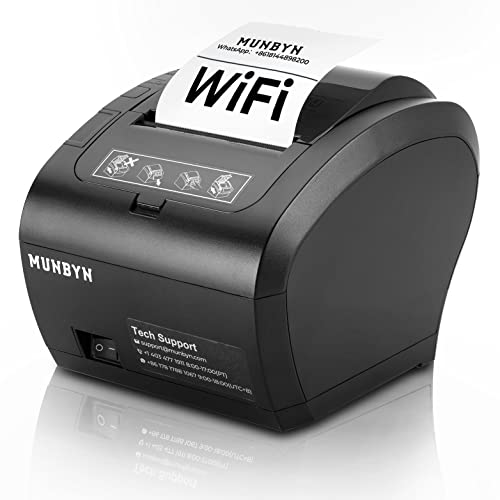
This 80mm POS printer lists Wi-Fi along with USB, LAN, and RS232 ports and compatibility with Mac, Windows, Chromebook, and Linux, plus cash drawer support. The port variety suits shops with older registers and newer tablets side by side.
- Wide port selection for flexible installs.
- Works with several operating systems.
- Trade-off: the many ports can complicate initial setup.
It rewards buyers who already know which interface their register uses. Skip it if you only need a simple plug-and-print home printer.
TATTMUSE AirPrint Inkless Portable Printer
TATTMUSE is a portable inkless thermal printer for letter-size 8.5×11 pages, with AirPrint, Wi-Fi, 300 dpi, a travel case, and extra paper rolls. It is the most document-friendly portable option, useful for printing a boarding form or contract on the road.
- No app required, per the title, thanks to AirPrint.
- Inkless design cuts supply costs.
- Trade-off: thermal paper output is not the same as laser print quality.
It is a convenience tool for a bag, not a replacement for a desk printer. Skip it if you need sharp color documents.
Which One Fits Your Situation
You print documents and the occasional color page
Choose the Brother MFC-L3780CDW. It is the only listing built for general paper printing, with duplex and Wi-Fi. Pair it with a separate label printer only if you also ship parcels.
You sell online and ship daily
Rollo or Phomemo fit best because AirPrint is named in the listing. Choose JADENS or MUNBYN Bluetooth if you print from a phone as often as from a Mac. Whichever you pick, buy the matching label size in a small trial pack first so you can confirm the margins line up with your carrier’s requirements.
You run a counter or market stall
Volcora or the MUNBYN WiFi receipt printer fits. Volcora’s auto cutter is handy, while MUNBYN offers more ports. Either way, set up a test receipt from your register software before opening day, and keep a spare roll under the counter.
You travel and need paper in a bag
TATTMUSE gives you letter-size output without ink, using AirPrint to skip app installs. Its included case and spare rolls make it easy to toss in a laptop bag for client meetings or trade shows.
Common Mistakes
- Buying a label printer expecting it to print letter-size documents.
- Assuming Bluetooth printing works for several users at once.
- Skipping the roll size check on a thermal printer.
- Ignoring macOS compatibility on budget receipt printers.
- Placing the printer where Wi-Fi is weak, then blaming the device, when moving it closer to the router would solve the problem.
Related guides
- Helping Hands Soldering Station With Magnifier
- Bench Power Supply For Electronics Hobbyists
- Is 8000Hz Polling Rate Worth It For 144Hz Monitor
Frequently Asked Questions
Do I need drivers for AirPrint printers on a Mac?
Generally no. AirPrint printers appear in the print dialog on the same network without extra software. Both the Mac and the printer must sit on the same Wi-Fi network, which is the usual reason a printer fails to show up.
Are thermal printers good for everyday documents?
They suit labels and receipts. For documents, a laser or inkjet gives better text and color. The TATTMUSE is the exception worth considering when portability matters more than print quality.
Wi-Fi or Bluetooth for a label printer?
Wi-Fi is better when more than one computer prints. Bluetooth is fine for a single phone or Mac, and it avoids router setup entirely, which some small sellers prefer.
Can a receipt printer work with a Mac?
Some list Mac compatibility, but they need POS software that supports ESC/POS commands. Check your register app first, then pick the printer, not the other way around.


