Key takeaways
- Ten NAS options for a Plex media server compared by bays, CPU, memory, network ports and what each listing says about Plex, with a sizing example.
For most Plex households, the UGREEN DXP2800 or the Asustor Lockerstor 2 are the sensible starting points: two bays, an Intel CPU, Plex named in the title and enough ports for a home network. If the library is large or several people stream at once, the four-bay UGREEN DXP4800 Plus or the Asustor Lockerstor 4 give more room. Every listing here is diskless except the BUFFALO, so budget for drives.
Fast shortlist
Our top picks






As an Amazon Associate we earn from qualifying purchases at no extra cost to you.
- Compact first server: UGREEN DXP2800
- Four bays with transcoding named: UGREEN DXP4800 Plus
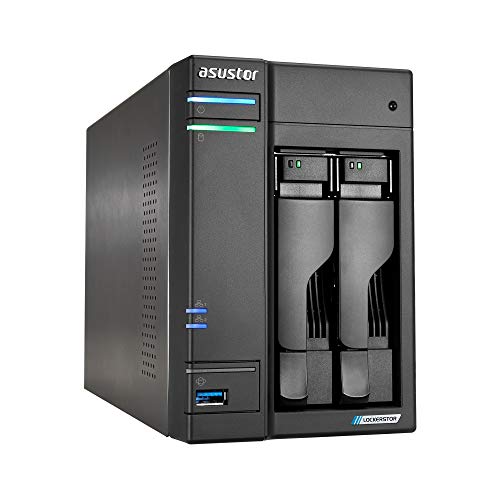
- Plex named, flash slots: Asustor Lockerstor 2
- Biggest archive: Asustor Lockerstor 6
- Small and all-SSD: Asustor Flashstor 6
Comparison table
| Model | Key point from title | Best for |
|---|---|---|
| UGREEN DXP2800 | 2-bay, Intel N100, 8GB DDR5, Plex named | Compact first server |
| UGREEN DH2300 | 2-bay, 4GB, backup focus, no Plex named | Backup first |
| UGREEN DXP4800 Plus | 4-bay, Intel 8505, 10GbE, transcoding | Growing library |
| UGREEN DXP4800 GT | 4-bay, Ryzen R2514, dual 10GbE | Creators on 10GbE |
| BUFFALO LinkStation 210 | 1-bay, 2TB drive included | Simple storage |
| TERRAMASTER F2-425 | 2-bay, x86 quad-core, 4GB | Two-bay media box |
| Asustor AS6702T | 2-bay, 4 M.2, Plex named | Flash plus disks |
| Asustor AS6704T v2 | 4-bay, dual 5GbE, Plex named | Faster network |
| Asustor AS6706T v2 | 6-bay, 8GB, dual 5GbE | Large archives |
| Asustor Flashstor 6 | 6 M.2 slots, all SSD, Plex named | Small fast library |
The ten NAS options
UGREEN DXP2800, the compact 2-bay with an Intel N100
The DXP2800 is a two-bay, diskless NAS with an Intel N100, 8GB of DDR5, 2.5GbE, two M.2 NVMe slots and a 4K HDMI port. The title names Plex, Docker and virtual machines, so Plex is a stated use rather than an afterthought. Diskless means you add the hard drives yourself. Two bays leave room for a mirrored pair, but little room to grow, so plan capacity before buying. Check the listing for which Plex transcoding features this CPU supports. Compare the 8GB figure and the two M.2 slots against the DH2300 and the F2-425 if you are choosing between small boxes.
Pros
- Plex named in the title, plus Docker and VM support
- Two M.2 slots and 2.5GbE on a small box
Cons
- Only two bays, so growth means bigger drives
- Drives are not included
Who it’s for: A first serious Plex server for a household with a modest library.
UGREEN DH2300, the beginner 2-bay
The DH2300 is pitched at beginners and personal users: phone backup, an AI album, private cloud and remote access, file sharing, multi-device backup and home entertainment, with 4GB of RAM on board and no drives. The title does not name Plex, a CPU or a network speed. That makes it a poor match for a Plex-first buyer unless the listing confirms the media server details. Consider it a labeled runner-up that fits a backup-first household that may add streaming later. If photos and phone backups are the real goal, that narrow focus may be a feature, not a flaw.
Pros
- Simple, personal-cloud focus
- Two bays allow a mirrored drive pair
Cons
- Plex and CPU details are not in the title
- 4GB of RAM is the lowest figure among the multi-bay listings
Who it’s for: Phone and photo backup first, with streaming as a maybe.
UGREEN DXP4800 Plus, the 4-bay with 10GbE
This four-bay model lists an Intel 8505, 8GB of DDR5, both 10GbE and 2.5GbE ports, a built-in 128GB SSD and two M.2 NVMe slots. The title promotes 4K home media and hardware transcoding, which are the Plex-relevant claims. Four bays allow more capacity or a different RAID layout than a two-bay box, though the layout you choose changes how much space you keep. Check the listing for what the built-in SSD is used for. Check which RAID levels the operating system offers before planning your drive purchase.
Pros
- Hardware transcoding and 4K media named in the title
- Four bays plus 10GbE and 2.5GbE ports
Cons
- Needs a 10GbE switch to use the faster port
- Drives are not included
Who it’s for: Families with a growing library and several streaming rooms.
UGREEN DXP4800 GT, the dual 10GbE editing box
The DXP4800 GT is a four-bay unit with a Ryzen R2514, 8GB of DDR4, two 10GbE ports and two M.2 NVMe slots. The title speaks to creators: direct NAS editing and dual 10GbE transfers. It does not mention Plex, hardware transcoding or a video output, so confirm how the CPU handles transcoding before you buy it mainly for streaming. If your work involves large files moved across a wired network, the networking is the draw. For a media-only household, the Plus model above puts transcoding in its title and is the clearer choice.
Pros
- Dual 10GbE ports and four bays
- Two M.2 slots for cache or a fast pool
Cons
- Plex and transcoding are not mentioned in the title
- DDR4 memory and a creator focus, not a media focus
Who it’s for: Creators who also run Plex and have a 10GbE network.
BUFFALO LinkStation 210, a 1-bay home cloud
This is not a Plex server on its face: the title describes a one-bay NAS with a 2TB hard drive included, working as a home cloud or network storage. It does not mention a CPU, memory, Plex or transcoding. We include it as a labeled runner-up for people who want simple network storage and might use it as a source of files. With one bay there is no mirrored drive inside, so a single drive failure can mean losing the data unless you keep another copy. If you want Plex later, a diskless multi-bay unit from this list is a better foundation.
Pros
- Drive included, so it works out of the box
- Simple home-cloud use
Cons
- One bay means no mirrored redundancy
- No Plex or hardware details in the title
Who it’s for: Basic storage for someone who does not need a media server.
TERRAMASTER F2-425, a 2-bay with an x86 quad-core
The F2-425 is a diskless two-bay with an Intel x86 quad-core CPU, 4GB of RAM and 2.5GbE. The title calls it a multimedia server for home users, though it does not name Plex. The x86 processor is the useful detail for people who want to run Plex or other apps, and 4GB is enough to start but leaves less room than the 8GB models. Check which operating system, app store and Plex package the listing mentions. Compare it with the UGREEN DXP2800, which names Plex and lists more memory.
Pros
- x86 quad-core CPU and 2.5GbE
- Multimedia server wording for home users
Cons
- Plex not named in the title
- 4GB of RAM and no M.2 slots mentioned
Who it’s for: Home users who want a two-bay media box and will confirm Plex support first.
Asustor Lockerstor 2 Gen2 AS6702T, the Plex-labeled 2-bay
The AS6702T title names Plex Media Server directly, alongside an Intel quad-core CPU, four M.2 NVMe slots, dual 2.5GbE, 4GB of DDR4 and HDMI. It has only two drive bays but four M.2 slots, so it suits a hybrid layout with SSDs for apps and hard drives for the library. The 4GB of RAM is the one figure to weigh if you plan to run many containers. Dual 2.5GbE can help if your switch supports it. It is the only two-bay model in the group with four M.2 slots, which gives you options for caching or fast storage.
Pros
- Plex named in the title with four M.2 slots
- Dual 2.5GbE and an HDMI port
Cons
- Only two drive bays
- 4GB of RAM is on the low side for containers
Who it’s for: A mid-size Plex setup that wants flash storage for apps.
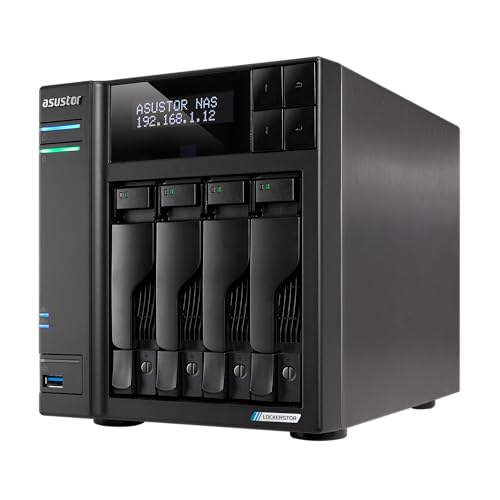
Asustor Lockerstor 4 Gen2+ AS6704T v2, the 4-bay with 5GbE
The AS6704T v2 lists four bays, dual 5GbE ports, 4GB of DDR4, four M.2 SSD slots, HDMI and Plex Media Server by name, plus video editing as a use. The 5GbE ports are the standout, but you need a 5GbE switch or adapter to use them. Four bays give you room for a decent library with a RAID layout of your choice. The 4GB of RAM again is the figure to compare with the 8GB models above. It sits between the Lockerstor 2 and the six-bay in capacity and in cost of drives.
Pros
- Four bays and four M.2 slots
- Dual 5GbE and Plex named in the title
Cons
- Needs 5GbE gear for full speed
- 4GB of RAM
Who it’s for: Households with a larger library and a faster home network.
Asustor Lockerstor 6 Gen2+ AS6706T v2, the 6-bay with 8GB
This six-bay model lists an Intel quad-core CPU, dual 5GbE ports, 8GB of DDR4, four M.2 SSD slots, HDMI and Plex Media Server. Six bays are the most room for hard drives in this group, which suits a big archive or a layout with more redundancy. It is also the largest class here, so check the listing for dimensions and power details, and make sure you have space and ventilation for it. Plan the drive purchase carefully, since filling six bays is the biggest single expense in the build.
Pros
- Six bays and 8GB of RAM
- Dual 5GbE, four M.2 slots and Plex named
Cons
- Largest footprint in the group
- More drives to buy and power
Who it’s for: Large libraries, multi-user households and long-term growth.
Asustor Flashstor 6 FS6706T, the all-SSD 6-bay
Flashstor is a different idea: six M.2 SSD slots instead of 3.5-inch bays, with an Intel quad-core CPU, dual 2.5GbE, 4GB of DDR4, HDMI and Plex Media Server in the title. You will need compatible M.2 SSDs, which may cost more per terabyte than hard drives. It is a good fit for a small, quiet, fast library box rather than a huge archive. Check the listing for compatible SSD sizes before buying. It also has no 3.5-inch bays, so it is not the place for a very large archive built on hard drives.
Pros
- All-SSD design with six M.2 slots
- Plex named in the title
Cons
- SSD capacity can cost more per terabyte than hard drives
- 4GB of RAM
Who it’s for: People who want fast storage in a small box and have a smaller library.
How these were picked
We read every listing title, noted which ones name Plex, a CPU, memory and network speed, and grouped by bays. Sources are published specifications, manufacturer documentation and buyer reviews. Nobody on the team used or measured these units, and we do not claim transcoding results. Two listings, the UGREEN DH2300 and the BUFFALO LinkStation 210, do not name Plex and are labeled runner-ups.
What actually matters for Plex
Transcoding: needed or not?
Plex only transcodes when a device cannot play a file as it is. Many modern TVs can play common formats directly, which needs little CPU. Remote streams, older devices or subtitles that are burned in often trigger transcoding. Hardware transcoding generally requires a paid Plex Pass and a supported chip, so check Plex’s current documentation and the NAS maker’s notes. Listings that mention hardware transcoding or a video output are easier to trust than ones that say nothing.
Bays, RAID and a sizing example
Suppose a library has 300 films averaging 10GB each and 40 seasons of TV at 40GB each. That is 3TB plus 1.6TB, or 4.6TB. Add roughly 30 percent for growth and you need about 6TB of usable space. A two-bay mirror stores one drive’s worth of data, so you would need two 8TB drives. These are illustrative round numbers, not results. RAID protects against one failed drive; it does not replace a separate backup.
Network ports against real needs
2.5GbE suits most households. 5GbE and 10GbE help only if your switch, cables and computers support them, and Plex streams rarely need that much. Choose faster ports for editing or big backups, not for streaming alone.
M.2 slots and memory
Where a listing offers M.2 slots, people commonly use them for apps and the Plex library database, leaving hard drives for media. Check the listing for what the slots can be used for, and prefer 8GB if you plan on running many containers.
Buying slip-ups
- Forgetting to budget for drives on a diskless NAS.
- Assuming a RAID mirror is a backup.
- Paying for 10GbE with no switch that can use it.
- Choosing by bay count without checking that Plex and transcoding are supported.
Verdict
The UGREEN DXP2800 is the all-round starter, the DXP4800 Plus is the four-bay pick with transcoding named, and the Asustor Lockerstor 4 and 6 suit bigger libraries on a faster network. Flashstor is the compact all-SSD option. Confirm Plex support on the listing before you buy.
Related guides
- Helping Hands Soldering Station With Magnifier
- Bench Power Supply For Electronics Hobbyists
- Does The Motherboard Affect Gaming Performance
FAQ
Is hardware transcoding required for Plex?
Not always. If your devices can play your files directly, the NAS mostly serves data. Transcoding becomes important for remote streaming, older devices or burned-in subtitles. Hardware transcoding generally needs a paid Plex Pass and a supported processor, so read Plex’s current documentation and the listing details before you rely on it.
How many bays should a Plex NAS have?
Two bays are enough for a modest library with a mirrored pair. Four bays suit larger libraries or a RAID layout that keeps more capacity. Six bays are for big archives. Work out the library size first, add room for growth, and then pick the bay count that fits that number with the redundancy you want.
Is a diskless NAS cheaper than one with drives?
A diskless NAS is only the enclosure, so you must buy the drives separately. That lets you pick the capacity and drive type you want, but you should add the drive cost to your budget. Look for drives sold for NAS use, check the maker’s compatibility notes, and compare capacity options before deciding how many to buy.
Is RAID the same as a backup for a Plex library?
No. RAID keeps the system running if one drive fails, but it does not protect against deletion, corruption, theft or a fire. Keep a second copy of anything you cannot replace on another device or off site. Your media can often be re-acquired, but personal files such as family photos cannot, so back those up first.
Why are the UGREEN DH2300 and BUFFALO LinkStation listed?
Neither title names Plex. They are included as runner-ups for readers whose main need is backup or simple network storage. If streaming is the priority, one of the listings that names Plex or hardware transcoding is a safer starting point, and the listing page should confirm app support before you order.