The best 144Hz laptops for smooth gaming in 2026 are the Lenovo Legion 5i for balanced performance, the ASUS ROG Strix G16 for higher frame rates, the Lenovo LOQ 15 for value, and the Acer Nitro V 15 for the lowest-cost entry into high-refresh gaming.
A 144Hz screen can display a new frame every 6.94 milliseconds, but refresh rate alone does not guarantee smooth motion. The panel also needs a reasonably fast response time, the GPU must render close to 144 frames per second, and the cooling system must prevent performance from dropping after several minutes. The choices below focus on that complete package rather than treating “144Hz” as the only specification that matters.
Our top picks
 HP Victus Gaming 15 Laptop: 15.6" FHD
- 『 Immersive Visual Experience 』15.6" FHD IPS 1920…
- 『 Power-Packed Performance 』Intel i5-13420H → 8 cores…
- 『 Lightning-Fast Memory & Storage 』8 GB DDR4…
 HP Victus 15.6" Full HD 144Hz Gaming
- Powered by an Intel Core i5 12th Gen…
- Equipped with an NVIDIA GeForce RTX 3050 6GB…
- Includes Up to 64GB of DDR4-3200 RAM for…
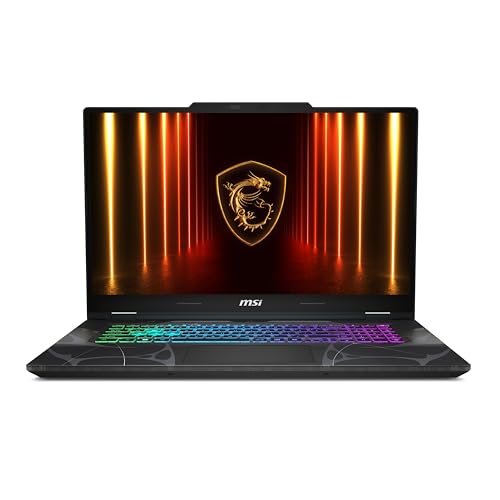 msi Cyborg 17 17.3" FHD 144Hz Gaming
- Thin & Light 17.3” Gaming Powerhouse: Experience big-screen…
- Powered by Intel Core 7-240H for Smooth, Responsive…
- RTX 5060 Graphics for Next-Gen Gameplay & AI-Boosted…
| Product | Key specs | |
|---|---|---|
| HP Victus Gaming 15 Laptop: 15.6" FHD | 『 Immersive Visual Experience 』15.6" FHD IPS 1920… 『 Power-Packed Performance 』Intel i5-13420H → 8 cores… 『 Lightning-Fast Memory & Storage 』8 GB DDR4… | Check price |
| HP Victus 15.6" Full HD 144Hz Gaming | Powered by an Intel Core i5 12th Gen… Equipped with an NVIDIA GeForce RTX 3050 6GB… Includes Up to 64GB of DDR4-3200 RAM for… | Check price |
| msi Cyborg 17 17.3" FHD 144Hz Gaming | Thin & Light 17.3” Gaming Powerhouse: Experience big-screen… Powered by Intel Core 7-240H for Smooth, Responsive… RTX 5060 Graphics for Next-Gen Gameplay & AI-Boosted… | Check price |
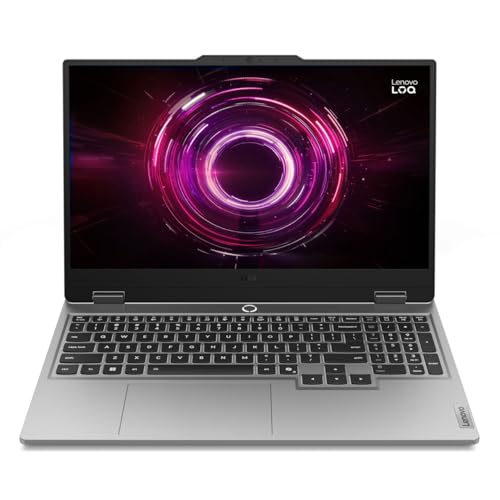 Lenovo LOQ 15.6" IPS FHD 144Hz AMD | Performance That Dominates: Equipped with an AMD Ryzen… Stunning Visuals: The 15.6" Full HD IPS LCD… Smart Connectivity: Wi-Fi 6 and Bluetooth 5.3 deliver… | Check price |
As an Amazon Associate we earn from qualifying purchases at no extra cost to you.
Best 144Hz laptops at a glance
| Laptop | Typical gaming configuration | Display | Panel response | Weight | Battery expectation |
|---|---|---|---|---|---|
| Lenovo Legion 5i 16 | Core i7/Core Ultra 7, RTX 4060 or RTX 5070 | 16-inch, 16:10, 144Hz or faster, 350–500 nits | About 7–12ms, configuration-dependent | About 2.3kg | 5–8 hours of light work |
| ASUS ROG Strix G16 | Core i7/Core Ultra 9, RTX 4060–RTX 5070 Ti | 16-inch, 16:10, 144Hz or faster, about 300–500 nits | About 5–10ms, panel-dependent | About 2.5kg | 5–7 hours of light work |
| Lenovo LOQ 15 | Core i5/Ryzen 7, RTX 4050 or RTX 4060 | 15.6-inch, 16:9, 144Hz, roughly 300–350 nits | About 8–15ms, panel-dependent | About 2.4kg | 4–6 hours of light work |
| Acer Nitro V 15 | Core i5/Core 7, RTX 4050 or RTX 4060 | 15.6-inch, 16:9, 144Hz, about 250–300 nits | About 10–20ms, configuration-dependent | About 2.1kg | 5–7 hours of light work |
| HP OMEN 16 | Core i7/Ryzen 7, RTX 4060 or RTX 4070 | 16.1-inch, 16:10, 144Hz or faster, about 300–400 nits | About 7–12ms, panel-dependent | About 2.4kg | 5–8 hours of light work |
These are representative ranges, not universal specifications. Manufacturers frequently sell the same laptop under several regional part numbers, and the display, battery, GPU power limit, and memory can change between them. Check the exact configuration before buying.
Our picks by type of buyer
Best overall: Lenovo Legion 5i 16
The Legion 5i 16 is the safest all-round choice when you want high frame rates without moving into the largest or most expensive gaming machines. An RTX 4060 configuration is well matched to a 144Hz 1080p or 1600p display in competitive games, while an RTX 5070-class configuration gives more headroom for demanding single-player titles.
Its main advantages are a sturdy chassis, a comfortable keyboard, useful port selection, and cooling that is generally more consistent than budget gaming laptops. The screen options matter: choose the brighter panel if you also work near windows, and avoid assuming that every 144Hz version has the same color coverage or response behavior. Expect fan noise while gaming, but sustained performance is usually the reason to choose this model over a thinner laptop.
Best for maximum frame rates: ASUS ROG Strix G16
The ROG Strix G16 is the better pick for players who prioritize GPU performance over portability. Higher-power RTX 4060, RTX 4070, and newer RTX 5070-class configurations can maintain high frame rates in esports games and provide stronger results with ray tracing than value models.
The advantage is not just the graphics chip. Larger cooling hardware and a substantial power adapter help the GPU maintain its speed during long sessions. The trade-offs are weight, fan noise, and a less discreet design. A fast 144Hz panel is enough for most players, but if you mainly play Counter-Strike 2, Valorant, or Overwatch 2, a 240Hz option may be worthwhile when its response time is also good.
Best value: Lenovo LOQ 15
The LOQ 15 is the strongest choice for buyers who want a dedicated GPU without paying for premium materials. With an RTX 4050, it can deliver high settings at 1080p in many games; an RTX 4060 version is a better long-term purchase if the price difference is reasonable and the laptop has 16GB of RAM.
The 144Hz screen is useful for competitive gaming, but brightness is a common limitation. Around 300 nits is acceptable indoors and less comfortable in strong daylight. Response times also vary more than the product name suggests, so look for measurements of the exact display code where possible. The plastic chassis is practical rather than luxurious, and the battery is modest, but the keyboard, upgrade access, and performance-per-dollar are compelling.
Best lower-cost option: Acer Nitro V 15
The Nitro V 15 makes sense when the purchase price matters most. An RTX 4050 paired with the 144Hz display is capable of smooth 1080p gaming after sensible settings adjustments, particularly in competitive games. It is also somewhat lighter than many 16-inch alternatives.
Its compromises are clearer: the screen may be dimmer, the chassis can feel more flexible, and the fans become noticeable under load. Some configurations use a lower-power GPU than similarly named competitors, so compare GPU wattage rather than looking only at “RTX 4050.” This is a good starter gaming laptop, but the LOQ 15 or Legion 5i is usually the better ownership choice if the budget can stretch.
Best for a larger work-and-play machine: HP OMEN 16
The HP OMEN 16 occupies the middle ground between the LOQ and more aggressively styled performance laptops. Its 16.1-inch screen gives games and productivity applications more space, while RTX 4060 and RTX 4070 configurations can sustain strong 1080p or 1600p performance.
Check the precise display before ordering. OMEN configurations can differ substantially in brightness, resolution, and refresh rate. The machine is suitable for everyday work, but it remains a gaming laptop: the charger is large, the fans are audible in demanding games, and battery life falls sharply when gaming away from a wall outlet.
Head-to-head: what matters beyond 144Hz?
Response time: A 144Hz refresh cycle lasts 6.94ms. A panel with a 20ms transition can therefore show visible trailing even though its refresh rate is high. For competitive games, aim for measured transitions near 7–10ms or less. Many advertised “1ms” figures use an optimistic measurement mode and should not be treated as a universal result.
GPU performance: The RTX 4050 is adequate for 1080p esports gaming and medium-to-high settings. The RTX 4060 is the more comfortable target for new games because its 8GB of VRAM provides more room for high-resolution textures. RTX 4070 and RTX 5070-class laptops are more appropriate for 1600p panels, ray tracing, or users who want to keep the laptop for several years.
Brightness: Around 250 nits works in a dim room but looks washed out near a bright window. Around 300–350 nits is a better minimum for mixed use, while 400 nits or more is preferable for daytime work. Brightness does not improve frame rate, but it strongly affects whether the laptop is pleasant to use outside a gaming session.
Thermals: Laptop CPUs can run at high temperatures without immediate damage, but heat and power limits can reduce clock speeds. Look for reviews showing performance after 15–30 minutes, not just a short benchmark. A laptop that is slightly slower in the first minute but holds its speed is better for long gaming sessions than one that briefly produces a higher score.
Battery life: Gaming on battery usually reduces performance and may last only one to two hours. The quoted light-use figures in the table assume web browsing, video, and office work with the discrete GPU mostly inactive. Battery capacity also matters: a 60Wh battery may be noticeably less useful than an 80Wh or 90Wh battery, even when both laptops use similar processors.
Decision matrix for choosing the right model
| Your situation | Recommended choice | Configuration to seek | Main compromise |
|---|---|---|---|
| First gaming laptop on a tight budget | Acer Nitro V 15 | RTX 4050, 16GB RAM, 144Hz display | Dimmer screen and less refined cooling |
| Best balance for frequent gaming | Lenovo Legion 5i 16 | RTX 4060, 16GB or 32GB RAM, brighter panel | Heavy charger and audible fans |
| Competitive gaming at a desk | ASUS ROG Strix G16 | High-power RTX 4060 or better, fast-response panel | Heavier and less portable |
| Gaming and college or office work | HP OMEN 16 | RTX 4060, 16:10 display, at least 300 nits | Exact screen quality varies by region |
| Value-focused 1080p gaming | Lenovo LOQ 15 | RTX 4060 if affordable, 16GB RAM | Battery life and brightness are average |
How to keep a high-refresh laptop performing well
- Use the original charger while gaming; USB-C power is often insufficient for full GPU performance.
- Raise the rear of the laptop by 1–2cm or use a ventilated stand. This can improve airflow without forcing the fans to work as hard.
- Clean the intake and exhaust areas every few months, especially in dusty rooms. Do not block vents with a bed, blanket, or soft sofa.
- Set the display to 144Hz in Windows and in the game. Some laptops ship at 60Hz to conserve battery.
- Use a frame-rate limit slightly below the panel’s maximum, such as 141fps for a 144Hz screen, to reduce heat and improve frame pacing.
- Upgrade to 32GB RAM if you stream, edit video, or play memory-heavy games. Confirm that the model has accessible memory slots before purchase.
Dust buildup, worn fans, a degraded battery, and a loose charging connector are more likely long-term problems than the panel suddenly losing its refresh rate. Treat the display gently, avoid carrying the laptop by one corner, and leave room in the budget for a replacement charger or battery several years down the line.
Final verdict
Choose the Lenovo Legion 5i 16 if you want the most balanced best 144Hz laptops package. Choose the ASUS ROG Strix G16 for sustained GPU performance and desk-based competitive gaming. The Lenovo LOQ 15 offers the best value when configured with an RTX 4060, while the Acer Nitro V 15 is the sensible low-cost starting point. Whichever model you choose, verify the exact panel brightness, response measurements, GPU power limit, and battery capacity—not just the 144Hz label.
More from Amazon
Programs that pair well with the guide above. Offers and eligibility are set by Amazon and may change.
Free shipping on eligible items, Prime Video and more. Eligible new members can start with a free trial.
Start a Prime free trialAd-free music streaming. Eligible new subscribers can start with a free trial.
Try Music Unlimited freeA Prime membership for ages 18-24 with a trial period. Eligibility is set by Amazon.
See Prime for Young AdultsAudiobooks and podcasts to listen to on the go. Eligible new members can start with a free trial.
Try Audible freeAs an Amazon Associate we earn from qualifying purchases.