
Key takeaways
- Best Wi-Fi 7 router under $300 —
/best-wifi-7-router-under-300/ - Best mesh Wi-Fi system under $300 —
/best-mesh-wifi-system-under-300/ - Best 2.5GbE network switch under $200 —
/best-2-5gbe-network-switch-under-200/
A $400 budget is the sweet spot for Wi-Fi 7. Below $200 the 6 GHz band and multi-gig ports are often cut down, and above $400 you pay for flagship speeds most homes will never use. Between $200 and $400, you can buy a genuine tri-band Wi-Fi 7 router with a 6 GHz radio, 2.5 Gbps or 10 Gbps wired ports, and enough power for a busy household.
This guide covers five real routers sold on Amazon US in November 2026, in configurations that fit the under-$400 budget at the time of research. Prices change often, so treat any price below as a snapshot and check the current price before you buy. We have not bench-tested these units.
Top pick: the TP-Link Archer BE550 is the best Wi-Fi 7 router under $400 for most buyers, pairing a real tri-band radio with five 2.5 Gbps ports at a price that often falls well under budget. If you want a 10 Gbps port, the ASUS RT-BE92U and RT-BE88U below do it without crossing $400.
Quick Picks
| Product | Best for | Key specs | Price note |
|---|---|---|---|
| TP-Link Archer BE550 | Best overall | Tri-band BE9300, 6 GHz, 5x 2.5G, up to 2,000 sq. ft. | Check current price; list $299.99, seen around $185–$200 on sale |
| NETGEAR Nighthawk RS300 | Best tri-band for gaming and streaming | Tri-band BE9300, 6 GHz, 2.5G WAN, up to 2,500 sq. ft. | Check current price; seen around $270–$300 |
| ASUS RT-BE92U | Best tri-band value with 10G | Tri-band BE9700, 6 GHz, 1x 10G + 2.5G, up to 2,750 sq. ft. | Check current price; seen around $220–$290 |
| ASUS RT-BE86U | Best for wired multi-gig | Dual-band BE6800, 1x 10G WAN/LAN, quad-core 2.6 GHz | Check current price; seen around $199–$250 |
| ASUS RT-BE88U | Best premium pick under $400 | Dual-band BE7200, 10G + 10G SFP+, 4x 2.5G LAN | Check current price; seen around $300–$350 |
How to Choose a Wi-Fi 7 Router Under $400
Start with the bands, not the headline speed. A tri-band router has separate 2.4 GHz, 5 GHz, and 6 GHz radios. The 6 GHz band is the main reason to buy Wi-Fi 7: wide, clean, and fast for nearby devices, and Multi-Link Operation (MLO) lets a Wi-Fi 7 device use two bands at once for lower latency. Dual-band routers skip 6 GHz entirely, a poor trade if you own Wi-Fi 6E or Wi-Fi 7 gear. Three picks here are tri-band; the two dual-band picks earn their place with 10 Gbps ports.
Count the wired ports before you buy. A 2.5 Gbps WAN port matters once your internet plan passes 1 Gbps, and 2.5 Gbps LAN ports matter for a NAS, a desktop, or a wired backhaul to a mesh node. Check the exact port list: some routers advertise “multi-gig” while only the WAN port runs faster than 1 Gbps.
Match coverage to your home. Manufacturer coverage figures assume open floor plans and few walls. If your home is large or multi-story, buy a router with mesh support (AiMesh for ASUS, EasyMesh for TP-Link) so you can add a node later. The 6 GHz band is fast but short-range, so do not expect it to reach the far bedroom.
Check the security and subscription model. ASUS includes AiProtection free for life, with no subscription. TP-Link’s HomeShield includes a free tier, with paid features on top. NETGEAR charges a subscription for Armor security and advanced parental controls after the trial — over three years, that can erase the price advantage of a cheaper router.
Do not pay for speed your plan cannot use. A BE9700 headline number is the sum of all three bands at once, which no single device ever reaches. What matters is the speed of the band your devices actually use.
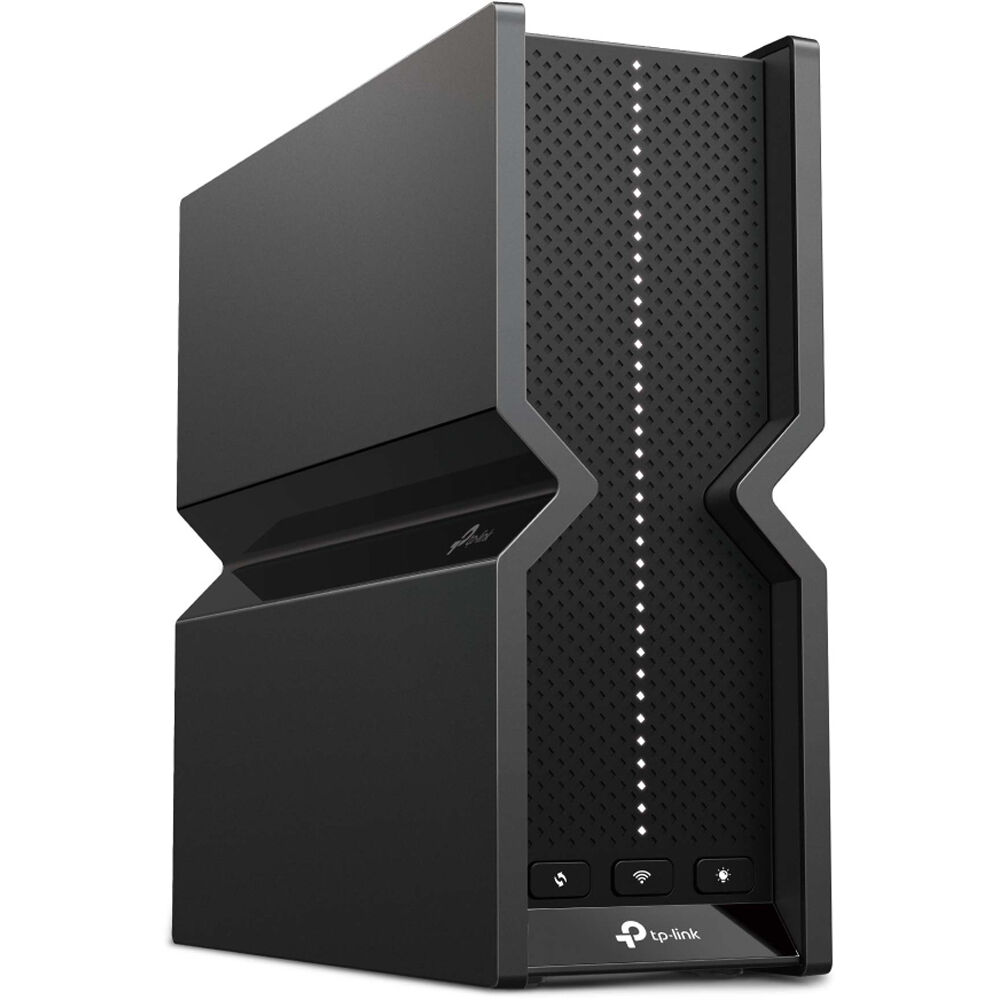
1. TP-Link Archer BE550 — Best Overall
Best for: Most homes that want tri-band Wi-Fi 7 and multi-gig wired ports without flagship prices.
The Archer BE550 is the router this budget was made for: tri-band Wi-Fi 7 rated BE9300, with a real 6 GHz radio, 320 MHz channels, 4096-QAM, and Multi-Link Operation. Its five Ethernet ports all run at 2.5 Gbps, so a gigabit-plus plan, a NAS, and a wired desktop can all run at full speed at once. TP-Link rates coverage at up to 2,000 sq. ft., and EasyMesh support lets you add a satellite later.
Specs: Tri-band Wi-Fi 7 (BE9300); 2.4, 5, and 6 GHz radios; 5x 2.5 Gbps Ethernet (1 WAN/LAN + 4 LAN); USB 3.0; coverage up to 2,000 sq. ft.; EasyMesh; HomeShield free tier.
Pros: Real tri-band Wi-Fi 7 with a 6 GHz radio at a mid-range price; all five ports are 2.5 Gbps; mesh-expandable; no security subscription required for the basics.
Cons: List price is $299.99, so the value depends on catching a sale; no 10 Gbps port; TP-Link has faced US regulatory scrutiny over its networking products, so keep firmware updated.
Who it is best for: Households with a gigabit or 2 Gbps plan, a mix of Wi-Fi 7 and older devices, and a NAS or wired PC.
Check price on Amazon — TP-Link Archer BE550
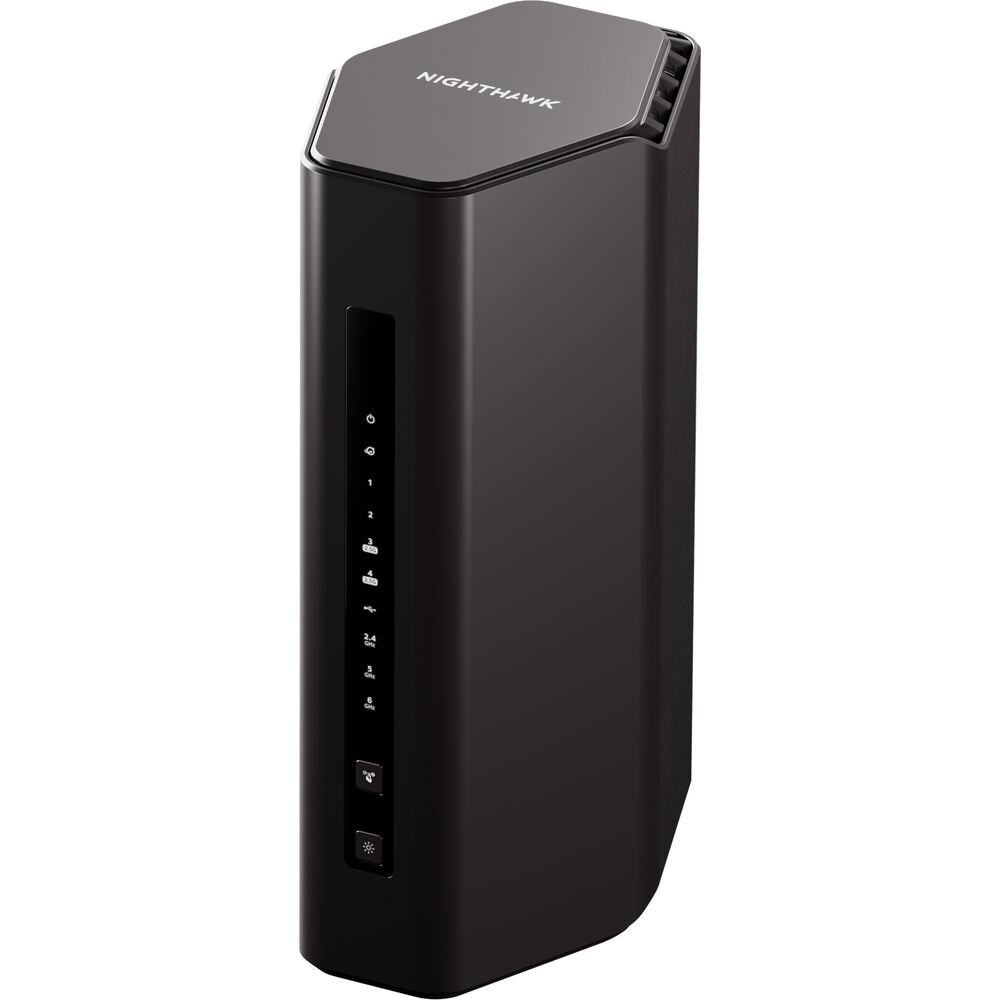
2. NETGEAR Nighthawk RS300 — Best Tri-Band for Gaming and Streaming
Best for: Gamers and streamers who want tri-band Wi-Fi 7 and a simple setup.
The Nighthawk RS300 is NETGEAR’s tri-band BE9300 router, with 2.4, 5, and 6 GHz radios and the same Wi-Fi 7 features as the BE550: MLO, 320 MHz channels, and 4096-QAM. Independent testing in 2026 rated its 5 GHz and 6 GHz performance excellent, with slightly weaker 2.4 GHz range. It covers up to 2,500 sq. ft. and handles around 100 devices. The wired side is more modest: one 2.5 Gbps WAN port, two 2.5 Gbps LAN ports, and two gigabit LAN ports, plus USB 3.0.
Specs: Tri-band Wi-Fi 7 (BE9300); 2.4, 5, and 6 GHz radios; 1x 2.5 Gbps WAN, 2x 2.5 Gbps LAN, 2x 1 Gbps LAN; USB 3.0; coverage up to 2,500 sq. ft.; around 100 devices.
Pros: Tri-band Wi-Fi 7 with strong 5 GHz and 6 GHz performance; simple app setup; a solid choice for a gaming household without five multi-gig ports.
Cons: Only three multi-gig ports in total; Armor security and advanced parental controls are paid after the trial; 2.4 GHz range is weaker than the competition in tests.
Who it is best for: Gamers and streamers in a mid-size home who want tri-band Wi-Fi 7 and easy setup, and connect most devices over Wi-Fi.
Check price on Amazon — NETGEAR Nighthawk RS300
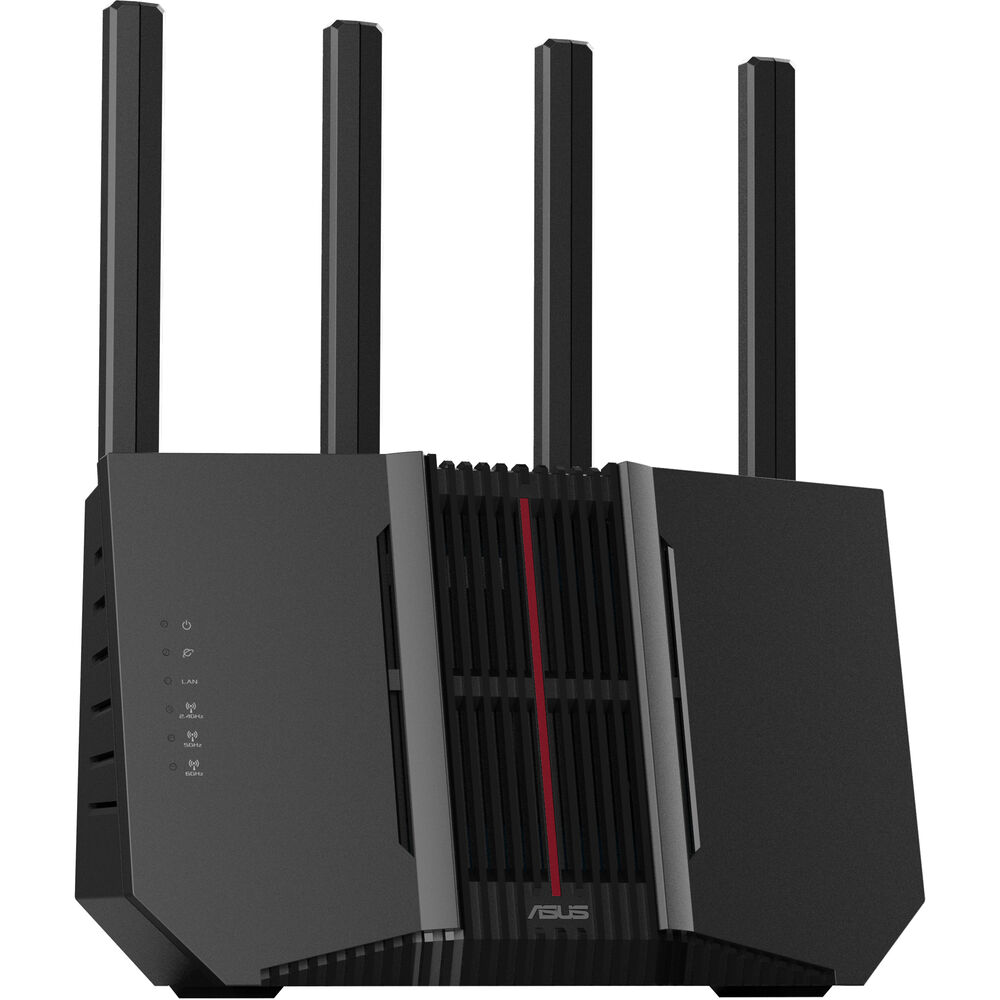
3. ASUS RT-BE92U — Best Tri-Band Value with 10G
Best for: Buyers who want tri-band Wi-Fi 7 and a 10 Gbps port at the lowest price.
The RT-BE92U is the most interesting router in this roundup: a tri-band BE9700 router — slightly faster on paper than the BE9300 pair above — with a 6 GHz radio, MLO, and 320 MHz channels, plus a 10 Gbps WAN/LAN port the BE550 and RS300 lack. The rest of the wired side is four 2.5 Gbps ports, giving up to 20 Gbps of total wired capacity. ASUS rates coverage at up to 2,750 sq. ft., and AiMesh support lets it join or lead a mesh system later. AiProtection is free for life.
Specs: Tri-band Wi-Fi 7 (BE9700); 1,032 Mbps on 2.4 GHz, 2,882 Mbps on 5 GHz, 5,764 Mbps on 6 GHz; 1x 10 Gbps WAN/LAN, 1x 2.5 Gbps WAN/LAN, 3x 2.5 Gbps LAN; USB 3.2; coverage up to 2,750 sq. ft.; quad-core 2.0 GHz, 1 GB RAM; AiMesh; AiProtection free for life.
Pros: Tri-band Wi-Fi 7 plus a real 10 Gbps port under $300 on sale; the widest coverage rating here; free lifetime security; AiMesh support.
Cons: Only one 10 Gbps port, so you cannot wire two multi-gig devices at full speed at once; some owners report occasional firmware instability, so update on arrival.
Who it is best for: Homes with a 2 Gbps fiber plan, or buyers who want a 10 Gbps port while keeping tri-band Wi-Fi 7 and the widest coverage here.
Check price on Amazon — ASUS RT-BE92U
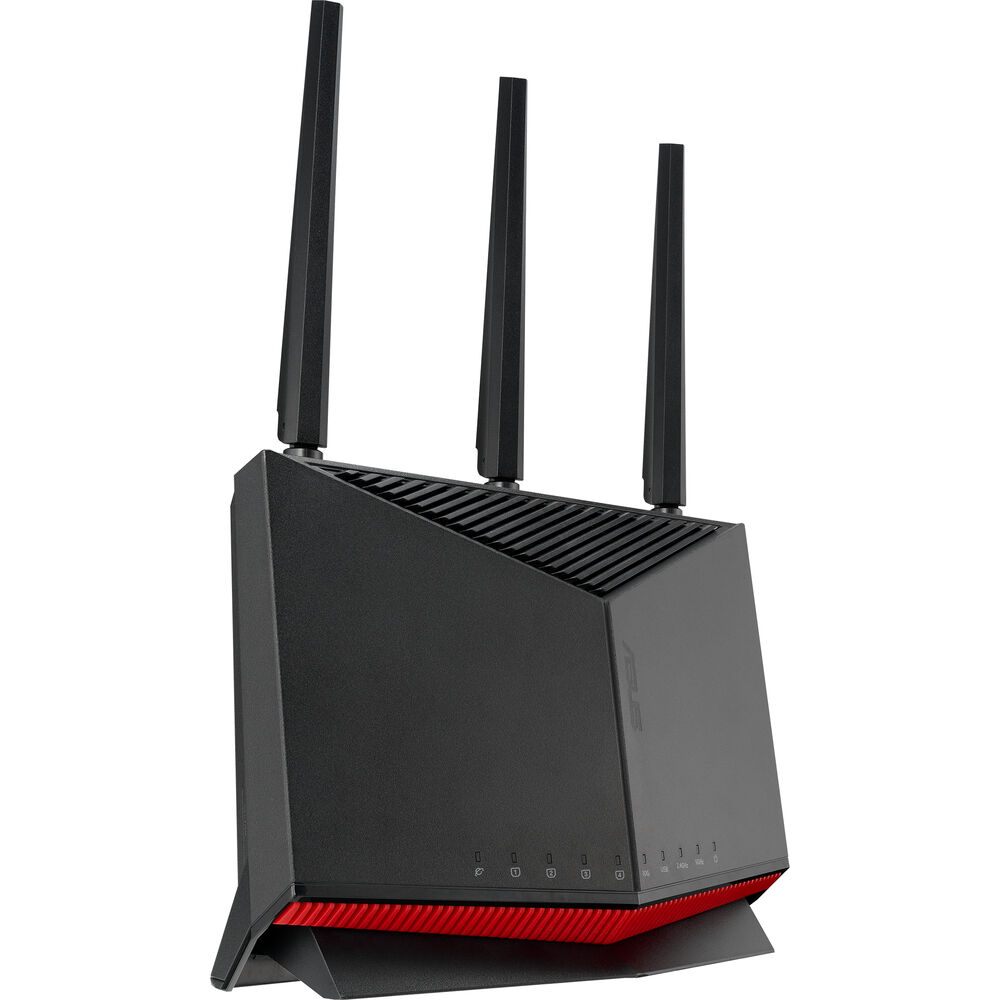
4. ASUS RT-BE86U — Best for Wired Multi-Gig
Best for: Gamers and wired-network users who care more about Ethernet than 6 GHz.
The RT-BE86U is the odd one out: a dual-band Wi-Fi 7 router with no 6 GHz radio. What it offers instead is a 10 Gbps WAN/LAN port, a quad-core 2.6 GHz processor, and ASUS’s Adaptive QoS for gaming traffic. Independent testing rated its 5 GHz performance on par with the more expensive RT-BE88U below. It supports AiMesh, includes AiProtection free for life, and suits households where the important devices are wired.
Specs: Dual-band Wi-Fi 7 (BE6800); 2.4 and 5 GHz radios, no 6 GHz; 1x 10 Gbps WAN/LAN plus 2.5 Gbps ports; quad-core 2.6 GHz; Adaptive QoS; AiMesh; AiProtection free for life.
Pros: A 10 Gbps port and strong 5 GHz performance for around $200 on sale; Adaptive QoS for gaming traffic; free lifetime security; AiMesh expandable.
Cons: No 6 GHz band, so it is not a true tri-band Wi-Fi 7 router and will age faster than the tri-band picks; Wi-Fi 7 devices cannot use MLO across a 6 GHz link.
Who it is best for: Gamers with a wired PC or console, and buyers who want 10 Gbps networking at the lowest price in this guide.
Check price on Amazon — ASUS RT-BE86U
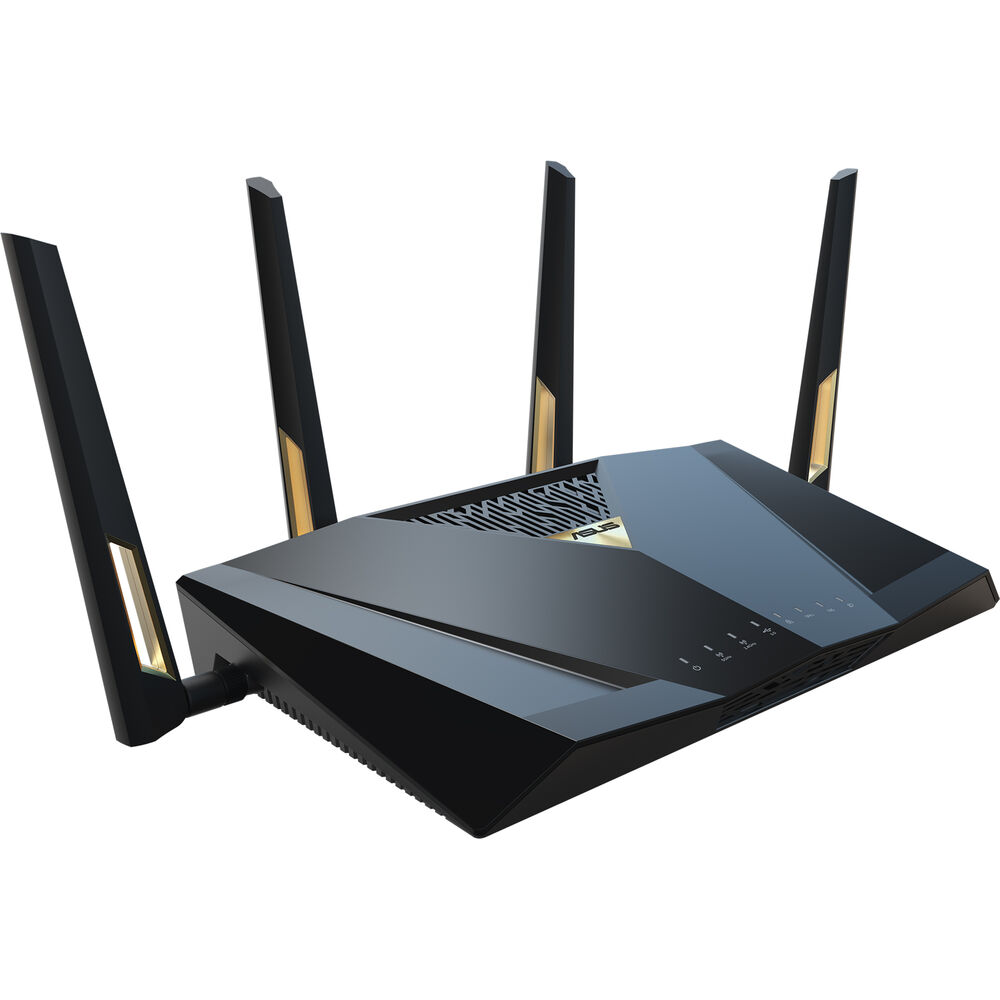
5. ASUS RT-BE88U — Best Premium Pick Under $400
Best for: Power users who want the most wired capacity and the strongest dual-band Wi-Fi 7 under $400.
The RT-BE88U is the premium dual-band pick: Wi-Fi 7 rated BE7200, a 10 Gbps WAN/LAN port, a 10 Gbps SFP+ port, and four 2.5 Gbps LAN ports. That wired lineup is unmatched under $400 and suits a home with a NAS, a multi-gig switch, or a wired backhaul to mesh nodes. Like the RT-BE86U, it has no 6 GHz radio.
Specs: Dual-band Wi-Fi 7 (BE7200); 2.4 and 5 GHz radios, no 6 GHz; 1x 10 Gbps WAN/LAN, 1x 10 Gbps SFP+, 4x 2.5 Gbps LAN; AiMesh; AiProtection free for life.
Pros: The best wired port selection under $400, including two 10 Gbps connections; strong dual-band Wi-Fi 7; free lifetime security; AiMesh expandable.
Cons: No 6 GHz band at a price where tri-band rivals exist; the SFP+ port needs a module or DAC cable, which adds cost; overkill for homes on a sub-gigabit plan.
Who it is best for: Power users with a NAS or a multi-gig wired network who want maximum wired capacity and will give up the 6 GHz band to get it.
Check price on Amazon — ASUS RT-BE88U
What to Avoid
Do not buy on the headline speed number alone. BE9300, BE9700, and BE7200 are totals across all bands. A dual-band router with a big number but no 6 GHz radio is not the same product as a tri-band one.
Do not assume every port is multi-gig. Some routers advertise “multi-gig” while only the WAN port exceeds 1 Gbps. Count the 2.5 Gbps and 10 Gbps LAN ports separately and match them to your wired devices.
Do not ignore the subscription cost. NETGEAR Armor and advanced parental controls are paid after the trial. ASUS AiProtection is free for life. Over the life of the router, that difference can exceed $100, which changes which router is actually cheaper.
Do not buy a router your internet plan cannot feed — or one that chokes it. A 10 Gbps port is wasted on a 300 Mbps plan, and a gigabit WAN port wastes a 2 Gbps plan. Match the WAN port to your plan first.
Do not skip the firmware update. Wi-Fi 7 routers are still receiving meaningful firmware fixes in 2026. Update on arrival, then re-test your dead zones before the return window closes.
FAQ
What is the best Wi-Fi 7 router under $400?
For most homes, the TP-Link Archer BE550: the only pick here that combines a tri-band 6 GHz radio with five 2.5 Gbps ports at a price that often falls to around $200 on sale. If you need a 10 Gbps port, the ASUS RT-BE92U is the better buy, since it keeps tri-band Wi-Fi 7 and adds 10 Gbps for a similar price.
Is a tri-band Wi-Fi 7 router worth it under $400?
Yes, if you own Wi-Fi 6E or Wi-Fi 7 devices. The 6 GHz band is the main upgrade Wi-Fi 7 offers: more spectrum, less congestion, and Multi-Link Operation for lower latency. If every device in your home is Wi-Fi 5 or older, a dual-band router with better wired ports, like the ASUS RT-BE86U, is the smarter spend.
Do I need a 10 Gbps port on a Wi-Fi 7 router?
Only if your internet plan exceeds 1 Gbps, or you move large files to a NAS at multi-gig speeds. For a 1 Gbps plan, 2.5 Gbps ports are the right match. A 10 Gbps port is cheap future-proofing at this budget, not a necessity.
Can these routers work as a mesh system later?
The TP-Link BE550 supports EasyMesh and the three ASUS routers support AiMesh, so you can add a node instead of replacing the router. Mesh systems do not mix across brands, so check node compatibility first.
Will a Wi-Fi 7 router under $400 work with my old devices?
Yes. Wi-Fi 7 routers are backward compatible with Wi-Fi 6, Wi-Fi 5, and older devices, which connect on the 2.4 GHz and 5 GHz bands as before. Only Wi-Fi 7 devices can use the 6 GHz band and Multi-Link Operation.
Verdict
The TP-Link Archer BE550 is the best Wi-Fi 7 router under $400 for most buyers: real tri-band Wi-Fi 7, five 2.5 Gbps ports, and a sale price that leaves room for a mesh node later. If your internet plan is 2 Gbps or faster, buy the ASUS RT-BE92U instead — it keeps tri-band Wi-Fi 7 and adds a 10 Gbps port for about the same money. Gamers who want simple setup and strong wireless performance should look at the NETGEAR Nighthawk RS300, while wired-first households should choose between the ASUS RT-BE86U for value and the ASUS RT-BE88U for maximum wired capacity.
Whichever you choose, check the exact configuration and current price on Amazon before you buy — Wi-Fi 7 prices move with every sale.
As an Amazon Associate, we earn from qualifying purchases.
Suggested internal links for gizmopc.com
- Best Wi-Fi 7 router under $300 —
/best-wifi-7-router-under-300/ - Best mesh Wi-Fi system under $300 —
/best-mesh-wifi-system-under-300/ - Best 2.5GbE network switch under $200 —
/best-2-5gbe-network-switch-under-200/
More from Amazon
Programs that pair well with the guide above. Offers and eligibility are set by Amazon and may change.
Free shipping on eligible items, Prime Video and more. Eligible new members can start with a free trial.
Start a Prime free trialAd-free music streaming. Eligible new subscribers can start with a free trial.
Try Music Unlimited freeA Prime membership for ages 18-24 with a trial period. Eligibility is set by Amazon.
See Prime for Young AdultsAudiobooks and podcasts to listen to on the go. Eligible new members can start with a free trial.
Try Audible freeAs an Amazon Associate we earn from qualifying purchases.
