Key takeaways
- Find the best network integrated amplifiers for desktop audio systems, with streaming, power, and desk-friendly sizing explained so you can pick the right one.
A desktop setup leaves little room for extra boxes, so the real decision is whether one compact unit can handle streaming, conversion, and amplification without a stack of separate components. A network integrated amplifier combines a streamer and a stereo amplifier in a single chassis, pulling music from Wi-Fi services and sending it straight to passive speakers beside the desk. The choice comes down to matching that all-in-one convenience with enough power, the right inputs, and the streaming services used every day. That single-box approach also keeps cables short and the workspace clear.
This guide suits remote workers who want background music without clutter, small-room listeners pairing bookshelf speakers with a computer, and anyone replacing a separate streamer and amplifier with one tidy unit. The amplifier below was chosen from the name and specifications shown on its Amazon product page, so the details reflect what the listing itself states rather than guesswork, and the guidance focuses on the trade-offs that matter at arm’s length.
Quick Picks
As an Amazon Associate we earn from qualifying purchases.
| Product | Best for | Key spec from title |
|---|---|---|
| WiiM Amp Ultra | Compact desktop streaming with a touchscreen | 100W per channel at 8 ohms |
How to Choose
Power Output and Speaker Matching
Power ratings only make sense next to the speakers sitting on the desk. An amplifier rated at 100 watts per channel into 8 ohms suits most bookshelf speakers in a nearfield setup, where the listener sits close by. Check the impedance of the speakers first, because an amplifier delivers different power into 4-ohm and 8-ohm loads, and a mismatch can leave the sound thin at higher levels. Sensitivity matters too: efficient speakers need less power to play loudly, while less sensitive designs ask more of the amplifier. A subwoofer output adds flexibility later, letting a small pair of speakers hand low frequencies to a dedicated sub. Match the amplifier to the speakers owned today, not to a hypothetical upgrade.
Streaming Services and Protocols
A network amplifier is only as useful as the services it can reach, so confirm the exact apps and protocols before buying. Look for direct support for the services already subscribed to, such as Spotify Connect, TIDAL Connect, or Qobuz Connect, because native support keeps control inside the familiar app. Open protocols add room to grow: Google Cast handles audio from a phone or browser, DLNA reaches a local music library, and Roon Ready suits listeners who already organise collections in Roon. A wired Ethernet port also removes dropouts in a crowded wireless environment. Choose the amplifier whose supported list already covers the services in daily use, and treat unfamiliar protocols as a bonus.
Inputs, Outputs, and Desk Connectivity
A desktop amplifier earns its place by connecting everything already on the desk. HDMI ARC takes audio from a monitor or television, an optical input suits a computer sound card or game console, and an RCA input covers a CD player, a turntable preamp, or an older source. Count the inputs and compare them with the devices staying connected, because swapping cables every evening quickly becomes tedious. A subwoofer output is worth having even with no sub planned, since small speakers benefit from handing bass to a dedicated unit later. Speaker terminals should accept banana plugs or bare wire, and a headphone output is handy for late listening sessions.
Size, Cooling, and Everyday Control
Check the amplifier dimensions against the free area beside the monitor before ordering. A compact chassis beside a keyboard keeps the desk usable, while a tall or deep unit can crowd out a notebook or a lamp. Passive cooling suits a quiet room, since there is no fan to add background noise during calls or focused listening. Everyday control matters just as much: a front touchscreen or rotary knob adjusts volume without opening an app, while a companion app handles source switching, equaliser settings, and multiroom grouping from the phone. A bundled voice remote is a small extra that makes daily use smoother, especially when the amplifier sits out of easy reach.
The 1 Best Option
WiiM Amp Ultra
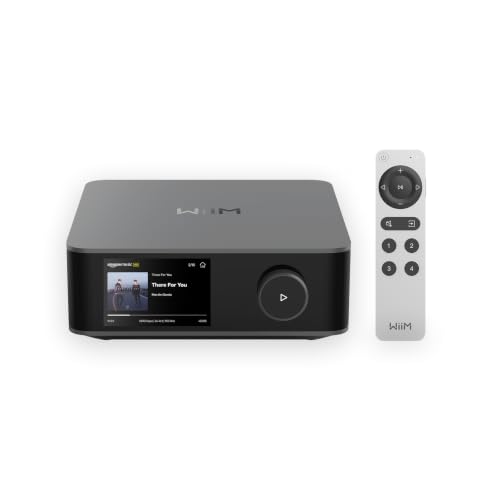
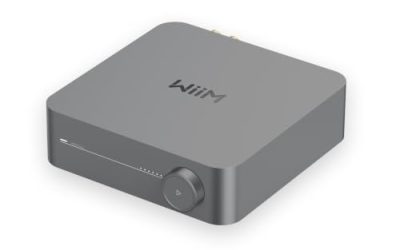
The WiiM Amp Ultra packs a streamer, a digital-to-analog converter, and a stereo amplifier into a compact aluminum chassis that suits a desk better than a full-width hi-fi rack. Its 100 watts per channel into 8 ohms drive typical bookshelf speakers in a nearfield setup, while the built-in touchscreen and rotary knob keep volume and source changes within arm’s reach. Streaming covers the major services through Wi-Fi, and HDMI ARC carries television audio when the desk doubles as a media station. RoomFit equalisation helps the sound fit a small room without extra hardware, and the subwoofer output leaves a clear path to deeper bass later.
Specs
- 100W per channel at 8 ohms; 200W per channel at 4 ohms
- ESS ES9039Q2M SABRE DAC with dual TI TPA3255 Class-D amplifiers and six TI OPA1612 op-amps
- 3.5-inch glass-covered touchscreen and multifunctional rotary knob for volume and play or pause
- HDMI ARC input, optical input up to 192kHz/24-bit, and one RCA stereo input
- Wi-Fi 6, Bluetooth 5.3, and an Ethernet port for wired networking
- Google Cast, Spotify Connect, TIDAL Connect, Qobuz Connect, Alexa Cast, DLNA, and Roon Ready
- RoomFit EQ with independent EQ settings for Wi-Fi, HDMI ARC, optical, Bluetooth, and line-in
- Signal-to-noise ratio of 121 dB
- Subwoofer output and gold-plated binding posts that accept banana plugs or bare wire
- Unibody aluminum chassis in Space Gray, measuring 7.87 x 8.3 x 3 inches and weighing 5.4 pounds
- Voice Remote 2 included for control from across the room
- Passive, silent operation with a copper heat pipe and large aluminum heatsink
Best for: listeners who want a compact, touchscreen-controlled streaming amplifier for bookshelf speakers on a desk, with support for the major streaming services and a subwoofer output for later.
Watch out for: confirm the speaker impedance and the streaming services in daily use match the amplifier’s supported list before ordering, and check that the desk has room for its 7.87-inch width.
Which One Fits Your Situation
A Small Desk With Bookshelf Speakers
A small desk calls for a single compact unit rather than a stack of separates, and the WiiM Amp Ultra fits that brief with its 7.87-inch width and passive cooling. Its 100 watts per channel suit efficient bookshelf speakers at close range, and the touchscreen puts volume and source control within reach. Place the speakers on stands or isolation pads, keep the amplifier ventilated, and the setup stays tidy while sounding larger than its footprint suggests.
A Desk That Doubles as a TV Station
When the desk monitor also serves as a television, the HDMI ARC input makes the WiiM Amp Ultra the natural hub for both music and screen audio. A single cable carries sound from the display to the amplifier, and the unit handles Dolby Digital formats from the TV alongside music streaming. The optical input remains free for a console or computer, so switching between work, games, and films takes a single tap on the touchscreen.
A Listener Who Uses Several Streaming Services
Listeners who move between Spotify, TIDAL, and Qobuz during the week need an amplifier that speaks each service natively, and the WiiM Amp Ultra covers them through Spotify Connect, TIDAL Connect, and Qobuz Connect. Google Cast and DLNA fill the gaps for browser audio and local libraries, while Roon Ready support suits collectors who organise music in Roon. One amplifier therefore replaces several single-service workarounds and keeps every playlist one tap away.
A First Step Into Streaming Hi-Fi
A first streaming amplifier should be simple to set up and forgiving to live with, and the WiiM Amp Ultra guides setup through the WiiM Home app in four clear steps: connect speakers, join the network, pair the remote, and sign in to a music account. RoomFit EQ then tunes the sound to the room, and the subwoofer output leaves room to grow. Beginners get a complete system now and an upgrade path later.
Common Mistakes
- Buying an amplifier without checking the speakers’ impedance and sensitivity first, then wondering why the sound feels strained or thin at higher volume in a small room.
- Choosing a unit for a streaming service it does not support natively, and ending up juggling extra apps, workarounds, or a second device just to play a favourite playlist.
- Forgetting to count inputs before ordering, so a turntable preamp, console, or computer has nowhere to plug in once the amplifier arrives on the desk.
- Placing a compact amplifier in a closed shelf or tight cubby with no airflow, which traps heat, shortens the life of the electronics, and can trigger thermal protection during long sessions.
- Skipping the subwoofer output when buying small desktop speakers, leaving no easy way to add bass later without replacing the whole amplifier.
Frequently Asked Questions
What is a network integrated amplifier?
A network integrated amplifier combines a music streamer, a digital-to-analog converter, and a stereo power amplifier in one chassis. It connects to Wi-Fi or Ethernet, pulls audio from streaming services or a local library, converts the signal, and drives passive speakers directly. The result is a single box that replaces a separate streamer and amplifier on a desk or in a small room, for listeners who want fewer boxes.
Can a network integrated amplifier drive passive bookshelf speakers?
Yes, provided the power rating and impedance match the speakers. Most desktop bookshelf speakers are rated at 8 ohms or 4 ohms, and an amplifier rated at 100 watts per channel into 8 ohms suits them in a nearfield setup in a small room. Check the speaker impedance and sensitivity first, and use the subwoofer output if the speakers need help with low frequencies at normal listening distances.
Do I still need a separate streamer with a network integrated amplifier?
No, a separate streamer is unnecessary when the amplifier already supports the services in daily use. Built-in support for Spotify Connect, TIDAL Connect, Qobuz Connect, Google Cast, and DLNA covers most listening, and Roon Ready support handles organised local collections. A separate streamer only makes sense when a favourite service is missing from the amplifier’s supported list, which is worth checking before buying.
Does a network integrated amplifier work with a turntable or a TV?
Yes, as long as the amplifier has the right inputs and the turntable signal is prepared correctly. A turntable needs a phono preamp before the amplifier’s RCA input, unless the turntable has one built in. A television connects through HDMI ARC, which carries audio from the screen to the speakers, while an optical input suits monitors, consoles, and computers without HDMI ARC.
More from Amazon
Programs that pair well with the guide above. Offers and eligibility are set by Amazon and may change.
Free shipping on eligible items, Prime Video and more. Eligible new members can start with a free trial.
Start a Prime free trialAd-free music streaming. Eligible new subscribers can start with a free trial.
Try Music Unlimited freeA Prime membership for ages 18-24 with a trial period. Eligibility is set by Amazon.
See Prime for Young AdultsAudiobooks and podcasts to listen to on the go. Eligible new members can start with a free trial.
Try Audible freeAs an Amazon Associate we earn from qualifying purchases.