Key takeaways
- Compare the best network adf scanners for shared offices, with Wi-Fi and Ethernet models, feeder sizes, duplex speeds and walk-up touchscreens.
A shared office scanner fails or succeeds on one decision: how the whole team reaches it. A fast feeder means little if the machine hangs off one person’s computer, because every colleague queues behind that desk. The real choice is the network link, the feeder size, and whether people can walk up, load paper, and send a scan to a shared folder without asking anyone to log in for them.


This guide serves small teams replacing a personal scanner, departments feeding a document system, and front desks handling walk-up paperwork. Every pick below has an automatic document feeder plus Ethernet, Wi-Fi, or both, and each one was chosen from the names and figures on its Amazon product page, including feeder capacity, duplex speed, connection type, and screen size.
Quick Picks
As an Amazon Associate we earn from qualifying purchases
| Product | Best for | Key spec from title |
|---|---|---|
| Brother ADS-4900W | Busy departments scanning through the whole day | 100-sheet ADF with dual-band Wi-Fi and Ethernet |
| Fujitsu fi-8170 | Mailrooms and records rooms on wired networks | 70 ppm duplex pace with gigabit Ethernet |
| Brother ADS-3300W | Small teams that want Wi-Fi and Ethernet in one unit | 60-sheet ADF with a 2.8-inch touchscreen |
| Epson WorkForce ES-580W | Teams sending scans straight to cloud folders | 100-sheet ADF with Wi-Fi and a 4.3-inch touchscreen |
| ScanSnap iX1600 | Small offices wanting simple walk-up scanning | 50-sheet ADF with Wi-Fi and profile-based touchscreen |
How to Choose
Connection Type: Wi-Fi, Ethernet, or Both
The connection decides where the scanner can live and how steady the link stays. Ethernet gives a fixed address on the office network, which suits a records room or a scanner parked beside a router or switch. Wi-Fi frees the machine from cable runs, so it can sit on a shared counter or a spare desk. Models offering both, like the two Brother units below, let a team wire the scanner now and move it later without replacing hardware. Check which bands a wireless model supports, because a 2.4 GHz-only unit cannot join a 5 GHz-only office network.
Feeder Capacity and Duplex Speed
Feeder size sets how often someone stands at the machine reloading paper. A 50-sheet feeder suits a small team scanning contracts and forms in short runs. A 100-sheet feeder fits departments clearing invoices, intake packets, or archived files in long batches. Duplex speed matters just as much: every model here captures both sides of a page in one pass, quoted in pages per minute for single sheets and images per minute for two-sided work. Match the pair of figures to your real paper flow, counting a two-sided contract as one page through the feeder but two images in the file.
Walk-Up Controls and Scan Destinations
A shared scanner earns its place when nobody needs a host computer. Look for a color touchscreen with saved shortcuts or profiles, so a colleague can load a stack, tap one button, and send the file on its way. Destinations worth having include shared network folders, email, cloud storage, and a USB drive for one-off jobs. The Brother ADS-4900W saves up to 56 shortcuts, while the ScanSnap iX1600 uses on-screen profiles for each person or job type. Confirm the destination list on the listing matches the folders and services your office already uses before you buy.
Drivers, Security, and Network Rules
Shared hardware touches shared documents, so the listing’s driver and security lines deserve a close read. TWAIN support lets the scanner plug into most document management software, and some models add WIA, ISIS, or SANE drivers for mixed Windows, Mac, and Linux fleets. On the network side, current wireless security such as WPA3 and encrypted connections protect scans moving across the office. If your workplace restricts which devices may join the network, note the exact connection types and protocols from the product page and clear them with whoever manages the network first.
The 5 Best Options
Brother ADS-4900W
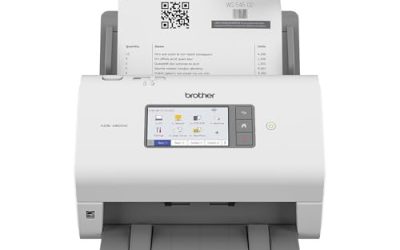
This is the heavy-duty shared unit in the group, built for a department where the scanner runs all day. Its 100-sheet feeder swallows thick stacks of invoices or case files in one load, and dual-band Wi-Fi plus Ethernet means it can join almost any office network. The 4.3-inch touchscreen holds up to 56 shortcuts, so each team can keep its own one-touch route to a folder, email address, or cloud service. Wide driver support, including TWAIN, WIA, ISIS, and SANE, helps it fit mixed computer fleets without extra software hunts.
Specs
- Scan speed up to 60 ppm, 120 ipm duplex
- 100-sheet automatic document feeder
- Dual-band Wi-Fi (2.4 GHz and 5 GHz), Ethernet, and USB 3.0
- 4.3-inch color touchscreen with up to 56 shortcuts
- Optical resolution up to 600 x 600 dpi
- Scan to network folder, email server, SharePoint, FTP, and cloud services
- Drivers: TWAIN, WIA, ISIS, and SANE
Best for: Departments with heavy daily volume and several teams sharing one machine.
Watch out for: It is the largest and heaviest unit here at 7.4 lb, so measure the counter or shelf space before ordering.
ASIN: B09TRX9JQ3
Fujitsu fi-8170
The fi-8170 is the wired workhorse for offices that treat scanning as a production job. It moves paper at 70 pages per minute and is built around a daily volume of 10,000 sheets, far beyond the other models in this guide. Gigabit Ethernet keeps those files moving to network destinations, and the 100-sheet feeder handles long runs of mixed documents. Fujitsu’s Clear Image Capture technology and the PaperStream IP driver aim at clean, consistent files for archiving and records work. There is no Wi-Fi on this model, which suits offices that prefer shared hardware on a cable.
Specs
- Scan speed 70 ppm simplex, 140 ipm duplex
- 100-sheet automatic document feeder
- Daily volume up to 10,000 sheets
- Ethernet 10BASE-T, 100BASE-TX, and 1000BASE-T, plus USB 3.2
- Resolution 600 dpi
- PaperStream IP driver with TWAIN and ISIS support
- Clear Image Capture technology
Best for: Mailrooms, records teams, and back-office groups scanning on a wired network.
Watch out for: There is no wireless connection at all, so confirm a live Ethernet port exists where the scanner will sit.
ASIN: B0BZZ9W6V1
Brother ADS-3300W
The ADS-3300W is the balanced pick for a small or mid-size team that wants both network options in a compact body. It offers wireless, wired Ethernet, and USB 3.0 in one unit, so it can join the network today and move desks tomorrow. The 60-sheet feeder and 40 ppm duplex pace handle the daily mix of contracts, forms, and receipts without the bulk of the bigger machines. A 2.8-inch touchscreen keeps walk-up jobs simple, and Brother’s triple layer security speaks to offices scanning personnel or finance paperwork.
Specs
- Scan speed up to 40 ppm, duplex scanning in one pass
- 60-sheet automatic document feeder
- Wireless LAN, wired Ethernet, and USB 3.0 connections
- 2.8-inch color touchscreen
- Optical resolution up to 600 x 600 dpi
- Scan to cloud services, email, file, image, OCR, and mobile devices
- Triple layer security for documents and network connections
Best for: Small teams that want one scanner reachable over both Wi-Fi and Ethernet.
Watch out for: Its wireless radio is 2.4 GHz only, so check that your office network still runs a 2.4 GHz band.
ASIN: B09TRWNL2G
Epson WorkForce ES-580W

The ES-580W suits teams whose scans go straight to shared cloud folders rather than to one person’s hard drive. Its 100-sheet feeder takes mixed paper types and sizes in a single batch, and the 4.3-inch touchscreen lets colleagues scan to Dropbox, Google Drive, OneDrive, email, or a USB drive with no computer involved. Single-Step Technology captures both sides of each page in one pass at up to 35 ppm and 70 ipm. Ultrasonic double feed detection and paper protection help guard long jobs against missed pages and damaged originals.
Specs
- Scan speed up to 35 ppm, 70 ipm duplex
- 100-sheet automatic document feeder
- Wi-Fi connectivity with a 4.3-inch touchscreen
- Single-Step Technology captures both sides in one pass
- Scan to cloud storage, email, or USB drive without a computer
- Searchable PDFs with OCR, plus conversion to Word and Excel files
- Peak daily duty cycle of 4,000 pages
- Ultrasonic double feed detection and paper protection
Best for: Teams that file scans into shared cloud folders from a walk-up screen.
Watch out for: The listing gives Wi-Fi as the network connection with no Ethernet port, so place it where the wireless signal is strong.
ASIN: B08P3ZT5WH
ScanSnap iX1600

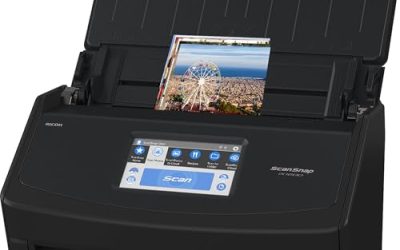
The iX1600 is the friendliest walk-up option for a small office where scanning is occasional but shared. Its 4.3-inch touchscreen carries customizable profiles, so each person or job type gets an icon that sends documents, receipts, or cards to the right cloud service or folder. Built-in Wi-Fi lets it scan to phones, computers, or cloud accounts without a PC switched on, and the 50-sheet feeder with 40 ppm duplex speed clears everyday stacks quickly. It also handles business cards, long receipts with the included guide, and folded A3 documents through manual feed.
Specs
- Scan speed 40 ppm duplex
- 50-sheet automatic document feeder
- Wi-Fi and USB connectivity
- 4.3-inch color touchscreen with customizable profiles
- Scans to cloud services and mobile devices without a computer
- Handles documents, receipts, business cards, and plastic cards
- Manual feed mode for folded A3 documents and envelopes
Best for: Small offices that want profile-based, one-touch scanning for a handful of people.
Watch out for: The 50-sheet feeder is the smallest here, so offices clearing long archives will reload it often.
ASIN: B08PH5Q51P
Which One Fits Your Situation
A Front Desk With Walk-Up Traffic
Choose the ScanSnap iX1600 or the Epson WorkForce ES-580W. Both put a large touchscreen in front of whoever walks up, and both send files to cloud folders or email without a computer session. The iX1600’s profiles suit a desk where the same few people scan the same forms daily, while the Epson’s bigger feeder handles longer visitor paperwork.
A Records Room Clearing Backlogs
Pick the Fujitsu fi-8170. Its 10,000-sheet daily volume, 100-sheet feeder, and gigabit Ethernet are built for clearing boxes of archived files onto a wired network. The Brother ADS-4900W is the fallback when that room also needs Wi-Fi, since it pairs the same feeder size with dual-band wireless and shortcut buttons for each archive project.
A Small Team Sharing One Desk Corner
The Brother ADS-3300W fits here. It is compact, connects by Wi-Fi or Ethernet, and its 60-sheet feeder covers the daily mix of signed forms, invoices, and mail. The touchscreen keeps walk-up jobs short, and the security features help when the stack includes payroll or personnel pages that should not sit in an open output tray.
An Office With Strict Network Rules
Go with a model offering wired Ethernet, meaning the Fujitsu fi-8170, the Brother ADS-4900W, or the Brother ADS-3300W. A cable connection with a fixed network address is easier for an administrator to approve and manage than a wireless device. Share the exact protocol and security details from the listing with the network manager before the unit arrives.
Common Mistakes
- Buying a USB-only scanner for a shared space, which ties every job to one person’s computer and desk.
- Ignoring the wireless band, then finding the scanner cannot join a 5 GHz-only office network.
- Choosing feeder size by weekly volume instead of the longest single stack the team scans at once.
- Skipping the destination check, so the scanner cannot send files to the shared folder or cloud service the office actually uses.
- Placing a Wi-Fi-only scanner far from the router, where a weak signal slows or drops long scans.
Frequently Asked Questions
Can several people use one network scanner at the same time?
One scanner processes one stack at a time, but everyone on the network can reach it without walking a USB cable between desks. In practice, colleagues queue short jobs through the day. Touchscreen shortcuts and profiles keep each job quick, so a shared unit with a large feeder rarely becomes a bottleneck for a small team.
Is Ethernet better than Wi-Fi for a shared office scanner?
Ethernet gives a steady link and a fixed network address, which helps in records rooms and on managed networks. Wi-Fi gives freedom to place the scanner on any counter or desk. Neither is better for every office. Match the choice to your space, your network rules, and where people actually hand in paper.
Does a network scanner need a computer left on all day?
Not for walk-up jobs on the models in this guide. Each one can send scans to network folders, email, cloud storage, or a USB drive from its own touchscreen, with no host computer running. A computer is still handy for changing settings, updating software, or scanning through a document management program using the TWAIN driver.
What feeder size suits a shared office?
Count the longest stack your team scans in one sitting rather than the weekly total. A 50- or 60-sheet feeder covers most small-team days of contracts and forms. Departments clearing intake packets or archive boxes should look at the 100-sheet models here, which halve the reload trips on long jobs and keep the queue moving.
More from Amazon
Programs that pair well with the guide above. Offers and eligibility are set by Amazon and may change.
Free shipping on eligible items, Prime Video and more. Eligible new members can start with a free trial.
Start a Prime free trialAd-free music streaming. Eligible new subscribers can start with a free trial.
Try Music Unlimited freeA Prime membership for ages 18-24 with a trial period. Eligibility is set by Amazon.
See Prime for Young AdultsAudiobooks and podcasts to listen to on the go. Eligible new members can start with a free trial.
Try Audible freeAs an Amazon Associate we earn from qualifying purchases.