Key takeaways
- Five 32GB DDR4 RAM kits for gaming compared on rated speed, CAS latency, module height and XMP support, for AM4 and Intel DDR4 boards worth upgrading.
Plenty of gaming PCs still run on DDR4 boards, and for those machines the memory decision is not whether to upgrade but which kit deserves the slots. A Ryzen 5000 or Intel 12th Gen DDR4 build with 16GB is held back in modern games, yet the wrong 32GB kit can be just as limiting: too slow, too tall for the cooler, or unstable at its rated profile. The real decision is matching speed, latency, height and profile support to the board you already own.
This guide serves AM4 owners squeezing more life from a Ryzen system, Intel DDR4 builders finishing a budget rig, and anyone replacing a failing or mismatched kit. Every pick is a 32GB set of two 16GB desktop DIMMs chosen from Amazon listing names and stated specifications, spanning tight CL16 kits, low-profile options for big air coolers, a plug-and-play JEDEC set, and one RGB kit for windowed cases.
Quick Picks
As an Amazon Associate we earn from qualifying purchases
| Product | Best for | Key spec from title |
|---|---|---|
| G.Skill Ripjaws V 32GB DDR4-3600 | Ryzen AM4 builds chasing low latency | 3600 MT/s at CL16-19-19-39 |
| Corsair Vengeance LPX 32GB DDR4-3600 | Tall coolers and tight cases | Low-profile heat spreader, CL18 |
| Kingston FURY Beast 32GB DDR4-3200 | Set-and-forget upgrades | CL16 with Plug N Play at 2666 |
| Crucial Pro 32GB DDR4-3200 | Prebuilt PCs and zero-fuss installs | JEDEC 3200 speed at 1.2V, CL22 |
| TEAMGROUP T-Force Delta RGB 32GB | Windowed RGB gaming builds | 3600 MT/s with full-frame RGB |
How to Choose
Read Speed and Latency as One Number
A DDR4 kit’s headline speed only tells half the story. Latency in nanoseconds comes from dividing the CAS latency by the transfer rate, so a 3600 MT/s CL18 kit and a 3200 MT/s CL16 kit land at roughly the same true latency, while 3600 CL16 is genuinely quicker and 3200 CL22 is noticeably looser. For gaming, that first-word latency shapes minimum frame rates more than raw bandwidth does. Compare kits on both figures printed in the listing title, not on megahertz alone, and treat any kit that hides its timings as a kit to skip.
Match the Kit to Your Platform
DDR4 lives on AMD AM4 boards and on Intel boards from several generations, and each side rewards different speeds. Ryzen 3000 and 5000 chips run their Infinity Fabric in step with memory, so DDR4-3600 keeps that link at its happiest ratio. Intel DDR4 boards are more forgiving and gain less past 3200. Every kit rated above the JEDEC baseline needs its XMP or DOCP profile enabled in the BIOS to reach the printed speed. Before ordering, confirm your exact motherboard model supports DDR4 rather than DDR5, because the two standards use different slots and are not interchangeable.
Buy One Matched Kit, Not Two Singles
Memory kits are binned and sold as matched sets that are meant to run together, and the listings say so plainly. Two separately bought sticks of the same model can still use different chips under the heat spreader, which shows up as failed training or random crashes at XMP speeds. A single 2x16GB kit also leaves two slots free on a four-slot board for a later jump to 64GB. Four-stick configurations load the memory controller harder and often need reduced speeds, so for a gaming PC the two-stick kit is both the safer and the faster route.
Check Module Height Before Anything Else
Heat spreader height decides whether a kit physically fits under a large tower air cooler. Low-profile kits around 34 millimetres tall clear almost any cooler fan, standard kits sit a little higher, and tall RGB modules near 49 millimetres regularly collide with front fans or force them up the fin stack, which then blocks the case side panel. Measure the gap between your first DIMM slot and the cooler before choosing, especially in compact cases. If the numbers are close, a low-profile kit removes the gamble entirely and costs nothing in performance.
The 5 Best Options
G.Skill Ripjaws V 32GB (2x16GB) DDR4-3600 CL16

The Ripjaws V is the kit for AM4 owners who want the sharpest timings DDR4 offers at a sane voltage. Its CL16-19-19-39 profile at 3600 MT/s gives the lowest true latency in this roundup, and that speed keeps Ryzen 3000 and 5000 Infinity Fabric running in sync. It carries no lighting and a plain black spreader, which suits performance-first builds. If your board’s memory controller is healthy and you are comfortable enabling XMP, this is the fastest plug-in upgrade a DDR4 gaming PC can still get.
Specs
- Capacity: 32GB kit, 2 x 16GB modules
- Rated speed: DDR4-3600 MT/s
- Timings: CL16-19-19-39 at 1.35V
- Profile: Intel XMP 2.0, plus JEDEC default profile
- Model: F4-3600C16D-32GVKC, 288-pin U-DIMM
Best for: Ryzen 5000 and 3000 gaming builds on AM4 that can hold a 3600 MT/s profile.
Watch out for: The rated speed is an overclock profile, so a board or CPU with a weak memory controller may need manual tuning or a step down to 3200 MT/s.
ASIN: B07Z45XB3G
Corsair Vengeance LPX 32GB (2x16GB) DDR4-3600 CL18
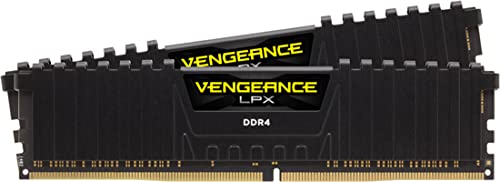
Vengeance LPX has been the default DDR4 recommendation for years because its low-profile spreader fits where taller kits cannot. At 3600 MT/s with CL18-22-22-42 timings it matches a 3200 CL16 kit on true latency while adding bandwidth, and the 34 millimetre class height slides under big dual-tower coolers without moving a fan. Corsair rates the kit for both Intel XMP and AMD platforms. Choose it when your case or cooler rules out standard-height memory but you still want a 3600 MT/s profile rather than a JEDEC fallback.
Specs
- Capacity: 32GB kit, 2 x 16GB modules
- Rated speed: DDR4-3600 MHz
- Timings: CL18-22-22-42 at 1.35V
- Dimensions: 5.31 x 0.28 x 1.32 inches, low-profile aluminum heat spreader
- Model: CMK32GX4M2D3600C18
Best for: Gaming PCs with large air coolers or compact cases where module height is the limiting factor.
Watch out for: Stock of this exact 3600 CL18 kit has been intermittent, so confirm the listing model number reads CMK32GX4M2D3600C18 and not the slower 3200 variant before ordering.
ASIN: B07ZPLM1R1
Kingston FURY Beast 32GB (2x16GB) DDR4-3200 CL16

The FURY Beast is aimed at builders who want CL16 response without living in the BIOS. Its headline trick is Plug N Play automatic overclocking, which lets the kit run at its highest BIOS-allowed speed out of the box, while an XMP 2.0 profile is there if you want to set 3200 MT/s manually. The low-profile heat spreader stands about 34 millimetres tall, clearing most coolers, and Kingston lists the kit as ready for both Intel XMP platforms and AMD Ryzen systems. It is the balanced middle of this roundup.
Specs
- Capacity: 32GB kit, 2 x 16GB modules
- Rated speed: 3200 MT/s
- Timings: CL16 at 1.35V
- Profile: Intel XMP 2.0 ready, Plug N Play auto-overclock at 2666 MT/s
- Form factor: 288-pin DIMM, low-profile heat spreader
- Model: KF432C16BB1K2/32
Best for: Upgraders who want tight CL16 timings and an easy install on either Intel or AMD DDR4 boards.
Watch out for: Plug N Play tops out at the highest speed the system BIOS allows, so check your board’s limits or plan to enable the XMP profile to guarantee the full 3200 MT/s.
ASIN: B097K5Q32R
Crucial Pro 32GB (2x16GB) DDR4-3200 CL22

Crucial’s Pro kit skips the overclocking conversation entirely. It runs at standard JEDEC 3200 MT/s on 1.2 volts with CL22 timings, downclocking cleanly to 3000 or 2666 where a board or CPU asks for less, which makes it the safest drop-in for prebuilt desktops and older systems with locked-down BIOS menus. Crucial lists compatibility across Intel 8th to 13th Gen Core and AMD Ryzen 1000 to 5000 processors. You give up the latency edge of the CL16 kits, and in return you get memory that simply trains and boots everywhere DDR4 fits.
Specs
- Capacity: 32GB kit, 2 x 16GB modules
- Rated speed: 3200 MT/s, downclocks to 3000 or 2666 MT/s
- Timings: CL22 at 1.2V
- Form factor: UDIMM, 288-pin, non-ECC
- Compatibility: Intel 8th–13th Gen Core, AMD Ryzen 1000–5000
- Model: CP2K16G4DFRA32A
Best for: Prebuilt gaming PCs, office-to-gaming conversions, and anyone who never wants to open memory settings.
Watch out for: CL22 is the loosest latency here, so competitive players chasing minimum frame rates should pick a CL16 kit instead.
ASIN: B0C29R9LNL
TEAMGROUP T-Force Delta RGB 32GB (2x16GB) DDR4-3600 CL18
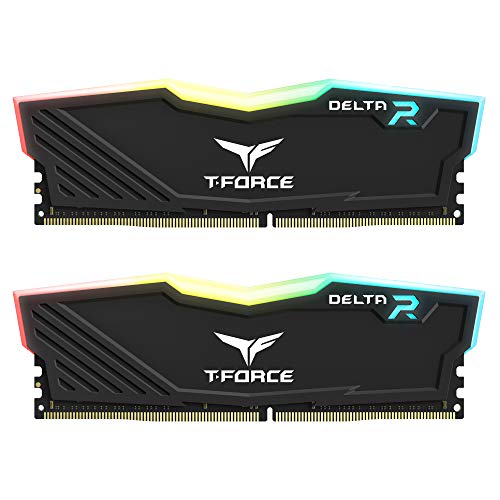
The Delta RGB is the pick when the memory is part of the build’s look. A full-frame light bar throws a wide 120 degree RGB effect across both modules, and the lighting syncs with the major motherboard ecosystems, including ASUS Aura Sync, MSI Mystic Light Sync, GIGABYTE RGB Fusion 2.0 and ASRock Polychrome. Under the spreader it is a conventional 3600 MT/s CL18 kit with an XMP 2.0 profile, so performance matches the Vengeance LPX while the presentation goes further. Just respect the tall 49 millimetre modules when you plan cooling.
Specs
- Capacity: 32GB kit, 2 x 16GB modules
- Rated speed: DDR4-3600 MHz
- Timings: CL18-22-22-42 at 1.35V
- Lighting: Full-frame 120 degree RGB with Force Flow effect
- Dimensions: 49 x 147 x 7 mm, aluminum alloy heat spreader
- Model: TF3D432G3600HC18JDC01
Best for: Windowed gaming builds on DDR4 where synchronized RGB lighting matters as much as the spec sheet.
Watch out for: At 49 millimetres tall these modules foul many large tower coolers, so verify DIMM clearance or plan on a liquid cooler before ordering.
ASIN: B08CM4V24M
Which One Fits Your Situation
You Are Upgrading a Ryzen AM4 Gaming PC
Start with the G.Skill Ripjaws V. DDR4-3600 at CL16 lines up with the Infinity Fabric clock Ryzen 3000 and 5000 chips prefer, and its timings are the tightest in this group. Enable DOCP, confirm stability with a long gaming session, and the same board and CPU will feel a generation fresher in memory-hungry titles.
Your Cooler Nearly Touches the RAM Slots
Take the Corsair Vengeance LPX or the Kingston FURY Beast. Both keep their spreaders in the low-profile class around 34 millimetres, which clears the front fan of most dual-tower coolers without raising it. The LPX adds a 3600 MT/s profile; the Kingston counters with CL16 at 3200 and easier setup. Either removes the fitment gamble that tall RGB kits create.
You Have a Prebuilt PC With a Locked BIOS
Choose the Crucial Pro. It runs at standard JEDEC voltage and speed, needs no profile support from the motherboard, and downclocks gracefully where a system insists on 2666 MT/s. That makes it the one kit here that works in machines whose BIOS hides every memory option, including many big-brand gaming desktops from the DDR4 years.
Your Build Has a Glass Panel and a Lighting Theme
Pick the TEAMGROUP T-Force Delta RGB. Its full-frame light bar is the visual centerpiece the other kits do not attempt, and it syncs with the lighting software your motherboard already uses. Keep the 3600 CL18 profile, check the 49 millimetre height against your cooler, and the memory becomes part of the display rather than a hidden component.
Common Mistakes
- Ordering DDR4 for a DDR5 motherboard, or the reverse; the two standards use different slot keying and never work in each other’s boards.
- Combining two separately bought kits and expecting XMP stability, when even identical model numbers can hide different memory chips.
- Leaving the BIOS on defaults after installing a 3600 MT/s kit, so the memory silently runs at 2133 or 2666 MT/s instead of its rated speed.
- Ignoring heat spreader height and discovering the new kit only after the cooler fan has nowhere to sit.
- Chasing the highest megahertz figure while ignoring CAS latency, when a 3200 CL16 kit matches a 3600 CL18 kit on true latency.
Frequently Asked Questions
Is DDR4 RAM still worth buying for gaming?
Yes, but only as an upgrade to a system that already uses it. If your motherboard takes DDR4, a 32GB kit is one of the cheapest ways to extend that PC’s life in modern games. If you are buying a new motherboard and CPU anyway, choose a DDR5 platform instead, because DDR4 stock is shrinking and the newer standard is where development has moved.
Will a DDR4 kit work in a DDR5 motherboard?
No. DDR4 and DDR5 modules use different pin layouts, notch positions and voltages, so a DDR4 stick physically cannot seat correctly in a DDR5 slot and should never be forced. Check the motherboard specification page for the memory standard before ordering any kit, since the board, not the CPU alone, decides which generation of memory the system accepts.
Which matters more for gaming, 3600 MT/s or CL16?
They work together. True latency comes from the pairing of speed and CAS latency, so 3600 CL16 is the strongest combination here, 3200 CL16 and 3600 CL18 land close to each other, and 3200 CL22 trails. On Ryzen AM4 systems the 3600 kits add a second benefit, because that speed keeps the Infinity Fabric running in its preferred one-to-one rhythm.
Do I need to enable XMP for these kits to work?
Only to reach the rated speed. Every kit here boots at a JEDEC speed with no changes, which is enough to use the PC. Kits rated above that baseline, including all three 3600 options, need the XMP or DOCP profile switched on in the BIOS to run at their full speed and timings. The Crucial Pro is the exception by design, since its rated speed is the JEDEC standard itself.
More from Amazon
Programs that pair well with the guide above. Offers and eligibility are set by Amazon and may change.
Free shipping on eligible items, Prime Video and more. Eligible new members can start with a free trial.
Start a Prime free trialAd-free music streaming. Eligible new subscribers can start with a free trial.
Try Music Unlimited freeA Prime membership for ages 18-24 with a trial period. Eligibility is set by Amazon.
See Prime for Young AdultsAudiobooks and podcasts to listen to on the go. Eligible new members can start with a free trial.
Try Audible freeAs an Amazon Associate we earn from qualifying purchases.