Key takeaways
- Tournament levers, a wireless stick and leverless boards: five arcade sticks for PC fighting games compared on parts, platforms, layout and feel.
Buying an arcade stick for PC fighting games comes down to one decision first: do you want a traditional lever, or an all-button leverless layout? The lever suits players raised on arcade cabinets and charge characters, while leverless boards give cleaner directional inputs once your fingers relearn the motions. After that, the parts inside the case, the platforms the stick also covers, and whether it connects by cable or wireless decide the rest.
This guide serves ranked Street Fighter and Tekken players on PC, pad players curious about their first stick, and leverless converts comparing boards. Every pick was chosen from its Amazon listing name and stated specifications, spanning a licensed tournament stick, a Sanwa-part multi-platform stick, the one wireless option here, and two leverless boards at different sizes.
Quick Picks
As an Amazon Associate we earn from qualifying purchases
| Product | Best for | Key spec from title |
|---|---|---|
| HORI Fighting Stick Alpha (Street Fighter 6 Edition) | Tournament play on PC and PS5 | Hayabusa lever and Hayabusa buttons |
| MAYFLASH F500 Elite | One stick across many platforms | Sanwa joystick and Sanwa buttons |
| 8BitDo Arcade Stick for Switch & Windows | Wireless play at a PC desk | Bluetooth, 2.4G receiver and wired modes |
| Haute42 Leverless Controller R16 | Leverless play with full-size rims | Crystal low-profile switches, hot swap |
| Haute42 Leverless Arcade Stick T16 | A slim leverless board for small desks | 16 buttons with turbo and custom RGB |
How to Choose
Decide Between a Lever and Leverless Layout
The lever is the familiar choice: quarter-circle and charge motions live in your wrist, and years of arcade muscle memory transfer directly. Leverless boards replace the stick with four directional buttons, which makes inputs like instant dashes and clean half-circles a matter of finger timing instead. Neither is objectively faster for a beginner, because the leverless advantage only appears after a real adjustment period. Pick the layout you are willing to practise on for a month, not the one that wins arguments online.
Read the Parts List Before the Case Design
Buttons and levers wear, get swapped, and define how a stick feels, so the listing’s parts line matters more than artwork. Named arcade parts such as Sanwa or HORI’s own Hayabusa line are replaceable through standard 30mm mounts and lever fittings, which keeps an older stick serviceable. Boards with hot-swap sockets let you change leverless switches without soldering. If a listing hides what switches or buttons it uses behind generic wording, treat that silence as a cost you will pay later in replacement parts.
Match the Platform List to Your Whole Setup
A PC accepts almost every stick here through USB, but many players also own a console, and platform support is where listings diverge sharply. Some sticks are licensed for one console family only, some cover nearly everything through mode switches, and leverless boards may need a specific mode or an adapter for certain consoles. Read the compatibility line literally: a stick that names Switch and Windows will not wake up a PlayStation, and the Xbox edition of the same product is a separate listing with its own page.
Weigh Size, Weight and Connection Type
A full-size tournament case gives your wrists a wide rest and stays planted during hard inputs, but it fills a backpack and dominates a small desk. Slim leverless boards travel easily and store in a drawer, yet their light weight can shift under aggressive play on a smooth surface. Connection matters too: wired USB is the tournament standard and removes battery worries, while Bluetooth and 2.4G wireless free a living-room setup from cables at the cost of charging and one more thing to pair.
The 5 Best Options
HORI Fighting Stick Alpha (Street Fighter 6 Edition)
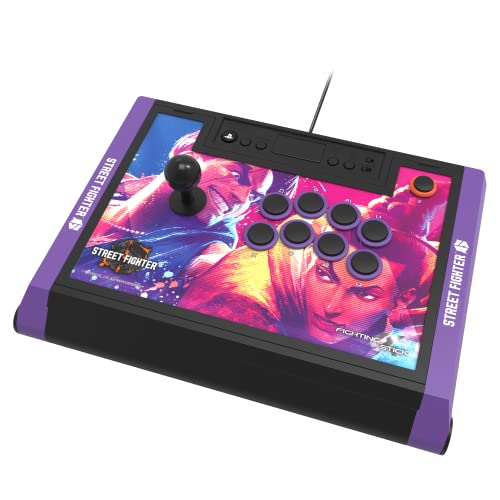
This is the pick for PC players who also compete on PlayStation and want one licensed, full-size stick for both. The case opens for maintenance and artwork swaps without surgery, the Hayabusa lever and buttons actuate short and fast, and the Street Fighter 6 Edition bundles downloadable artwork images for the top panel. It is a wired, tournament-pattern stick with a profile system, aimed at committed players rather than casual experimentation.
Specs
- Compatibility: PlayStation 5, PlayStation 4 and PC, per the listing title
- Parts: HORI Hayabusa joystick and Hayabusa buttons
- Case: Opens for customization and easy maintenance
- Extras: Downloadable hi-res Street Fighter 6 artwork images included
- Licensing: Officially licensed by Sony
Best for: Ranked players who split time between PC and PS5 and want a licensed tournament stick.
Watch out for: HORI sells standard, Street Fighter 6 and Tekken 8 editions plus a separate Xbox version as distinct listings, so confirm the exact edition on the page before ordering.
ASIN: B0BZQKCFSD
MAYFLASH F500 Elite

The F500 Elite is the multi-platform workhorse of this group, covering consoles old and new alongside PC, which makes it the sensible buy for a household with several systems. Its draw is the parts sheet: a genuine Sanwa joystick and Sanwa buttons in a mid-size case, with turbo support and firmware that can be updated as platforms change. For a first serious stick that will not be outgrown quickly, this is the balanced option.
Specs
- Parts: Sanwa joystick and Sanwa buttons, per the listing title
- Compatibility: PS4, PS3, Xbox One, Xbox 360, PC, Switch, Android and NEOGEO mini
- Features: Turbo support and upgradable firmware
- Layout: Full-size arcade layout with eight action buttons
Best for: Players who game across PC and several consoles and want Sanwa parts without a premium case.
Watch out for: On some consoles a licensed controller may need to be connected to the stick for authentication, so read the listing’s platform notes for the system you plan to use.
ASIN: B07QJ1JJ7J
8BitDo Arcade Stick for Switch & Windows

This is the only wireless stick in the guide, and it suits a PC desk or living room where a cable across the floor is a genuine nuisance. It connects over Bluetooth, through its 2.4G receiver, or by plain USB cable when you want a wired session, and its button layout adapts between the Switch and Windows modes it is built for. Players who value a tidy setup over tournament licensing will feel at home here.
Specs
- Compatibility: Nintendo Switch and Windows, per the listing title
- Connectivity: Wireless Bluetooth, 2.4G receiver and wired USB connection
- Layout: Arcade layout with dynamic button mapping between modes
- Use case: Built for cable-free desk and living-room play
Best for: PC players who want one tidy wireless stick for desk and couch sessions.
Watch out for: This listing is the Switch and Windows edition only; the Xbox version and the all-button models are separate listings, and there is no PlayStation support here.
ASIN: B08GJC5WSS
Haute42 Leverless Controller R16

The R16 is a leverless board for players who want full-size, rimmed buttons under their fingers rather than a keyboard feel. Its Crystal low-profile switches sit in hot-swap sockets, so changing switch feel is a pull-and-push job, and the firmware supports the SOCD cleaning that tournament rules expect from all-button controllers. With sixteen buttons there is room for every shortcut a modern fighting game allows, and the board covers PC, PS4 and Switch out of the box.
Specs
- Layout: Leverless all-button layout with rims, 16 buttons
- Switches: Crystal low-profile switches in hot-swap sockets
- Firmware: GP2040-CE with SOCD support
- Compatibility: PC, PS4 and Switch, per the listing title
Best for: Leverless converts who want big rimmed buttons and swappable switches.
Watch out for: Console support on boards like this can depend on firmware mode or a separate adapter for some systems, so check the listing’s notes for your console before ordering.
ASIN: B0D66JZ9P8
Haute42 Leverless Arcade Stick T16

The T16 takes the same leverless idea and flattens it into a slim board that slides into a laptop bag or a shallow desk drawer. Sixteen buttons, turbo, custom RGB and hot-swap sockets are all present, and the compatibility list stretches from PC and Steam Deck back to PS3. It is the easiest entry point here for a pad player who wants to test leverless play at home before committing to a larger, heavier board for events.
Specs
- Layout: Slim all-button leverless layout, 16 buttons
- Switches: Low-profile switches with hot-swap support
- Features: Turbo function and custom RGB lighting
- Compatibility: Switch, PC, PS4, PS3 and Steam Deck, per the listing title
Best for: New leverless players who need a slim board that travels between desk and couch.
Watch out for: Several sellers list Haute42 boards under near-identical names, so confirm the T16 model name, button count and colour on the listing you open.
ASIN: B0CRRHM3Q9
Which One Fits Your Situation
You Play Ranked on PC and PS5
Take the HORI Fighting Stick Alpha. Its Sony licensing covers your console sessions natively, the Hayabusa parts are proven tournament hardware, and the opening case makes your first button swap painless. The Mayflash is cheaper to run across more systems, but for a two-platform competitive setup the HORI is the deliberate choice.
You Own Several Consoles and One PC
Take the MAYFLASH F500 Elite. Its compatibility list is the widest here by a distance, and the Sanwa lever and buttons mean the wide support does not come with bargain-bin parts. One stick follows you from PC ranked sets to the older consoles still sitting in the cabinet under the television.
Your Desk Doubles as a Living Room
Take the 8BitDo Arcade Stick. Wireless play over Bluetooth or its 2.4G receiver keeps the room clear of cables, and you can still plug in USB for a serious wired session. Just be sure Switch and Windows are genuinely your platforms, because this particular edition stops there and skips PlayStation entirely.
You Are Switching From Pad to Leverless
Start with the Haute42 T16 if space and travel matter, or the R16 if you want the fuller, rimmed-button feel from day one. Both share hot-swap switches and SOCD support, so the choice between them is about size, weight and button feel rather than capability or compatibility.
Common Mistakes
- Buying a stick licensed for the wrong console family, then discovering the PC was never the problem
- Choosing leverless for instant results and quitting inside the two-week window where inputs feel worse
- Ignoring the parts list and ending up with unbranded buttons that no standard replacement fits
- Assuming every edition of a named stick shares one listing, when colours and game editions are separate pages
- Leaving a slim board on a glossy desk with no mat, so it slides during dragon-punch motions
Frequently Asked Questions
Do arcade sticks work on any PC game?
Most fighting games on PC accept standard USB controllers, and every stick here connects over USB or presents itself as a standard controller wirelessly. The friction appears in older titles and launchers that expect an Xbox-style pad, where a mode switch or a remapping tool usually resolves it. Check the listing’s stated PC mode before buying for a specific older game.
Is leverless actually better than a lever?
Leverless gives very precise directional inputs because each direction is a separate button, which helps with clean dashes and charge partitioning. It also demands new muscle memory, and many strong players still prefer a lever for 360-degree motions. The honest answer is that both layouts win tournaments; the better one is the layout you will practise on consistently.
What does SOCD cleaning mean on a leverless board?
SOCD stands for simultaneous opposing cardinal directions: pressing left and right at the same time. Games and tournaments need a defined outcome for that input, so leverless firmware resolves the pair to neutral, up, or the last direction pressed, depending on the mode. Boards like the Haute42 models list SOCD support because event rules require predictable behaviour here.
Can I replace the buttons and lever myself?
On the lever-based sticks here, yes: standard 30mm buttons and common lever mounts are designed for swapping, and the HORI case opens specifically to make maintenance easy. On the leverless boards, hot-swap sockets let you change switches without soldering. Keep the original parts until you are sure the replacements feel right.
More from Amazon
Programs that pair well with the guide above. Offers and eligibility are set by Amazon and may change.
Free shipping on eligible items, Prime Video and more. Eligible new members can start with a free trial.
Start a Prime free trialAd-free music streaming. Eligible new subscribers can start with a free trial.
Try Music Unlimited freeA Prime membership for ages 18-24 with a trial period. Eligibility is set by Amazon.
See Prime for Young AdultsAudiobooks and podcasts to listen to on the go. Eligible new members can start with a free trial.
Try Audible freeAs an Amazon Associate we earn from qualifying purchases.