Our Short List of 3

- Best for: Streaming box and HTPC owners who want the established remote replacement.
- Connection: 2.4GHz wireless with USB receiver
- Layout: 92-key QWERTY with central touchpad
- Backlight: LED
- Battery: built-in rechargeable lithium-ion
- Best for: Couch users who scroll long streaming menus and media libraries.
- Connection: 2.4GHz wireless with USB dongle
- Layout: 92-key QWERTY with multi-touch touchpad
- Backlight: RGB
- Extras: scroll wheel, left and right mouse buttons, multimedia keys

- Best for: Setups where every USB port is taken and Bluetooth is the only way in.
- Connection: Bluetooth 3.0
- Layout: QWERTY keypad with built-in touchpad
- Model: 23022KB
- Weight: 75 g
All 5 Picks at a Glance
| Product | Specs | Action |
|---|---|---|
| Rii i8+ Mini Wireless Keyboard with Touchpad |
| Check price on Amazon |
| Rii X8 Mini Keyboard |
| Check price on Amazon |
| Fosmon Mini Bluetooth Keyboard |
| Check price on Amazon |
 iPazzPort Mini Bluetooth Keyboard Remote KP-810-30B |
| Check price on Amazon |
 Rii K06 Mini Bluetooth Keyboard |
| Check price on Amazon |
Key takeaways
- Compare five handheld mini keyboards with touchpads for HTPC and smart TV, checked on connection type, backlight and battery style before you buy.
Typing a film title or a streaming password with a TV remote is the slowest part of any movie night: arrow, arrow, arrow, select, for every single letter. A handheld mini keyboard ends that, putting a thumb-sized QWERTY deck and a touchpad into one remote-shaped unit. The real decision is not size, since all five picks below are pocketable, but how the board connects to your host and how much menu surfing you expect to do from the couch.
This guide serves HTPC owners, Android TV box and Fire TV users, and anyone running a Raspberry Pi media centre who is tired of on-screen keyboards. Every pick was chosen from its Amazon product title and listing specifications, with the connection type, backlight and battery arrangement checked against the listing record for each model.
Quick Picks
As an Amazon Associate we earn from qualifying purchases
| Product | Best for | Key spec from title |
|---|---|---|
| Rii i8+ Mini Wireless Keyboard with Touchpad | The classic couch remote replacement | 92-key QWERTY with LED backlit keys |
| Rii X8 Mini Keyboard | Menu-heavy streaming and long lists | RGB backlit with rechargeable battery |
| Fosmon Mini Bluetooth Keyboard | Hosts with no free USB port | Bluetooth connection with built-in touchpad |
| iPazzPort Mini Bluetooth Keyboard Remote KP-810-30B | Fire TV Stick owners who pair over Bluetooth | Bluetooth remote with LED backlit keys |
| Rii K06 Mini Bluetooth Keyboard | One handset for the TV and the box | IR learning with 2.4GHz and Bluetooth |
How to Choose
Start with the port: dongle, Bluetooth or both
Connection decides whether a mini keyboard works with your setup at all. A 2.4GHz board talks to its own USB receiver, so it works with almost anything that has a USB port, including Android boxes, mini PCs and Raspberry Pi boards, with no pairing menus. The catch is that port: a streaming stick has none spare, so dongle boards need a Micro USB OTG cable there. Bluetooth boards skip the receiver but depend on the host offering Bluetooth and accepting keyboard input, which some TVs restrict. Dual-mode boards like the Rii K06 carry both, and that flexibility suits mixed households.
Be honest about how much you will type
A mini keyboard is a thumb-typing device, and its keys suit search terms, URLs, usernames and passwords rather than sentences. If your living-room typing is a few searches an evening, any pick here keeps up. If you also answer messages or rename files from the couch, layout starts to matter: a gamepad-style shell like the Rii i8+ spreads keys under both thumbs, while flatter remote-style boards such as the iPazzPort keep multimedia keys closer. Nobody writes an email comfortably on any of them, so judge the board as a remote that types, not as a shrunken desk keyboard.
Dark-room control: backlight, wheel and remote tricks
Living rooms are dark when these boards earn their keep, so a backlight is worth more than it sounds. Plain LED backlighting on the i8+ and iPazzPort keeps legends readable without draining the battery quickly, while the Rii X8’s RGB lighting is easier to spot on a cushion but shortens the time between charges if left cycling. A physical scroll wheel, which only the X8 offers here, is the fastest way down a long streaming library. The K06 goes further and learns infrared commands from your TV remote, folding volume and power into the same handset.
Battery style decides the upkeep
Four of these five boards carry a built-in rechargeable lithium battery, which removes the battery drawer from your life but adds a charging cable to it, usually an older Micro USB lead on models of this age. Expect days to weeks between charges depending on how hard the backlight works, and expect a short wake-up lag after the board has slept. Boards that run on replaceable cells trade that convenience for instant revival, so the choice is lifestyle: set-and-forget cells you swap rarely, or a rechargeable unit you top up like a phone.
The 5 Best Options
Rii i8+ Mini Wireless Keyboard with Touchpad
- Best for: Streaming box and HTPC owners who want the established remote replacement.
- Connection: 2.4GHz wireless with USB receiver
- Layout: 92-key QWERTY with central touchpad
- Backlight: LED
- Battery: built-in rechargeable lithium-ion
Streaming box and HTPC owners who want the established remote replacement.
Fire TV 4K and Fire Stick need a Micro USB OTG cable to accept the receiver, and several near-identical i8 and i8+ listings exist, so confirm the listing says i8+ before ordering.
The i8+ is the board that defined this category: a game-controller-shaped shell holding 92 backlit keys around a central touchpad, connected over 2.4GHz through a small USB receiver. Because the host sees a standard keyboard and mouse, the listing rates it for PCs, smart TVs, Android TV boxes, Raspberry Pi boards and game consoles alike. Its touchpad sensitivity can be adjusted, which helps on big screens where a fixed pointer speed feels twitchy. If you want the proven, simple option that lives on the coffee table and just works when picked up, this is the default pick.
Watch out for: Fire TV 4K and Fire Stick need a Micro USB OTG cable to accept the receiver, and several near-identical i8 and i8+ listings exist, so confirm the listing says i8+ before ordering.
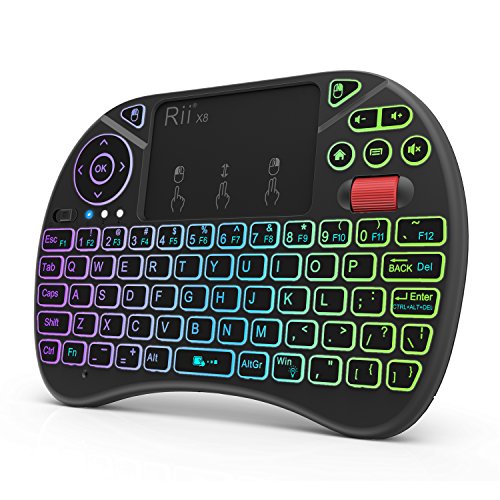
Rii X8 Mini Keyboard
- Best for: Couch users who scroll long streaming menus and media libraries.
- Connection: 2.4GHz wireless with USB dongle
- Layout: 92-key QWERTY with multi-touch touchpad
- Backlight: RGB
- Extras: scroll wheel, left and right mouse buttons, multimedia keys
Couch users who scroll long streaming menus and media libraries.
As with the i8+, Fire TV 4K and Fire Stick need a separate Micro USB OTG cable for the dongle, and Rii does not state a battery capacity, so runtime varies with backlight use.
The X8 keeps the handheld formula and adds the two things menu-heavy users ask for: a physical scroll wheel and RGB backlighting. The wheel, worked by a thumb, moves through long streaming libraries and web pages faster than repeated touchpad swipes, and it sits alongside the multi-touch touchpad, left and right mouse buttons and multimedia keys. Connection is 2.4GHz through the included USB dongle, plug and play with no pairing, and the internal battery recharges over USB. Choose it over the i8+ if your evenings involve browsing big catalogues rather than the occasional search.
Watch out for: As with the i8+, Fire TV 4K and Fire Stick need a separate Micro USB OTG cable for the dongle, and Rii does not state a battery capacity, so runtime varies with backlight use.
Fosmon Mini Bluetooth Keyboard
- Best for: Setups where every USB port is taken and Bluetooth is the only way in.
- Connection: Bluetooth 3.0
- Layout: QWERTY keypad with built-in touchpad
- Model: 23022KB
- Weight: 75 g
Setups where every USB port is taken and Bluetooth is the only way in.
There is no USB receiver in the box, so a host without Bluetooth cannot use this board at all, and Bluetooth 3.0 is an older radio, so check your device’s pairing support first.
Fosmon’s mini is the Bluetooth-only entry here, which makes it the natural pick when the host has no USB port to spare or hides its ports behind the TV. The compact QWERTY keypad carries a built-in touchpad on the right side with directional keys beneath it, and the listing aims it at Apple TV, Amazon Fire Stick, PlayStation 4 and 5, HTPC and IPTV boxes, VR glasses and smartphones. At 75 grams it is the lightest board in this guide, small enough to disappear into a drawer between uses. Pick it when pairing, not plugging, is the only route your setup allows.
Watch out for: There is no USB receiver in the box, so a host without Bluetooth cannot use this board at all, and Bluetooth 3.0 is an older radio, so check your device’s pairing support first.
iPazzPort Mini Bluetooth Keyboard Remote KP-810-30B
- Best for: Fire TV and smart TV owners who want a slim, remote-shaped Bluetooth board.
- Connection: Bluetooth
- Layout: full QWERTY with LED backlit keys
- Model: KP-810-30B
- Size: 6 x 1.7 x 0.6 inches
Fire TV and smart TV owners who want a slim, remote-shaped Bluetooth board.
It pairs with one device at a time over Bluetooth, so there is no dongle fallback for a box without Bluetooth, and switching between two hosts means re-pairing.
The KP-810-30B is the slimmest board here, a flat remote-style unit just 1.7 inches wide that pairs over Bluetooth and lights its full QWERTY deck with an LED backlight. Multimedia keys sit within thumb reach, a keyboard lock stops pocket presses, and the built-in lithium battery recharges rather than being swapped. Its listing targets smart TVs, Fire TV Stick 4K and Android TV boxes, which matches how it will actually be used: short searches and menu work from the sofa. Choose it if you want the board that looks and handles most like the remote it replaces.
Watch out for: It pairs with one device at a time over Bluetooth, so there is no dongle fallback for a box without Bluetooth, and switching between two hosts means re-pairing.
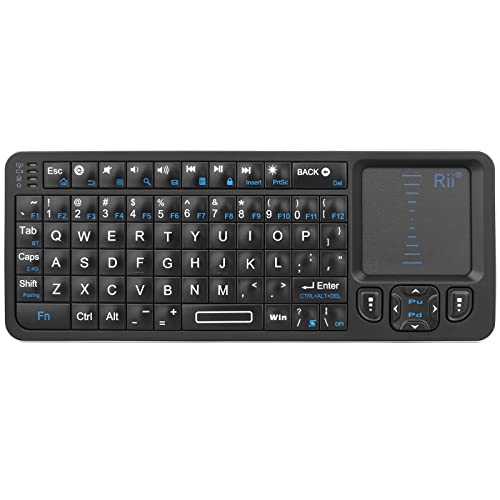
Rii K06 Mini Bluetooth Keyboard
- Best for: Households that want a single handset running both the TV and the streaming box.
- Connection: Bluetooth and 2.4GHz USB receiver (dual mode)
- Extras: IR learning function with 10 learning keys
- Layout: QWERTY with built-in touchpad
- Backlight: yes
Households that want a single handset running both the TV and the streaming box.
IR learning needs your TV’s original infrared remote to learn from and some patience in setup, and it cannot copy commands from a Bluetooth-only remote.
The K06 is the consolidation pick: one handset that tries to replace both the streaming remote and the TV remote. It connects two ways, over Bluetooth or through its 2.4GHz USB nano receiver, and adds an infrared learning function with ten learning keys that can copy commands such as power, volume and input from your television’s own remote. The touchpad and backlit keys cover the box side of the job. If your coffee table currently holds three remotes and a keyboard is the fourth thing it is about to gain, the K06 is the one that can hand some of them back.
Watch out for: IR learning needs your TV’s original infrared remote to learn from and some patience in setup, and it cannot copy commands from a Bluetooth-only remote.
Which One Fits Your Situation
Your streaming box has a free USB port and you want zero setup
Take the Rii i8+ or the Rii X8. Both skip pairing entirely: plug in the receiver and the board works, even in setup screens where Bluetooth has not loaded yet. The i8+ is the simpler, proven shape, while the X8 earns its place if you scroll a lot. Either way, keep the receiver’s storage slot in mind, because a lost dongle sidelines the whole board.
Your stick or TV leaves no port for a dongle
Go Bluetooth. The Fosmon mini pairs directly with Fire Stick, Apple TV and consoles, and the iPazzPort KP-810-30B does the same in a slimmer, remote-like body with a backlight. Check that your exact host accepts Bluetooth keyboards before ordering, since a few televisions limit what can pair, then pick on shape: the Fosmon is the lighter, simpler pad, the iPazzPort the more remote-like one.
You are tired of juggling the TV remote as well
The Rii K06 is built for you. Its infrared learning keys can absorb your television’s power, volume and input commands, so one handset wakes the TV, drives the streaming box and types the search. It is the only pick here that reduces the remote pile instead of adding to it, provided your TV still uses an infrared remote worth copying.
Your evenings are long menus, not long messages
Choose the Rii X8. In big streaming libraries the scroll wheel beats repeated touchpad swiping, and the RGB backlight keeps the small keys findable in a dark room. The trade is charging discipline: leave the lighting cycling all evening and you will meet the charging cable sooner than an i8+ owner will.
Common Mistakes
- Buying a 2.4GHz-only board for a streaming stick without checking for a free USB port or an OTG cable.
- Expecting thumb-sized keys to handle email and documents; these boards are for searches, passwords and menus.
- Mixing up the Rii i8 and i8+ at checkout, when the backlight, battery and touchpad differ between versions.
- Leaving an RGB backlight running constantly, then blaming the battery for the short time between charges.
- Assuming every TV accepts a Bluetooth keyboard, when some sets restrict pairing or hide it in a service menu.
Frequently Asked Questions
Will a mini keyboard work with a Fire TV Stick?
Yes, with the right connection. Bluetooth models such as the Fosmon and iPazzPort pair with the stick directly where supported. Dongle boards like the Rii i8+ and X8 need a Micro USB OTG cable to give the stick a USB port for the receiver, and that cable is not included with either keyboard.
Can a mini keyboard replace a mouse on a media PC?
For couch tasks, yes. Every board here carries a touchpad that handles pointing, clicking and scrolling well enough for streaming apps, browsers and media front ends. For fast or precise pointer work, such as editing photos or picking through dense spreadsheets, a real mouse on a solid surface is still quicker and more accurate.
How long do the batteries last in these boards?
The rechargeable models here run for days to weeks of typical evening use between charges, with backlight use the biggest drain; an RGB board left lit will need its cable sooner than a plain LED one. Exact figures vary because some listings do not state a battery capacity, so treat charging as a weekly habit rather than a monthly one.
Can one mini keyboard run both a TV and a PC?
The Rii K06 comes closest: its Bluetooth and 2.4GHz modes cover two kinds of host, and its infrared learning keys can operate the television itself. The other boards control whatever the connected computer or box shows on the TV, not the set directly, so check whether your screen is driven by a box or by its own smart platform.
More from Amazon
Programs that pair well with the guide above. Offers and eligibility are set by Amazon and may change.
Free shipping on eligible items, Prime Video and more. Eligible new members can start with a free trial.
Start a Prime free trialAd-free music streaming. Eligible new subscribers can start with a free trial.
Try Music Unlimited freeA Prime membership for ages 18-24 with a trial period. Eligibility is set by Amazon.
See Prime for Young AdultsAudiobooks and podcasts to listen to on the go. Eligible new members can start with a free trial.
Try Audible freeAs an Amazon Associate we earn from qualifying purchases.