Our Short List of 3

- Best for: 10G switch-to-switch and switch-to-server links over existing multimode fiber.
- Data rate: 10Gbps (10GBASE-SR)
- Wavelength: 850nm
- Media: multimode fiber, OM1/OM2/OM3/OM4, 62.5µm and 50µm
- Reach: up to 300 m

- Best for: Buyers who want an SR module coded by a second vendor for their switch brand.
- Data rate: 10Gbps (10GBASE-SR)
- Form factor: SFP+
- Media: multimode fiber
- Connector: duplex LC
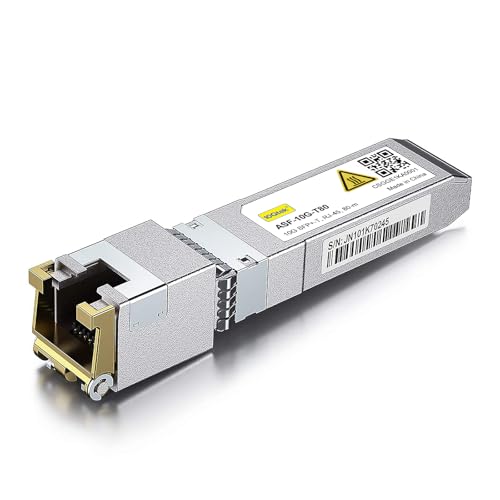
- Best for: Adding a 10G copper port to a switch that only has SFP+ cages free.
- Form factor: SFP+
- Standard: 10GBase-T
- Port: RJ45
- Cable: Cat6a
All 5 Picks at a Glance
| Product | Specs | Action |
|---|---|---|
| 10Gtek 10GBase-SR SFP+ LC Transceiver |
| Check price on Amazon |
| QSFPTEK 10GBASE-SR SFP+ Module |
| Check price on Amazon |
| 10Gtek 10GBase-T SFP+ Module |
| Check price on Amazon |
 10GTEK 1.25G SFP-T 1000BASE-T Copper SFP |
| Check price on Amazon |
 10Gtek 1.25G SFP 1000Base-LX, Pack of 2 |
| Check price on Amazon |
Key takeaways
- Compare the best SFP transceiver modules for 10G and gigabit switch ports, with SR, LR-style reach, and copper RJ45 options matched to your cabling.
An empty SFP or SFP+ cage on a switch is only useful once it holds the right module. The transceiver you drop in decides the speed of the link, the cable it runs on, and how far that link can reach, and a module coded for the wrong brand may not link at all. The five modules below cover the combinations most home-lab and small-office racks actually need.
Two are 10GBASE-SR fiber modules for short multimode runs, one puts 10G on ordinary RJ45 copper, and two serve gigabit ports — one over copper, one over single-mode fiber for long runs between buildings. Match the coding to your switch brand, the media to your cabling, and the reach to your longest run, and any of them drops straight in.
Quick Picks
As an Amazon Associate we earn from qualifying purchases
| Product | Best for | Key spec from title |
|---|---|---|
| 10Gtek 10GBase-SR SFP+ LC Transceiver | 10G fiber uplinks inside one rack room | 10GBase-SR, 850nm, up to 300 m |
| QSFPTEK 10GBASE-SR SFP+ Module | A second coded SR option | 10GBASE-SR SFP+ transceiver |
| 10Gtek 10GBase-T SFP+ Module | 10G over existing Cat6a runs | 10GBASE-T SFP+ transceiver |
| 10GTEK 1.25G SFP-T Copper SFP | Gigabit ports on copper | 1000Base-T, RJ45, up to 100 m |
| 10Gtek 1.25G SFP 1000Base-LX, Pack of 2 | Long gigabit fiber runs | 1000Base-LX, 1310nm, up to 10 km |
How to Choose
Match the Module to the Port and the Brand
SFP and SFP+ modules share the same cage shape, but they are not interchangeable in speed: an SFP+ module is built for 10G signaling, while a 1.25G SFP module tops out at gigabit. Check what your port supports before ordering. Brand coding matters just as much. Switch firmware reads the module’s EEPROM, and many vendors expect their own part numbers — Cisco SFP-10G-SR, Meraki MA-SFP-10GB-SR, Ubiquiti UF-MM-10G and their gigabit equivalents. Every module here is coded against named OEM part numbers, so pick the listing variant that names your switch brand.
Pick Fiber Type by Reach
Short-reach SR modules run at 850nm over multimode fiber and top out at 300 meters, which comfortably covers switch-to-switch links inside one room or one floor. Once a run leaves the building or stretches past a few hundred meters, you need single-mode: LX optics at 1310nm carry gigabit traffic up to 10 km over OS1 or OS2 fiber. The two ends of a fiber link must match — an SR module will not link to an LX module — and both use duplex LC connectors, so order patch cables in the same fiber type as the modules.
Use Copper Modules Only for Short Runs
Copper SFP modules trade reach for convenience. A 10GBase-T SFP+ module turns a fiber cage into an RJ45 port, but the standard caps the link at 30 meters over Cat6a, and a gigabit SFP-T module stretches to 100 meters over ordinary twisted pair. That makes copper the right call when the rack already has structured cabling and the run stays in the room, and the wrong call for anything longer. Copper modules also draw more power and run warmer than fiber optics in a densely populated switch, so leave cage spacing where you can.
Check Diagnostics and Operating Range
DDM, also called digital optical monitoring, lets the switch report received and transmitted optical power, temperature, and supply voltage for each module, which turns a flaky link into a quick CLI check instead of a ladder and a flashlight. The 10Gtek fiber modules here include DDM. Also read the operating temperature range before a module goes into an unconditioned space: the 10Gtek SR module is rated from 0°C to 70°C, which suits offices and cooled racks but rules out unheated outdoor cabinets and cold garages in winter.
The 5 Best Options
10Gtek 10GBase-SR SFP+ LC Transceiver
- Best for: 10G switch-to-switch and switch-to-server links over existing multimode fiber.
- Data rate: 10Gbps (10GBASE-SR)
- Wavelength: 850nm
- Media: multimode fiber, OM1/OM2/OM3/OM4, 62.5µm and 50µm
- Reach: up to 300 m
10G switch-to-switch and switch-to-server links over existing multimode fiber.
Multimode only — a single-mode run past 300 m needs an LR-class module instead, and the fiber patch cable is sold separately.
This is the default pick for a 10G uplink between switches, servers, or a NAS in the same room. It is coded against the part numbers most racks actually run — Cisco SFP-10G-SR, Meraki MA-SFP-10GB-SR, Ubiquiti UniFi UF-MM-10G, plus Fortinet, Mikrotik, Netgear, D-Link, Supermicro, and TP-Link — and it links at 10G over the multimode fiber many buildings already have pulled. DDM diagnostics report optical power and temperature from the switch CLI, and at under 1.05W per module it stays easy on a fully populated switch.
QSFPTEK 10GBASE-SR SFP+ Module
- Best for: Buyers who want an SR module coded by a second vendor for their switch brand.
- Data rate: 10Gbps (10GBASE-SR)
- Form factor: SFP+
- Media: multimode fiber
- Connector: duplex LC
Buyers who want an SR module coded by a second vendor for their switch brand.
Still multimode-only with the same 300 m ceiling — confirm your switch model appears on the listing’s compatibility list before ordering.
A second SR option for buyers whose switch brand is better served by QSFPTEK’s coding than by 10Gtek’s. The job is identical — a 10GBASE-SR SFP+ module that carries 10G over multimode fiber with duplex LC connectors for runs up to 300 meters — so the choice comes down to the compatibility list on the listing and which vendor’s coding your switch accepts without complaint. Keeping a second brand qualified also helps when one seller is out of stock and a link needs to go live the same week.
10Gtek 10GBase-T SFP+ Module
- Best for: Adding a 10G copper port to a switch that only has SFP+ cages free.
- Form factor: SFP+
- Standard: 10GBase-T
- Port: RJ45
- Cable: Cat6a
Adding a 10G copper port to a switch that only has SFP+ cages free.
The 30 m ceiling is firm — longer copper runs belong on fiber or on a gigabit module.
Choose this when the cage is SFP+ but the cable plant is copper. The module presents an RJ45 port and negotiates 10GBase-T over Cat6a, so a switch with no spare 10G copper ports can still uplink to a server, NAS, or another switch on ordinary structured cabling. The trade is reach: 30 meters is the ceiling, which fits racks and rooms but not floor-to-floor runs. It is the simplest way to add one 10G copper drop without replacing the switch or pulling new fiber.
10GTEK 1.25G SFP-T 1000BASE-T Copper SFP
- Best for: Turning a gigabit SFP cage into a normal copper Ethernet port.
- Data rate: 1.25G (1000Base-T)
- Port: RJ45
- Cable: Cat5e UTP
- Reach: up to 100 m
Turning a gigabit SFP cage into a normal copper Ethernet port.
Gigabit only — it cannot carry a 10G uplink, so keep it out of the backbone path.
Plenty of switches still ship with gigabit SFP cages, and this module turns one into a standard RJ45 Ethernet port. It carries 1000Base-T over Cat5e for up to 100 meters — the full structured-cabling distance — and it is coded for a long list of hosts, including Cisco SFP-GE-T, Meraki, Fortinet, Ubiquiti UniFi UF-RJ45-1G, D-Link, Supermicro, Netgear, and TP-Link. Reach for it when a fiber run makes no sense: a nearby access point controller, a management appliance, or one more wired drop in the same room.
10Gtek 1.25G SFP 1000Base-LX, Pack of 2
- Best for: Gigabit links between buildings or over any run far past multimode reach.
- Data rate: 1.25G (1000Base-LX/LH)
- Wavelength: 1310nm
- Media: single-mode fiber, OS1/OS2
- Reach: up to 10 km
Gigabit links between buildings or over any run far past multimode reach.
The listing’s feature text mentions a longer reach figure than its title — plan around the title’s 10 km, and remember it needs single-mode fiber at both ends.
This two-pack is built for the longest links in the roundup: gigabit over single-mode fiber between buildings, across a campus, or down a long conduit run where multimode gives up. The 1310nm LX optics are rated for up to 10 km over OS1 and OS2 fiber with duplex LC connectors, and DDM monitoring is built in. Because a fiber link needs a matched module at both ends, the pack of two covers one complete link. Coding targets Cisco GLC-LH-SMD, Meraki MA-SFP-1GB-LX10, Ubiquiti UniFi, Fortinet, Mikrotik, and TP-Link TL-SM311LS hosts.
Which One Fits Your Situation
Your Switches Sit in the Same Rack Room
Take one of the two SR modules. Runs are short, multimode patch cables are already the rack standard, and 10G over fiber keeps heat down in a full switch. Choose between the 10Gtek and the QSFPTEK by the compatibility list: the one that names your switch model and its OEM part number is the one to order.
You Need a Link Between Buildings
The LX two-pack is the only pick here built for that distance. Single-mode fiber shrugs off the hundreds of meters between buildings, the 10 km rating leaves enormous headroom, and the pair in the box covers both ends of the link. Confirm both switches have gigabit SFP cages and matching coding before you bury or hang the cable.
Your Cabling Is Already Cat6a
Use the copper modules and skip the fiber entirely. The 10Gtek 10GBase-T module gives an SFP+ cage a 10G RJ45 port for in-room runs up to 30 meters, which covers most rack-to-desk and rack-to-server drops. Anything longer on copper drops to gigabit, where the 1.25G SFP-T reaches the full 100 meters — pick by the speed the port must carry.
You Are Filling One Empty Gigabit Cage
Decide by what is on the other end of the cable. A copper device within patch-cord distance takes the SFP-T and behaves like any built-in Ethernet port. A fiber run to another switch takes the LX module — and remember the far end needs its twin, which is why the two-pack exists. Either way, verify the coding names your switch brand first.
Common Mistakes
- Mixing media on one link: an SR module at one end and an LX module at the other will never link — match wavelength and fiber type at both ends.
- Ignoring brand coding: a module not coded for your switch’s firmware may be rejected outright, so order the variant that names your switch’s OEM part number.
- Expecting 10G from a gigabit cage: a 1.25G SFP module caps the link at gigabit no matter what sits at the far end.
- Forgetting the patch cables: fiber modules ship without fiber, so budget for duplex LC cables in the same fiber type as the run.
- Stretching copper past its limit: 10GBase-T over SFP+ stops at 30 meters — longer runs belong on fiber.
Frequently Asked Questions
Will a third-party module work in my Cisco or Ubiquiti switch?
Usually, yes — provided it is coded for your brand. Switches read an ID code from the module, and the modules here are coded against named OEM part numbers such as Cisco SFP-10G-SR and SFP-GE-T and Ubiquiti UniFi UF-MM-10G and UF-RJ45-1G. Check that the listing variant names your switch family before ordering, and keep the packaging until the link is up.
Can I put an SFP+ module in an SFP port, or the reverse?
The cage shape is shared, but the signaling is not. An SFP+ module needs a port wired for 10G and will not give you 10G in a gigabit-only cage; many SFP+ ports accept 1.25G SFP modules and simply run them at gigabit. Treat the port’s rated speed as the ceiling and buy the module class that matches it.
What cable does each module type need?
SR modules take duplex LC multimode fiber, in OM1 through OM4 grades. LX modules take duplex LC single-mode fiber, OS1 or OS2. The copper modules skip fiber entirely: the 10GBase-T module wants Cat6a and the gigabit SFP-T runs on Cat5e. Match the connector and the media to the module, not to whatever cable is already coiled in the rack.
How far can each kind of link actually reach?
Over fiber, the SR modules reach up to 300 meters on multimode, while the LX pair is rated for up to 10 km on single-mode. Copper is shorter: 100 meters for the gigabit SFP-T and 30 meters for the 10GBase-T module. Plan every run with headroom under those ceilings rather than designing right up against them.
More from Amazon
Programs that pair well with the guide above. Offers and eligibility are set by Amazon and may change.
Free shipping on eligible items, Prime Video and more. Eligible new members can start with a free trial.
Start a Prime free trialAd-free music streaming. Eligible new subscribers can start with a free trial.
Try Music Unlimited freeA Prime membership for ages 18-24 with a trial period. Eligibility is set by Amazon.
See Prime for Young AdultsAudiobooks and podcasts to listen to on the go. Eligible new members can start with a free trial.
Try Audible freeAs an Amazon Associate we earn from qualifying purchases.