Our Short List of 3

- Best for: A single headless PC, mini PC or home server that needs a full 4K virtual desktop.
- Connector: HDMI
- Max virtual resolution: 4096×2160 at 60Hz, 3840×2160 at 60Hz
- High-refresh modes: 2560×1440 at 60/120Hz, 1920×1080 at 60/120/144Hz
- HDR support: Yes
- Best for: A Windows, Mac or Linux desktop or server that needs a dependable virtual display for remote access.
- Connector: HDMI
- Max virtual resolution: 4Kx2K 2160P, with 1080p support
- Compatibility: Windows, Mac OSX, Linux
- Model number: T0667-1

- Best for: Homelabs and small offices converting two or three headless machines in one go.
- Connector: HDMI
- Max virtual resolution: Up to 4K at 60Hz, with HDR
- High-refresh mode: 1080p at 120Hz
- Pack quantity: 3
All 4 Picks at a Glance
| Product | Specs | Action |
|---|---|---|
| FUERAN HDMI Dummy Plug 4K |
| Check price on Amazon |
| DTECH 4K HDMI Dummy Plug (fit-Headless, 1 Pack) |
| Check price on Amazon |
| Woieyeks HDMI Dummy Plug (3 Pack) |
| Check price on Amazon |
 EVanlak 8K HDMI Dummy Plug (1-Pack) |
| Check price on Amazon |
Key takeaways
- Compare five HDMI dummy plugs for headless PCs and servers, checked on max resolution, refresh rate, pack size and EDID modes before you buy.
Run a PC without a monitor and it often boots into a tiny, blurry desktop, disables GPU acceleration, or refuses to render anything for your remote session at all. An HDMI dummy plug solves that by answering the graphics card with a stored EDID, the same identity data a real monitor sends, so the machine believes a display is attached and renders a full virtual desktop. The real decision is which set of advertised resolutions and refresh rates you need that virtual display to offer.
This guide serves home server owners, homelab builders, GPU rig users and anyone who remotes into a monitorless machine. The picks come from Amazon listing titles and specifications, and they cover a single all-round plug, a long-running fit-headless model, a three-pack for several machines, and two HDMI 2.1 plugs that push the virtual display to higher refresh rates.
Quick Picks
As an Amazon Associate we earn from qualifying purchases
| Product | Best for | Key spec from title |
|---|---|---|
| FUERAN HDMI Dummy Plug 4K | A single headless PC or mini PC | 4K HDR up to 4096×2160 at 60Hz |
| DTECH 4K HDMI Dummy Plug (1 Pack) | Windows, Mac and Linux desktops | 4K 2160p fit-headless design |
| Woieyeks HDMI Dummy Plug (3 Pack) | Outfitting several machines at once | 4K at 60Hz, 1080p at 120Hz |
| EVanlak 8K HDMI Dummy Plug | Newer HDMI 2.1 graphics cards | 8K at 30Hz, 4K at 120Hz |
| Woieyeks 4K 120Hz HDMI 2.1 Dummy Plug | High-refresh remote sessions | 3840×2160 at 120Hz |
How to Choose
Match the plug to the port on the machine
Dummy plugs are connector-specific, so start at the back panel of the PC you are converting. Most headless desktops, mini PCs and servers offer HDMI, and every pick in this guide is an HDMI model. Machines with only DisplayPort or USB-C outputs need the matching plug type instead, because a passive adapter chain can stop the EDID from registering cleanly. Also separate closed-end dummy plugs, which terminate the output and create the virtual display on their own, from pass-through EDID emulators that sit between a PC and a real monitor to hold its settings. They solve different problems and are not interchangeable.
Read the full mode list, not the headline resolution
The big number in a dummy plug title is only the top mode its EDID can advertise. What decides how a remote session feels is the refresh rate available at the resolution you will actually use. A plug that offers 1920×1080 at 120Hz or 144Hz feels far smoother under a mouse than one capped at 60Hz, even if both claim 4K support. Check the lower resolutions in the listing as carefully as the top one. Also note that some 4K 60Hz plugs reach that mode with reduced 4:2:0 colour sampling, which is fine for desktops but softens fine text.
Count machines before choosing a pack size
A dummy plug serves exactly one video output on one computer, so a rack with four headless boxes needs four plugs. Sellers package these adapters singly and in packs of two, three, four, five and ten, and the per-plug cost usually drops as the pack grows. Single plugs suit a first conversion or a test on one troublesome machine. Multipacks make more sense for homelabs, mining or rendering rigs, and small offices standardising a remote-access setup. Keeping one spare in a drawer is also worthwhile, because a lost plug returns the machine to its low-resolution fallback the next time it reboots.
Check operating system and software fit
Listings for these plugs typically name Windows, macOS and Linux support, and the adapters themselves are driver-free, but the machine still has to cooperate. Some systems need the integrated graphics left enabled in the BIOS, or a setting that stops the PC sleeping its display output, before the virtual screen appears. Remote tools that lean on GPU acceleration, such as game streaming hosts and some screen-sharing apps, are exactly the workloads a plug rescues. One firm limit: dummy plugs are not a route for copy-protected video, so check the listing’s HDCP notes if a protected source is part of your plan.
The 5 Best Options
FUERAN HDMI Dummy Plug 4K
- Best for: A single headless PC, mini PC or home server that needs a full 4K virtual desktop.
- Connector: HDMI
- Max virtual resolution: 4096×2160 at 60Hz, 3840×2160 at 60Hz
- High-refresh modes: 2560×1440 at 60/120Hz, 1920×1080 at 60/120/144Hz
- HDR support: Yes
A single headless PC, mini PC or home server that needs a full 4K virtual desktop.
High resolution, high refresh and HDR behaviour depend on the operating system, graphics hardware and remote software, so a mode the listing offers may not be selectable on every system.
FUERAN’s single plug is the straightforward pick for one headless machine that needs a convincing virtual monitor. Its EDID advertises a wide ladder of modes, from small legacy resolutions up to 4096×2160 at 60Hz, with 1080p available at up to 144Hz for unusually smooth remote control. The aluminium shell carries an LED status indicator, a small detail that helps in a dark rack or behind a desk, because you can see at a glance that the plug is seated and live. It suits mini PCs, home servers and remote workstations equally, and it asks for no drivers, software or external power.
Watch out for: High resolution, high refresh and HDR behaviour depend on the operating system, graphics hardware and remote software, so a mode the listing offers may not be selectable on every system.
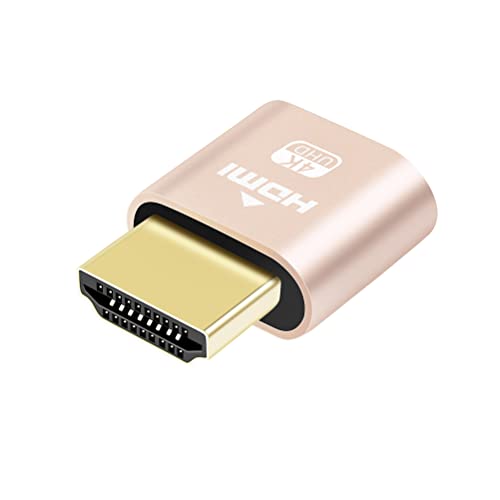
DTECH 4K HDMI Dummy Plug (fit-Headless, 1 Pack)
- Best for: A Windows, Mac or Linux desktop or server that needs a dependable virtual display for remote access.
- Connector: HDMI
- Max virtual resolution: 4Kx2K 2160P, with 1080p support
- Compatibility: Windows, Mac OSX, Linux
- Model number: T0667-1
A Windows, Mac or Linux desktop or server that needs a dependable virtual display for remote access.
The listing’s mode list tops out at 4K 2160p without the high-refresh 1080p modes some rivals advertise, so streaming hosts that feel best above 60Hz should look at the HDMI 2.1 picks instead.
DTECH’s fit-headless plug is the conservative choice for a desktop that must simply stay awake and addressable. It presents a 4K-class display identity to the graphics card, covering 2160p and 1080p desktops, and the listing names Windows, Mac OSX and Linux compatibility, which makes it a safe fit for mixed homelabs where a Mac mini sits beside a Linux server. The design is a plain closed-end adapter with no cable and no output socket, so nothing dangles behind the machine. Buy the single pack to solve one PC, and note the same model is also sold in multi-packs if the setup grows.
Watch out for: The listing’s mode list tops out at 4K 2160p without the high-refresh 1080p modes some rivals advertise, so streaming hosts that feel best above 60Hz should look at the HDMI 2.1 picks instead.
Woieyeks HDMI Dummy Plug (3 Pack)
- Best for: Homelabs and small offices converting two or three headless machines in one go.
- Connector: HDMI
- Max virtual resolution: Up to 4K at 60Hz, with HDR
- High-refresh mode: 1080p at 120Hz
- Pack quantity: 3
Homelabs and small offices converting two or three headless machines in one go.
All three plugs share the same EDID profile, so identical virtual displays are fine for remote access but offer no variety if you were hoping to test different monitor identities.
Woieyeks sells this plug as a three-pack, which is the practical shape of most real headless problems: a server, a spare workstation and a test bench all need one at the same time. Each plug advertises up to 4K at 60Hz with HDR, and 1080p at 120Hz for remote sessions that feel noticeably more responsive than a 60Hz desktop. The plugs are tiny, at about 1.0 by 0.8 by 0.35 inches, so they sit neatly in crowded rear panels and travel well in a laptop bag. For a small homelab being converted in one afternoon, this is the pack that avoids a second order.
Watch out for: All three plugs share the same EDID profile, so identical virtual displays are fine for remote access but offer no variety if you were hoping to test different monitor identities.
EVanlak 8K HDMI Dummy Plug (1-Pack)
- Best for: A headless gaming, streaming or rendering PC with an HDMI 2.1 graphics card.
- Connector: HDMI 2.1
- Max virtual resolution: 8K at 30Hz
- High-refresh modes: 4K at 120Hz, 1440p at 144Hz, 1080p at 144Hz
- Finish: Gold-plated dongle
A headless gaming, streaming or rendering PC with an HDMI 2.1 graphics card.
The 8K and 4K 120Hz modes only appear when the graphics card and port support HDMI 2.1 bandwidth; on older hardware the plug behaves like a regular 4K 60Hz model.
EVanlak’s plug is built for recent graphics cards with HDMI 2.1 outputs, and its mode list runs higher than the rest of this guide. The EDID advertises 8K at 30Hz, 4K at 120Hz, 1440p at 144Hz and 1080p at 144Hz, which makes it the natural pick for a headless gaming or rendering host whose remote client can actually use those rates. The gold-plated dongle is a single closed-end plug with no cable, so it adds almost no depth behind a tower or mini PC. Older HDMI 2.0 machines can still use it, but they will only see the modes their own ports can drive.
Watch out for: The 8K and 4K 120Hz modes only appear when the graphics card and port support HDMI 2.1 bandwidth; on older hardware the plug behaves like a regular 4K 60Hz model.
Woieyeks 4K 120Hz HDMI 2.1 Dummy Plug
This second Woieyeks model is a different plug from the three-pack above: a single HDMI 2.1 adapter whose EDID is tuned for refresh rate rather than pack value. It advertises 3840×2160 at 120Hz, with 1440p and 1080p also at 120Hz, so a remote desktop or game-streaming session can run at double the usual rate on a suitably new graphics card. The listing is explicit that 8K is not supported, which keeps expectations honest. Choose it when one machine matters more than several, and when that machine’s owner actually notices the difference between 60Hz and 120Hz mouse movement.
Specs
- Connector: HDMI 2.1
- Max virtual resolution: 3840×2160 at 120Hz
- Other modes: 1440p at 120Hz, 1080p at 120Hz
- Model number: 4K 120Hz HDMI 2.1 Dummy Plug
- 8K support: Not supported
- Function: Virtual display emulator, headless ghost display adapter
Best for: One high-value headless machine used for game streaming or fast remote work.
Watch out for: Confirm your remote software can negotiate the 120Hz modes; some tools cap the session at 60Hz regardless of what the virtual display offers.
Which One Fits Your Situation
Your home server lives in a closet
A media or file server that only gets visited through remote desktop needs reliability, not exotic modes. The DTECH plug covers that brief with broad Windows, Mac and Linux listing support, while the FUERAN adds an LED you can check during the rare physical visit. Either turns a 1024×768 fallback desktop into a proper workspace the moment the server reboots after an update.
A GPU rig that only wakes up for jobs
Rendering, encoding and mining hosts often refuse full GPU clocks until a display appears. Any plug here satisfies the card, but the EVanlak’s HDMI 2.1 mode list gives a modern card the richest identity to lock onto. Fit the plug once, confirm the job software sees full acceleration, and the rig can run monitorless between jobs without a dummy screen taking shelf space.
A homelab with several headless boxes
Once a lab grows past one machine, pack maths takes over. The Woieyeks three-pack covers a server, a firewall box and a spare node in a single order, and every machine ends up with the same predictable 4K 60Hz virtual display. That consistency simplifies remote settings, because each host presents identical resolution options to your client software.
You remote into a gaming PC from another room
Game streaming and low-latency remote play are where refresh rate stops being a spec-sheet detail. The Woieyeks 4K 120Hz plug or the EVanlak lets the host render at 120Hz-class modes that a 60Hz plug cannot offer, provided the graphics card is HDMI 2.1 equipped. Pair the plug with a wired network connection and the session feels close to sitting at the machine.
Common Mistakes
- Buying a pass-through EDID emulator when the machine has no monitor at all, or a closed dummy plug when the real goal was locking a connected monitor’s settings.
- Reading only the headline resolution and missing that the refresh rate at your working resolution is capped at 60Hz.
- Assuming the plug fixes everything, when the PC also needs its BIOS or power settings changed to keep the display output active.
- Ordering a single plug for a rack of machines, then discovering each output on each computer needs its own adapter.
- Expecting copy-protected streaming services to play through a virtual display, when dummy plugs make no HDCP promises.
Frequently Asked Questions
Does an HDMI dummy plug need power or drivers?
No. The plugs in this guide draw what they need from the HDMI port itself and present a stored EDID, so the operating system treats them as an ordinary monitor. There is no software to install and no settings inside the plug. If a virtual display does not appear, the cause is almost always a machine-side setting, such as a disabled graphics output, rather than the adapter.
Will a dummy plug work on a laptop?
It can, provided the laptop has a full-size HDMI output and you want it to run with the lid closed or the internal screen off. The plug makes the laptop believe an external monitor is attached, which keeps the desktop at a full resolution for remote access. Check the laptop’s power settings too, because many machines sleep on lid close regardless of what display they think is connected.
What resolution will my remote desktop actually use?
The session can only use modes the plug’s EDID advertises and the graphics card accepts. Most plugs here offer a ladder from small legacy sizes up to 4K, and your remote tool usually picks the client’s window size from that list. If a wanted mode is missing, it is not offered by that plug’s profile, and choosing a plug with a longer published mode list is the fix.
Can one dummy plug serve two computers?
No. A plug occupies one video output and identifies itself to one graphics card, so every headless machine needs its own. That is why multipacks exist: a three or four pack costs less per plug than singles and leaves a spare for the next machine you retire to the rack. Swapping one plug between machines only works while the other machine stays powered off.
More from Amazon
Programs that pair well with the guide above. Offers and eligibility are set by Amazon and may change.
Free shipping on eligible items, Prime Video and more. Eligible new members can start with a free trial.
Start a Prime free trialAd-free music streaming. Eligible new subscribers can start with a free trial.
Try Music Unlimited freeA Prime membership for ages 18-24 with a trial period. Eligibility is set by Amazon.
See Prime for Young AdultsAudiobooks and podcasts to listen to on the go. Eligible new members can start with a free trial.
Try Audible freeAs an Amazon Associate we earn from qualifying purchases.