Our Short List of 3

- Best for: A first rack build with a typical count of home or office runs.
- Ports: 24 RJ45
- Category: Cat6, rated for 10 Gigabit Ethernet
- Size: 1U, 19-inch
- Mounting: rackmount or wall mount

- Best for: Mixed-generation cabling where older and newer runs land in one place.
- Ports: 24 RJ45
- Category: Cat6, unshielded
- Bandwidth: 250MHz
- Termination: 110-type IDC

- Best for: Larger installs that would outgrow a 24-port panel within a year or two.
- Ports: 48 RJ45
- Category: Cat6, rated for 10 Gigabit Ethernet
- Size: 2U, 3.5 inches high, 19-inch wide
- Termination: 180-degree punch-down block, 110 or Krone tools
All 5 Picks at a Glance
| Product | Specs | Action |
|---|---|---|
| Cable Matters 24-Port Cat6 Patch Panel (UL Listed) |
| Check price on Amazon |
| TRENDnet TC-P24C6 24-Port Cat6 Patch Panel |
| Check price on Amazon |
| Cable Matters 48-Port Cat6 Patch Panel (UL Listed) |
| Check price on Amazon |
 Rapink 24-Port Cat7 Inline Coupler Patch Panel |
| Check price on Amazon |
 Intellinet 12-Port Cat6 Wall-Mount Patch Panel |
| Check price on Amazon |
Key takeaways
- Five patch panels compared on port count, termination style and mounting: 24 and 48-port Cat6 panels, a Cat7 coupler panel and a 12-port wall-mount pick.
Running Ethernet through a house or office is the easy part; keeping two dozen cable ends organised at the rack is where most installs fall apart. A patch panel gives every run a fixed, labelled home, so swapping a switch or tracing a dead port takes seconds instead of an afternoon. The real decision is format: how many ports you need, whether you want to punch down solid-core cable or plug in pre-terminated leads, and whether the panel mounts in a 19-inch rack or straight onto a wall.
This guide is for home network builders, small offices and anyone tidying an existing wiring closet. The five picks below were chosen from current Amazon listings and their stated specifications, and they cover the main formats: standard 24-port punch-down panels, a high-density 48-port model, a toolless coupler panel and a compact wall-mount option for setups with no rack at all.
Quick Picks
As an Amazon Associate we earn from qualifying purchases
| Product | Best for | Key spec from title |
|---|---|---|
| Cable Matters 24-Port Cat6 Patch Panel | Most home and small-office racks | 24 ports, 1U, rated for 10 Gigabit Ethernet |
| TRENDnet TC-P24C6 24-Port Cat6 Patch Panel | Standards-focused wired installs | 250MHz bandwidth, 110-type IDC blocks |
| Cable Matters 48-Port Cat6 Patch Panel | Large racks that are still growing | 48 ports in 2U of rack space |
| Rapink 24-Port Cat7 Inline Coupler Patch Panel | Pre-terminated cables, no punch tool | Toolless inline keystones, shielded build |
| Intellinet 12-Port Cat6 Wall-Mount Patch Panel | Small setups without a rack | 12 ports, 89D mounting bracket included |
How to Choose
Count Ports and Rack Space First
Start with the number of cable runs you have today, then add headroom for the rooms you are likely to wire next. A 24-port panel in a single rack unit covers most houses; dropping to 12 ports saves money and wall space but leaves nothing spare when you add a camera or an access point later. If your run count is already past twenty, a 48-port panel in two rack units is usually tidier than stacking two smaller panels and splitting your labelling scheme across both.
Pick a Termination Style
Punch-down panels terminate solid-core cable directly onto IDC blocks with a 110 or Krone impact tool, which gives the most permanent, professional result and suits new in-wall wiring. Pass-through coupler panels skip that step entirely: each port is a female-to-female keystone, so factory-terminated patch cables plug into both sides. That makes couplers faster to install and easier to rearrange, but every connection adds another plug joint. Blank keystone panels sit between the two, letting you snap in your own jacks and mix Ethernet with other keystone formats.
Match the Cable Category and Shielding
The panel should match the cable you pulled. A Cat6 panel preserves the rating of Cat6 runs, and several models here are also rated for 10 Gigabit Ethernet on suitable cable. Unshielded panels are the default for homes and pair with standard UTP cable. Shielded panels only make sense when the whole channel is shielded, including the cable and the jacks, which is more common in electrically noisy commercial spaces. Mixing shielded and unshielded parts in one run rarely helps and can complicate grounding.
Decide How It Mounts and Manages Cables
Most rack panels fit the standard 19-inch width and can also hang on a wall, while compact models use a bracket for direct wall mounting where no rack exists. Check the depth behind the panel too, since punched-down cables need room to bend without kinking. A rear support or management bar keeps heavy cable bundles from pulling on the terminations, and numbered ports with write-on label space matter more than they sound: six months later, that labelling is the difference between a five-minute fix and a full re-trace.
The 5 Best Options
Cable Matters 24-Port Cat6 Patch Panel (UL Listed)
- Best for: A first rack build with a typical count of home or office runs.
- Ports: 24 RJ45
- Category: Cat6, rated for 10 Gigabit Ethernet
- Size: 1U, 19-inch
- Mounting: rackmount or wall mount
A first rack build with a typical count of home or office runs.
You need your own 110 or Krone impact tool; the panel is the termination point only, and patch cables to the switch are a separate purchase.
This is the panel to shortlist first for a conventional home or small-office rack. It terminates 24 runs in one rack unit, carries a UL listing, and is rated for 10 Gigabit Ethernet, so it will not hold back a Cat6 install. The rear blocks accept both 110 and Krone impact tools, which means the punch-down tool already in most installers’ kits will work. It mounts in a 19-inch rack or on a wall, giving smaller setups a migration path if a rack arrives later.
TRENDnet TC-P24C6 24-Port Cat6 Patch Panel
- Best for: Mixed-generation cabling where older and newer runs land in one place.
- Ports: 24 RJ45
- Category: Cat6, unshielded
- Bandwidth: 250MHz
- Termination: 110-type IDC
Mixed-generation cabling where older and newer runs land in one place.
It is a Gigabit-era design rather than a 10 Gigabit one, so check the stated bandwidth against the switches you plan to feed before committing a whole closet to it.
TRENDnet’s panel targets buyers who care about standards compliance and long service in a fixed install. It is an unshielded 24-port Cat6 design with 110-type IDC terminals and a stated 250MHz bandwidth, aimed at Ethernet, Fast Ethernet and Gigabit applications. The rear blocks accept cabling from Cat3 through Cat6, which makes it a sensible landing point when a building mixes older Cat5e runs with newer Cat6 ones. Like the Cable Matters above, it can wall-mount or rackmount, and its plain black finish suits utility spaces and office closets equally.
Cable Matters 48-Port Cat6 Patch Panel (UL Listed)
- Best for: Larger installs that would outgrow a 24-port panel within a year or two.
- Ports: 48 RJ45
- Category: Cat6, rated for 10 Gigabit Ethernet
- Size: 2U, 3.5 inches high, 19-inch wide
- Termination: 180-degree punch-down block, 110 or Krone tools
Larger installs that would outgrow a 24-port panel within a year or two.
Forty-eight punched-down terminations is a long sitting with an impact tool; budget the time, and leave rear clearance for the much larger cable bundle this panel collects.
When 24 ports are clearly not going to be enough, this 2U panel doubles the density without changing anything else about the install. All 48 ports are Cat6 and rated for 10 Gigabit Ethernet, the termination blocks are a 180-degree punch-down design that takes 110 or Krone tools, and the panel is UL Listed. At 3.5 inches tall it still fits compact racks, and it can wall-mount where a rack is absent. For a growing office or a house wired room-by-room over several years, landing everything on one labelled panel beats a patchwork of smaller ones.
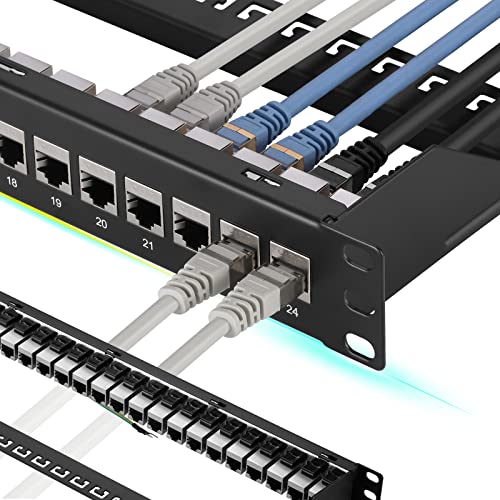
Rapink 24-Port Cat7 Inline Coupler Patch Panel
- Best for: Setups built from pre-terminated cables that get rearranged often.
- Ports: 24 inline keystone couplers
- Category: Cat7, also suits Cat6A, Cat6 and Cat5e
- Design: shielded pass-through, no punch-down required
- Speed: 10G support
Setups built from pre-terminated cables that get rearranged often.
Every port adds two plug connections to the channel, and the shielded design only pays off when the cables plugged into it are shielded too; with plain unshielded leads it behaves like a standard coupler panel.
The Rapink panel removes the punch-down step completely. Each of its 24 ports is an inline keystone coupler, so a cable with an RJ45 plug on each end simply clicks into the front and back. That suits renters, test benches and anyone whose runs are already terminated, and changes take seconds because nothing is punched down. The body is shielded and rated for Cat7 with 10G support, while remaining compatible with Cat6A, Cat6 and Cat5e leads. A removable rear bar helps support the weight of two dozen plugged-in cables.
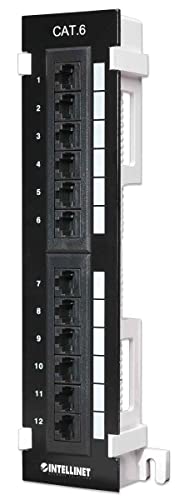
Intellinet 12-Port Cat6 Wall-Mount Patch Panel
- Best for: Rack-free installs with a dozen or fewer cable runs.
- Ports: 12 RJ45
- Category: Cat6
- Mounting: wall mount, 89D bracket included
- Contacts: gold plated, 50 micro-inch
Rack-free installs with a dozen or fewer cable runs.
Twelve ports fill up faster than expected once cameras, access points and a spare desk drop are counted; if your plan is already near the limit, step up to a 24-port model instead.
Not every network has a rack. This compact Intellinet panel mounts directly to a wall on its included 89D bracket and terminates twelve Cat6 runs, which is enough for a small house, a home office or a single-room business install. The jack contacts are gold plated, and the whole unit is a simple black block that sits happily inside a structured-wiring cabinet or on a backboard next to the router. It keeps the punch-down permanence of a full panel while skipping the cost and footprint of rack hardware entirely.
Which One Fits Your Situation
Building a First Home Rack
Start with the Cable Matters 24-port panel. One rack unit, a UL listing and a 10 Gigabit rating cover the typical mix of desk drops, access points and cameras, with spare ports left over for the rooms you wire next year. Add the TRENDnet instead only if your house already mixes older Cat5e runs with new Cat6 and you want one panel specified for both.
Wiring a House Without a Rack
Choose the Intellinet 12-port wall-mount panel and put it on a backboard or inside a wiring cabinet near the router. It terminates a small set of runs permanently, needs no rack rails, and keeps the installation looking deliberate rather than improvised. Count your planned runs carefully first, including any outdoor camera positions, before deciding twelve ports is enough.
Expanding an Existing Network Closet
The 48-port Cable Matters panel is the consolidation move: one labelled landing point for every run, in two rack units. It makes sense when a second 24-port panel would otherwise split your numbering across two units. If the existing closet is full of pre-terminated leads instead, the Rapink coupler panel expands capacity without re-terminating anything.
Rearranging Cables Often
Pick the Rapink inline coupler panel. Lab benches, media desks and rental properties all benefit from ports that accept a standard plug on both sides, because a change means unplugging rather than re-punching. Accept the extra connection points per channel as the price of that flexibility, and keep the plugged-in cables supported on the rear bar.
Common Mistakes
- Buying exactly as many ports as you have runs today, leaving nothing for the access point, camera or desk drop you add next year.
- Punching stranded patch cable into IDC blocks; punch-down panels are designed for solid-core cable, and stranded conductors make unreliable terminations.
- Mixing T568A on one end of a run and T568B on the other, which turns a straight-through link into a crossover and breaks the connection.
- Choosing a shielded panel while the rest of the channel is unshielded cable and jacks, then expecting a shielding benefit that cannot exist.
- Skipping port labels during the install because the layout seems obvious, then having to tone out every cable the first time something moves.
Frequently Asked Questions
Do I need a patch panel for a small home network?
Only if your cables are permanently installed in walls. A panel gives fixed, labelled endpoints for in-wall runs and protects the switch ports from repeated plugging. If every device sits near the router on loose patch cables, a panel adds cost without benefit, and a simple switch alone is the cleaner setup.
Can I plug Cat5e cables into a Cat6 patch panel?
Yes. The TRENDnet panel in this guide explicitly accepts Cat3 through Cat6 cabling, and standard punch-down blocks handle Cat5e conductors without issue. The finished link simply performs to the lower-rated component, so a Cat5e run on a Cat6 panel behaves like Cat5e. Keep one wiring scheme, T568A or T568B, consistent across the whole install.
What tools do I need to install a punch-down panel?
The essential tool is a 110 or Krone impact punch-down tool, which seats and trims each conductor in one action. Add a cable stripper for jackets, a cutter for tidying ends, and ideally a basic continuity tester to verify each run before the panel goes live. Coupler panels such as the Rapink need none of this, because cables arrive pre-terminated.
What is the difference between a patch panel and a switch?
A patch panel is passive: it organises and labels cable endpoints but moves no data by itself. A switch is the powered device that actually connects your network together. Short patch cables link each panel port to a switch port, which is why the panel protects the switch — the permanent wiring stays still while only the short cables get swapped.
More from Amazon
Programs that pair well with the guide above. Offers and eligibility are set by Amazon and may change.
Free shipping on eligible items, Prime Video and more. Eligible new members can start with a free trial.
Start a Prime free trialAd-free music streaming. Eligible new subscribers can start with a free trial.
Try Music Unlimited freeA Prime membership for ages 18-24 with a trial period. Eligibility is set by Amazon.
See Prime for Young AdultsAudiobooks and podcasts to listen to on the go. Eligible new members can start with a free trial.
Try Audible freeAs an Amazon Associate we earn from qualifying purchases.