Our Short List of 3

- Best for: Intuos Pro and Cintiq owners replacing the pen their display shipped with.
- Model: KP504E
- Pressure levels: 8,192 at the tip and eraser
- Tilt recognition: plus or minus 60 degrees
- Technology: battery-free electromagnetic resonance (EMR)

- Best for: Artist Pro display owners who need a like-for-like replacement pen.
- Pressure levels: 8,192
- Tilt support: 60 degrees
- Technology: battery-free EMR
- Compatibility: XP-Pen Artist 12 Pro, 13.3 Pro, 15.6 Pro, 22R Pro and 24 Pro only
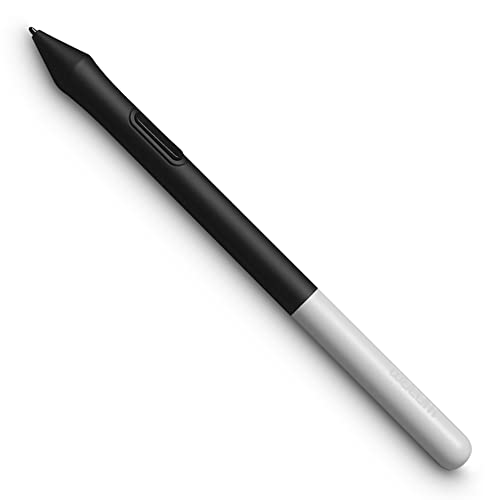
- Best for: Wacom One display owners who need the correct first-party replacement pen.
- Model: CP91300B2Z
- Pressure levels: 4,096
- Tilt recognition: plus or minus 60 degrees
- Technology: battery-free EMR
All 3 Picks at a Glance
| Product | Specs | Action |
|---|---|---|
| Wacom Pro Pen 2 (KP504E) |
| Check price on Amazon |
| XP-Pen PA2 Battery-Free Stylus |
| Check price on Amazon |
| Wacom One Pen (CP91300B2Z) |
| Check price on Amazon |
Key takeaways
- The best graphics tablet pens for Wacom, XP-Pen and Huion tablets compared on pressure levels, tilt support, buttons and exact model compatibility.
A graphics tablet pen is not a universal accessory. Each pen talks to one family of tablets through electromagnetic resonance, so a stylus built for a Wacom Intuos Pro will not register on a Huion Kamvas, and an XP-Pen pen will not wake up a Wacom One display. When the original pen is lost, cracked or worn smooth at the grip, the replacement has to match the exact tablet model, not just the brand on the box.
This guide collects the five replacement and spare pens most worth buying for the big three pen tablet ecosystems, covering pen displays and screenless tablets alike. Every pick is battery-free, every pick lists the models it actually fits, and the differences that matter, pressure levels, tilt support, side buttons and spare nibs, are set out model by model so you can order the right pen the first time.
Quick Picks
As an Amazon Associate we earn from qualifying purchases
| Product | Best for | Key spec from title |
|---|---|---|
| Wacom Pro Pen 2 (KP504E) | Intuos Pro and Cintiq pen displays | 8,192 pressure levels with tilt support |
| XP-Pen PA2 | Artist Pro pen displays | 8,192 pressure levels, battery-free EMR |
| Huion PW517 | Kamvas pen displays | PenTech 3.0 with 8,192 pressure levels |
| Wacom Pen 4K (LP1100K) | Intuos screenless tablets | 4,096 pressure levels, nibs stored in the barrel |
| Wacom One Pen (CP91300B2Z) | Wacom One pen displays | 4,096 pressure levels, one side switch |
How to Choose
Match the Pen to the Exact Tablet Model
Compatibility is the whole decision with a graphics tablet pen. Electromagnetic resonance pens are tuned to a specific digitizer generation, so two pens from the same brand can still be strangers to each other: the Wacom Pen 4K fits the entry Intuos line but not the Intuos Pro, and the Huion PW517 fits Kamvas displays but not Inspiroy tablets. Before ordering, find the model code printed on your tablet, then match it against the compatibility list in the pen listing, model for model, rather than trusting a brand-level claim.
Compare Pressure Levels and Tilt Support
Pressure levels describe how finely the pen reads force, and the current split is simple: flagship pens read 8,192 levels while entry pens read 4,096. In daily drawing the gap shows up in very light strokes and slow pressure ramps rather than in ordinary line work. Tilt support matters more for painters, because a pen that reads its own angle lets brushes lay down broad, natural shading strokes. Three pens here read tilt to plus or minus 60 degrees, the Wacom Pen 4K does not read tilt at all, and that single line in the spec list should steer shading-heavy work.
Check Buttons, Erasers and Spare Nibs
Small hardware details decide how a spare pen fits your habits. Most of these pens carry two side switches that can be mapped to an eraser toggle, right-click or undo, while the Wacom One Pen keeps a single switch and the Pro Pen 2 adds a dedicated eraser end. Nib supply varies just as much: the PW517 ships with eight spare nibs, the Pen 4K hides three spares inside its own barrel, and the PA2 arrives as a bare pen with nothing else in the box, so check what is included before assuming a like-for-like swap.
Think About Grip, Weight and Pen Feel
A replacement pen sits in your hand for hours, so its shape matters as much as its electronics. Weights here run from about 11 grams for the slim Pen 4K to 15 grams for the Pro Pen 2, and grips range from narrow pencil-like barrels to wider rubberized sections. If your original pen caused finger fatigue, a spare is a chance to change shape rather than repeat it. Artists who switch between inking and painting sometimes keep two pens with different nib types fitted, one standard and one felt, for a faster change of surface feel.
The 5 Best Options
Wacom Pro Pen 2 (KP504E)
- Best for: Intuos Pro and Cintiq owners replacing the pen their display shipped with.
- Model: KP504E
- Pressure levels: 8,192 at the tip and eraser
- Tilt recognition: plus or minus 60 degrees
- Technology: battery-free electromagnetic resonance (EMR)
Intuos Pro and Cintiq owners replacing the pen their display shipped with.
It does not work with the entry Intuos line or Wacom One displays, despite sharing the Wacom name.
The Pro Pen 2 is the pen Wacom ships with its professional line, and it remains the one to buy when an Intuos Pro, Cintiq Pro, Cintiq or MobileStudio Pro pen goes missing. It reads 8,192 pressure levels at both the tip and the eraser end, tracks tilt to plus or minus 60 degrees, and never needs a battery or a charge. The included case is genuinely useful rather than decorative: it stores the pen with one felt nib and two POM nibs, so a worn tip can be swapped in seconds and the pen travels without rattling loose in a bag.
XP-Pen PA2 Battery-Free Stylus
- Best for: Artist Pro display owners who need a like-for-like replacement pen.
- Pressure levels: 8,192
- Tilt support: 60 degrees
- Technology: battery-free EMR
- Compatibility: XP-Pen Artist 12 Pro, 13.3 Pro, 15.6 Pro, 22R Pro and 24 Pro only
Artist Pro display owners who need a like-for-like replacement pen.
It fits only the five Artist Pro models listed, not other XP-Pen tablets such as the Deco line.
The PA2 is the dedicated pen for XP-Pen’s Artist Pro pen displays, built to restore the exact feel of the stylus those screens shipped with. It reads 8,192 pressure levels, supports tilt to 60 degrees for natural shading strokes, and runs on battery-free EMR, so it is always ready when the display wakes. XP-Pen sells it as a straightforward spare or replacement: the box holds the pen and nothing else, which keeps things simple if your nibs and stand from the original kit are still on the desk, and slightly annoying if they are not.
Huion PW517 Battery-Free Stylus
The PW517 is Huion’s PenTech 3.0 pen for the Kamvas family of pen displays, and it is the most complete package in this guide. Alongside 8,192 pressure levels and plus or minus 60 degrees of tilt, the box includes eight spare PN05A nibs and a nib clip, so the pen arrives ready for years of tip wear. Two programmable buttons sit under the thumb, the barrel measures 163.7 by 14.3 millimeters, and at 14 grams it stays comfortable through long sessions. Its compatibility list covers most Kamvas and Kamvas Pro displays plus a few Inspiroy models.
Specs
- Pen technology: Huion PenTech 3.0
- Pressure levels: 8,192
- Tilt support: plus or minus 60 degrees
- Pen resolution: 5080 LPI
- Controls: 2 programmable buttons
- Technology: battery-free EMR
- Dimensions: 163.7 x 14.3 mm
- Weight: 14 g
- In the box: pen, 8 PN05A nibs and a nib clip
- Compatibility: Kamvas 12, Kamvas 13, Kamvas 16 (2021), Kamvas 22, Kamvas 22 Plus, Kamvas 24, Kamvas 24 Plus, Kamvas Pro 13 (2.5K), Kamvas Pro 16 (2.5K), Kamvas Pro 16 (4K), Kamvas Pro 16 Plus (4K), Kamvas Pro 24 (4K), Inspiroy KeyDial KD200, Inspiroy Giano G930L and Inspiroy Dial 2
Best for: Kamvas display owners who want a spare pen with a full set of nibs included.
Watch out for: Kamvas owners with older displays may need the PW500 or PW507 instead, so check the pen model, not just the display size.
ASIN: B089VWDJCS
Wacom Pen 4K (LP1100K)
The Pen 4K is the replacement stylus for Wacom’s entry Intuos tablets, the CTL4100 and CTL6100 family found on countless student and home desks. It reads 4,096 pressure levels, carries two side switches, and weighs about 11 grams, making it the lightest pen in this guide. Its neatest trick is storage: three spare standard nibs hide inside the pen barrel itself, so a fresh tip is always within reach even when the tablet box is long gone. There is no tilt reading, which keeps it aimed at drawing, note-taking and photo retouching rather than brush-style painting.
Specs
- Model: LP1100K
- Pressure levels: 4,096
- Tilt support: not supported
- Technology: battery-free EMR
- Controls: 2 side switches
- Accuracy: plus or minus 0.25 mm
- Reading height: 7 mm
- Resolution: 2540 lpi
- Report rate: 133 pps
- Weight: 11 g
- Extras: 3 spare standard nibs stored inside the pen barrel
- Compatibility: Wacom Intuos CTL4100, CTL4100WL and CTL6100WL
Best for: Intuos owners replacing a lost or damaged pen on a screenless tablet.
Watch out for: It is not an upgrade path for Intuos Pro owners, and the lack of tilt rules it out for shading-heavy brush work.
ASIN: B07CYRWTZF
Wacom One Pen (CP91300B2Z)
- Best for: Wacom One display owners who need the correct first-party replacement pen.
- Model: CP91300B2Z
- Pressure levels: 4,096
- Tilt recognition: plus or minus 60 degrees
- Technology: battery-free EMR
Wacom One display owners who need the correct first-party replacement pen.
The single side switch gives you one shortcut on the pen instead of two, and nibs wear with heavy use on the display surface.
The Wacom One Pen is the dedicated stylus for Wacom One creative pen displays, and it is deliberately the simplest pen here. It reads 4,096 pressure levels, recognizes tilt to plus or minus 60 degrees, and offers a single programmable side switch, which keeps the barrel clean for artists who rest a finger where a second button would sit. Like every pen in this guide it is battery-free EMR, drawing its power from the display surface itself. For Wacom One owners it is the only correct replacement, since the Pro Pen 2 and Pen 4K in this same guide will not register on that screen.
Which One Fits Your Situation
You Lost the Pen for a Pen Display
Start from the display, not the pen drawer. Intuos Pro and Cintiq owners need the Pro Pen 2, Artist Pro owners need the PA2, Kamvas owners need the PW517, and Wacom One owners need the CP91300B2Z pen. Each display family reads its own pen generation, so the brand logo alone is not enough to go on; match the display model first and the choice makes itself.
Your Screenless Tablet Pen Is Worn Out
If you draw on a screenless Intuos, the Pen 4K is your replacement, and its barrel-stored spare nibs fix the scratchy, worn-tip feel that often gets mistaken for a dying pen. Inspiroy owners should note that none of these five fits their tablets: Huion keeps the Inspiroy line on a different pen family, so order by your tablet model rather than by the Huion name.
You Want a Spare Pen Set Up Differently
A second pen earns its place when it is configured differently from the first. Keep one Pro Pen 2 or PW517 fitted with a felt nib for painterly work and another with a standard nib for inking, or map the side switches differently per pen for illustration versus retouching. Because these pens need no pairing or charging, swapping between them mid-session takes seconds.
You Run a Shared Studio or Classroom
Shared desks eat pens, so buy spares by model code and label them. Keep Pro Pen 2 cases with the Cintiq stations, PA2 pens with the Artist Pro screens, and Pen 4K pens with the Intuos loaner kits, and store each pen with its own nib supply. A labeled case per station ends the common mix-up where a pen from the wrong family sits in the tray and simply refuses to draw.
Common Mistakes
- Assuming any pen from the same brand fits, when compatibility is set by the exact tablet model and digitizer generation.
- Buying a touchscreen stylus for a pen tablet, because capacitive pens cannot deliver pressure or tilt on an EMR surface.
- Mixing up Huion pen generations, since the PW517, PW500 and PW507 look alike but serve different Kamvas displays.
- Forgetting that a pen is an accessory with no drawing surface of its own, so it does nothing without the matching tablet.
- Throwing away a pen that only needs a fresh nib, when a worn tip is the usual cause of scratchy, skipping strokes.
Frequently Asked Questions
Will a pen from one brand work on another brand of tablet?
No. Graphics tablet pens use electromagnetic resonance tuned to one manufacturer’s digitizer, and usually to one product family within that brand. A Wacom pen will not register on a Huion or XP-Pen tablet, and even within Wacom the Pen 4K, Pro Pen 2 and Wacom One Pen each serve different hardware. Always match the pen to the exact tablet model.
Do graphics tablet pens need batteries or charging?
None of the five pens in this guide do. Battery-free EMR pens draw power wirelessly from the tablet surface while you draw, so there is nothing to charge, no cell to replace and no low-battery warning mid-session. That is one reason replacement pens are simple: unbox the pen, let the tablet sense it, and start drawing with your existing driver settings intact.
Is 8,192 pressure levels always better than 4,096?
Not automatically. The higher figure gives finer control at very light pressure and across slow pressure ramps, which illustrators and painters can feel in delicate work. For note-taking, photo retouching and general drawing, 4,096 levels already cover the range most hands can deliberately control. Compatibility with your tablet should decide first; treat the pressure figure as a secondary difference between pens that both fit.
Can I use one of these pens on an iPad or a touchscreen laptop?
No. These are EMR pens built for pen tablets and pen displays, and they do not work on capacitive touchscreens such as iPads, phones or touchscreen laptops. Touchscreen devices need their own stylus families, like the pens sold for iPad or Surface, which use entirely different signaling. If you split work between a drawing display and a tablet computer, expect to keep a separate pen for each.
More from Amazon
Programs that pair well with the guide above. Offers and eligibility are set by Amazon and may change.
Free shipping on eligible items, Prime Video and more. Eligible new members can start with a free trial.
Start a Prime free trialAd-free music streaming. Eligible new subscribers can start with a free trial.
Try Music Unlimited freeA Prime membership for ages 18-24 with a trial period. Eligibility is set by Amazon.
See Prime for Young AdultsAudiobooks and podcasts to listen to on the go. Eligible new members can start with a free trial.
Try Audible freeAs an Amazon Associate we earn from qualifying purchases.