Our Short List of 3

- Best for: a low-profile install of a typical home projector on a flat ceiling.
- Universal ceiling mount for regular and mini projectors
- All-steel construction, white finish
- Supports projectors up to 30 pounds
- Tilt 15 degrees, swivel 15 degrees, 360-degree rotation

- Best for: small rooms and tight installs where a wide tilt range matters more than drop length.
- Universal low-profile ceiling mount, white
- Supports projectors up to 30 pounds
- Tilt 0 to 90 degrees, pitch from -15 to +15 degrees
- Roll from -15 to +15 degrees, 360-degree rotation

- Best for: vaulted and cathedral ceilings, and heavier projectors that outclass budget brackets.
- Kit includes the QG-PRO-PM-50-W mount, vaulted ceiling adapter, and a 3-inch pipe
- 1.5-inch NPT threading, compatible with QualGear pipes from 3 inches to 3 feet
- Mount rated for projectors up to 50 pounds
- Pitch from -20 to +20 degrees, roll from -8 to +8 degrees, 360-degree rotation
All 5 Picks at a Glance
| Product | Specs | Action |
|---|---|---|
| VIVO Universal Adjustable Ceiling Projector Mount (MOUNT-VP01W) |
| Check price on Amazon |
| QualGear PRB-717 Universal Ceiling Projector Mount |
| Check price on Amazon |
| QualGear Pro-AV Projector Mount Kit with Vaulted Ceiling Adapter (QG-KIT-VA-3IN-W) |
| Check price on Amazon |
 suptek Projector Ceiling Mount Bracket (PR05) |
| Check price on Amazon |
 Kanto P101 Universal Projector Ceiling Mount |
| Check price on Amazon |
Key takeaways
- Compare five projector mounts for flat, sloped and vaulted ceilings, with load limits, hole spacing and drop lengths checked before you drill anything.
A ceiling mount looks like the simplest part of a projector setup, right up until the projector arrives and its mounting holes refuse to match the bracket, or the lens sits six inches above where the screen needs it. The real decision is fit: your projector’s weight and hole pattern, your ceiling type, and the drop length that puts the lens level with the top of the image. Get those three right and almost any well-made mount works; get one wrong and no amount of adjustment saves the install.
This guide serves home theater builders, boardroom and classroom installers, and owners of awkward sloped or vaulted ceilings. The picks come from current Amazon listings and span low-profile flat-ceiling mounts, a joist kit for angled ceilings, an extendable budget bracket, and a ball-joint mount for fine aiming. Each one is compared on stated load capacity, mounting-hole range, drop length, and adjustment range.
Quick Picks
As an Amazon Associate we earn from qualifying purchases
| Product | Best for | Key spec from title |
|---|---|---|
| VIVO MOUNT-VP01W | Low-profile flat ceilings | 30-pound capacity, sits about 6 inches down |
| QualGear PRB-717 | Close-quarters rooms | Tilt from 0 to 90 degrees, 30-pound capacity |
| QualGear Pro-AV Vaulted Kit | Sloped and cathedral ceilings | 3-inch NPT pipe kit, mount rated to 50 pounds |
| suptek PR05 | Budget installs on mixed ceilings | Extendable pole, fits holes to 11.4 inches |
| Kanto P101 | Boardrooms needing fine aim | 360-degree ball joint, 9 to 12 inch extension |
How to Choose
Measure the projector before the ceiling
Universal describes an adjustable interface, not a guaranteed fit. Every mount here states a mounting-hole range, and your projector’s threaded holes must fall inside it with the arms fitted, or inside the small square pattern some mounts offer with the arms removed. Weigh the projector too, including any lens or mount plate you plan to hang from it, and keep a margin under the stated capacity. Five minutes with a tape measure and the projector’s manual prevents the most common return in this category.
Match the mount to the ceiling you actually have
A flat drywall ceiling over joists is the easy case: nearly every mount works if you anchor into structure. Sloped and vaulted ceilings need an adapter that levels the pole, which is why complete kits exist for them. Suspended tile ceilings are a third case, served by tile-replacement plates rather than joist hardware. Brick and concrete need the right anchors and a mount whose plate suits masonry. Naming your ceiling type honestly shortens the shortlist faster than any feature comparison.
Set the drop length from the screen, not the ceiling
The lens needs to sit at a height the projector’s lens shift and zoom can work with, usually near the top edge of the screen for a ceiling install. A low-profile mount dropping about six inches suits rooms where the screen hangs high; taller ceilings or lower screens call for an extension pole or a telescoping bracket. Work backward from the screen position, then choose the drop. Buying the mount first and hoping the math works is how projectors end up aimed with heavy digital keystone correction.
Decide how you will aim it after install
Friction joints on budget mounts tilt and swivel by hand and lock with a screw, which is fine when you set the image once. Ball joints allow quick fine aiming and suit rooms where the projector comes down for servicing. Geared and preset designs hold heavier projectors steady against drift. Think about who adjusts the image and how often: a classroom projector touched twice a year tolerates simple joints, while a shared boardroom mount earns its keep with easier adjustment.
The 5 Best Options
VIVO Universal Adjustable Ceiling Projector Mount (MOUNT-VP01W)
- Best for: a low-profile install of a typical home projector on a flat ceiling.
- Universal ceiling mount for regular and mini projectors
- All-steel construction, white finish
- Supports projectors up to 30 pounds
- Tilt 15 degrees, swivel 15 degrees, 360-degree rotation
a low-profile install of a typical home projector on a flat ceiling.
VIVO lists specific incompatible models from brands such as Epson, Mitsubishi, and LG, so check your projector against the listing’s exclusion list before ordering.
This is the default pick for a standard flat ceiling. The all-steel mount sits the projector about six inches below the ceiling, which keeps the lens high and the hardware nearly invisible in a finished room. Its extending arms cover most regular and mini projectors, and the head offers tilt, swivel, and full rotation for squaring the image. For the common case of a mid-weight home projector over a joist, it covers the brief without paying for extension range you will never use.
QualGear PRB-717 Universal Ceiling Projector Mount
- Best for: small rooms and tight installs where a wide tilt range matters more than drop length.
- Universal low-profile ceiling mount, white
- Supports projectors up to 30 pounds
- Tilt 0 to 90 degrees, pitch from -15 to +15 degrees
- Roll from -15 to +15 degrees, 360-degree rotation
small rooms and tight installs where a wide tilt range matters more than drop length.
the compact arms suit small to medium projectors, so confirm your hole spacing fits before relying on the universal label.
The PRB-717 is the close-quarters specialist. Its head tilts through a wide range, up to a full right angle, which makes it useful where the projector must sit tight to the ceiling or angle steeply toward a nearby screen. The compact plate suits wood beams, concrete, and brick, and the white finish disappears against most ceilings. It is a simple, light bracket, and for small to medium projectors in bedrooms, dens, and small meeting rooms that simplicity is the point.
QualGear Pro-AV Projector Mount Kit with Vaulted Ceiling Adapter (QG-KIT-VA-3IN-W)
- Best for: vaulted and cathedral ceilings, and heavier projectors that outclass budget brackets.
- Kit includes the QG-PRO-PM-50-W mount, vaulted ceiling adapter, and a 3-inch pipe
- 1.5-inch NPT threading, compatible with QualGear pipes from 3 inches to 3 feet
- Mount rated for projectors up to 50 pounds
- Pitch from -20 to +20 degrees, roll from -8 to +8 degrees, 360-degree rotation
vaulted and cathedral ceilings, and heavier projectors that outclass budget brackets.
the included pipe gives only a near-flush drop, so measure whether you also need a longer NPT pipe before the install day.
Sloped ceilings defeat standard mounts because the pole must hang plumb while the plate sits at an angle. This kit solves it as a system: a professional mount, a vaulted ceiling adapter, and a short threaded pipe in one box, with longer pipes available in the same standard when the room needs more drop. The mount itself carries the heaviest rating in this guide, and the pre-assembled interface with pre-sorted hardware shortens a ladder job that nobody wants to do twice.
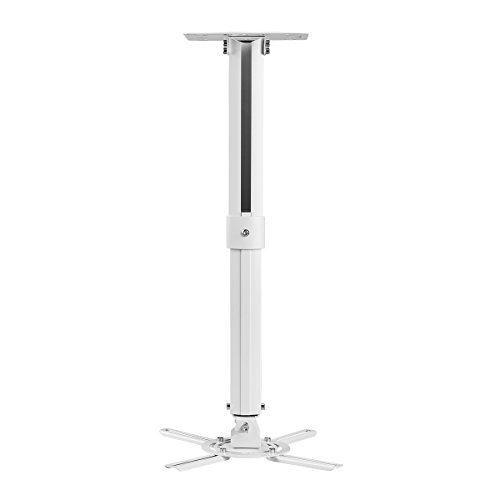
suptek Projector Ceiling Mount Bracket (PR05)
- Best for: budget installs and rooms where the ceiling angle or layout is not standard.
- Three-in-one bracket for flat ceilings, sloped ceilings, or walls
- Extendable pole, roughly 13.4 to 21.3 inches from the ceiling
- Fits projectors with mounting holes up to 11.41 inches apart
- Supports projectors under 30 pounds
budget installs and rooms where the ceiling angle or layout is not standard.
keep the projector comfortably under the weight limit and check the hole spacing twice, since the fit range is narrower than the premium kits.
The PR05 is the flexible budget route. One bracket handles flat ceilings, sloped ceilings, and wall mounting, and its pole extends so the drop can be tuned to the screen instead of fixed at the factory. That range makes it a sensible first mount for classrooms and spare rooms where the setup may change. The trade-off for the price is a lighter build and a smaller fit window, so it rewards buyers who measure first and stay well inside its limits.
Kanto P101 Universal Projector Ceiling Mount
- Best for: boardrooms, classrooms, and compact projectors that get re-aimed often.
- Universal ceiling mount with solid steel construction
- Supports projectors up to 22 pounds
- Extension adjusts from 9 to 12 inches
- 360-degree ball joint for positioning
boardrooms, classrooms, and compact projectors that get re-aimed often.
the box includes hardware to attach the projector but not hardware to attach the mount to the ceiling, so budget for the right joist or masonry fixings separately.
The P101 aims with a ball joint, and that changes the setup experience. Instead of loosening friction plates in sequence, you point the projector, level the image, and lock it, which suits boardrooms and classrooms where the mount gets adjusted by whoever is presenting. The extension adjusts across a short range for fine height placement, and the arms ship in two lengths to cover different hole patterns. It is rated for lighter projectors, so it fits the portable and compact end of the market best.
Which One Fits Your Situation
You have a flat ceiling and a typical home projector
Choose the VIVO MOUNT-VP01W. It is the least complicated path to a clean install: short drop, steel build, enough adjustment to square the image, and arms that cover most projectors sold for home use. Unless your ceiling or projector is unusual, the extra features elsewhere in this guide solve problems you do not have.
Your ceiling slopes or peaks
Choose the QualGear Pro-AV Vaulted Kit. The adapter keeps the pole vertical on an angled surface, the pipe system lets you set the drop precisely, and the mount’s rating covers larger projectors. If the budget is tight and the projector is light, the suptek PR05 is the fallback, since it also accepts sloped ceilings.
The projector is heavy or the room is commercial
Choose the QualGear Pro-AV kit for its 50-pound mount rating and joist-focused hardware, and run cables through the hollow pipe for a clean finish. In a boardroom with a lighter projector that staff re-aim often, the Kanto P101 and its ball joint will save more time than the heavier kit saves worry.
You are mounting on a budget in a spare room
Choose the suptek PR05 if your projector is light and its holes fall inside the stated range, or the QualGear PRB-717 if the ceiling is flat and you want the wider tilt range for a steep throw. Both keep the spend low; the deciding factor is whether you need the PR05’s extension or the PRB-717’s tilt.
Common Mistakes
- Trusting the word universal and skipping the hole-spacing check, then finding the arms cannot reach the projector’s mounting points.
- Anchoring a ceiling plate into drywall alone instead of a joist, beam, or rated masonry anchor, and letting the projector sag or worse.
- Choosing a fixed short mount when the screen top sits well below the lens line, which forces heavy keystone correction and softens the image.
- Ignoring the mount’s load rating and hanging a large projector from a bracket designed for compact models.
- Forgetting the cables: the mount position still needs power and an HDMI run, and poles without a cable path leave cords dangling beside the install.
Frequently Asked Questions
How do I know whether a universal mount fits my projector?
Compare two numbers from the projector’s manual with the mount’s listing: the weight, and the spacing between its threaded mounting holes. The holes must fall inside the mount’s arm range, or match the small square pattern some mounts offer with the arms removed. If either figure sits outside the range, choose a different mount.
Can I install a projector mount on a sloped ceiling?
Yes, with the right hardware. A standard flat plate leaves the pole tilted, so use a mount or kit with a vaulted or sloped ceiling adapter that lets the pole hang vertically, like the QualGear Pro-AV kit or the suptek PR05 in this guide. The adapter must still anchor into structure, never into drywall alone.
How far below the ceiling should the projector hang?
Only as far as the image geometry requires. The lens generally needs to sit near the top edge of the screen, within the range the projector’s lens shift can correct. Measure from the ceiling to that lens height, then pick a fixed drop, telescoping pole, or pipe length that lands there with a little adjustment to spare.
Do projector mounts include the ceiling screws and anchors?
Usually the box includes hardware for attaching the projector to the mount, and often basic ceiling fixings, but not always. The Kanto P101, for example, ships without ceiling attachment hardware. Check the contents list for your ceiling type and buy joist screws or masonry anchors separately if they are missing.
More from Amazon
Programs that pair well with the guide above. Offers and eligibility are set by Amazon and may change.
Free shipping on eligible items, Prime Video and more. Eligible new members can start with a free trial.
Start a Prime free trialAd-free music streaming. Eligible new subscribers can start with a free trial.
Try Music Unlimited freeA Prime membership for ages 18-24 with a trial period. Eligibility is set by Amazon.
See Prime for Young AdultsAudiobooks and podcasts to listen to on the go. Eligible new members can start with a free trial.
Try Audible freeAs an Amazon Associate we earn from qualifying purchases.