Key takeaways
- Compare the best presentation clickers by wireless range, battery type, and extra controls like volume and timer for slides, lectures, and classroom talks.
As an Amazon Associate we earn from qualifying purchases.
A presentation clicker is a small tool that changes how a talk feels from the front of the room. Instead of staying beside a laptop to tap the arrow keys, you can walk toward your audience, turn to face them while you speak, and move through slides with a button press that nobody notices. For teachers, that freedom means circulating among students during a lecture. For business presenters, it means standing beside the screen to point at a chart rather than hiding behind a podium. The five clickers in this guide cover the main ways people present: a simple plug-and-play remote for borrowed laptops, a classic model with a red laser pointer, a rechargeable remote with a built-in timer workflow, a Bluetooth model with a long operating range, and a remote that adds volume and hyperlink control for media-heavy decks. Every specification below comes from the maker’s own listing and product copy, including the wireless range, the connection type, and the battery each model uses, so you can match a remote to your room size, your computer, and the way you like to present.

Disclosure: This article contains affiliate links. If you make a purchase through these links, we may earn a commission at no extra cost to you.
Our top picks
How to Choose a Presentation Clicker
Start with the connection. Most clickers use a small USB receiver on the 2.4GHz band: plug it in and the remote works immediately, with no pairing and no software. That is the safest choice for shared or borrowed computers, because it behaves like a keyboard and is recognized by Windows and macOS alike. Bluetooth models pair directly with the computer, which matters on laptops with few ports or on tablets, and some remotes offer both options so you can switch between machines. Check the port on your laptop before buying, since a USB-A receiver needs an adapter on a computer that only has USB-C ports.
Range is the second decision. Makers state operating range in feet or meters, and the right figure depends on your room. A small meeting room or classroom is well served by a remote that works across 50 to 65 feet, while a lecture hall or conference stage calls for a model listed at 100 feet so the link holds from the back of the room. Remember that walls, podiums, and audience members can shorten the usable distance, so treat the printed figure as a ceiling rather than a promise.
Next, think about the pointer. A red laser is the traditional choice and shows up clearly on projection screens in dim rooms. Green laser light appears brighter to the eye and is often chosen for large, well-lit halls. A growing number of premium remotes skip the laser entirely and draw a digital highlight or magnified circle on the screen through companion software, which has the advantage of appearing on television panels and on shared screens during video calls, where a laser dot cannot be seen.
Battery style shapes daily use. Remotes that run on AAA cells are easy to feed anywhere and often run for many months on one set, which suits shared equipment kits. Rechargeable models remove the battery hunt before a big talk and usually charge over USB, sometimes with a quick-charge feature that adds hours of use from a minute or two plugged in. Finally, look at extra controls: a timer with silent vibration alerts helps you finish on schedule, volume buttons help when a deck includes video, and a dedicated button for links or window switching helps when your talk jumps between slides and a browser.
1. Kensington Wireless Presenter with Laser Pointer (K33374US)
The Kensington Wireless Presenter is the straightforward option for people who present on computers they do not own. Its USB receiver plugs in and works right away, with no drivers or software to install, and Kensington lists compatibility with PowerPoint and Keynote on both Windows and Mac systems. That simplicity is exactly what a guest lecturer or a teacher moving between classrooms needs: the remote either works the moment the receiver is inserted or it does not, and this one is built around that promise.
The layout is a simple four-button design covering forward and back slide movement, the laser, and a screen-blanking function, arranged on an ergonomically shaped body with a rubberized grip that Kensington says is styled to fit comfortably in the palm. The built-in laser pointer is red, and the receiver stores inside the presenter body when you are done; Kensington’s manual notes that docking the receiver also acts as an on/off switch, which protects the batteries while the remote rides in a bag. The receiver’s indicator light flashes green on each press when the battery level is good and red when the level runs low, a small detail that prevents surprises mid-lecture. Kensington lists a wireless range of up to 65 feet (20 meters) on the 2.4GHz connection, and the package includes the two AAA batteries the remote runs on.
Specs
- Connection: 2.4GHz wireless via USB receiver, plug and play with no software
- Wireless range: up to 65 ft (20 m), per Kensington’s product literature
- Pointer: built-in red laser pointer
- Battery: 2 AAA batteries, included in the package
- Controls: four-button layout for forward, back, laser, and blank screen
- Receiver storage: receiver docks inside the presenter and doubles as an on/off switch
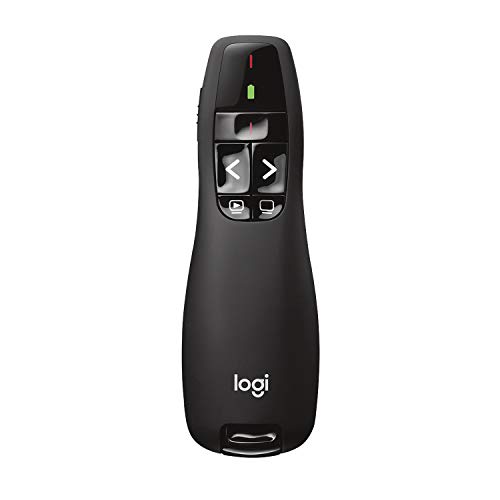
2. Logitech Wireless Presenter R400
The Logitech R400 is the long-running classic in this category, and it fills the laser pointer slot in this guide with a red laser that Logitech positions for projection screens and everyday meeting rooms. The slideshow controls are the draw: along with next and previous slide buttons, the R400 has dedicated buttons to begin or end a presentation and to blank the screen, so a speaker can hide a deck while answering a question and bring it back without touching the laptop. The buttons are shaped and placed so they can be found by touch, keeping your eyes on the audience.
Logitech lists an operating range of 15 meters (about 50 feet) over its 2.4GHz connection, which covers most classrooms and boardrooms with room to spare. A battery indicator on the remote shows the remaining charge, and the plug-and-play USB receiver stores inside the presenter body for travel. The R400 runs on two AAA batteries, and Logitech’s product information describes an on/off switch to conserve them between talks. It is a Windows-focused design that also works with presentation software such as PowerPoint and Keynote per Logitech’s compatibility notes. If your talks live on projection screens and you want a pointer the whole room can follow, the R400’s combination of a visible red laser and one-touch slideshow controls is the reason it has stayed in briefcases for so long.
Specs
- Connection: 2.4GHz wireless via plug-and-play USB receiver
- Wireless range: 15 m (about 50 ft), per Logitech
- Pointer: red laser pointer
- Battery: 2 AAA batteries, with a battery indicator on the remote
- Controls: next/previous slide, start and end presentation, and black screen buttons
- Model: 910-001354; receiver stores inside the remote
3. Logitech Spotlight Presentation Remote
The Logitech Spotlight takes a different route from every other remote here: it is rechargeable, and instead of a laser it draws its pointer on the screen digitally. Through the Logi Options+ app, the Spotlight can highlight a section of the slide or magnify a detail inside a circle, and because the pointer is rendered by the software, it stays visible on television panels, LED walls, and shared screens in video calls where a laser dot disappears. For hybrid presenters who speak to a room and a remote audience at the same time, that behavior is the main reason to choose it.
Time management is the other headline feature. Logitech’s copy explains that you can set a timer in the app and the remote vibrates in your hand when your time is nearly up and again when it runs out, so you can pace a lecture without glancing at a clock. The Spotlight connects over Bluetooth Smart or through its USB receiver, which docks inside the remote, and Logitech lists an operating range of 30 meters (100 feet). The built-in lithium polymer battery charges over USB: Logitech states that one minute of charging gives three hours of presenting, and a full charge lasts up to three months. Gesture commands in the app also cover scrolling, panning, and volume control, rounding out a remote aimed at speakers who present often and want the pacing help.
Specs
- Connection: Bluetooth Smart or USB receiver, switchable by plugging or unplugging the receiver
- Wireless range: 30 m (100 ft), per Logitech
- Pointer: digital highlight and magnify pointer rendered through the Logi Options+ app; no physical laser
- Battery: rechargeable lithium polymer; 1 minute of charging gives 3 hours of use, full charge lasts up to 3 months
- Timer: app-set timer with vibration alerts in hand
- Extras: gesture-based scrolling, panning, and volume control via the app
4. Logitech R500s Laser Presentation Remote
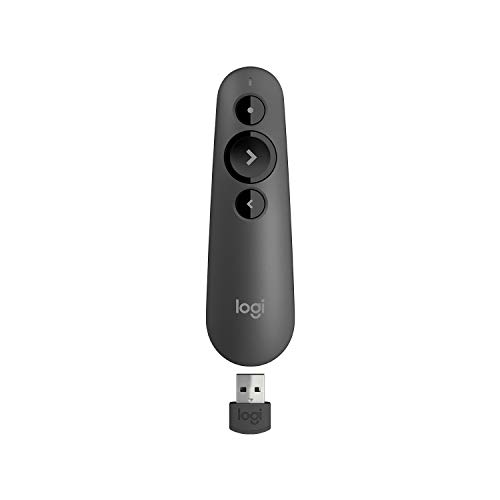
The R500s is the Bluetooth pick for presenters who move between machines. Logitech gives it two ways to connect: a USB receiver on the 2.4GHz band for any computer with a spare port, or Bluetooth Low Energy for laptops and tablets where ports are scarce. Either way, Logitech lists an operating range of 20 meters (65 feet), which is enough to work a lecture hall from the back row or pace a large classroom without losing the link. Compatibility covers Windows, macOS, Chrome OS, and, over Bluetooth, iOS and Android devices, and it works with PowerPoint, Keynote, Google Slides, and Prezi according to Logitech.
The remote itself is deliberately simple: a three-button design with shapes your thumb can identify without looking down, a soft rubber surface, and textured buttons for a confident grip. The built-in laser pointer is red and Class 1 per Logitech’s technical specifications, with a wavelength of 640–660 nm. Power comes from a single AAA battery, and Logitech lists battery life of up to 12 months, plus an extra week of use without the laser. An indicator LED reports battery and connection status, and the Logi Options+ app lets you customize button functions and monitor the battery from the computer. For teachers and trainers who present from whatever device the room provides, the dual connection is the feature that matters most.
Specs
- Connection: Bluetooth Low Energy or 2.4GHz wireless via USB receiver
- Wireless range: 20 m (65 ft), per Logitech
- Pointer: red laser pointer, Class 1, 640–660 nm wavelength
- Battery: 1 AAA battery; up to 12 months of battery life per Logitech
- Controls: three-button navigation design with battery and connectivity LED
- Compatibility: Windows, macOS, Chrome OS, iOS, and Android; PowerPoint, Keynote, Google Slides, and Prezi
5. DinoFire Rechargeable Presentation Clicker
The DinoFire rechargeable clicker is built for decks that mix slides with media. Beyond the usual page up and page down buttons, its control set includes volume adjustment and a multipurpose button that opens hyperlinks and switches between windows, so a presenter can jump from a slide to a linked page or a video and back without returning to the keyboard. DinoFire’s listing notes that the buttons carry small raised marks so they can be located by touch while you face the room. The built-in laser pointer is red, and the maker lists a light distance of more than 660 feet, with a control distance of 330 feet (100 meters) in its specification table for the 2.4GHz radio link.
Power is the other difference from the AAA-fed remotes above: a built-in 160 mAh lithium polymer battery recharges over USB, and DinoFire states that about one hour of charging usually provides more than a week of use, depending on how often the remote is used. The listing describes plug-and-play support for PowerPoint, Keynote, Prezi, and other presentation software across Windows, macOS, Linux, and Android systems, with no software to install for the receiver. For instructors whose lectures embed clips and links, having volume and hyperlink control on the remote removes the two most common reasons to walk back to the laptop mid-talk.
Specs
- Connection: 2.4GHz RF wireless via USB receiver, plug and play
- Wireless range: control distance of 330 ft (100 m) in the maker’s specification table
- Pointer: red laser pointer, maker-listed light distance over 660 ft
- Battery: built-in rechargeable 160 mAh lithium polymer; about 1 hour to charge
- Controls: slide navigation plus volume control, hyperlink opening, and window switching
- Compatibility: PowerPoint, Keynote, and Prezi on Windows, macOS, Linux, and Android; model X16-DF-US
Frequently Asked Questions
Do presentation clickers work with Google Slides and Keynote, or only PowerPoint?
Most clickers act as a simple keyboard sending page up and page down commands, so they advance slides in PowerPoint, Keynote, Google Slides, and Prezi alike. The listings for the remotes above name these applications directly, and plug-and-play USB models need no extra setup in any of them.
How far from the computer can I stand with a wireless presenter?
It depends on the model. The remotes in this guide list operating ranges from 15 meters for the Logitech R400 up to 30 meters for the Logitech Spotlight and a maker-listed 100 meters for the DinoFire. Treat those figures as best-case numbers, since walls, metal podiums, and crowded rooms can shorten the usable distance.
Is a laser pointer or a digital pointer better for presenting on a TV screen?
A laser dot is hard to see on a television or LED panel and never appears on a shared screen during a video call. A digital pointer such as the one on the Logitech Spotlight is drawn by software, so it shows up on any display type and in screen shares, while a laser remains the simpler choice for projection screens.
How long do clicker batteries usually last?
Battery life varies widely by design. Logitech lists up to 12 months for the R500s on a single AAA battery, Kensington’s manual says its presenter should work up to one year on the included AAA pair, and rechargeable models such as the Spotlight run for up to three months per charge, while the DinoFire’s maker states more than a week of typical use per one-hour charge.
Conclusion
The right clicker depends on the room and the deck. For a shared classroom or a borrowed laptop, the Kensington Wireless Presenter is the safe plug-and-play choice, with its receiver doubling as an on/off switch in storage. If you present on projection screens and want a traditional red laser with one-touch slideshow controls, the Logitech R400 remains the benchmark. Presenters who need pacing help and a pointer that works on modern displays should look at the rechargeable Logitech Spotlight, with its app-set timer, vibration alerts, and digital highlighting. If you switch between a laptop and a tablet, the Logitech R500s covers both with its Bluetooth and USB connections and a 20-meter range. And for lectures built around video clips and links, the DinoFire rechargeable clicker puts volume and hyperlink control in your hand so the laptop can stay where it is.
More from Amazon
Programs that pair well with the guide above. Offers and eligibility are set by Amazon and may change.
Free shipping on eligible items, Prime Video and more. Eligible new members can start with a free trial.
Start a Prime free trialAd-free music streaming. Eligible new subscribers can start with a free trial.
Try Music Unlimited freeA Prime membership for ages 18-24 with a trial period. Eligibility is set by Amazon.
See Prime for Young AdultsAudiobooks and podcasts to listen to on the go. Eligible new members can start with a free trial.
Try Audible freeAs an Amazon Associate we earn from qualifying purchases.