Key takeaways
- Five USB-C to DisplayPort cables compared by DP version, bandwidth, length and build, for laptops driving high-refresh gaming monitors over one cable.
A gaming laptop with a USB-C port can drive a fast DisplayPort monitor at full refresh rate, but only if the cable between them carries enough bandwidth. A DisplayPort 1.2 cable tops out well below what a 1440p 240Hz or 4K 144Hz panel can accept, and the two cable types look identical on a shelf. Picking the wrong one quietly caps your frame rate no matter what the monitor menu says.
This guide is for laptop and mini PC owners connecting to a DisplayPort gaming monitor, plus handheld and tablet users adding an external screen. The five picks come straight from current Amazon listings and span both standards: three DisplayPort 1.4 cables with HBR3 bandwidth for high-refresh play, a certified two-pack for dual-desk setups, and a short DisplayPort 1.2 cable for a simple 4K office screen.
Quick Picks
As an Amazon Associate we earn from qualifying purchases
| Product | Best for | Key spec from title |
|---|---|---|
| UGREEN USB C to DisplayPort 1.4 Cable, 6.6FT | High-refresh gaming from a Thunderbolt laptop | DisplayPort 1.4, 8K at 60Hz, 32.4Gbps |
| Maxonar USB C to DisplayPort 1.4 VESA Certified Cable, 6.6FT | Buyers who want a certified cable | VESA certified DisplayPort 1.4, HBR3 |
| Cable Matters 2-Pack USB C to DisplayPort 1.4 Cable, 6 ft | Two monitors or a spare for the desk drawer | DisplayPort 1.4, 8K at 60Hz, pack of two |
| Warrky USB C to DisplayPort Cable 8K, 6FT | A metal-shell cable for frequent unplugging | DisplayPort 1.4, 4K at 240Hz, gold-plated plug |
| uni USB C to DisplayPort Cable, 3FT | A short run to a 4K office monitor | DisplayPort 1.2, 4K at 60Hz, braided |
How to Choose
Match the DisplayPort version to your monitor
DisplayPort 1.4 with HBR3 moves 32.4Gbps, enough for 4K at 240Hz or 1440p at 360Hz on the listings here when the source and panel also support those modes, usually with Display Stream Compression. DisplayPort 1.2 carries 21.6Gbps, which covers 4K at 60Hz and 1440p at 165Hz but nothing beyond. If your monitor runs above 1440p at 165Hz, buy a 1.4 cable; if it is a 4K 60Hz office panel, a 1.2 cable is not a compromise, it is simply the right tool.
Confirm your USB-C port outputs video
These cables need a source port with DisplayPort Alt Mode, which every Thunderbolt 3, 4 and 5 port provides, along with USB4 ports. A plain USB-C port wired only for charging and data will show a black screen with any cable in this guide, and no adapter fixes that. Check your laptop maker’s spec page for a DisplayPort or video-output note beside the port before ordering, especially on budget laptops and older Chromebooks where video support varies by model.
Respect the one-way direction and the length
Every cable here is unidirectional: signal flows from the USB-C source to the DisplayPort display, never the other way around, so none of them can feed a USB-C portable monitor from a graphics card. Length matters twice over. Short cables keep a laptop dock tidy, while long passive runs are the first place a marginal signal flickers at top bandwidth. Buy the shortest length that reaches comfortably, and treat six feet as the practical ceiling for full-rate gaming modes.
Weigh the connector and jacket build
A cable that lives behind a desk can be almost anything, but one that travels in a bag or gets swapped between machines weekly needs strain relief, a braided jacket and metal connector shells rather than bare plastic. Gold-plated plugs resist corrosion on the contact surfaces. Latching DisplayPort ends hold firm in a monitor socket yet need a button press to release, which is awkward behind a wall-mounted screen; latch-free ends pull out cleanly but sit looser.
The 5 Best Options
UGREEN USB C to DisplayPort 1.4 Cable, 6.6FT

This is the straightforward pick for a Thunderbolt or USB4 laptop driving a high-refresh gaming monitor. The listing rates it for 8K at 60Hz, 4K at 240Hz and 2K at 360Hz over DisplayPort 1.4 with the full 32.4Gbps of HBR3 bandwidth, so a 1440p 240Hz panel gets the headroom it needs. At 6.6 feet it reaches from a laptop on a stand to a monitor on an arm without a tight bend, and the unidirectional design is clearly stated, which saves the usual reverse-connection confusion.
Specs
- Standard: DisplayPort 1.4, unidirectional
- Bandwidth: 32.4Gbps (HBR3)
- Max modes per listing: 8K at 60Hz, 4K at 240Hz, 2K at 360Hz
- Length: 6.6 feet
- Model: 25158 (part UG-USBC-25158)
- Host support: Thunderbolt 4 and 3, USB-C with DP Alt Mode
Best for: A gaming laptop feeding a 1440p or 4K high-refresh monitor.
Watch out for: The top modes need a source and monitor that support HBR3 and DSC; an older laptop will fall back to lower rates.
ASIN: B0C4DB8MLL
Maxonar USB C to DisplayPort 1.4 VESA Certified Cable, 6.6FT

Certification is the reason to shortlist this one. Maxonar lists the cable as VESA certified to DisplayPort 1.4 HBR3, with DSC, FEC, Dynamic HDR and HDCP 2.2 support stated, plus FreeSync and G-Sync compatibility. The build is a step up from basic cables: a zinc alloy shell, 28 AWG copper conductors, a nylon braided jacket and 24K gold-plated connectors. For a permanent single-monitor desk where the cable stays plugged in for years, that combination of paperwork and hardware is reassuring.
Specs
- Standard: DisplayPort 1.4, VESA certified
- Bandwidth: 32.4Gbps (HBR3) with DSC and FEC
- Max modes per listing: 8K at 60Hz, 4K at 144Hz, 2K at 240Hz
- Length: 6.6 feet
- Shell: zinc alloy, nylon braided jacket
- Conductors: 28 AWG copper, gold-plated connectors
Best for: A fixed gaming desk where certification and build quality matter most.
Watch out for: One recent listing record showed no featured offer with other sellers listed instead, so check the seller and delivery terms on the page before ordering.
ASIN: B08B3XNZGS
Cable Matters 2-Pack USB C to DisplayPort 1.4 Cable, 6 ft
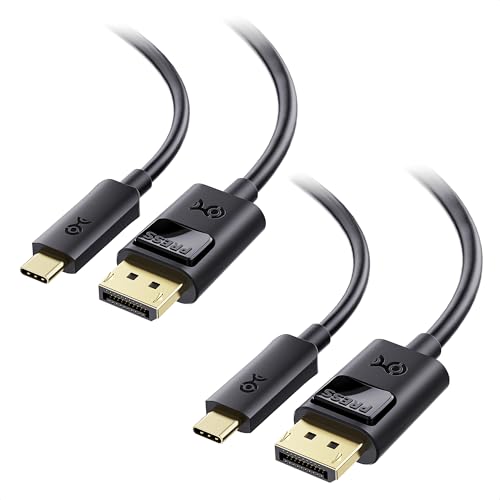
Cable Matters sells its 201036 cable as a two-pack, which suits anyone wiring two desks, a desk and a TV stand, or simply keeping a spare. Each cable is a unidirectional DisplayPort 1.4 lead rated for 8K at 60Hz and 4K at 240Hz, and the maker’s specification adds MST support and up to 7.1-channel audio over the link. Buying the pair also sidesteps the classic failure mode of a single cable dying the night before a deadline, since the replacement is already in the drawer.
Specs
- Standard: DisplayPort 1.4, unidirectional
- Max modes per listing: 8K at 60Hz, 4K at 240Hz
- Length: 6 feet per cable, pack of two
- Model: 201036-BLK-1.8mx2
- Extras per maker spec: MST support, up to 7.1-channel audio
- Note from listing: not for portable USB-C monitors
Best for: Dual-monitor desks and anyone who wants a matched spare.
Watch out for: Both cables are the same six-foot length, so a setup needing one short and one long run is better served by two singles.
ASIN: B0BNW5SS4M
Warrky USB C to DisplayPort Cable 8K, 6FT

Warrky’s cable pairs DisplayPort 1.4 bandwidth with a metal case and gold-plated plugs, aimed at buyers who unplug often. The listing states 8K at 60Hz, 4K at 240Hz and 1440p at 360Hz, with Thunderbolt 5, 4 and 3 compatibility named in the title. That makes it a sensible travel companion for a gaming laptop that docks to different monitors at home, at work and at events, where connector wear is the usual failure point long before the cable itself gives up.
Specs
- Standard: DisplayPort 1.4, unidirectional
- Max modes per listing: 8K at 60Hz, 4K at 240Hz, 1440p at 360Hz
- Length: 6 feet
- Plugs: gold-plated, metal case
- Host support: Thunderbolt 5, 4 and 3 per listing title
Best for: A laptop bag cable that gets plugged and unplugged daily.
Watch out for: Confirm the exact length variant on the listing page, since this model family is sold in several lengths under similar titles.
ASIN: B07RY75V7Q
uni USB C to DisplayPort Cable, 3FT

Not every desk needs DisplayPort 1.4. This three-foot uni cable is a DisplayPort 1.2 model rated for 4K at 60Hz and 2K at 165Hz, which covers a standard office monitor or a mid-range 1440p panel without paying for bandwidth you will never use. The braided nylon jacket has strain relief at both ends, the short length keeps a laptop dock area free of cable loops, and HDCP 2.2 support means streamed video plays without a handshake complaint from the monitor.
Specs
- Standard: DisplayPort 1.2, unidirectional
- Max modes per listing: 4K at 60Hz, 2K at 165Hz
- Length: 3 feet
- Jacket: braided nylon with strain relief at both ends
- HDCP: 2.2
- Model: UA15-23
Best for: A compact dock setup driving a 4K 60Hz monitor.
Watch out for: The 1.2 ceiling is real: a 1440p 240Hz or 4K 144Hz monitor will be capped, so step up to a 1.4 cable for those panels.
ASIN: B0C7BY2CKB
Which One Fits Your Situation
Your laptop drives a 1440p 240Hz gaming monitor
Take the UGREEN 6.6FT or the Warrky 6FT. Both are DisplayPort 1.4 cables with the bandwidth that panel needs, and both are long enough for a raised laptop stand. Set the refresh rate manually in your operating system’s display settings after connecting, because many systems default to 60Hz on a new display until told otherwise.
You are wiring a permanent desk and want it done once
The Maxonar is built for this: VESA certification on paper, metal shell and braided jacket in hand. Route it once, leave it alone, and the certified HBR3 link should carry whatever monitor upgrade arrives next, up to the 8K and high-refresh 4K modes the listing states.
You run two setups or hate waiting on replacements
The Cable Matters two-pack covers a home desk and an office desk with identical cables, or keeps one in service and one in reserve. Identical spares also make troubleshooting easy: swap the cable first, and if the flicker follows it, you have found the fault in a minute.
You just need a second screen for work
The uni 3FT is the honest buy. A 4K 60Hz office monitor cannot use DisplayPort 1.4 bandwidth, and the short braided cable keeps a dock or laptop stand tidy. Spend the savings on the monitor arm instead, and revisit the cable only if a high-refresh panel joins the desk.
Common Mistakes
- Buying a DisplayPort 1.2 cable for a 240Hz monitor, then blaming the panel when the system caps the refresh rate.
- Plugging into a charge-only USB-C port and assuming the cable is faulty when the screen stays black.
- Trying to run one of these cables backwards from a graphics card to a USB-C portable monitor; they are one-way by design.
- Ordering a ten-foot passive cable for top-bandwidth modes when a six-foot run would reach, then chasing intermittent flicker.
- Forgetting to raise the refresh rate in display settings after connecting, leaving a fast monitor running at 60Hz.
Frequently Asked Questions
Will a USB-C to DisplayPort cable work with my laptop?
It works if your laptop’s USB-C port supports DisplayPort Alt Mode, which all Thunderbolt 3, 4 and 5 ports and most USB4 ports do. Charge-only USB-C ports carry no video signal at all. Your laptop maker’s specification page is the authority here; look for DisplayPort or video output listed beside the port before you buy any cable in this guide.
Can I use one of these cables from a graphics card to a USB-C monitor?
No. Every cable in this guide is unidirectional, carrying video from a USB-C source to a DisplayPort display only. Feeding a USB-C monitor from a DisplayPort graphics card needs a bidirectional cable, which is a different product type with different listings. Check the direction statement on any listing carefully, because the connectors look the same in both product families.
Do I need DisplayPort 1.4, or is 1.2 enough?
Match the cable to the monitor. DisplayPort 1.2 handles 4K at 60Hz and 1440p at 165Hz, which covers most office and mid-range gaming panels. DisplayPort 1.4 adds the bandwidth for 4K at 240Hz, 1440p at 360Hz and 8K at 60Hz, usually with DSC. Buying 1.4 for a 60Hz monitor gains nothing; buying 1.2 for a 240Hz monitor loses the panel’s main feature.
Why does my new cable show a black screen or flicker?
Start with the port: a charge-only USB-C port is the most common cause of a black screen. Flicker at high refresh rates usually means the cable is too long for the mode, the connector is not fully seated, or the source cannot sustain HBR3 with DSC. Shorten the run, reseat both ends firmly, and lower the refresh rate one step to isolate which factor is responsible.
More from Amazon
Programs that pair well with the guide above. Offers and eligibility are set by Amazon and may change.
Free shipping on eligible items, Prime Video and more. Eligible new members can start with a free trial.
Start a Prime free trialAd-free music streaming. Eligible new subscribers can start with a free trial.
Try Music Unlimited freeA Prime membership for ages 18-24 with a trial period. Eligibility is set by Amazon.
See Prime for Young AdultsAudiobooks and podcasts to listen to on the go. Eligible new members can start with a free trial.
Try Audible freeAs an Amazon Associate we earn from qualifying purchases.