Key takeaways
- Compare under desk keyboard trays that set the right typing height. See which trays adjust, stay stable, fit your desk, and leave room for a mouse.
As an Amazon Associate we earn from qualifying purchases.
Most desks stand about 29 to 30 inches tall. That height works for writing on paper, but for typing it puts the keyboard too high for many people: shoulders creep up, elbows bend past a right angle, and wrists tilt upward. Hours of it adds up to aching shoulders and tired forearms.
An under-desk keyboard tray fixes the geometry instead of forcing you to adapt to it. It drops the keyboard to elbow height, tilts slightly down at the front so wrists stay flat, and slides out of sight when you are done. The five trays below cover the main mounting styles: a fully adjustable arm, two clamp-on models, a wide drawer for oversized keyboards, and a steel drawer that bolts in for good.
Disclosure: This article contains affiliate links. If you make a purchase through these links, we may earn a commission at no extra cost to you.
How to Choose a Keyboard Tray
Start With the Position You Are Trying to Reach
Sit with your feet flat, your shoulders relaxed, and your elbows bent at roughly 90 degrees with your forearms level. Your keyboard should sit right under your hands at that height, wrists straight rather than bent up or down. For many people that surface sits one to four inches below the desktop: exactly the gap a tray fills. A slight negative tilt, front edge a little lower than the back, keeps wrists neutral. Positive tilt does the opposite and is the first thing to avoid.
Measure the Underside of Your Desk Before Anything Else
More tray purchases fail on fit than on features. Get under the desk with a tape measure and check four things. First, clear width and depth: screw-in tracks run from about 17 to 23 inches front to back, and the space must be free of obstructions. Second, crossbars and modesty panels: a steel beam two inches behind the front edge blocks most tracks and many clamps. Third, desktop thickness: clamp-on trays here grip tops from half an inch to an inch and a quarter thick, and need a straight, square edge: rounded or beveled edges give the clamp nothing to bite. Fourth, knee room: with the tray pulled out, check the platform still leaves room for your thighs.
Screw-Track Mounts vs. Clamp-On Mounts
A screw-track tray bolts a steel rail to the underside of the desk and slides or hangs from it. This is the most stable arrangement: it supports articulating arms with real height and tilt adjustment, and it stays put under hard typing. The trade-offs are drilling, a permanent change to the desk, and the clearance demands above. A clamp-on tray grips the front edge with C-clamps and hangs its sliders from them. It installs in minutes, leaves no holes, and comes off cleanly when you move, the natural pick for renters and shared desks. In exchange you give up tilt adjustment on most models, accept an 11-pound weight limit, and live with more flex, since the platform hangs from two points at the edge.
Be Honest About Width and Mouse Room
Tray width is the most misleading number in this category. A full-size keyboard is about 17 to 18 inches wide, and a mouse needs another 8 inches beside it. A 20-inch tray holds a keyboard and almost nothing else, pushing mouse work up onto the desk. Platforms in the 26 to 27 inch range fit both side by side. Separate mouse platforms are the other answer, mounting beside the keyboard platform; the better ones adjust independently. Decide where your mouse will live before you buy, and if you switch hands, look for one that mounts on either side.
Adjustments Only Help If They Stay Put
Adjustments are worth having only if the mechanism holds its setting under typing force. Knob-locked arms, like the 3M below, set height and tilt firmly and keep them. Fixed-height drawers set their position at installation: less flexible, but nothing can drift. Bounce is the failure mode of lightly built trays: the platform flexes at the front edge with every keystroke. Longer tracks, steel brackets, and ball-bearing slides all reduce it. If you type hard, favor bolted steel hardware over thin stamped brackets.
Standing Desks and Special Cases
A tray still helps under a height-adjustable desk, because the height that suits your monitor rarely suits your elbows sitting and standing. Check that the tray clears the frame’s crossbar at every height and that the platform misses the lifting columns as it slides in. Glass and metal desktops rule out screw mounts entirely, and most clamp makers exclude glass as well. Corner desks need trays designed for them, since a straight track cannot follow the angle.
3M AKT80LE Adjustable Keyboard Tray — Best Full-Featured Adjustable Tray

The AKT80LE is the tray to pick when you want the keyboard placed precisely and then left alone. A single knob controls both height and tilt: loosen it, move the platform from 1.5 inches above the mounting surface to 4.5 inches below it, dial in tilt between +15 and −15 degrees, and tighten to lock everything at once. That covers the negative tilt most typists need, and the arm swivels a full 360 degrees, so the platform swings aside or tucks under the desk.
The 17.75-inch track is the practical advantage here: it installs in as little as 18 inches of mounting depth, where a long 23-inch track will not fit, suiting shallow workstations. It does not fit corner desks. The platform also slides left and right on the arm, which matters when a crossbar keeps the track from mounting dead center.
Mousing gets its own hardware instead of leftover platform space. The separate mouse platform mounts on either side, adjusts up, down, forward, and back, tilts independently, and carries 3M’s Precise mousing surface. Gel wrist rests with a leatherette cover run along both platforms. For all-day typing, this is the most complete ergonomic package in the guide.
Specs
- Mount: screw-in steel track, 17.75 in long; needs about 18 in of clear mounting depth; not for corner workstations
- Height range: +1.5 in above to −4.5 in below the mounting surface, set by a single locking knob
- Tilt range: +15° to −15°; platform swivels 360°
- Mouse platform: separate unit, mounts left or right, adjusts up, down, forward, back, and in tilt
- Wrist support: gel wrist rests with leatherette cover and antimicrobial protection on both platforms
- Platform slides left and right for off-center mounting; contains 25% preconsumer recycled content
VIVO MOUNT-KB05E Large Clamp-On Keyboard Tray — Best No-Drill Tray

The MOUNT-KB05E is the answer for anyone who cannot or will not drill into a desk. Two steel C-clamps grip the front edge, the sliding platform hangs from them, and the tray goes on in minutes and comes off again without a mark. At 26.8 by 11 inches, the platform is wide enough for a full-size keyboard and a mouse side by side.
The clamps fit desktops from about 0.5 to 1.25 inches thick with a straight edge; beveled and rounded edges are out. The clamps also widen the footprint: the full span including clamps is about 32.5 inches, so measure your desk’s front edge, not just the tray. The platform pulls out up to 8.5 inches and supports up to 11 pounds, enough for any keyboard and mouse, but not for leaning on.
What you give up is adjustment: the platform sits flat, with no tilt and no height settings, so your chair height does the ergonomic work. There is also some flex under a heavy hand, the unavoidable result of hanging a wide platform from two edge clamps. For a rental, a dorm, or a desk you do not own, those are fair trades.
Specs
- Platform: 26.8 x 11 in sliding surface; about 32.5 in total width including clamps
- Mount: two steel C-clamps, no drilling; fits desktops roughly 0.5 to 1.25 in thick with a straight edge
- Extension: slides out up to 8.5 in from the desk edge
- Capacity: 11 lb; alloy steel construction; platform is flat with no tilt adjustment
- Item weight: 10.45 lb; covered by VIVO’s 3-year manufacturer warranty
See the VIVO MOUNT-KB05E on Amazon
Kensington SmartFit Underdesk Comfort Keyboard Drawer (K60004US) — Best Wide Tray for Big Keyboards
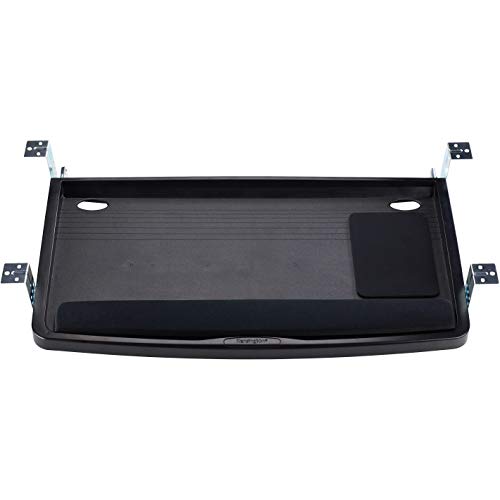
Split, curved, and oversized ergonomic keyboards defeat standard trays; this Kensington drawer exists for exactly those boards. The extra-wide tray measures 24.5 by 11.75 inches, wide enough for a large ergonomic keyboard with a mouse and wrist rest beside it. It is a drawer rather than an articulating arm: it screws under the desk, glides out for use, and hides keyboard and mouse completely when pushed back.
Height setup uses Kensington’s SmartFit system: measure your hand against the included color chart, match the color, and install the drawer at the matching one of four height positions. It is set-it-once rather than daily adjustment, but it removes the guesswork, and once set, the position cannot drift.
Built-in cable management keeps the cord from dangling into your lap, and the tray surface includes a mousing area, so a separate pad is optional. There is no tilt adjustment, and the screw mount needs a clear run under the desk, so confirm the underside is free of crossbars before ordering. For wide ergonomic keyboards, it is the tray that actually fits.
Specs
- Platform: extra-wide tray, 24.5 x 11.75 in, sized for oversized and split ergonomic keyboards
- Mount: screw-in underdesk drawer; slides out for use and stores keyboard and mouse out of sight
- Height: SmartFit system sets one of four mounting heights using the included hand-size color chart
- Cable management: built-in channel routes the keyboard cord
- Mousing surface integrated into the tray beside the keyboard area
See the Kensington SmartFit K60004US on Amazon
VIVO MOUNT-KB05ES Small Clamp-On Keyboard Tray — Best Compact Tray for Small Desks
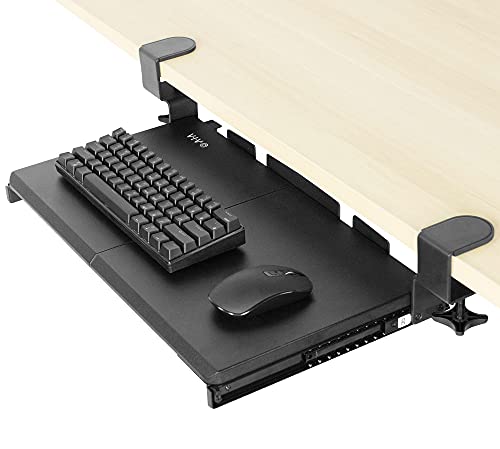
Small desks rule out most trays twice over: the platform is too wide for the desk, and the clamp span is wider still. The MOUNT-KB05ES shrinks VIVO’s clamp-on design to a 20 by 11 inch platform for compact and tenkeyless keyboards, narrow desks, and tight workstations. It keeps the same no-drill C-clamp mounting.
Be clear-eyed about the space: twenty inches holds a compact keyboard and leaves little room for a mouse, so plan on mousing on the desktop. The brackets assemble two ways, extending the platform 9 inches from the desk edge or 10 in the extended layout, and the tray locks fully extended and fully stored so it cannot drift while you type. The extended layout needs about 12 inches of clearance under the desk, so check for drawers and crossbars.
The 11-pound capacity matches its bigger sibling, the clamps fit desktops up to 1.25 inches thick, and a rear keyboard stop keeps the board from sliding off the back edge.
Specs
- Platform: 20 x 11 in, sized for compact and tenkeyless keyboards
- Mount: C-clamps, no drilling; fits desktops up to 1.25 in thick
- Extension: two assembly options, 9 in (standard) or 10 in (extended) from the desk edge; extended layout needs about 12 in of under-desk clearance
- Capacity: 11 lb; tray locks at fully extended and fully stored positions
- Rear keyboard stop included to keep the keyboard on the platform
See the VIVO MOUNT-KB05ES on Amazon
Mount-It! MI-7136 Keyboard Drawer — Best Steel Drawer for Heavy Typing

If bounce is your complaint, bolt something in. The MI-7136 mounts steel brackets under the desk with screws and runs its drawer on steel ball-bearing tracks, giving it the firmest feel in this guide. The tracks extend up to 10 inches, the longest travel here, so the keyboard comes fully out and disappears completely when stored.
The platform is 21 inches wide, and the mouse gets a separate 8 by 7.5 inch platform mounting on either side, keeping total width manageable. A padded wrist rest runs along the front edge, and a sliding clamp locks the keyboard so it cannot creep forward as you type.
Height is set at installation, three levels spanning 1.25 inches: enough to fine-tune elbow height for one user, not a substitute for an articulating arm. The brackets fit wood or MDF desktops only, not glass or metal, and the installation is permanent. In return you get the smoothest slide and least flex of the group, backed by a lifetime manufacturer warranty.
Specs
- Tracks: steel ball-bearing slides, extension up to 10 in from the desk edge
- Mount: screw-in steel brackets; for wood or MDF desktops only
- Height: three installation levels spanning 1.25 in; no tilt adjustment
- Mouse platform: 8 x 7.5 in, mounts on the left or right side
- Platform: 21 in wide with integrated wrist rest and a sliding clamp that locks the keyboard in place
- Backed by a lifetime manufacturer warranty
See the Mount-It! MI-7136 on Amazon
Frequently Asked Questions
How far below the desk should a keyboard tray sit?
Aim for elbow height when you sit with shoulders relaxed and forearms level, which for most people puts the typing surface one to four inches below the desktop. Your wrists should stay straight, neither reaching up to the keys nor pressing into the platform edge. Set the tray first, then chair height, so your feet stay flat on the floor or a footrest.
Will a keyboard tray work with a standing desk?
Usually, yes, and it often helps, because the desk height that suits your monitor rarely suits your elbows in both positions. Check two things: the track must clear the frame’s crossbar at every height, and the sliding platform must not hit the lifting columns. Clamp-on trays are simplest to test, since they move if the fit is wrong.
Can I put a keyboard tray on a glass or metal desk?
Screw mounts are out: there is nothing safe to drill into, and most clamp makers exclude glass tops as well because clamping pressure concentrates on a small area. If your desk cannot take either mount, a desktop keyboard stand or a different desk solves the problem better than forcing a mount.
Why does my keyboard tray bounce when I type, and how do I fix it?
Bounce comes from flex in the mounting hardware, worst on wide platforms hung from two edge clamps. Tighten the clamps, confirm the edge is straight and fully gripped, and keep the keyboard close to the desk edge to reduce leverage. If it still moves, the lasting fix is a screw-track mount with steel brackets, which supports the platform along its length instead of at two points.
Conclusion
Match the tray to the desk and the way you type. For a fixed desk and all-day typing, the 3M AKT80LE offers the widest height and tilt range and a mouse platform that adjusts on its own. If drilling is not an option, the VIVO MOUNT-KB05E clamps on in minutes and fits a keyboard and mouse, while the smaller VIVO MOUNT-KB05ES brings the same idea to compact desks. Owners of wide ergonomic boards should look at the Kensington SmartFit K60004US, the one drawer here that fits them with room to spare. If stability matters more than adjustability, the Mount-It! MI-7136 bolts in with steel ball-bearing tracks and simply stays put. Measure the underside of your desk first, and any of these five will do its job for years.
More from Amazon
Programs that pair well with the guide above. Offers and eligibility are set by Amazon and may change.
Free shipping on eligible items, Prime Video and more. Eligible new members can start with a free trial.
Start a Prime free trialAd-free music streaming. Eligible new subscribers can start with a free trial.
Try Music Unlimited freeA Prime membership for ages 18-24 with a trial period. Eligibility is set by Amazon.
See Prime for Young AdultsAudiobooks and podcasts to listen to on the go. Eligible new members can start with a free trial.
Try Audible freeAs an Amazon Associate we earn from qualifying purchases.