Key takeaways
- Compare the best film scanners for digitizing slides and negatives at home, with resolutions, scan speeds, and software explained in full detail.
As an Amazon Associate we earn from qualifying purchases.
Shoeboxes of slides and sleeves of negatives hold decades of family history, but film fades, scratches, and gets harder to view every year. A dedicated film scanner turns those frames into JPEG files you can store, share, print, and back up, and modern home models do the job far faster than the flatbed workflows of the past. The catch is that headline numbers can mislead: many compact scanners advertise large megapixel counts that come from software interpolation rather than a true optical capture, and format support varies widely between models. This guide compares five film scanners across the main buying angles — a standalone unit with a big screen, a high-resolution flagship for careful archiving, a compact multi-format converter, a model that also handles photo prints, and a small all-in-one with built-in memory — so you can match a machine to the film sitting in your closet.
Disclosure: This article contains affiliate links. If you make a purchase through these links, we may earn a commission at no extra cost to you.
Our top picks
How to Choose a Film Scanner
Start with your film. Most home archives are 35mm negatives and mounted slides, and nearly every scanner here handles those. If your collection includes 110 or 126 cartridges film, 127 rolls, APS canisters, or Super 8 reels, the list of compatible machines shrinks fast, so check the maker’s stated format list against what you actually own before anything else. Holders matter too: a scanner that ships with trays for each of your formats saves frustration, and a quick-feeding tray design speeds up long sessions with mounted slides.
Next, read resolution claims carefully. Standalone converters use a fixed CMOS sensor and photograph each frame; a 14 megapixel sensor produces a 14 megapixel file, and any larger figure on the box — 22 megapixels is common — is created by interpolation, which enlarges the file in software without adding real detail. Dedicated computer-connected scanners work differently and quote optical resolution in dots per inch instead. A true 7200 dpi optical scan of a 35mm frame captures far more information than an interpolated snapshot, which is why the flagship pick below suits large prints and careful archiving, while the standalone units suit fast, good-enough digitizing for screens and small prints.
Decide whether you want a computer in the loop. Standalone scanners work on their own: you feed film, watch the frame on a built-in screen, adjust brightness and color with buttons, and save JPEGs to an SD card. They are quick — most captures take a second or two — and need no software skills. A computer-connected scanner is slower per frame and depends on bundled software, but it gives you control over exposure, color correction, dust and scratch removal, and file formats, which pays off when the film is precious or damaged.
Finally, think about storage and viewing. Standalone models save to SD cards, sometimes with a small amount of internal memory as backup, and several include an HDMI output so you can check frames on a television. Check the maximum card size the maker supports — 32GB is typical — and whether a card is included in the box, because some models require you to supply your own before you can save a single frame.
1. KODAK Slide N SCAN Film and Slide Scanner — Standalone Pick with a 5-Inch Screen
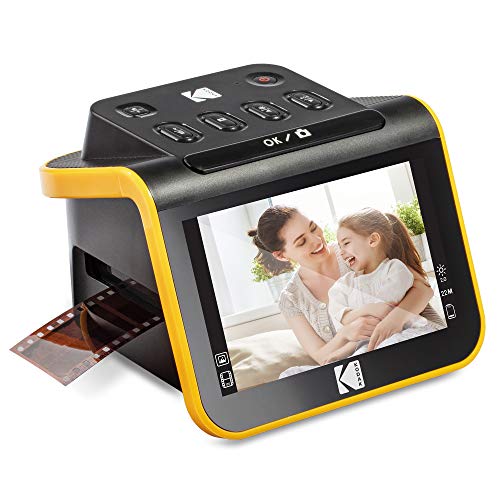
The KODAK Slide N SCAN is built for people who want to work through boxes of film without touching a computer. Its 5-inch color LCD is the largest screen among the standalone picks in this guide, which makes it easier to judge framing and color before saving each frame. The scanner handles color and black-and-white negatives plus 50mm mounted slides in 135 (35mm), 110, and 126 formats, using the included slide holder and film adapters. A quick-feeding tray lets you slide mounted frames through one after another, so long sessions move at a steady pace, and on-screen controls handle brightness and color adjustments before you commit a frame to the card.
Kodak fits a 14.0 megapixel CMOS sensor, and the maker states the resolution plainly as 14MP with an optional 22MP interpolated setting — the honest way to read that is that the true capture is 14 megapixels, and the 22 megapixel mode enlarges the file in software. For sharing online, viewing on screens, and modest prints, that capture size is plenty. Files save as JPEGs to an SD card of up to 32GB, which you supply yourself, and an HDMI output lets you view frames on a TV. Power comes from a USB port, power bank, or a 5V adapter, so the unit is easy to move between rooms.
Specs
- Sensor: 14.0 megapixel (4320 x 3252) 1/2.33-inch CMOS
- Stated resolution: 14MP native, 22MP via interpolation
- Film types: 135, 110, and 126 color and B&W negatives; 50mm slides (135, 110, 126)
- Display: 5-inch all-angle color LCD
- Storage: SD/SDHC card up to 32GB (not included)
- Connections: USB 2.0 (Type-C), HDMI TV output
- Operation: fully standalone, no computer required
2. Plustek OpticFilm 8300i Ai — High-Resolution Flagship for Serious Archiving
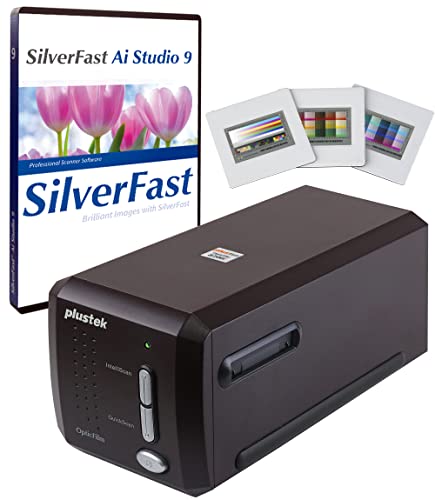
The Plustek OpticFilm 8300i Ai sits at the opposite end of the market from the snapshot-style converters. It is a dedicated 35mm scanner that connects to a Windows or Mac computer by USB, and its headline figure is a true optical resolution of 7200 dpi — a hardware specification, not an interpolated one. At that setting, a 35mm frame yields a file of roughly 69 megapixels with the fine grain structure of the film preserved, which is the kind of capture you want for large prints, cropping, and long-term archiving of important images.
The 8300i Ai bundle pairs the hardware with SilverFast Ai Studio 9 software and Plustek’s QuickScan Plus, plus an advanced IT8 calibration target with three slides for color calibration. SilverFast brings tools the standalone units cannot match, including infrared-based dust and scratch removal that uses the scanner’s infrared channel to map defects on color film, along with detailed control over exposure and color. The trade-offs are speed and scope: each frame takes longer, the software has a learning curve, and the scanner accepts only 35mm film strips and mounted slides — no 110, 126, or medium format. For a large, valuable 35mm archive, this is the pick that extracts everything the film holds.
Specs
- Optical resolution: 7200 dpi (true optical, not interpolated)
- Film types: 35mm film strips and mounted slides only
- Software: SilverFast Ai Studio 9 and QuickScan Plus included
- Calibration: advanced IT8 calibration target (3 slides) included
- Defect removal: infrared channel with SilverFast iSRD dust and scratch removal
- Operation: computer required (Windows and Mac), USB connection
- Display and storage: none built in; files save to the connected computer
3. Wolverine Titan 8-in-1 — Compact Converter for Mixed Film Collections
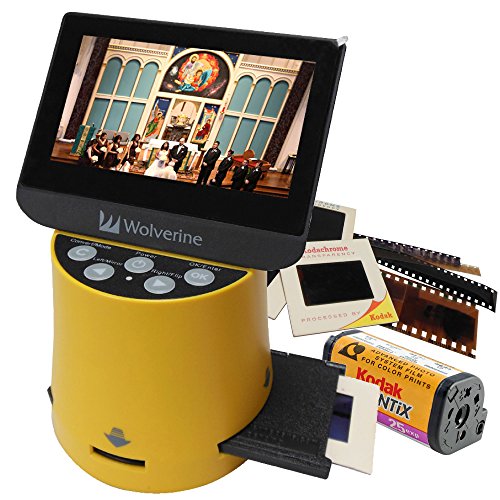
Family archives rarely stick to one format, and the Wolverine Titan 8-in-1 is built for that reality. It converts 35mm, 127, 126, 110, and APS slides and negatives, and it also captures individual frames from 8mm and Super 8 movie film — the widest format list in this guide. That breadth makes it a sensible single purchase for households whose film drawer spans several decades of cameras, from 35mm point-and-shoots to cartridge formats and home-movie reels.
The Titan works as a standalone unit with a 4.3-inch color screen for framing and adjustments, and an HDMI output for viewing on a television. Wolverine fits a 20 megapixel sensor and saves JPEG files to an SD card of up to 32GB, with a small internal memory that holds a limited number of images when no card is inserted. Captures take only a few seconds each, and the included adapters and holders cover the supported formats. As with the other standalone converters here, treat the megapixel figure as the maker’s stated output size for sharing and screen viewing rather than a match for a true high-dpi scan; within that role, the Titan’s format flexibility is its strength.
Specs
- Stated resolution: 20 megapixels
- Film types: 35mm, 127, 126, 110, and APS slides and negatives; 8mm and Super 8 film frames
- Display: 4.3-inch color screen
- Storage: SD card up to 32GB, plus small internal memory
- Connections: HDMI output for TV viewing, USB
- Operation: fully standalone, no computer required
- Output format: JPEG
4. ClearClick QuickConvert 2.0 — Scans Photo Prints as Well as Film
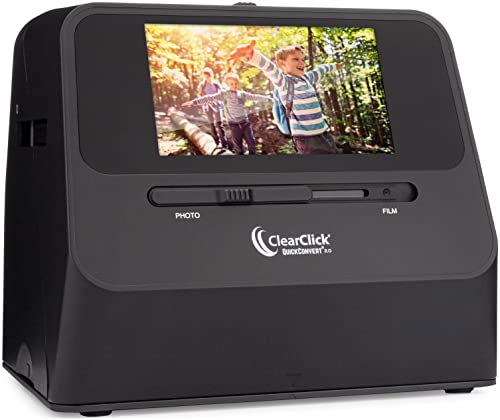
Many memory-keeping projects mix film with prints, and the ClearClick QuickConvert 2.0 is the one scanner here designed for both piles. In photo mode it scans prints in sizes including 4×6, 3.5×5, and 4×4 inches by placing the unit over the picture; switch it to film mode and the included holders handle 35mm slides and negatives plus 110 and 126 film. Film remains the headline function — the holders, film-type menus, and conversion workflow are built around negatives and slides — with print scanning as a genuinely useful second talent for albums that were never shot on film you still have.
ClearClick gives the QuickConvert 2.0 a 14 megapixel capture with an optional 22 megapixel interpolated setting, a built-in LCD screen for framing, and one-second captures. It runs from a rechargeable lithium battery as well as mains power, which makes it easy to use at a kitchen table away from a desk. The box is unusually complete: a 32GB SD card is included, along with the film holders, an HDMI cable for TV viewing, and a license for PhotoPad Pro editing software for touch-ups after transfer. No computer is needed for scanning itself.
Specs
- Stated resolution: 14MP capture, 22MP via interpolation
- Film types: 35mm slides and negatives, 110 and 126 film
- Photo prints: scans prints including 4×6, 3.5×5, and 4×4 inches
- Storage: SD card up to 32GB (32GB card included)
- Power: rechargeable lithium battery and included power adapter
- Extras: HDMI cable included, PhotoPad Pro software license included
- Operation: fully standalone, no computer required
5. DIGITNOW M126 All-In-1 — Small Footprint with Built-In Memory

The DIGITNOW M126 takes the all-in-one converter formula and shrinks it. The compact body houses a 2.4-inch color LCD, a 14 megapixel CMOS sensor with the maker’s stated 14MP and 22MP interpolated settings, and — the detail that sets it apart — 128MB of built-in memory, so you can save scans even before you add a card. An SD slot accepts cards up to 32GB for larger sessions, and a TV output lets you view frames on a bigger screen.
Format support covers 35mm/135, 110, and 126KPK film plus Super 8, as slides, negatives, and black-and-white film, with holders for negatives, slides, and Super 8 in the box along with a cleaning brush. On-device controls adjust brightness and color, and scans save as JPEGs. The screen is smaller than the Kodak’s and the unit is simpler overall, but for a modest archive — a few rolls and a box of slides rather than a whole closet — the M126 covers the essential formats, works entirely on its own, and its internal memory means it is ready to use straight out of the box.
Specs
- Sensor: 14 megapixel CMOS
- Stated resolution: 14MP native, 22MP via interpolation (maker also lists 7200 dpi interpolated)
- Film types: 35mm/135, 110, 126KPK, and Super 8 films, slides, and negatives
- Display: 2.4-inch color LCD
- Storage: 128MB built-in memory; SD card up to 32GB (not included)
- Connections: USB 2.0, TV output
- Operation: fully standalone, no computer required
FAQ
What is the difference between megapixel counts and optical dpi on film scanners?
They describe two different machines. Standalone converters photograph film with a fixed sensor, so their real capture is the sensor size — 14 megapixels on several picks here — and larger advertised figures come from interpolation, which enlarges the file in software. A computer-connected scanner like the Plustek quotes optical resolution in dpi instead; its 7200 dpi figure is a hardware specification that captures substantially more detail from each frame.
Do any of these scanners work without a computer?
Yes. The KODAK Slide N SCAN, Wolverine Titan, ClearClick QuickConvert 2.0, and DIGITNOW M126 all work entirely on their own, saving JPEGs to an SD card while you frame shots on a built-in screen. Only the Plustek OpticFilm 8300i Ai requires a connected Windows or Mac computer, because its scanning and correction tools run in the bundled SilverFast software.
Which scanner should I choose for 110, 126, or Super 8 film?
Check the format list first, because support varies. The KODAK Slide N SCAN covers 110 and 126 alongside 35mm. The Wolverine Titan adds 127 and APS and captures Super 8 and 8mm frames as well. The DIGITNOW M126 covers 110, 126KPK, and Super 8. The Plustek, by contrast, scans 35mm only, so it suits archives that never left that format.
Can these scanners fix scratches and faded colors automatically?
Only to a limited degree. The standalone converters offer basic brightness and color adjustments before each capture, and the ClearClick bundles editing software for work afterward. True defect removal needs the Plustek’s approach: an infrared channel that maps dust and scratches on color film, handled by the SilverFast software. For badly damaged or faded film, expect to do some correction in photo software regardless of the scanner.
Conclusion
The right film scanner depends on what is in your archive and how you plan to use the files. For fast, computer-free digitizing of 35mm, 110, and 126 film with the clearest view of each frame, the KODAK Slide N SCAN and its 5-inch screen are the easiest fit. If your 35mm collection deserves the most detail a home scanner can capture — for large prints and permanent archiving — the Plustek OpticFilm 8300i Ai is the flagship choice. Mixed-format households should look at the Wolverine Titan for its eight-format support, anyone whose project includes loose prints alongside film will appreciate the ClearClick QuickConvert 2.0, and smaller archives are well served by the compact DIGITNOW M126 with its built-in memory. Whichever you choose, save the original film after scanning: a good digital copy is a backup, not a replacement.
More from Amazon
Programs that pair well with the guide above. Offers and eligibility are set by Amazon and may change.
Free shipping on eligible items, Prime Video and more. Eligible new members can start with a free trial.
Start a Prime free trialAd-free music streaming. Eligible new subscribers can start with a free trial.
Try Music Unlimited freeA Prime membership for ages 18-24 with a trial period. Eligibility is set by Amazon.
See Prime for Young AdultsAudiobooks and podcasts to listen to on the go. Eligible new members can start with a free trial.
Try Audible freeAs an Amazon Associate we earn from qualifying purchases.