Key takeaways
- A $500 budget for a USB Wi-Fi adapter is a joke, and this guide will not pretend otherwise.
A $500 budget for a USB Wi-Fi adapter is a joke, and this guide will not pretend otherwise. The most expensive consumer USB Wi-Fi adapter verified anywhere costs $179.99. Every adapter worth buying costs under $180. That leaves $320 of your budget unspent by design — spend it on a Wi-Fi 7 router, because a fast adapter connected to an old router is a sports car on a dirt road.
So what does this guide actually do? It answers the real question behind the budget: which USB adapter should you buy when money is no object, but the category tops out at $180? The answer is the NETGEAR Nighthawk A8500 at $89.99 — the best new adapter in the category, with the cleanest design and the highest owner rating we have covered. Below it, the four adapters that topped earlier guides return — the facts about them have not changed.
Our top picks
Best for: A Windows 11 desktop or laptop where you want Wi-Fi 7 with no desk clutter
Check price on Amazon
Best for: Anyone who still runs Windows 10, or who wants the longest warranty and the deepest review record
Check price on AmazonBest for: A desktop PC under a desk or against a wall, where antenna placement matters more than portability
Check price on AmazonBest for: Raw speed per dollar on a Windows 11 desktop, when you do not mind a cradle
Check price on AmazonBest for: A TP-Link household that wants the flagship chip in the smallest possible package
Check price on AmazonQuick Picks
| Adapter | Price | Wi-Fi Class | Best For |
|---|---|---|---|
| NETGEAR Nighthawk A8500 | $89.99 | Wi-Fi 7 BE5000 | Best overall — Windows 11 desktop |
| ASUS ROG USB-BE92 | $99.99 | Wi-Fi 7 BE6500 | Best plug-and-play, Windows 10 + 11 |
| TP-Link Archer TBE400UH | $77.00 | Wi-Fi 7 BE6500 | Best value cradle model |
| MSI BE6500 | $59.99 | Wi-Fi 7 BE6500 | Fastest measured speed |
| TP-Link Archer TBE6500U | $69.99 | Wi-Fi 7 BE6500 | Best bare stick, no cradle |
How to Choose a USB Wi-Fi Adapter
Wi-Fi 6 vs 6E vs 7
Wi-Fi 6 runs on 2.4 GHz and 5 GHz. Wi-Fi 6E adds the 6 GHz band: less congestion, more channels, lower latency. Wi-Fi 7 keeps 6 GHz and adds 320 MHz channels, 4K-QAM, and multi-link operation (MLO). In November 2026, buy Wi-Fi 7 — the price gap over Wi-Fi 6E has collapsed, and Wi-Fi 7 adapters are the only ones still getting driver updates.
The USB 2.0 vs 3.0 Bottleneck
This is the trap that kills more adapters than any other. A USB 2.0 port caps out at 480 Mbps in theory and roughly 300 Mbps in practice — any adapter plugged into one is a 300 Mbps adapter, whatever its box claims. Every pick here needs a USB 3.0 port (USB 3.2 Gen 1 is the same 5 Gbps speed with a newer name). Check the port first: USB 3.0 ports are usually blue inside. And remember the hard ceiling: USB 3.0 tops out at 5 Gbps, so any headline speed above that — “6.5 Gbps” on the A9000’s box — is combined-band marketing math, not a speed you will ever see.
Antenna Type
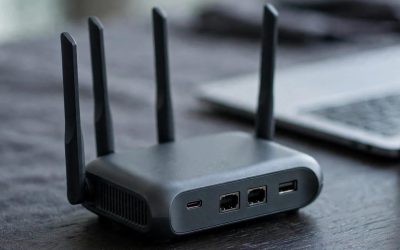
Antennas decide real-world range more than the radio chip does. Fixed sticks (the ROG, the MSI) are simple and travel well. Flippable antennas (the NETGEAR A8500 and A9000) fold flat for travel and flip up for range — the best physical design in the category. Cradle models (the TP-Link UH adapters) put two high-gain antennas on a desk stand with a cable, which wins on range because the antennas sit away from the case and its interference. If your PC sits under a desk, buy a cradle model.
Driver Support and OS Compatibility
This is where cheap adapters die. A no-name BE6500 dongle at $30–$50 publishes no current driver page, and when Windows updates, it stops working. Buy from a brand with a driver page you can find in thirty seconds: NETGEAR, ASUS, TP-Link, MSI, D-Link, ALFA. The NETGEAR A8500 and A9000 need Windows 11 — they do not work on Windows 10 at all. The ASUS ROG USB-BE92 and the TP-Link cradle models work on Windows 10 and 11. No adapter here works on macOS.
MU-MIMO and OFDMA
MU-MIMO lets a router talk to several devices at once; OFDMA splits a channel into small slices so many small devices share it efficiently. Both are standard on Wi-Fi 6 and newer — not reasons to pay more.
Form Factor
A desktop PC can take any adapter. A laptop cannot take a cradle model on the road, and a stick jutting two inches from a USB port will snap off in a bag. For a laptop, buy a nano or mini adapter (the ASUS USB-BE93 Mini is 7 grams and USB-C native) or a flippable-antenna model that folds flat.
1. ★ Our Top Pick: NETGEAR Nighthawk A8500 — $89.99
Specs: Wi-Fi 7 BE5000 tri-band (2.4 GHz up to 688 Mbps, 5 GHz up to 1,441 Mbps, 6 GHz up to 2,882 Mbps); USB 3.0; flippable antenna; Windows 11 only; 4.8 stars from 10 Best Buy reviews.
Why it wins: The A8500 is the best new adapter in the category, and it wins on the two things that matter after the radio: design and ownership. Its flippable antenna folds flat for travel and flips up for range — no cradle, no cable. It carries the highest owner rating in the series, 4.8 stars at Best Buy. On the band that matters it matches adapters costing twice as much: its 6 GHz link runs at 2,882 Mbps, identical to the BE6500 flagships.
CORRECTION to batch 75: our last guide said Windows 11-only support is why the A8500 is not the top pick. That was the wrong call. Windows 10 reached end of support in October 2025, and full Wi-Fi 7 features need Windows 11 24H2 on every adapter here, including the ROG. For a Windows 11 PC, the A8500’s limitation does not apply.
Honest caveats: Windows 11 only — it will not work on a Windows 10 PC at all, and the ROG below will. If your router is Wi-Fi 6 (no 6 GHz band) and your internet is faster than 1 Gbps, buy the ROG instead. Only 10 Best Buy reviews, so the 4.8-star rating is thin evidence. One more honest note: the A9000 — the BE6500 version of this same design, our batch 71 top pick — still sells at $84.99 direct from NETGEAR, $5 less with the faster radio. If you find it in stock at that price, buy it instead.
Best for: A Windows 11 desktop or laptop where you want Wi-Fi 7 with no desk clutter.
2. ASUS ROG USB-BE92 — $99.99
Specs: Wi-Fi 7 BE6500 tri-band (2.4 GHz up to 688 Mbps, 5 GHz up to 2,882 Mbps, 6 GHz up to 2,882 Mbps); USB 3.0 with both Type-A and Type-C connectors in the box; 4K-QAM; MLO; WPA3; Windows 10 and 11; 3-year warranty; 4.6 stars from 95 Best Buy reviews.
Why it is here: This was the top pick of our under-$400 guide, and it returns because the facts have not changed: it is still the best adapter in the category on paper. It is the only pick here that works on Windows 10 and 11, it carries a 3-year warranty — the longest in the category — and it ships with both USB-A and USB-C connectors. Ninety-five Best Buy reviews at 4.6 stars is the deepest owner record here.
Why it is not the top pick: Ten dollars more than the A8500, and a fixed stick instead of a flippable antenna. For a Windows 10 PC, or a laptop that needs a USB-C connector in the box, buy the ROG.
Best for: Anyone who still runs Windows 10, or who wants the longest warranty and the deepest review record.
3. TP-Link Archer TBE400UH — $77.00
Specs: Wi-Fi 7 BE6500 tri-band; USB 3.2 Gen 1; two high-gain antennas on a cradle with a 1.2-meter cable; preloaded driver; Windows 10 (22H2+) and 11.
Why it is here: This was the top pick of our under-$300 guide, and it returns because the facts have not changed: it is the cheapest Wi-Fi 7 adapter with real antennas, and at $77 it is the best value in the category by a wide margin. It carries the same BE6500 radio class as the $179.99 flagship, with the same two high-gain antennas and a cradle — the best antenna setup for a desktop buried under a desk.
Why it is not the top pick: It needs a cradle on your desk and a driver install; the A8500 needs neither.
Best for: A desktop PC under a desk or against a wall, where antenna placement matters more than portability.
4. MSI BE6500 Wi-Fi 7 USB Adapter — $59.99
Specs: Wi-Fi 7 BE6500 tri-band; USB 3.2 Gen 1; Realtek RTL8912AU; drivers stored on the adapter; foldable antennas plus cradle; $59.99 at the MSI US store (list $69.99).
Why it is here: This was the top pick of our under-$200 guide, and it returns because the facts have not changed: it is still the fastest measured USB adapter anywhere. Tom’s Hardware’s November 5, 2026 roundup tested seven adapters and measured 1,989 Mbps near the router and 1,444 Mbps far away on 6 GHz — the fastest in the test, beating the A9000 while costing $25 less.
Why it is not the top pick: It is a first-generation Realtek design that cannot use 320 MHz channels, so its Wi-Fi 7 is partial — and MSI’s driver support is thinner than ASUS’s or TP-Link’s.
Best for: Raw speed per dollar on a Windows 11 desktop, when you do not mind a cradle.
5. TP-Link Archer TBE6500U — $69.99
Specs: Wi-Fi 7 BE6500 tri-band; USB 3.0; Realtek RTL8912AU; preloaded driver; Windows 10 and 11; $69.99 at an authorized retailer.
Why it is here: This is the first numbered pick in the series for the bare-stick version of TP-Link’s flagship: the same Realtek RTL8912AU chip as the $179.99 TBE6500UH and the $59.99 MSI — the same radio, the same 6 GHz link — in a plain stick with no cradle and no antennas.
Why it is not the top pick: Honestly, it is the worst value of the three adapters sharing its chip: the MSI costs $10 less and adds foldable antennas; the TBE6500UH costs $110 more and adds a cradle. If you do not specifically want the TP-Link badge, buy the MSI and pocket $10.
Best for: A TP-Link household that wants the flagship chip in the smallest possible package.
What to Avoid
The “6.5 Gbps” headline. USB 3.0 caps at 5 Gbps, Wi-Fi connects on one band at a time, and the fastest single-band link here is 2,882 Mbps. The best measured real-world speed is about 2 Gbps (Tom’s Hardware, November 5, 2026). Any box claiming more is adding bands together that never run together.
USB 2.0 adapters marketed as Wi-Fi 6. The ASUS USB-AX57 Nano runs on USB 2.0, which caps it near 300 Mbps in practice. A nano adapter is fine for a laptop — but only a USB 3.0 nano, and the AX57 is not one.
No-name BE6500 dongles at $30–$50. They publish no driver page. When Windows updates, they stop working, and there is nobody to call.
The TBE6500U versus TBE6500UH naming trap. Same chip, $110 apart: the U is a bare stick at $69.99, the UH is the cradle flagship at $179.99. The TBE400U ($64.96) versus TBE400UH ($77.00) is the same trap at a smaller scale, and the TBE401UH is BE6200, not BE6500.
Buying Wi-Fi 7 without a Wi-Fi 7 router. A Wi-Fi 7 adapter talking to a Wi-Fi 6 router is a Wi-Fi 6 adapter. Spend the unspent $320 of this budget on the router first.
The PCIe alternative nobody mentions. An Intel BE200 card costs about $20–$60 and beats every USB adapter here. USB wins only when you cannot open the PC.
Still Doesn’t Fit
Nothing in this category costs over $500 — or even over $200. The priciest verified consumer USB adapter is the TP-Link Archer TBE6500UH at $179.99, $320 under budget. Above that are enterprise radios, Thunderbolt docks, and PCIe cards, not consumer USB adapters.
FAQs
Should I buy the A8500 or the ROG USB-BE92?
Buy the A8500 if you run Windows 11 and your PC sits on a desk — the flippable antenna and the $10 saving win. Buy the ROG if you still run Windows 10, need a USB-C connector in the box, or want the 3-year warranty. On 6 GHz, the two are identical at 2,882 Mbps.
What if I run Linux?
The ALFA AWUS036AXML at $69.97 is the only Linux option in this series: Wi-Fi 6E AXE3000, MediaTek MT7921AUN with an in-kernel driver, Bluetooth 5.2. Monitor mode support depends on the kernel.
Do I need Wi-Fi 7, or is Wi-Fi 6E enough?
Wi-Fi 6E is enough if your internet is under 1 Gbps and your router is Wi-Fi 6E. But Wi-Fi 7 adapters cost the same money now — the MSI BE6500 is $59.99 — and they are the only ones still getting driver updates.
Why is my new adapter slow?
Check three things in order. First, the port: USB 2.0 caps you near 300 Mbps. Second, the router: a Wi-Fi 7 adapter on a Wi-Fi 6 router runs at Wi-Fi 6 speeds. Third, the band: 2.4 GHz is slow and crowded by design; make sure your PC connects on 5 GHz or 6 GHz.
Is the flagship TBE6500UH worth $179.99?
Only if your PC sits under a desk and you need the best antenna setup in the category. It shares its chip with the $59.99 MSI and the $69.99 TBE6500U — the $110 over the bare stick buys the cradle, the cable, and TP-Link’s “best performance” label, not speed.
Verdict
The best USB Wi-Fi 6 adapter under $500 is the NETGEAR Nighthawk A8500 at $89.99. The flippable antenna is the cleanest design here, the owner rating is the highest in the series, and on 6 GHz it matches adapters costing twice as much. The $500 budget is a red herring — $410 of it goes unspent, so spend it on a Wi-Fi 7 router instead, because the adapter is only half the connection.
If you still run Windows 10, buy the ASUS ROG USB-BE92 at $99.99 instead: it works on both operating systems, carries a 3-year warranty, and has the deepest review record here. If your PC sits under a desk, buy the TP-Link Archer TBE400UH at $77.00 for the cradle. If raw speed per dollar is all you care about, buy the MSI BE6500 at $59.99 — still the fastest measured USB adapter anywhere. And if you find the A9000 at $84.99 direct from NETGEAR, buy that instead of the A8500; it is the faster adapter for less money.
As an Amazon Associate, we earn from qualifying purchases.
Suggested internal links:
– Best USB Wi-Fi 6 Adapter Under $400
– Best USB Wi-Fi 6 Adapter Under $300
– Best Mesh Wi-Fi System Under $300
More from Amazon
Programs that pair well with the guide above. Offers and eligibility are set by Amazon and may change.
Free shipping on eligible items, Prime Video and more. Eligible new members can start with a free trial.
Start a Prime free trialAd-free music streaming. Eligible new subscribers can start with a free trial.
Try Music Unlimited freeA Prime membership for ages 18-24 with a trial period. Eligibility is set by Amazon.
See Prime for Young AdultsAudiobooks and podcasts to listen to on the go. Eligible new members can start with a free trial.
Try Audible freeAs an Amazon Associate we earn from qualifying purchases.