
Key takeaways
- /best-wifi-7-router-under-300/ — for readers who can stretch the budget and want tri-band at a stable price
- /best-mesh-wi-fi-system-under-300/ — for larger or multi-floor homes that need more than one node
- /best-2-5gbe-network-switch-under-200/ — for readers who need more fast wired ports than a router alone provides
The best Wi-Fi 7 router under $200 for most homes is the TP-Link Archer BE600 — but only when it is on sale. At its sale price in November 2026 research, it was the only router here with a tri-band radio, a 6 GHz band, and a 10 Gbps port. At its $249.99 list price, it is not an under-$200 router at all.
Most routers reliably under $200 are dual-band, with 2.4 GHz and 5 GHz only. Tri-band models dip below $200 on sale, then climb back above it. Prices below are November 2026 research snapshots — check the current price and exact model name before you buy.
Top pick: TP-Link Archer BE600, when under $200. Otherwise, TP-Link Archer BE550 on sale, or TP-Link Archer BE400.
Quick Picks
| Product | Best for | Key specs | Price note |
|---|---|---|---|
| TP-Link Archer BE600 | Best overall, on sale | Tri-band BE9700, 6 GHz, 10G, 4 x 2.5G, 2,600 sq. ft. | Check current price on Amazon; list $249.99, seen at $189.98 on sale in Oct 2026 |
| TP-Link Archer BE550 | Best tri-band for most homes, on sale | Tri-band BE9300, 6 GHz, 5 x 2.5G, 2,000 sq. ft. | Check current price on Amazon; list $299.99, seen at $185-$200 on sale |
| TP-Link Archer BE400 | Best dual-band step-up | Dual-band BE6500, 2 x 2.5G, USB 3.0, 2,400 sq. ft. | Check current price on Amazon; list $179.99, seen at $139-$160 |
| ASUS RT-BE58U | Best for families and VPN | Dual-band BE3600, 1 x 2.5G, AiProtection, AiMesh | Check current price on Amazon; list $149.99, seen at $135-$143 |
| TP-Link Archer BE230 | Best budget | Dual-band BE3600, 2 x 2.5G, USB 3.0, 2,000 sq. ft. | Check current price on Amazon; list $119.99, seen at $80-$100 |
How to Choose a Wi-Fi 7 Router Under $200
Start with the band, not the big number. A BE9700, BE9300, BE6500, or BE3600 rating adds up the top link rates of all bands. It is not a speed one device will see, and it is not your internet speed. The useful question is whether the router has a 6 GHz band. Tri-band routers have 2.4, 5, and 6 GHz; dual-band routers have 2.4 and 5 GHz only.
Wi-Fi 7’s most useful feature in a busy home is Multi-Link Operation (MLO): a Wi-Fi 7 device can use more than one band at once, keeping latency steadier under load. On a tri-band router, MLO can also use the cleaner 6 GHz band, with wider 320 MHz channels. That helps most in crowded apartments.
Match the wired ports to your plan. If your plan is 1 Gbps or slower, a 1 Gbps WAN port is enough. Faster needs a 2.5 Gbps or 10 Gbps WAN port, or the router will cap your plan. The BE600 is the only pick here with a 10 Gbps port. The BE550 has five 2.5 Gbps ports, the BE400 and BE230 have two each, and the RT-BE58U has one.
Coverage is a manufacturer rating, not a guarantee. Ratings here are up to 2,000 to 2,600 square feet in open layouts. Walls and floors reduce range, and 6 GHz travels through walls worst of all. Put the router near the centre of your home, out in the open. Long or multi-floor homes should plan for a mesh node.
What you give up versus $300 models: a stable tri-band price, a second fast wired port or any 10 Gbps port, range at distance, and free advanced features. Some TP-Link models put fuller parental controls behind a paid plan; ASUS includes AiProtection free for life on the RT-BE58U.
Quick rule: above 2 Gbps — BE600 on sale. 1 to 2.5 Gbps and want 6 GHz — BE550 on sale. 1 Gbps and want the strongest 5 GHz radio — BE400. Want free controls and VPN — RT-BE58U. 1 Gbps or slower and want the cheapest real Wi-Fi 7 router — BE230.
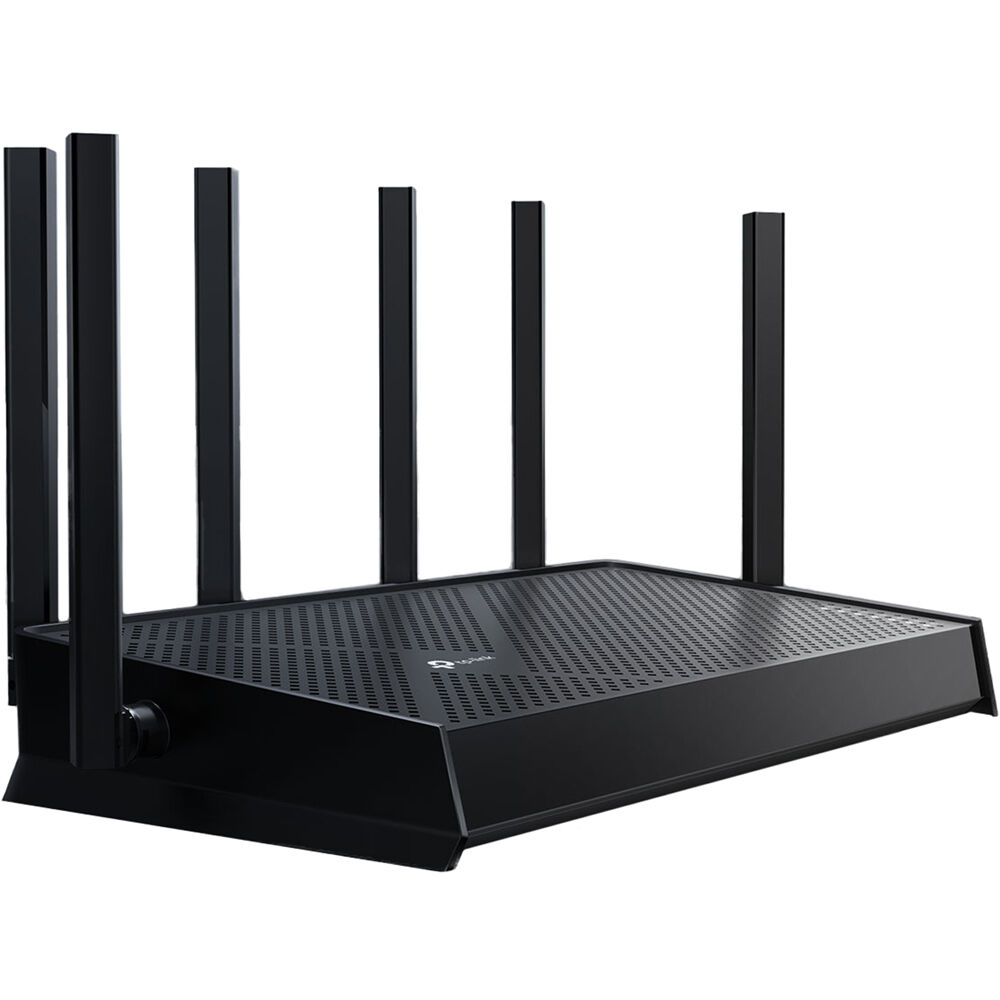
1. TP-Link Archer BE600 — Best Overall, When on Sale
Best for: Fibre plans above 2.5 Gbps, and buyers who want tri-band Wi-Fi 7 and a 10 Gbps port without flagship prices.
The Archer BE600, also sold as the Archer BE9700, is tri-band Wi-Fi 7, rated BE9700, with link rates up to 5,765 Mbps on 6 GHz, 2,882 Mbps on 5 GHz, and 1,032 Mbps on 2.4 GHz — link rates, not measured speeds. It has a 10 Gbps WAN/LAN port and four more 2.5 Gbps ports, so a 5 or 8 Gbps fibre plan can connect at full speed. Coverage is rated at up to 2,600 square feet for up to 120 devices.
Specs: Tri-band BE9700; 5,765 / 2,882 / 1,032 Mbps; 1 x 10G, 4 x 2.5G; USB; 2,600 sq. ft., 120 devices; EasyMesh, HomeShield, VPN.
Pros: Only pick here with a 10 Gbps port; genuine tri-band with 6 GHz; every wired port is 2.5 Gbps or faster.
Cons: List price $249.99 — only under $200 on sale. It was $189.98 on Amazon on 20 Oct 2026, and back to $249.99 on 11 Nov 2026. Newer platform than the BE550, so less firmware history.
Who it is best for: Buyers on a multi-gig fibre plan, or expecting one soon.
Check price on Amazon — TP-Link Archer BE600
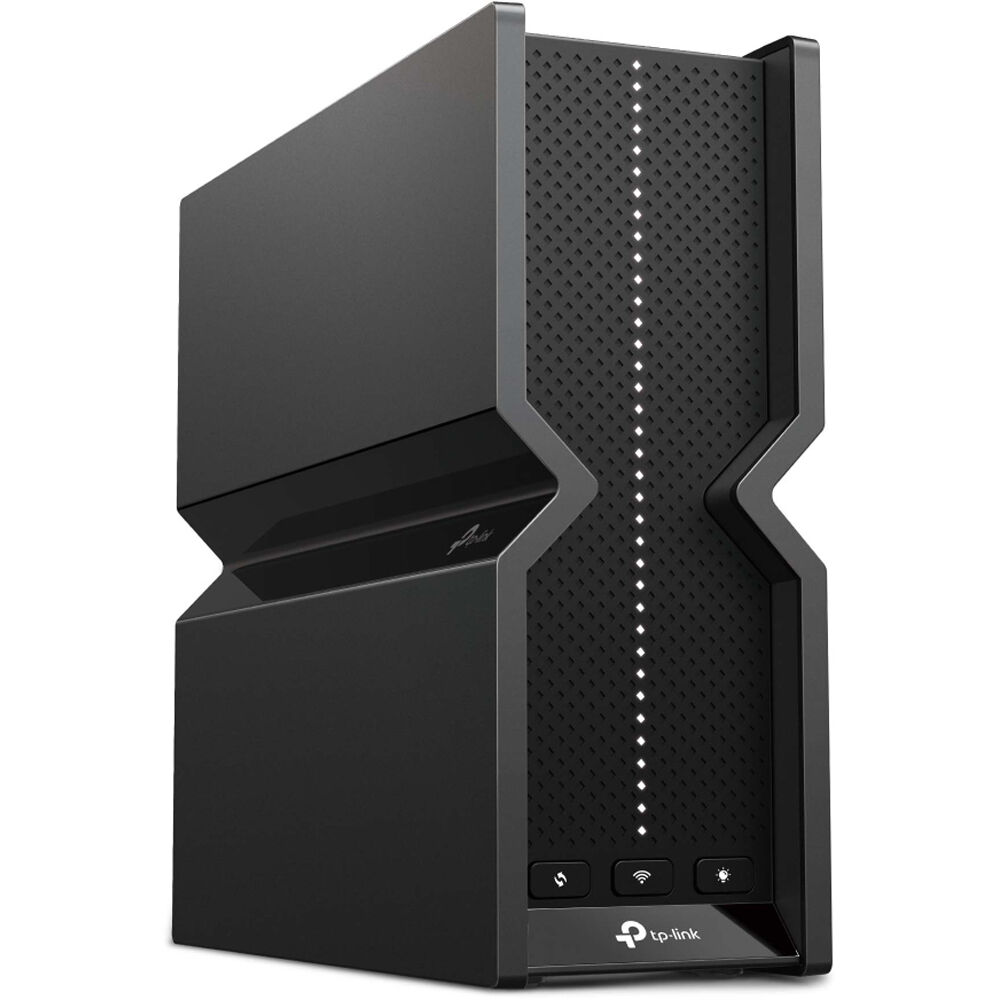
2. TP-Link Archer BE550 — Best Tri-Band for Most Homes, When on Sale
Best for: Most homes on a 1 to 2.5 Gbps plan that want a real 6 GHz band and five fast wired ports.
The Archer BE550 is the safer tri-band default. It is tri-band Wi-Fi 7, rated BE9300, with link rates up to 5,760 Mbps on 6 GHz, 2,880 Mbps on 5 GHz, and 574 Mbps on 2.4 GHz, plus MLO and 320 MHz channels. All five Ethernet ports run at 2.5 Gbps: one WAN and four LAN. There is no 10 Gbps port, so a plan above 2.5 Gbps will be capped. Coverage is rated at up to 2,000 square feet, and it works with EasyMesh.
Specs: Tri-band BE9300; 5,760 / 2,880 / 574 Mbps; 5 x 2.5G; 6 internal antennas; USB; 2,000 sq. ft.; EasyMesh, HomeShield, VPN.
Pros: Genuine tri-band with a fast 6 GHz band; every wired port is 2.5 Gbps; more mature firmware than the BE600.
Cons: List price $299.99 — only under $200 on sale, seen at about $185-$200. Coverage thins through thick walls, especially on 6 GHz.
Who it is best for: Buyers who want tri-band and a full set of 2.5 Gbps ports, and will wait for a sale to stay under $200.
Check price on Amazon — TP-Link Archer BE550
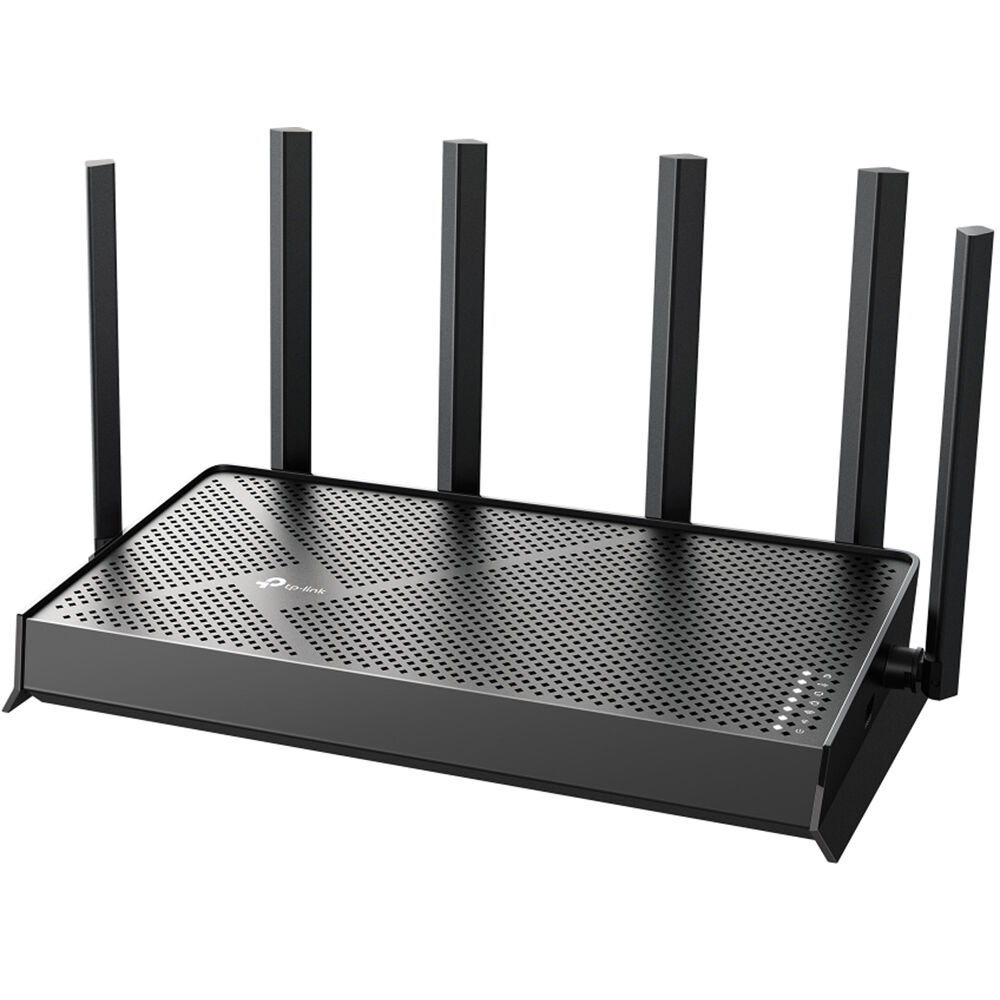
3. TP-Link Archer BE400 — Best Dual-Band Step-Up
Best for: Gigabit homes that want the strongest 5 GHz radio they can get without paying for 6 GHz.
The Archer BE400, rated BE6500, is the middle pick, and for many homes the most sensible one. It is dual-band, with 2.4 and 5 GHz only, and no 6 GHz radio. It offers a much stronger 5 GHz radio than the BE3600 picks below: up to 5,764 Mbps on 5 GHz, versus 2,882 Mbps, plus 688 Mbps on 2.4 GHz — link rates, not measured speeds. It has one 2.5 Gbps WAN port, one 2.5 Gbps LAN port, three 1 Gbps LAN ports, and a USB 3.0 port.
Specs: Dual-band BE6500; 5,764 / 688 Mbps; 1 x 2.5G WAN, 1 x 2.5G LAN, 3 x 1G LAN; USB 3.0; 6 antennas; 2,400 sq. ft., 90 devices; EasyMesh, HomeShield, VPN.
Pros: Strongest 5 GHz radio among the dual-band picks; two 2.5 Gbps ports; reliably under $200, list $179.99, seen at $139-$160.
Cons: No 6 GHz band; three of four LAN ports are 1 Gbps; no 10 Gbps port.
Who it is best for: Buyers replacing an ISP gateway on a gigabit plan, without paying a tri-band premium.
Check price on Amazon — TP-Link Archer BE400
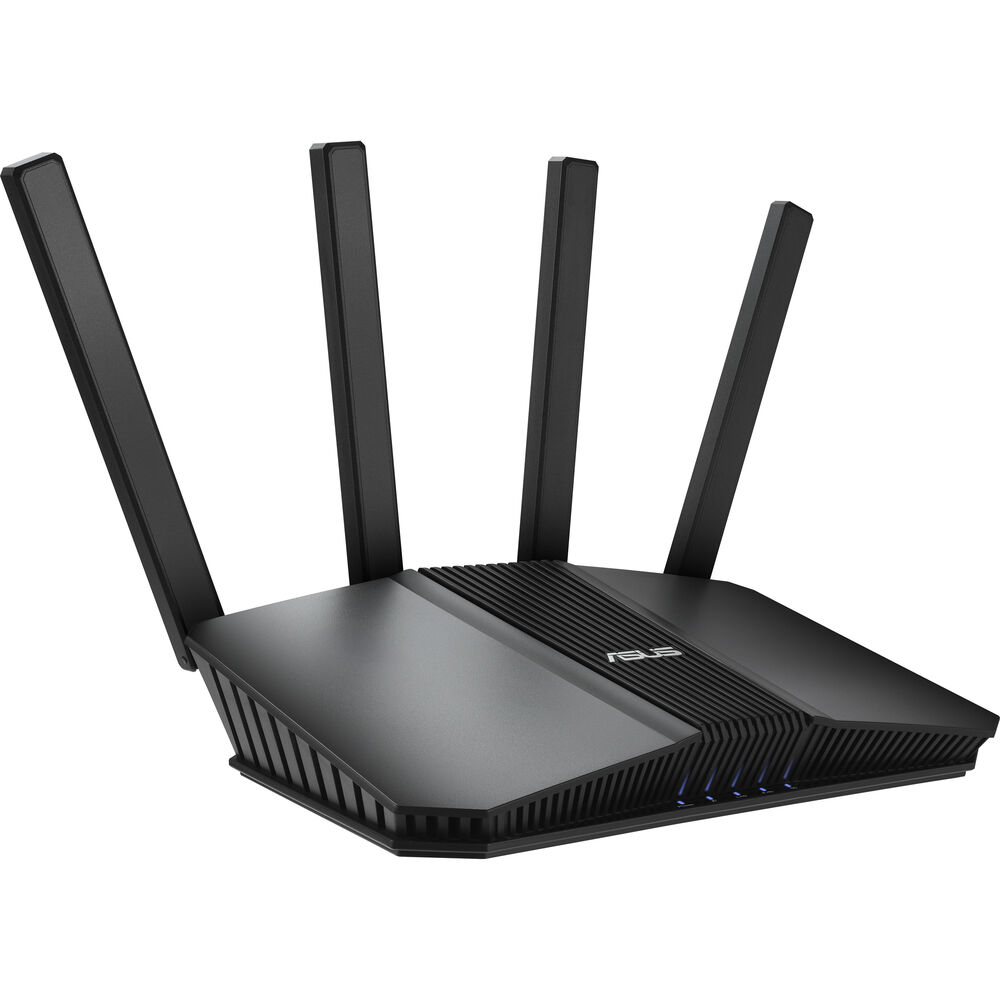
4. ASUS RT-BE58U — Best for Families, VPN and Free Security
Best for: Families who want parental controls and security without a subscription, and buyers who want VPN tools and AiMesh expansion.
The ASUS RT-BE58U is the software pick. On speed alone it matches the BE230: dual-band Wi-Fi 7, rated BE3600, with up to 2,882 Mbps on 5 GHz and 688 Mbps on 2.4 GHz, 160 MHz channels, 4K-QAM, and MLO. There is no 6 GHz band.
What you pay for is the feature set. AiProtection Pro is free for the life of the router, with no subscription. Parental controls, including scheduling, site blocking, and per-device time limits, are also free. It has a full VPN toolkit, dual-WAN support, and a USB 3.2 port, and works with AiMesh. Best Buy sells this exact router as the RT-BE3600 — do not pay more for the same hardware under a different name.
Specs: Dual-band BE3600; 2,882 / 688 Mbps; 1 x 2.5G WAN/LAN, 3 x 1G LAN, 1 x 1G WAN/LAN; USB 3.2; 4 antennas; AiProtection Pro, VPN, AiMesh, dual WAN.
Pros: Free AiProtection and parental controls for life; strong VPN and dual-WAN tools; AiMesh expansion; list $149.99, seen at $135-$143, and $149.99 direct from ASUS in our catalog search.
Cons: No 6 GHz band; only one 2.5 Gbps port; range falls off at distance — about 840 Mbps at 35 feet on 5 GHz, falling to about 430 Mbps at 60 feet in lab testing.
Who it is best for: Families, and anyone who wants proper controls and VPN features without a monthly fee.
Check price on Amazon — ASUS RT-BE58U
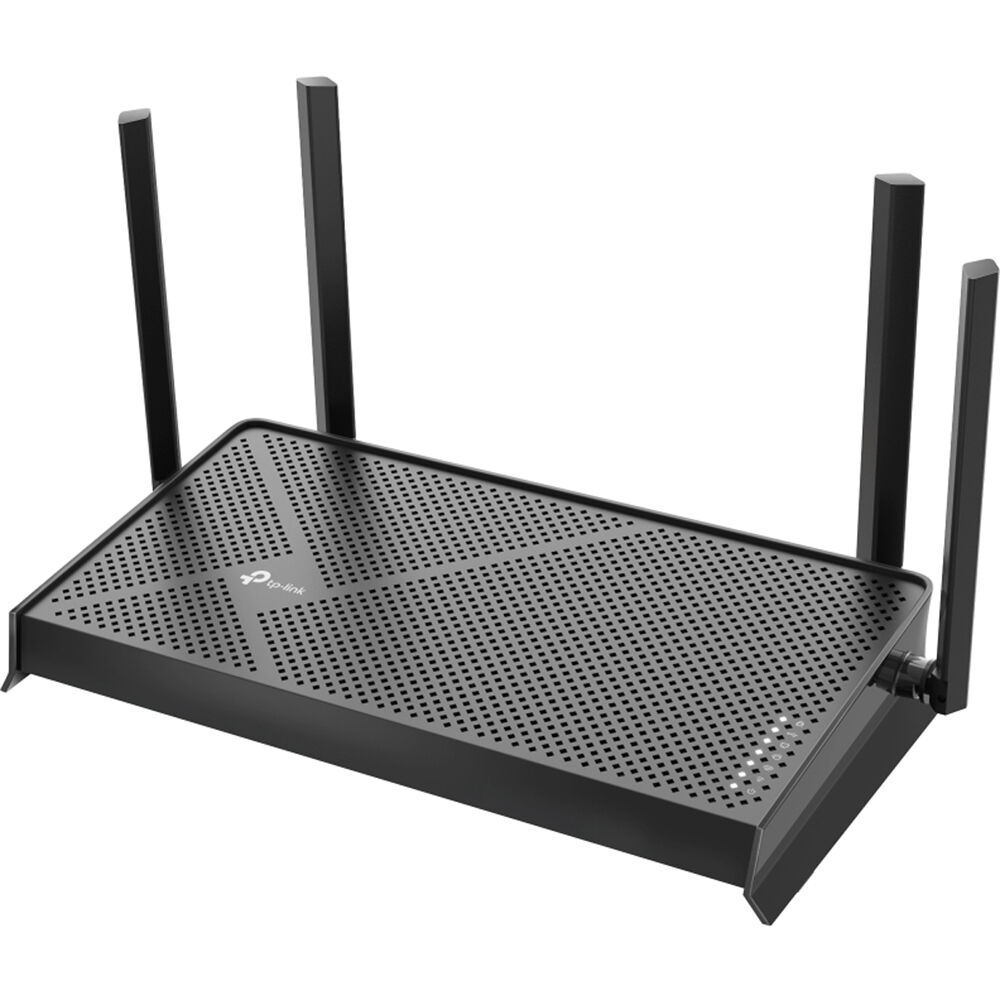
5. TP-Link Archer BE230 — Best Budget
Best for: Apartments and smaller homes on a 1 Gbps or slower plan that want the cheapest genuine Wi-Fi 7 router.
The TP-Link Archer BE230 is the cheapest router here, and the clearest budget pick. It is dual-band Wi-Fi 7, rated BE3600, with up to 2,882 Mbps on 5 GHz and 688 Mbps on 2.4 GHz, 160 MHz channels, 4K-QAM, and MLO. Coverage is rated at up to 2,000 square feet. It has two 2.5 Gbps ports and three 1 Gbps ports, plus a USB 3.0 port, and works with EasyMesh.
Specs: Dual-band BE3600; 2,882 / 688 Mbps; 2 x 2.5G, 3 x 1G; USB 3.0; 2.0 GHz quad-core; 4 antennas; 2,000 sq. ft.; EasyMesh, HomeShield, VPN.
Pros: Lowest price here — list $119.99, seen at $79.98-$99.99 in November 2026 research, including $79.98 on 16 Nov 2026 and $99.99 in our catalog search; two 2.5 Gbps ports at a budget price; simple app setup.
Cons: No 6 GHz band; fuller parental controls need a paid plan; do not expect flagship range.
Who it is best for: Buyers on a gigabit or slower plan in a flat or three-bedroom home who want Wi-Fi 7 now, without paying for 6 GHz or a 10 Gbps port.
Check price on Amazon — TP-Link Archer BE230
What to Avoid
Do not buy on the BE number alone. A BE9700 router is not twice as fast as a BE3600 router for one phone. Check tri-band versus dual-band and the fast wired ports.
Do not assume a tri-band router is under $200. The BE600 and BE550 are only under $200 on sale or with a coupon. At list price they cost $249.99 and $299.99.
Do not pay for speed your plan cannot use. If your plan is 500 Mbps, a $79.98 BE230 does the same job over the internet as a $189.98 BE600.
Do not put the router in a cabinet. Put it out in the open, near the centre of the home.
Do not buy a router with only 1 Gbps ports for a multi-gig plan. A 2.5 Gbps plan through a 1 Gbps WAN port is a 1 Gbps plan.
FAQ
Is a Wi-Fi 7 router under $200 worth it in 2026?
Yes, if you have a gigabit plan, Wi-Fi 7 devices, or a busy home network. It is not worth it if your plan is slower than 500 Mbps, your devices are Wi-Fi 5 or older, and your current router already reaches every room.
Do I need a tri-band Wi-Fi 7 router under $200?
Not always. Tri-band adds a 6 GHz band, which helps in crowded apartments and with Wi-Fi 7 devices that can use 320 MHz channels. Dual-band is enough for most homes on a gigabit plan. Buy tri-band when you can get the BE600 or BE550 on sale under $200.
What is the difference between the best Wi-Fi 7 router under $200 and under $300?
Under $300, tri-band is available at a stable price, with more fast wired ports and often a 10 Gbps port. Under $200, tri-band is usually a sale price, and most routers are dual-band with one or two 2.5 Gbps ports.
Can a Wi-Fi 7 router under $200 cover a large house?
A single router here is rated for up to about 2,000 to 2,600 square feet in an open layout. Thick walls and multiple floors reduce that range. For a large or multi-floor house, buy a router that supports mesh expansion — EasyMesh for TP-Link, AiMesh for ASUS — and add a node.
Will a Wi-Fi 7 router under $200 work with my Wi-Fi 6 and older devices?
Yes. Wi-Fi 7 routers are backward compatible with Wi-Fi 6, Wi-Fi 5, and older devices. Those devices will not get Wi-Fi 7 features such as MLO, but they will connect normally.
Verdict
If you can catch a sale, buy the TP-Link Archer BE600. It is the only pick here with tri-band Wi-Fi 7 and a 10 Gbps port under $200.
If the BE600 is back at $249.99 when you shop, do not pay it for this keyword. Buy the TP-Link Archer BE550 on sale for tri-band, or the TP-Link Archer BE400 if you do not need 6 GHz. The BE400 is the best value here at a stable under-$200 price.
For families, buy the ASUS RT-BE58U for free AiProtection, parental controls, and VPN tools. For the lowest price, buy the TP-Link Archer BE230. At $79.98 to $99.99 in our November 2026 research, it is the cheapest genuine Wi-Fi 7 router here. Check the current price on Amazon before you buy.
As an Amazon Associate, we earn from qualifying purchases.
Suggested Internal Links for gizmopc.com
- /best-wifi-7-router-under-300/ — for readers who can stretch the budget and want tri-band at a stable price
- /best-mesh-wi-fi-system-under-300/ — for larger or multi-floor homes that need more than one node
- /best-2-5gbe-network-switch-under-200/ — for readers who need more fast wired ports than a router alone provides
Editor note: verify these slugs on gizmopc.com before publishing. Amazon links are search-URL placeholders — replace them with the site’s Amazon Associates links. Prices are November 2026 snapshots and are subject to change.
More from Amazon
Programs that pair well with the guide above. Offers and eligibility are set by Amazon and may change.
Free shipping on eligible items, Prime Video and more. Eligible new members can start with a free trial.
Start a Prime free trialAd-free music streaming. Eligible new subscribers can start with a free trial.
Try Music Unlimited freeA Prime membership for ages 18-24 with a trial period. Eligibility is set by Amazon.
See Prime for Young AdultsAudiobooks and podcasts to listen to on the go. Eligible new members can start with a free trial.
Try Audible freeAs an Amazon Associate we earn from qualifying purchases.
