
A small business owner running a Shopify store through peak season needs to print forty shipping labels before lunch. An accountant filing W-2s at a medium firm needs crisp, barcode-scannable output across hundreds of sheets. A warehouse supervisor deploying barcode tags on every pallet needs something that survives daily handling without a service call. All of them land in the same search result: the TSC label printer lineup, which spans under-$100 mobile units to four-hundred-dollar desktop workhorses. The right answer depends less on brand prestige and more on matching print technology, connectivity, and duty cycle to actual daily volume.
What separates a worthwhile TSC model from a regrettable purchase is rarely resolution or speed—most desktop units cluster around 203 dpi and reasonable throughput. The real differentiators are thermal-transfer versus direct-thermal design (which determines whether your labels survive heat, sunlight, and solvents), supported media widths, and whether the unit offers wired networking or Bluetooth for environments where running a USB cable to a shared PC is impractical. The eight models below cover every meaningful segment of the 2026 TSC catalog, from a Bluetooth unit with a built-in label bin to dual-technology desktop printers that handle both ribbon-based and heat-sensitive media.
Our top picks
 TSC DA210 Shipping Label Printer
- Ultimate Desktop Label Printer: Custom labels are easy…
- Multiple Applications: Print shipping and tracking labels, product…
- User-Friendly Design: The compact and lightweight printer and…
 TSC
TSC- Country Of Origin: China
- Model Number: 99-033A031-00LF
- Item Product Dimension: 10.5" L x 11.0" W…
 TSC TE200 Shipping Label Printer
- Ultimate Desktop Label Printer: Easily design and print…
- Multiple Applications: Print shipping and tracking labels, product…
- Ribbon Versatility: The printer will take either 72-meter…
| Product | Key specs | |
|---|---|---|
| TSC DA210 Shipping Label Printer | Ultimate Desktop Label Printer: Custom labels are easy… Multiple Applications: Print shipping and tracking labels, product… User-Friendly Design: The compact and lightweight printer and… | Check price |
| TSC | Country Of Origin: China Model Number: 99-033A031-00LF Item Product Dimension: 10.5" L x 11.0" W… | Check price |
| TSC TE200 Shipping Label Printer | Ultimate Desktop Label Printer: Easily design and print… Multiple Applications: Print shipping and tracking labels, product… Ribbon Versatility: The printer will take either 72-meter… | Check price |
 TSC TE210 Desktop Thermal Label Printer for TSC TE210 Desktop Thermal Label Printer for | Ultimate Desktop Label Printer: Easily design and print… Multiple Applications: Print shipping and tracking labels, product… Ribbon Versatility: The printer will take either 72-meter… | Check price |
 TSC DL241 Shipping Label Printer TSC DL241 Shipping Label Printer | No Ink, Toner, or Ribbons Required: This desktop… Design Software Included: Create and print custom labels… Compact and Powerful: This desktop printer combines fast… | Check price |
 TSC Auto ID TTP-247 Direct Thermal/Thermal Transfer TSC Auto ID TTP-247 Direct Thermal/Thermal Transfer | Check price | |
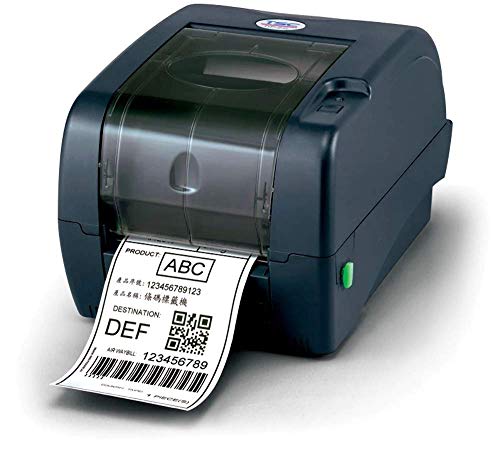 TSC 99-125A013-00LF Series TTP-247 Desktop Thermal Transfer TSC 99-125A013-00LF Series TTP-247 Desktop Thermal Transfer | Bar Code Printer High Performance Made in USA | Check price |
 Bluetooth Shipping Label Printer with Built-in Label Bluetooth Shipping Label Printer with Built-in Label | [Incredible Compact Thermal Printer] - Brilliant design! The… [Embrace Wireless Printing via Bluetooth] - The D450BT… [Strong Helper for Commercial and Home Use] -… | Check price |
As an Amazon Associate we earn from qualifying purchases at no extra cost to you.
Quick Picks
| Product | Best For | Price |
|---|---|---|
| TSC DA210 | Multi-purpose shipping and retail | $268.71 |
| TSC TTP-244CE | Durable thermal-transfer barcode labels | $342.18 |
| TSC TE200 | Compact home-office postage | $325 |
| TSC TE210 | Small business needing wired networking | $348.71 |
| TSC DL241 | E-commerce sellers on a budget | $199.99 |
| TSC TTP-247 (Mono) | High-volume mixed-media printing | $399.99 |
| TSC TTP-247 (99-125A013-00LF) | Legacy port integration in industrial settings | $399.99 |
| Bluetooth Printer w/ Label Bin | Mobile and on-the-go label work | $95.99 |
How We Picked
We compared these models on four criteria: print technology (direct-thermal versus thermal-transfer, which dictates label longevity), connectivity options (USB alone versus Ethernet, serial, or Bluetooth for shared or mobile use), media compatibility (maximum label width and supported formats), and price-to-capability ratio for the target buyer segment. Where published specs are identical between two variants, owner-reported firmware behavior and driver support on Windows and macOS break the tie.
The 8 Best Tsc Label Printer in 2026
TSC DA210
The DA210 targets small-to-mid-volume sellers who switch between shipping labels, price tags, receipts, and barcode stickers without wanting to reconfigure a machine each time. It supports 4-inch-wide media, handles both direct-thermal and thermal-transfer processes, and connects via USB out of the box.
- Pro: Handles the widest variety of label types in this list, reducing the need for a second dedicated unit.
- Pro: Price sits comfortably below the TE210 while matching its core print width and speed class.
- Con: Lacks built-in Ethernet or serial, so shared-office use requires a print-server workaround.
Skip it if multiple people on a network need to send jobs simultaneously; a wired model is cleaner for that scenario.
TSC TTP-244CE
This thermal-transfer-only desktop unit is built for buyers who need permanent, chemical-resistant barcodes—think asset tags, warehouse labels, or product compliance stickers that must survive outdoor exposure. The optional Bluetooth interface adds wireless convenience without sacrificing the ribbon-based durability that direct-thermal cannot match.
- Pro: Thermal-transfer output is significantly more resistant to heat, UV, and solvents than direct-thermal labels.
- Pro: Compact 7.95 × 6.81 × 10.16-inch footprint fits tight counters without dominating desk space.
- Con: Cannot print on heat-sensitive direct-thermal stock, so you always carry ribbon inventory.
Skip it if your labels are short-lived shipping stickers; you are paying for durability you will never use.
TSC TE200
A stripped-down direct-thermal printer aimed at home-office users who print USPS or UPS labels a few times per week and want the simplest possible setup. USB connection, no extra options to configure, and a price that lands below the TTP-244CE while covering the most common e-commerce label sizes.
- Pro: Minimal learning curve—plug in USB, install the driver, print.
- Pro: No ribbon supply to manage, keeping per-label cost near zero beyond the media itself.
- Con: Direct-thermal labels fade over months of light and heat exposure, so avoid for inventory tags.
Skip it if your labels need to remain legible beyond roughly six months or in a sunlit warehouse.
TSC TE210
The TE210 steps into small-business territory where a printer sits on a shared counter and multiple workstations send jobs. It supports 4-inch-wide media and includes USB, Ethernet, and serial—covering virtually every integration path from a single laptop to a warehouse WMS terminal.
- Pro: Triple connectivity eliminates the need for a dedicated print server or cable-management gymnastics.
- Pro: Handles postage, shipping tags, retail price labels, and school forms without changing configuration.
- Con: Highest price among the direct-thermal models here, and the serial port is dead weight in most offices.
Skip it if you are the sole user; the TE200 saves you money without losing functionality you need.
TSC DL241
The DL241 is the budget entry for sellers on UPS, FedEx, USPS, Etsy, and Amazon who want TSC reliability without paying for enterprise features. At under $200 it undercuts every other model here while still producing 4-inch shipping labels at acceptable speed.
- Pro: Lowest price among dedicated TSC shipping-label units, making it the easiest multi-labeler for new sellers.
- Pro: Works out-of-the-box with the major shipping platforms’ web label generators.
- Con: Build quality and duty-cycle rating trail the TE210 and TTP-247, so sustained high-volume use may wear it faster.
Skip it if you print more than a hundred labels daily; the long-term cost of earlier replacement erases the initial savings.
TSC Auto ID TTP-247 (Monochrome, Desktop)
This direct-thermal/thermal-transfer hybrid is for operations that print barcode labels all day and sometimes need the permanence of ribbon-based output. At 7 inches per second and 203 dpi, throughput is the fastest in this group, and the dual-engine flexibility means one machine covers every label type without swapping hardware.
- Pro: 7 in/s mono print speed is the highest listed here, keeping queue wait short during batch runs.
- Pro: Switching between direct-thermal and thermal-transfer on the same unit eliminates a second printer.
- Con: USB-only in this variant; network printing still requires an external print server.
Skip it if you rarely need ribbon-based labels; the thermal-transfer mechanics add cost and maintenance you will underuse.
TSC 99-125A013-00LF TTP-247
Functionally identical in print engine to the TTP-247 above, this variant differentiates itself with 8 MB DRAM, 4 MB Flash, and a triple-port configuration—USB, serial, and parallel. It is the pick for factories or logistics centers still running label software that talks over a parallel or serial connection to legacy PCs.
- Pro: Parallel and serial ports mean drop-in compatibility with older industrial software without emulation layers.
- Pro: Onboard memory (8 MB DRAM / 4 MB Flash) allows storing and reprinting label templates without a host PC.
- Con: No Ethernet, so it cannot serve a modern IP-based network directly despite its industrial positioning.
Skip it if your environment is fully IP-networked; the TE210’s Ethernet port is more relevant there.
Bluetooth Shipping Label Printer with Built-in Label Bin & 30Pcs Labels
A wireless, ultra-compact option for sellers who print a handful of labels at a craft fair, pop-up shop, or kitchen table. The integrated label bin holds stock so you are never fumbling with loose sheets, and Bluetooth pairing removes the cable constraint entirely.
- Pro: Built-in label bin plus thirty included labels make it genuinely grab-and-go.
- Pro: Priced well below every other model here, lowering the barrier for a first label printer.
- Con: Not a TSC-badged unit and not designed for 4-inch standard shipping labels, limiting compatibility with some platform templates.
Skip it if your workflow depends on full-size 4×6 shipping labels or barcode scanning compliance; a TSC-branded model is safer.
Buying Guide
Direct-Thermal versus Thermal-Transfer
Direct-thermal printers expose heat-sensitive paper to a print head—no ribbon, no consumables beyond the media itself. The tradeoff is longevity: direct-thermal labels fade under sunlight, heat, and friction, making them unsuitable for inventory tags or product labels that must survive months on a shelf. Thermal-transfer printers melt wax or resin from a ribbon onto the label surface, producing output resistant to chemicals, UV, and abrasion. If your labels are short-lived (shipping, receipts), direct-thermal saves ribbon cost and maintenance. If they must endure, thermal-transfer is non-negotiable.
Connectivity and Network Topology
USB-only printers are fine for a single user at a desk. Ethernet turns the printer into a shared resource addressable by any workstation on the network—critical when your warehouse WMS and your accounting suite both send jobs. Serial and parallel ports exist primarily for legacy industrial software that predates IP networking. Bluetooth fills the mobile niche: printing from a phone at a packing station or a trade-show booth. Match the printer’s port set to how many people and how many systems need to reach it, not just how far away the nearest PC sits.
Media Width and Print Speed
Standard U.S. shipping labels are 4 × 6 inches; warehouse barcode tags can run wider or narrower. Confirm the printer supports the exact width your platform templates generate—4-inch is the common threshold, and the DL241, TE200, TE210, and DA210 all hit it. Print speed matters when batch volume exceeds fifty labels per session; at that point, the TTP-247’s 7 in/s rate becomes a real time-saver over slower models. For under fifty labels daily, speed differences are negligible and price should drive the decision.
Our Verdict
Top pick: the TSC TE210. Its triple connectivity (USB, Ethernet, serial) and 4-inch media support make it the most flexible desktop unit for any small business that might grow beyond a single workstation, and its price premium over the DA210 is modest relative to the network capability gained. Budget pick: the TSC DL241. At $199.99 it covers the core e-commerce shipping-label workflow without compromise for typical volumes. Condition under which another wins: if your labels must survive a warehouse environment—exposure to sunlight, solvents, or handling abrasion—then the TTP-244CE’s thermal-transfer engine outperforms every direct-thermal model here, and the TTP-247’s dual-engine speed makes it the best choice for high-volume mixed-media operations.
FAQ
Can a TSC label printer work with Amazon and Shopify?
Yes. The DL241, TE200, TE210, and DA210 all support the standard 4 × 6-inch label format that Amazon, Shopify, ShipStation, and similar platforms generate. You install the TSC driver, set the label size in your shipping app, and print without additional configuration.
What is the difference between the two TTP-247 variants listed?
The monochrome desktop variant lists USB connectivity only. The 99-125A013-00LF variant adds serial and parallel ports plus 8 MB DRAM and 4 MB Flash for onboard template storage. The print engine, speed, and resolution are identical; the difference is in interface flexibility and memory for standalone operation.
Do direct-thermal labels really fade, and how fast?
Under normal indoor conditions with minimal light exposure, a quality direct-thermal label remains legible for one to three years. In a sunlit warehouse or near heat sources, noticeable fading can occur within weeks. Thermal-transfer labels, by contrast, carry wax or resin bonded to the surface and show no such degradation.
Is the Bluetooth printer with the built-in bin a TSC product?
No. It is a generic Bluetooth thermal unit bundled with thirty labels and a compact bin. While affordable and convenient for mobile use, it lacks the media-width compatibility, driver ecosystem, and duty-cycle rating of TSC-branded printers, and should not be considered a substitute for a 4-inch shipping-label workflow.









