
A small business owner shipping forty packages a weekend does not need a desktop application that crashes on the fourth print job. They need label printer software that talks reliably to a thermal printer, pulls order data from a platform like ShipStation or Etsy, and produces a legible 4×6 shipping label without a manual re-do. The gap between software that works and software that wastes your Saturday afternoon comes down to driver stability, platform integration depth, and whether the companion app handles edge cases like fanfold paper or wireless pairing drops.
Hardware choice shapes the software experience more than most buyers expect. A printer locked to a single desktop OS limits which label printer software you can run, while Bluetooth-capable machines open the door to mobile-only workflows. The eight devices below represent the range of connectivity, platform support, and price points you will encounter in 2026, and each one pairs with different software ecosystems. This roundup compares published specs and aggregated owner feedback to help you match the right hardware to the software workflow you already use—or the one you are about to build.
Our top picks
 Bluetooth Shipping Label Printer with Built-in Label
- [Incredible Compact Thermal Printer] - Brilliant design! The…
- [Embrace Wireless Printing via Bluetooth] - The D450BT…
- [Strong Helper for Commercial and Home Use] -…
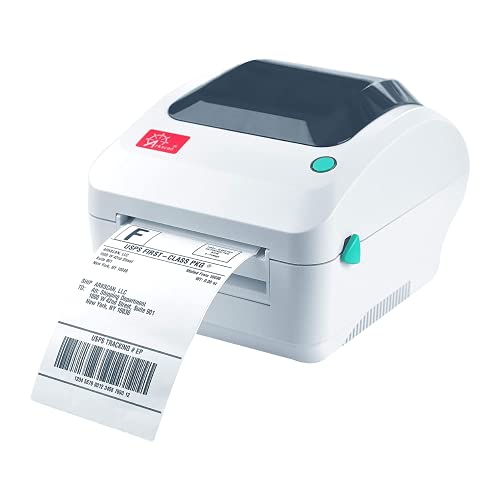 Arkscan 2054A Shipping Label Printer for Windows
- Print shipping labels for Amz Seller Merchant Fulfillment,…
- A multi-functional printer to print shipping label, product…
- Come a free software of BarTender UltraLite Label…
 Brother P-Touch PT-D610BT Business Professional Connected Label
- Advanced Connectivity: Seamlessly create and print labels through…
- Brother P-Touch Design Options: Features 17 fonts, 17…
- Efficient Organization: Built-in memory stores up to 90…
| Product | Key specs | |
|---|---|---|
| Bluetooth Shipping Label Printer with Built-in Label | [Incredible Compact Thermal Printer] - Brilliant design! The… [Embrace Wireless Printing via Bluetooth] - The D450BT… [Strong Helper for Commercial and Home Use] -… | Check price |
| Arkscan 2054A Shipping Label Printer for Windows | Print shipping labels for Amz Seller Merchant Fulfillment,… A multi-functional printer to print shipping label, product… Come a free software of BarTender UltraLite Label… | Check price |
| Brother P-Touch PT-D610BT Business Professional Connected Label | Advanced Connectivity: Seamlessly create and print labels through… Brother P-Touch Design Options: Features 17 fonts, 17… Efficient Organization: Built-in memory stores up to 90… | Check price |
 TYPONOS PM240 Label Maker Machine with 3 TYPONOS PM240 Label Maker Machine with 3 | Bundle Contents: One black PM240 label maker and… High-Definition Inkless Printing: The PM240 safety label maker… Smart and Powerful App with Templates: The Labelnize… | Check price |
 SUPVAN E11 Keyboard & Bluetooth Label Maker SUPVAN E11 Keyboard & Bluetooth Label Maker | Fast Keyboard & Smart App Printing: Print directly… Portable with Rechargeable Battery: Features with 1200 mAh… Minimal Margin Printing: Prints labels with only 0.2"… | Check price |
 Thermal Shipping Label Printer 4x6 Bluetooth Label Thermal Shipping Label Printer 4x6 Bluetooth Label | 【High‑Quality, Energy‑Efficient Thermal Printing】The NULLTONEX shipping label printer… 【Bluetooth & USB Dual Connectivity】 Connect seamlessly to… 【User‑Friendly Operation】 Easy setup and a dedicated FlashLabel… | Check price |
 Rongta Bluetooth Shipping Label Printer Rongta Bluetooth Shipping Label Printer | Wireless Bluetooth Connectivity for Flexible Use: The RONGTA… Automatic Label Identification: Rongta shipping label printer automatically… Easy Installation for Multiple Systems: The Windows and… | Check price |
 Nelko P21 Label Maker Machine with Tape Nelko P21 Label Maker Machine with Tape | 2026 New Version: Compared with traditional label makers,… High-quality Printing: The P21 label maker features BPA-Free… Easy to Use: NELKO label printer connects with… | Check price |
As an Amazon Associate we earn from qualifying purchases at no extra cost to you.
Quick Picks
| Product | Best for | Price |
|---|---|---|
| Bluetooth Shipping Label Printer with Built-in Label Bin | Compact all-in-one shipping setup | $95.99 |
| Arkscan 2054A | High-volume sellers needing broad platform support | $189 |
| Brother P-Touch PT-D610BT | Professional labeling with a physical keyboard | $114.99 |
| TYPONOS PM240 | Home organization on a tight budget | $31.99 |
| SUPVAN E11 | Portable keyboard-driven labeling | $29.99 |
| Thermal Shipping Label Printer 4×6 Bluetooth | Small business shipping at low cost | $62.90 |
| Rongta Bluetooth Shipping Label Printer | Cross-platform wireless shipping labels | $35.09 |
| Nelko P21 | Lowest-cost entry into Bluetooth label making | $20.99 |
How We Picked
We narrowed the field using four criteria: connectivity breadth (does the printer support the label printer software platforms you actually use, from desktop to mobile?), thermal output quality for 4×6 shipping labels versus decorative tape labels, bundled software or app maturity based on owner-reported experiences, and total cost of ownership including tape or paper refill pricing. Printers with narrow OS support or single-platform software dependencies were ranked lower regardless of hardware quality, because the best label printer software is useless if your printer will not connect to it.
The 8 Best Label Printer Software in 2026
Bluetooth Shipping Label Printer with Built-in Label Bin
This unit suits sellers who ship in batches and want zero clutter on the desk. The integrated label bin holds a small supply of 4×6 stickers, reducing mid-session reloads. It pairs over Bluetooth with common mobile label printer software apps, letting you pull orders from a phone without a laptop tether. Owners appreciate the compact footprint and the included label starter pack. The main drawback is limited documentation around which desktop label printer software drivers are fully supported, and Bluetooth range drops noticeably in metal shelving environments. Skip this if you print more than a few hundred labels weekly; the bin capacity and feed mechanism will slow you down compared to a roll-fed dedicated machine.
Arkscan 2054A Shipping Label Printer
The Arkscan 2054A is the workhorse for sellers juggling multiple sales channels. Its published compatibility list spans Amazon, eBay, PayPal, Etsy, Shopify, ShipStation, Stamps, UPS, USPS, FedEx, and DHL, which means virtually any label printer software ecosystem can drive it. Windows, Mac, Chromebook, and Android are all supported, giving you flexibility to swap computers without swapping printers. Roll and fanfold media acceptance is a genuine advantage for sellers who buy labels in different bulk formats. The downside is price: at $189 it costs nearly double the next-closest competitor, and some owners note the power adapter feels undersized for the printer’s peak draw. Skip this if you sell on one platform and never print more than twenty labels a day.
Brother P-Touch PT-D610BT
Brother’s PT-D610BT targets office and operations managers who label assets, shelves, and cables rather than shipping boxes. The physical QWERTY keyboard paired with Bluetooth connectivity lets you type directly on the device or control it through Brother’s companion label printer software on a phone. Print quality on Brother’s proprietary tapes is sharp and smudge-resistant, and the business-grade build outlasts cheaper tape makers by a wide margin. The limitation is tape cost and format: it will not produce 4×6 thermal shipping labels, so it cannot replace a shipping printer in a software workflow designed for parcel labels. Skip this if your primary need is e-commerce shipping rather than facility organization.
TYPONOS PM240 Label Maker Machine
The PM240 fills the niche for households or micro-operations that need simple printed labels on three tape widths without spending more than thirty dollars. It connects via Bluetooth and runs through a basic companion app that functions as lightweight label printer software for creating text and icon labels. Setup is quick, and the included tape variety covers most home-organization use cases. Owners report the print contrast fades under direct sunlight, and the app interface feels sparse compared to more mature label printer software options. Skip this if you need durable outdoor labels, multi-language font support, or barcode generation for inventory tracking.
SUPVAN E11 Keyboard & Bluetooth Label Maker
The SUPVAN E11 combines a standalone physical keyboard with Bluetooth app connectivity, offering a hybrid workflow that suits users who prefer tactile typing but still want the flexibility of mobile label printer software. It ships with four tape rolls, covering common widths for pantry, storage, and craft labeling. The on-device editing lets you build labels without opening a phone, which speeds up repetitive batch tasks. The trade-off is durability: the keyboard membrane and tape compartment latch draw repeated owner complaints about looseness after several months. Skip this if you plan to reprint the same label template dozens of times per session, as the manual editing cycle slows throughput compared to saved templates in a desktop software package.
Thermal Shipping Label Printer 4×6 Bluetooth
At just over $60, this printer slots into a small business budget while still producing true 4×6 thermal shipping labels over a Bluetooth link. It pairs with mobile label printer software apps and supports the common thermal paper dimensions that e-commerce platforms export by default. The price-to-capability ratio is the main selling point, and owners confirm it handles daily volumes up to roughly fifty packages without feed issues. The weakness is software support depth: no bundled label printer software or dedicated driver suite, meaning you rely entirely on third-party apps and their compatibility lists. Skip this if you need barcode label formatting or batch printing from a desktop spreadsheet without a workaround.
Rongta Bluetooth Shipping Label Printer
The Rongta earns its spot by offering wireless 4×6 thermal printing across Windows, macOS, Android, and iOS at a price under thirty-six dollars. This cross-platform coverage makes it the easiest hardware to pair with any label printer software you already use, whether that is ShipStation on a laptop or a mobile fulfillment app on a phone. Compact build and low power draw suit small workspaces. The trade-off is print head longevity: owner feedback clusters around degraded output after a year of heavy daily use, and replacement parts availability is limited. Skip this if your volume exceeds one hundred labels per day or if you need guaranteed long-term serviceability.
Nelko P21 Label Maker Machine
The Nelko P21 is the lowest-cost Bluetooth label maker in this roundup at just under twenty-one dollars, and it runs through a companion app that serves as entry-level label printer software for creating simple text and emoji labels. It suits gift wrappers, students organizing binders, and anyone who wants printed labels without committing to a subscription or expensive tape stock. Setup is straightforward and the white finish looks clean on a desk. The limitations are obvious: narrow tape widths mean it cannot produce shipping labels, and the app’s label printer software templates are basic compared to paid alternatives. Skip this if you need anything beyond decorative or small organizational labels.
Buying Guide
Connectivity Determines Your Software Options
The single most important spec is how the printer connects, because that dictates which label printer software you can use. USB-only printers require a desktop driver and lock you to one machine. Bluetooth printers open phone and tablet workflows through companion apps. The best label printer software for a mobile-first seller running ShipStation on an iPad is useless on a printer that only supports Windows USB drivers. Check whether the printer lists native support for your platform, or whether you must rely on a third-party app bridge. Multi-OS printers like the Arkscan and Rongta give you the widest software compatibility floor.
Label Format: Shipping Versus Organizational
Thermal 4×6 printers and tape-based label makers serve fundamentally different software workflows. Shipping label printer software generates barcodes, address blocks, and routing information that only a 4×6 thermal output can render legibly. Organizational label makers use narrow tapes and their companion software focuses on text styling, icons, and saved templates. Do not buy a tape-based unit hoping to print shipping labels, and do not buy a thermal printer expecting it to handle half-inch file folder tabs. Match the hardware format to the output your chosen software produces natively.
Software Ecosystem and Template Support
Beyond basic printing, evaluate whether the companion label printer software lets you save templates, import data from a CSV or API, and batch print. For sellers processing orders in bulk, a software platform with template memory and batch queue support saves hours per week compared to manually typing each label. Desktop-focused software typically offers more template depth than mobile apps, so if your workflow centers on a computer, prioritize printers with verified desktop driver support rather than Bluetooth-only models with app-limited features.
Our Verdict
Our top pick is the Arkscan 2054A. No other product in this list matches its breadth of label printer software compatibility across eleven named platforms and four operating systems, making it the safest buy for sellers who refuse to be locked into one ecosystem. Our budget pick is the Rongta Bluetooth Shipping Label Printer, which delivers cross-platform wireless 4×6 thermal printing at a price that leaves room in the budget for label paper stock. If your need is purely facility or asset labeling rather than shipping, the Brother P-Touch PT-D610BT wins on print quality and build longevity over every other option here, provided you accept tape-only output.
FAQ
Do I need to buy label printer software separately?
Most thermal shipping printers work with free label printer software from fulfillment platforms like ShipStation, Stamps.com, or your marketplace dashboard directly. Tape-based label makers typically include a companion app at no extra cost. Dedicated design software like BarTender or NiceLabel is only necessary if you need advanced database-driven batch printing or compliance barcode symbologies beyond what your shipping platform already provides.
Can any printer use any label printer software?
No. A printer must expose a compatible driver or print protocol for the software to communicate with it. This is why connectivity type and OS support matter as much as the hardware build. A Bluetooth-only printer may not install a desktop driver, and a printer without macOS support will not appear in a Mac-based label printer software queue regardless of the app’s capabilities.
What label size do I need for shipping?
Almost every major carrier and e-commerce platform uses 4×6 inch thermal labels as the standard format. If you choose a tape-based label maker from this list, confirm it supports at least four-inch tape width; otherwise you cannot produce a valid shipping label and the device is limited to organizational use regardless of the software running it.
Are Bluetooth label printers slower than USB?
In practice, the difference is negligible for individual label printing because the data payload is small. Bluetooth can introduce a one- or two-second pairing handshake delay between jobs, and range limitations in a warehouse or metal shelving environment may cause dropped connections that require re-pairing. For continuous batch printing of fifty-plus labels, a wired USB connection remains more stable.









