
A receipt printer is the kind of gadget that quietly defines how smoothly your checkout, kitchen, or warehouse floor runs. When it works, nobody notices. When it jams, drops characters, or refuses to talk to your POS software, every transaction slows to a crawl. The gap between a reliable thermal printer and a mediocre one comes down to paper width, print speed, interface options, and whether the unit handles cash drawer kick commands without a firmware update.
We compared eight printers that owners have put through daily retail, restaurant, and mobile use. The price range spans from under thirty dollars to roughly three hundred, and the performance differences track closely with where a unit falls in that range. Some excel at one job and choke on another. The sections below break down who each machine suits best so you can match hardware to workflow without overspending.
Our top picks
 Epson TM-T20IV Thermal Receipt Printer C31CL47022
- ✅【High-Speed Thermal Printing Performance】– Print receipts lightning fast…
- ✅【Triple Interface Connectivity】– Equipped with USB, Serial (RS-232),…
- ✅【Seamless Multi-Platform Compatibility】– Works with Windows, Android, and…
 Star Micronics TSP143IIIU USB Thermal Receipt Printer
- High-speed printing of 43 receipts per minute (250mm/s)…
- Compatible with iOS, Android, and Windows for a…
- The "Drop-In and Print" clamshell design allows for…
| Product | Key specs | |
|---|---|---|
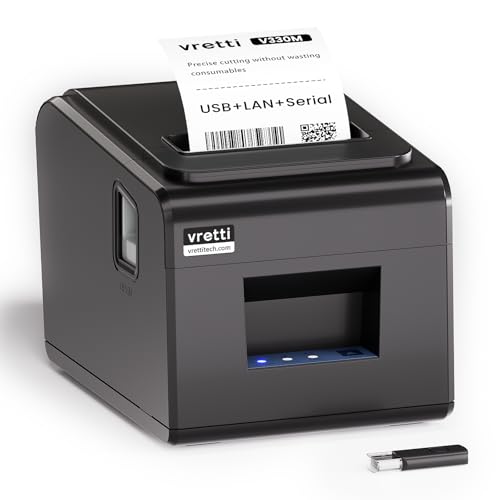 vretti Thermal Receipt Printer vretti Thermal Receipt Printer | Check price | |
| Epson TM-T20IV Thermal Receipt Printer C31CL47022 | ✅【High-Speed Thermal Printing Performance】– Print receipts lightning fast… ✅【Triple Interface Connectivity】– Equipped with USB, Serial (RS-232),… ✅【Seamless Multi-Platform Compatibility】– Works with Windows, Android, and… | Check price |
| Star Micronics TSP143IIIU USB Thermal Receipt Printer | High-speed printing of 43 receipts per minute (250mm/s)… Compatible with iOS, Android, and Windows for a… The "Drop-In and Print" clamshell design allows for… | Check price |
 Sunydog Thermal Printer Sunydog Thermal Printer | Before Purchase, Please NOTE: Not supported for OS Effortless Connectivity: This thermal printer supports both BT… High-Speed & High-Resolution Printing: Achieve exceptional clarity with… | Check price |
 NetumScan USB POS Receipt Printer NetumScan USB POS Receipt Printer | Note: Not compatible with Square POS/IOS/Uber Eats/Clover/Postmates/Shopify/Lightspeed &… 【User-Friendly Design】This 80mm receipt printer has USB ports… 【Wall Mount Option】This POS receipt printer has two… | Check price |
 Rongta POS Printer Rongta POS Printer | 【Fast Printing & Auto Cutter】The pos printer high… 【Wall Hanging Design】 Kitchen printer with two hanging… 【Wide Compatibility&Reasonable Design】Desktop or wall-mounted type for option,… | Check price |
 Rongta 80mm Thermal POS Receipt Printer Rongta 80mm Thermal POS Receipt Printer | Fast Printing & Auto Cutter: High-speed printing technology… Wide Compatibility & Sturdy Design: The pos receipt… Wall Hanging Design: Kitchen printer with two hanging… | Check price |
 Star Micronics TSP143IIILAN Ethernet Star Micronics TSP143IIILAN Ethernet | High-speed printing of 43 receipts per minute (250mm/s)… Compatible with iOS, Android, and Windows for a… The "Drop-In and Print" clamshell design allows for… | Check price |
As an Amazon Associate we earn from qualifying purchases at no extra cost to you.
Quick Picks
| Product | Best for | Price |
|---|---|---|
| vretti 80mm Thermal | Small shops wanting full-width on a budget | $72.99 |
| Epson TM-T20IV | Multi-interface reliability | $161.79 |
| Star TSP143IIIU | Apple-ecosystem storefronts | $242.99 |
| Sunydog Mini 58mm | Mobile vendors and pop-up sellers | $31.39 |
| NetumScan 8360 | Linux-based kitchen stations | $57.99 |
| Rongta RP326 | USB/Serial/Ethernet flexibility | $79.99 |
| Rongta 80mm POS | General POS on a tight budget | $79.99 |
| Star TSP143IIILAN | Networked multi-station setups | $299.99 |
How We Picked
We narrowed this list using four criteria: paper width compatibility with your existing stock, interface options that match your POS platform, whether the auto-cutter reliably handles repeated jobs, and what long-term owners report about durability and driver support. A printer that looks impressive on spec but fights Windows updates for weeks is not a good pick, regardless of speed.
The 8 Best Receipt Printer in 2026
vretti Thermal Receipt Printer, 80mm
The vretti fills a real gap: a full 80mm thermal printer priced like a budget 58mm unit. It suits small retail counters and café registers that need wider receipts without paying enterprise rates. Owners consistently note the auto-cutter handles hundreds of cuts before dulling.
- 80mm print width at a price well below most competitors
- Compatible with common ESC/POS command sets
- Driver support is thinner than established brands, and setup can take a second attempt on some Windows versions
Skip it if your POS software demands certified drivers from Epson or Star, or if you run high-volume queues where margin on cut quality matters.
Epson TM-T20IV
Epson’s TM-T20IV remains the safe default for anyone who wants three interface options in one box. USB, Ethernet, and Serial cover nearly every POS architecture, and the 310 mm/s head prints noticeably faster than entry-level rivals. It earns Energy Star certification, which matters if you run dozens of stations.
- Three interfaces plus auto-cutter and internal power supply
- Proven reliability across retail and restaurant deployments
- Premium pricing over budget alternatives that share the same 80mm format
Skip it only if your workflow is locked to a single interface and budget constraints rule out the price jump over the vretti or NetumScan.
Star Micronics TSP143IIIU
Star’s USB-only TSP143IIIU targets Apple-heavy environments. The built-in MFi port lets it charge iPhones and iPads used as POS terminals, eliminating dongle clutter. The auto-cutter and internal power supply keep the counter clean. It is a polished unit for single-USB-station setups.
- Native iOS and iPadOS integration via MFi USB port
- Sturdy build with internal power supply and auto-cutter
- USB-only interface limits placement behind a router or in networked kitchen setups
Skip it if you need Ethernet for multi-station routing or if your POS runs on Android or Windows without Apple hardware.
Sunydog Thermal Printer, 58mm Mini
The Sunydog is a pocketable solution for mobile sellers, food truck vendors, and anyone printing from a phone. It uses 58mm paper, runs over USB, and works with Android and Windows. At just over thirty dollars it is the cheapest way to produce physical receipts on the go.
- Ultra-compact and genuinely portable
- Works with Android and Windows without complex setup
- 58mm paper limits receipt detail, and no auto-cutter means tearing by hand
Skip it for fixed counters where 80mm paper and automated cutting save real time across a full shift.
NetumScan USB POS Receipt Printer 8360
The NetumScan 8360 is the standout value for kitchens and warehouses running Linux-based POS systems. Its ESC/POS support works cleanly on Windows, Mac, and Linux, and the included cash drawer kick command handles standard 24-volt drawers. At 300 mm/s it matches the Epson on raw speed.
- Genuine cross-platform driver support including Linux
- Auto-cutter plus cash drawer interface included at a sub-sixty-dollar price
- USB interface only, so it cannot join a wired network
Skip it if your station sits far from the POS computer and requires Ethernet, or if you need the brand recognition that some enterprise buyers require.
Rongta POS Printer RP326
The RP326 offers USB, Serial, and Ethernet interfaces at a price that undercuts most three-port competitors. It also kicks a cash drawer and supports Windows, Mac, and Linux. Owners in restaurant kitchen roles report dependable performance, though the “Do Not Square” label in the model name refers to its rounded shell design.
- Three interface types at a mid-budget price
- Broad OS compatibility with cash drawer support
- Build quality and long-term cutter durability trail Epson and Star units
Skip it if you need a printer rated for thousands of cuts per day or if your procurement team requires Energy Star certification.
Rongta 80mm Thermal POS Receipt Printer
This Rongta shares the same price point as the RP326 but targets users who need a straightforward USB connection with auto-cutter and cash drawer support. It covers the basics well for single-station retail counters and small food-service operations that do not require network connectivity.
- Competent auto-cutter with cash drawer kick
- Simple USB setup for single-station shops
- No Ethernet or Serial option limits placement flexibility
Skip it if your layout demands networked printing or if you manage multiple terminals that share one printer queue.
Star Micronics TSP143IIILAN
The TSP143IIILAN is the networked counterpart to Star’s USB model, built for stores running several stations off a shared receipt-printing queue. Ethernet connectivity lets it sit in a back closet while POS terminals print over the LAN. The auto-cutter and internal power supply keep the footprint professional.
- Wired Ethernet interface supports multi-station networked environments
- Star’s reputation for longevity in high-volume retail
- Highest price in this roundup; overkill for a single-USB counter
Skip it if you operate one register and do not need LAN routing. The USB version saves over fifty dollars without losing any relevant features for a solo setup.
Buying Guide
Paper Width: 58mm vs 80mm
Paper width determines what fits on the receipt and how much stock you pay for. 58mm rolls work for short order slips, credit-card vouchers, and mobile ticketing. 80mm rolls allow logos, detailed line items, legal return policies, and QR codes. If your receipts exceed four or five lines, buy 80mm. The price gap between the two formats is small, so committing to 80mm gives you room to grow without replacing hardware.
Interfaces: USB, Ethernet, and Serial
USB is simplest but ties the printer within cable length of the computer. Ethernet lets one printer serve multiple terminals across a store network. Serial persists in legacy POS software and industrial kitchen setups. Match the interface to your physical layout before comparing anything else. A printer with the wrong port is a dead weight regardless of its speed rating.
Auto-Cutter and Cash Drawer Kick
Manual tearing slows service and produces ragged edges that annoy customers. An auto-cutter with a durable blade (typically rated for 1.5 million cuts or more) pays for itself in a busy store within weeks. The cash drawer kick signal sends a voltage pulse that opens the drawer automatically after a transaction. Confirm your drawer’s voltage and trigger type before purchasing if you need hands-free drawer operation.
Our Verdict
Top pick: The Epson TM-T20IV wins on interface versatility, proven durability, and brand-wide driver support that spans almost every POS platform. It is the printer that will still work after you upgrade your software.
Budget pick: The NetumScan 8360 delivers auto-cutter, cash drawer support, and Linux compatibility at under sixty dollars, making it the best value for small operations that do not need networking.
Condition for another winner: If your entire stack is Apple-based and every station uses an iPhone or iPad, the Star TSP143IIIU’s MFi integration makes it the smarter buy despite its USB-only limitation.
FAQ
Do receipt printers work with Square or Shopify POS?
Most ESC/POS-compatible printers work with Square and Shopify through their supported hardware lists or generic driver modes. Epson and Star models have official integrations, while budget units like the NetumScan may require the POS app’s generic thermal printer setting.
How long does an auto-cutter blade last?
Typical commercial blades are rated between one and two million cuts. At a busy restaurant printing around two hundred receipts per day, that translates to roughly ten to twenty years of service, so cutter wear rarely becomes a real concern before the printer is otherwise replaced.
Can I print from an Android phone over USB?
Yes, though you need an OTG adapter unless the phone connects directly. The Sunydog handles this scenario natively. Most full-size 80mm printers support Android through ESC/POS commands sent via a USB host cable, but confirm your specific POS app lists the printer as compatible before purchasing.
Is thermal paper the same as receipt paper?
Direct thermal printers require thermal paper coated with heat-sensitive chemicals, which is the standard for receipt rolls. It does not need ink. If a printer lists “direct thermal,” you buy thermal rolls only. Some thermal-transfer models use ribbon, but none of the eight printers in this roundup require a separate ink or toner supply.









